Overview
The Blob (Binary Large Object) data type in MaxCompute allows you to store large, unstructured binary objects, such as images, audio, videos, and documents, directly in tables. By using the Blob type, you can consolidate raw files, metadata, and annotation data for multimodal data within a single MaxCompute table. This lets you use SQL for unified querying and maintenance, and perform batch processing with MaxFrame and SQL user-defined functions (UDFs).
Use cases
AI training dataset management: Store images, audio, or video files along with their corresponding labels and annotations in a single table, and use SQL to filter for specific data samples.
Multimodal data processing pipelines: Unify the storage of intermediate and final results from multi-step pipelines, such as video frame extraction, audio-to-text transcription, and content labeling.
Multimodal processing cache layer: Act as a caching layer for data sources like object storage to improve the throughput of large-scale parallel computing with MaxFrame and SQL, overcoming the QPS limits associated with batch requests for small files.
Unstructured data ingestion: Import files from various external storage systems into MaxCompute and enrich them with metadata to build an enterprise-level unstructured asset library, benefiting from transaction guarantees and unified access control.
Specifications
Feature | Description |
Size limit | Up to 5 GB for each Blob object in a cell. |
Storage format | Binary format |
Supported table format for Blob | Append Delta Table. Blob columns inherit table format features, including ACID transactions, storage tiering, and snapshots. |
Blob optimization services |
|
Limitations
You must enable MaxCompute 2.0 data types:
SET odps.sql.type.system.odps2=true;.The Blob type cannot be nested within complex types such as ARRAY, MAP, or STRUCT.
A Blob column cannot be used as a primary key or a partition key.
A Blob column cannot be used in ORDER BY, GROUP BY, or JOIN ON clauses.
Unified multimodal storage
The following figure compares a traditional, distributed storage architecture with the unified multimodal storage architecture in MaxCompute.
On the left, the traditional approach stores raw files in object storage, while their metadata and annotations are scattered across different data warehouses and data lakes. Querying and processing this data requires coordination across multiple systems.
On the right, the MaxCompute approach uses the Blob column type to store binary files such as images, audio, and videos alongside their structured metadata in a single table. This allows SQL queries, MaxFrame batch processing, and SDK data imports.
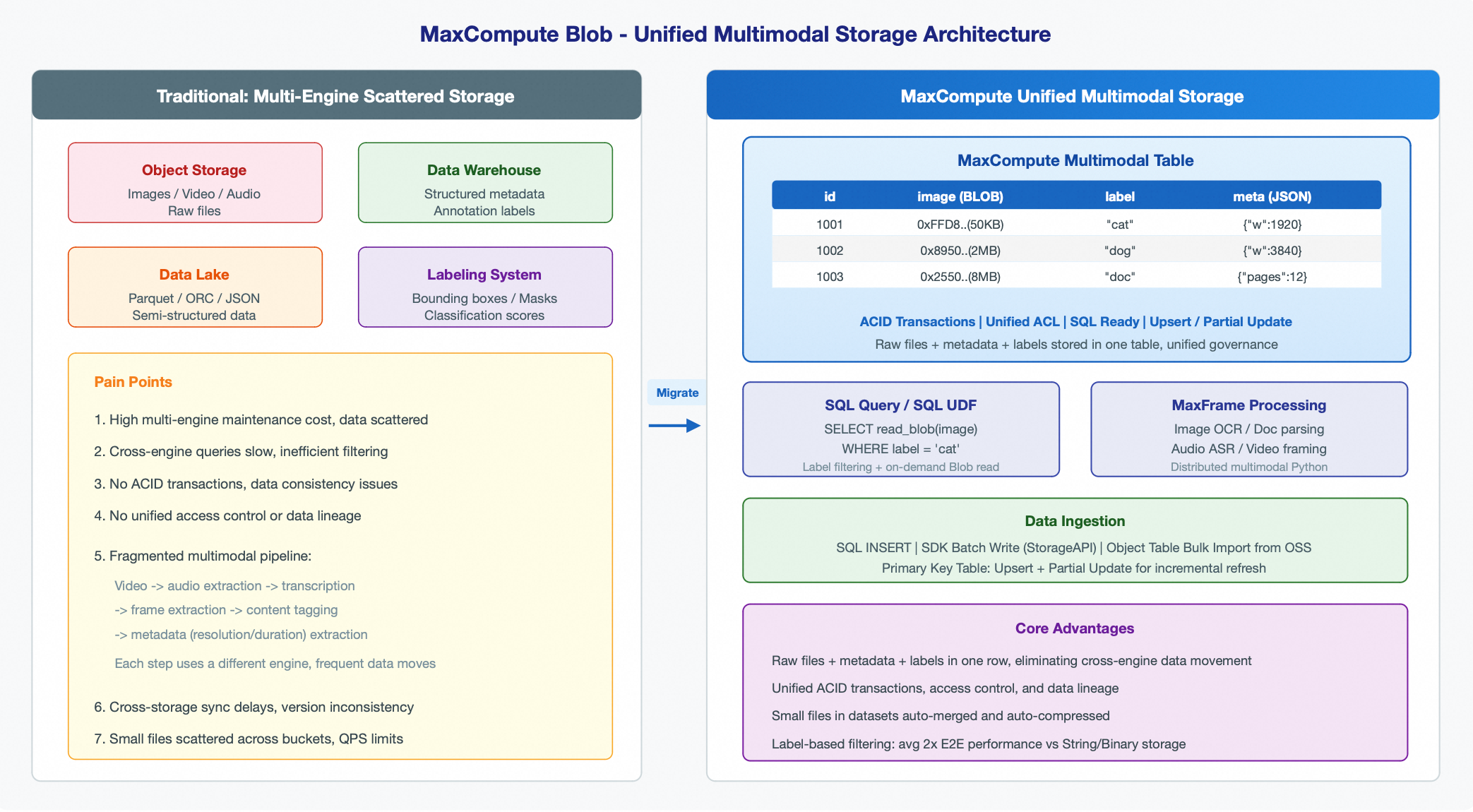
MaxCompute provides native support for the Blob column type, allowing you to store all data—including raw files, metadata, and annotations—in a single table:
-- Example of a multimodal dataset table
CREATE TABLE multimodal_dataset (
    id          BIGINT NOT NULL,
    image       BLOB,                       -- Raw image binary
    label       STRING,                     -- Classification label
    bbox        STRING,                     -- Annotation bounding box (JSON)
    resolution  STRING,                     -- Resolution metadata
    created_at  DATETIME                    -- Ingestion time
) TBLPROPERTIES("table.format.version"="2");
Traditional vs. MaxCompute multimodal approaches
Traditional architectures distribute multimodal data—such as raw files, metadata, and annotations—across various systems like object storage, data warehouses, and data lakes. MaxCompute solves these challenges by using the Blob column type to unify all data into a single table:
Traditional approach | MaxCompute solution |
High maintenance costs: A multi-engine architecture scatters data, making unified management difficult. | Unified storage and management: Raw files, metadata, and annotations are stored in a single table, eliminating the need to maintain multiple systems. |
High latency for cross-engine queries: Filtering images by label requires multiple steps, such as querying a database for metadata before retrieving files from object storage. | Direct filtering with SQL: Query data based on conditions like labels or timestamps without requiring multi-hop access across systems. |
Lack of unified ACID guarantees: Data consistency, access permissions, and data lineage cannot be managed centrally. | Full ACID transactions and unified access control: Every write operation is atomic and consistent, and all data is managed by the MaxCompute permission system. |
Fragmented processing pipelines: A typical multimodal workflow (video to audio extraction, transcription, frame splitting, content labeling, and metadata extraction) spans multiple systems, leading to frequent data movement. | Unified processing pipeline: Intermediate and final results from multi-step pipelines are centralized in a single table, eliminating data movement across systems. |
Storage model and performance benefits
Storage model
MaxCompute Blob uses a reference-entity separated storage model, which separates structured data columns from Blob large object columns into different physical files. As shown in the following figure, the architecture has three layers:
The access layer provides multiple access methods, including SQL, MaxFrame, odpscmd, SDK, and the Storage API.
The service layer handles compaction, Blob reference routing, ACID transaction management, storage tiering, and backups.
The storage layer splits data into:
Data File (structured data file): Stores non-Blob column data (such as id, label, and metadata) and a reference pointer (Reference) to the Blob column. These files use a standard columnar storage format that supports efficient predicate pushdown and column pruning.
Blob File (large object file): Stores the raw binary content of Blob objects, along with data checksums and index information. Storage files are dynamically split or merged based on the size of each Blob object.
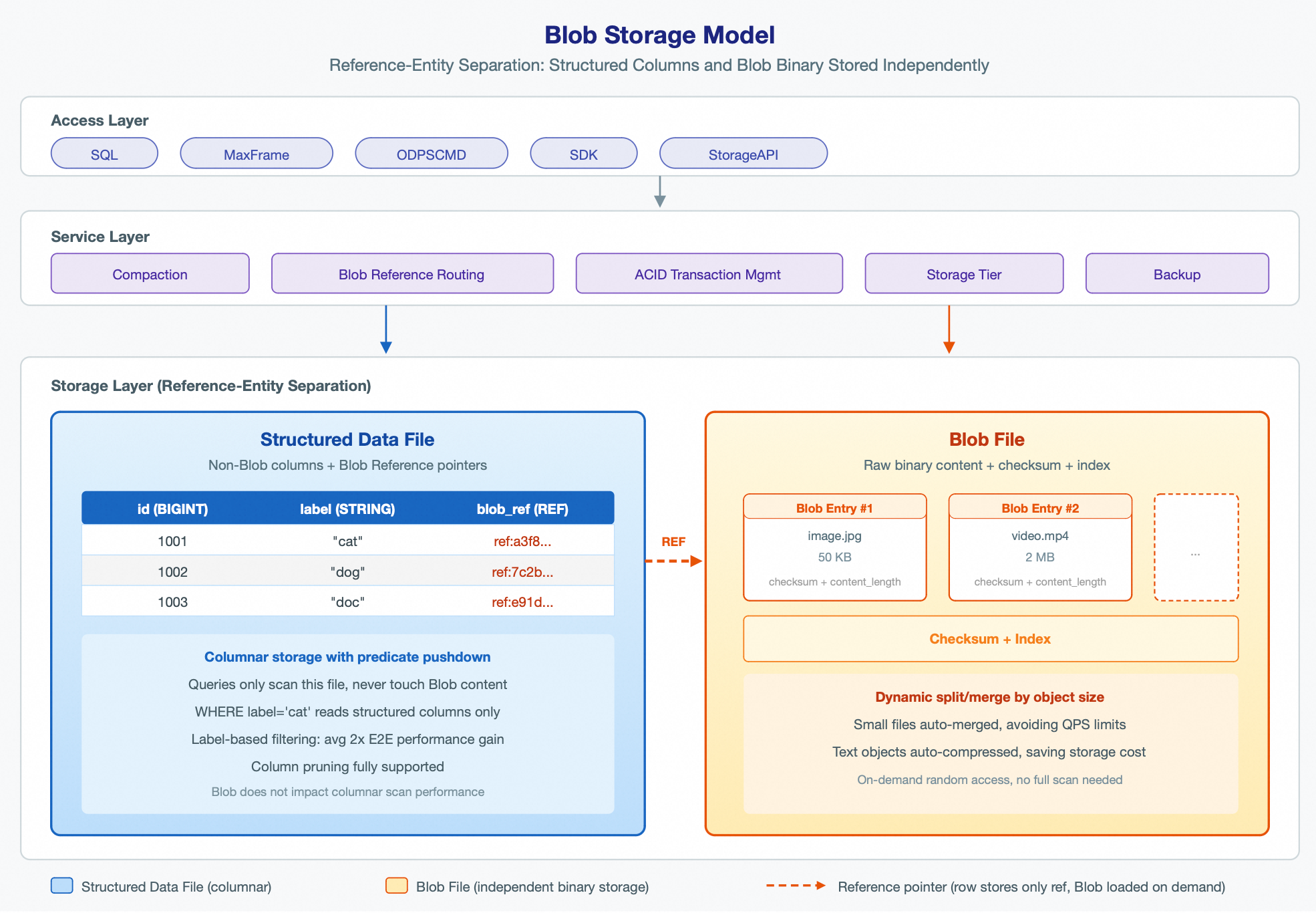
When writing data, the system uploads the binary content to a Blob File and writes a reference pointer to the structured Data File. When reading data, the system first retrieves the reference pointer from the structured column and then loads the binary content from the Blob File as needed. The Blob upload and reference write are completed atomically in a single session commit, and MaxCompute manages the read/write operations as one transaction to ensure atomicity.
This process is transparent to you and requires no special handling.
Performance benefits
Small file merging and compression
Blob storage automatically merges many small objects (such as images, HTML snippets, and JSON session logs) into larger Blob Files, supporting batch read and write operations. This resolves the QPS limitations associated with requests for a large number of small files.
Text-based objects are automatically compressed on write and decompressed on read. For example, for HTML snippets and JSON text, this can reduce storage space by an average of 50%, lowering storage costs.
Efficient filtering on metadata without scanning large file objects
When filtering data based on metadata or label columns (for example, finding samples with a specific label), storing objects as the Blob type instead of as STRING or BINARY types can double end-to-end performance on average.
For example, consider a dataset of 1 million images with an average size of 1.4 MB. The following table compares the query overhead of storing the image as a BINARY type versus a Blob type:
Storage method
Scanned data
Image stored in a BINARY column
Approx. 1,400 GB (full table scan)
Image stored in a BLOB column
Approx. 30 GB (Data File only)
When you run the following label filtering query, the table with the BINARY type performs a full table scan of 1,400 GB. In contrast, the table with the Blob type scans only 30 GB of data, a 45-fold reduction.
-- Image stored as BINARY type
SELECT id, image FROM multimodal_dataset_binary Where label = "cat";
-- Image stored as Blob type
SELECT id, read_blob(image) FROM multimodal_dataset_blob Where label = "cat";
Data import and export
SDK
Use this method for high-throughput batch reading and writing of large-scale data. You must use MaxCompute Java SDK version 0.57.1-public or later.
For Blob objects smaller than 1 MB, use the batch upload interface. The SDK automatically groups objects into 64 MB batches for uploading.
<dependency>
    <groupId>com.aliyun.odps</groupId>
    <artifactId>odps-sdk-storage-api</artifactId>
    <version>0.57.1-public</version>
</dependency>
Object table
Use this method to import many existing unstructured files (such as images, audio, video, and documents) from OSS into a MaxCompute table with a Blob column. You can create an Object Table to access objects and metadata in an OSS bucket, and then bulk-insert them into a MaxCompute multimodal table. This process requires no staging.
Example:
-- Step 1: Create an Object Table to associate with OSS data
SET odps.namespace.schema=true;
SET odps.sql.type.system.odps2 = true;
CREATE OBJECT TABLE oss_images
LOCATION 'oss://<accessKeyId>:<accessKeySecret>@<endpoint>/<bucket>/<path>/';

-- Refresh metadata
ALTER TABLE oss_images REFRESH METADATA;

-- Step 2: Create a multimodal table that contains a Blob column
CREATE TABLE ods_dataset_images (
  key VARCHAR(2048) COMMENT 'Object key',
  size BIGINT COMMENT 'Object size',
  type VARCHAR(32) COMMENT 'Object type',
  last_modified TIMESTAMP_NTZ COMMENT 'Last modified time',
  storage_class VARCHAR(32) COMMENT 'Storage class',
  etag VARCHAR(64) COMMENT 'ETag information',
  restore_info VARCHAR(256) COMMENT 'Restore information',
  owner_id BIGINT COMMENT 'Owner ID',
  owner_display_name VARCHAR(256) COMMENT 'Owner display name',
  data_file BLOB COMMENT 'Data file'
) COMMENT 'Multimodal table'
tblproperties ('table.format.version'='2') ;

-- Step 3: Bulk import data into the Blob table
INSERT OVERWRITE ods_dataset_images
SELECT key, size, type, last_modified, storage_class, etag, restore_info, owner_id, owner_display_name,
  to_blob(get_data_from_oss('<project_name>.default.oss_images', key)) AS data_file
  FROM oss_images;
SQL syntax
DDL
You can define multiple Blob columns in a CREATE TABLE statement.
CREATE TABLE video_dataset (
    id        BIGINT,
    video     BLOB,
    thumbnail BLOB,
    title     STRING
) TBLPROPERTIES('table.format.version'='2');
Blob functions
to_blob()
The to_blob() function converts string or binary data into a Blob object.
Function | Description |
| Converts the entire string to a Blob. |
| Converts the entire binary value to a Blob. |
| Creates a Blob from a substring starting at the specified |
| Creates a Blob from a binary substring starting at the specified |
| Creates a Blob from a substring of a specified length, starting at the specified |
| Creates a Blob from a binary substring of a specified length, starting at the specified byte |
-- Create a Blob from a string
SELECT to_blob('hello world'); -- Returns: Blob{reference=CAEQAxqqAgEAAAAJA...}

-- Create a Blob from hexadecimal binary data
SELECT to_blob(X'89504E47');   -- PNG file header

-- Substring with an offset
SELECT to_blob('hello world', 6);           -- Result: 'world'
SELECT to_blob('hello world', 0, 5);        -- Result: 'hello'
read_blob()
The read_blob() function returns the content of a Blob object as a STRING or BINARY.
Function | Description |
| Reads the full content of the Blob as a STRING. |
| Reads the content starting from the specified |
| Reads a specified length of content starting from the specified |
-- Read the content of a Blob
SELECT id, read_blob(image) FROM image_dataset WHERE label = 'cat' LIMIT 10;

-- Read partial content (for example, to check the file header)
SELECT id, read_blob(content, 0, 4) AS file_header FROM media_library;

-- Nested usage
SELECT read_blob(to_blob('hello world'));  -- Returns 'hello world'
length()
-- Gets the length of a Blob in bytes
SELECT id, length(read_blob(image)) AS image_size FROM image_dataset;
Quick start
-- Create a table with a Blob column
CREATE TABLE blob_table (col1 BLOB)
TBLPROPERTIES (
  "table.format.version"="2"
);

-- Write data
INSERT INTO blob_table VALUES (to_blob("hello world"));

-- Read data
SELECT read_blob(col1) FROM blob_table;