This topic uses typical scenarios to demonstrate how to select and configure subscription and elastic reserved compute resources. It also provides suggestions to help you reduce costs and improve efficiency.
Background information
MaxCompute previously supported custom quota splitting and time-based configurations for subscription reserved compute resources. You could divide a day into a maximum of three time periods and assign different reserved CU amounts to different quotas for each period. This feature greatly improved the utilization of compute resources.
MaxCompute now offers elastic reserved CUs. When combined with the new quota plan and time plan features, you can flexibly scale compute resources based on evaluations to reduce costs and improve efficiency.
The prices and evaluation methods in the scenarios in this topic are for demonstration purposes only.
For actual prices, see the product purchase page.
In practice, consider multiple factors and test your configuration for a period to find the optimal settings.
Scope
To configure and use elastic reserved CUs, you must first purchase subscription reserved resources. The maximum number of elastic reserved CUs that you can configure is equal to your subscription reserved CU amount. The minimum is 50 CUs, and the step size is 10 CUs.
Elastic reserved CUs are pay-as-you-go and billed hourly. Billing starts when a scale-out is successful and stops when a scale-down is successful. If usage continues for more than one hour, metering data is pushed on the hour. Hourly bills are generated with a three-hour delay.
The price of an elastic reserved CU is 0.0488 USD/CU/hour, and the price of a subscription reserved compute resource is 22.0 USD/CU/month.
If you use elastic reserved CUs for more than 16 hours per day (the cost for 16 hours is
1 CU × 0.0488 USD/CU/hour × 16 hours × 30 days = 23.424 USD/CU/month), it is more cost-effective to purchase subscription reserved CUs.
Scenario 1: Idle resources
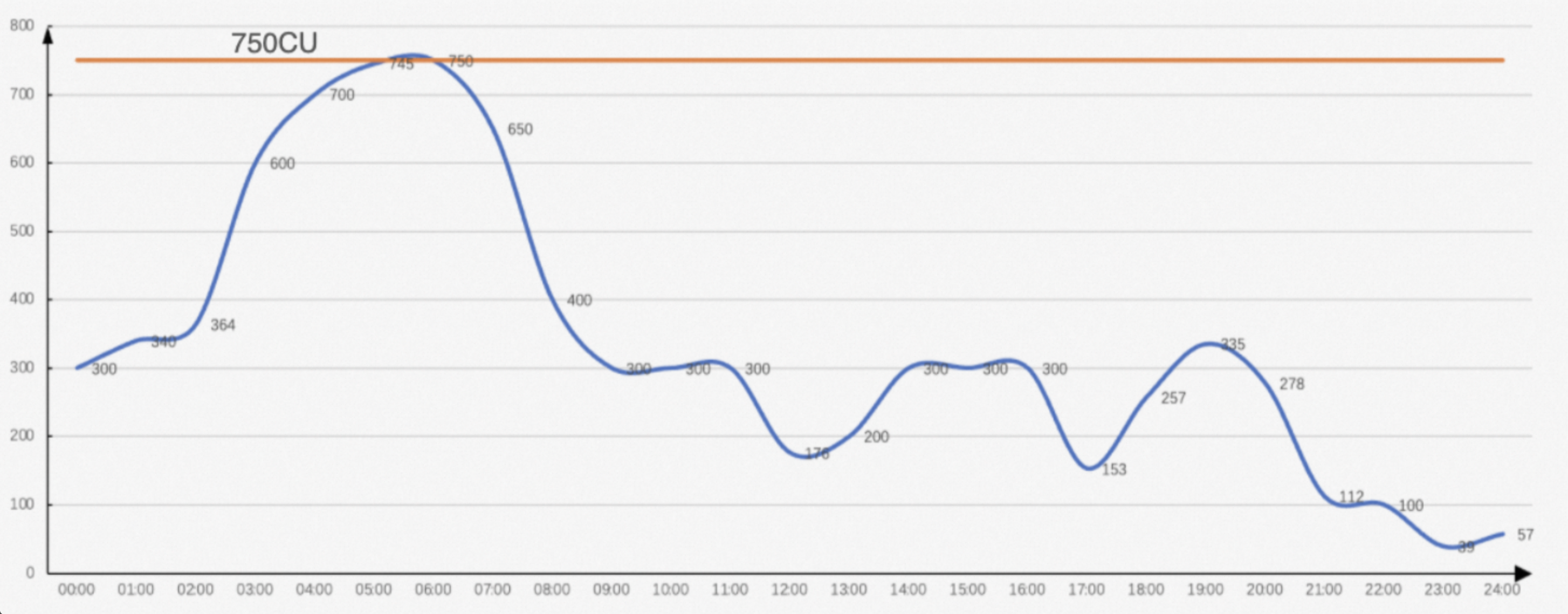
Production jobs run overnight, causing compute demand to peak. Some lines of business have strict time requirements for data, which means that compute results must be generated before a specific time. Compared to the night, the number of compute requests is lower during the day. However, to meet the high demand at night, you purchase a higher level of CUs for your MaxCompute subscription. This results in significant resource idling during the day.
Typical CU usage plan
The typical daily CU usage trend for this scenario is shown in the following figure. You purchase 750 CUs of subscription reserved computing resources primarily to cover the five-hour computing peak from 03:00 to 08:00.
The original monthly fee is 750 CUs × 22.0 USD/CU/month = 16,500 USD/month.
The following figure shows the usage trend of subscription reserved CUs:
Elastic reserved CU plan
The business requires guaranteed performance during the peak hours in the early morning and during secondary peaks. You can purchase 400 subscription reserved CUs and 350 elastic reserved CUs for five hours (from 03:00 to 08:00). The usage trend for the plan that combines subscription reserved CUs and elastic reserved CUs is shown in the following figure:
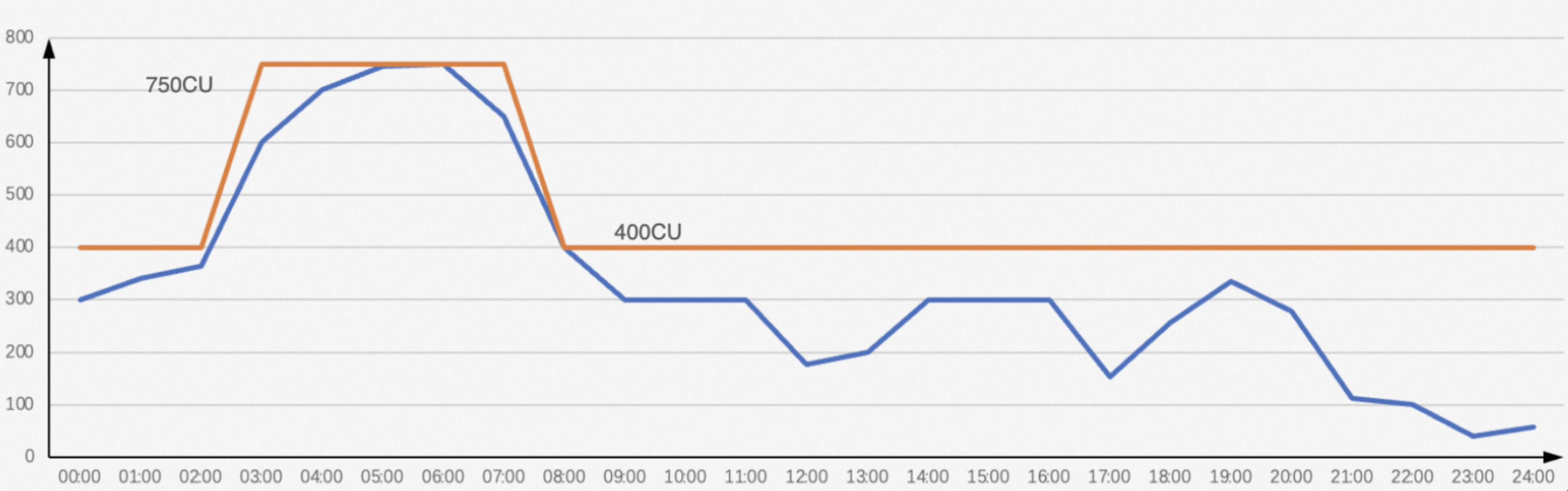 The monthly fee for the elastic reserved CU plan is 400 × 22.0 + 350 × 0.0488 × 5 × 30 = 11,362 USD. Compared to the plan that does not use elastic reserved CUs, you can save about
 31% on costs per month.
Configuration steps for the elastic reserved CU plan
Log in to the MaxCompute console and select a region in the upper-left corner.
In the left-side navigation pane, choose .
Downgrade the quota
To downgrade MaxCompute subscription resources, follow these steps.
On the Quotas page, click Downgrade in the Actions column of the target quota.
On the Downgrade page, configure the required number of CUs after the downgrade, click Buy Now, and complete the downgrade.
For more information about the downgrade rules, see Alibaba Cloud International Website Cancellation Rules.
View the downgrade order on the Alibaba Cloud Orders page.
NoteDowngrading immediately after an upgrade may result in a smaller refund:
Discounted orders: The refund is based on the discounted amount paid, not the original price. For example, a one-year subscription with a 15% discount has an original price of 154.7 USD but a payment of 131.5 USD. The refund is calculated from 131.5 USD.
Coupon-paid orders: The refund includes only the cash portion. Coupon amounts are not refunded.
Add a configuration plan
You can add a new quota configuration plan for MaxCompute subscription resources by following these steps. In this example, the value of Elastically Reserved CUs for the tier-1 quota is
350.On the Quotas page, click Quota Configuration in the Actions column of the target quota.
On the Quota Configuration page, select the Scaling Configuration tab.
On the Scaling Configuration tab, click Add Configuration Plan. In the Add Configuration Plan dialog box, enter a Configuration Plan Name and configure Elastically Reserved CUs for both the level-1 and level-2 quotas.
Click OK to add the plan.
Edit the time plan
You can monitor quota resource consumption daily and adjust the amount of elastic reserved CUs at any time as needed.
On the Scaling Configuration tab, click Edit Time Plan in the Scheduled Scaling Management section.
Click Add Effective Period, and then select an Effective start time and a Configuration Plan.
The following table provides an example of a time plan:
Effective Start Time (UTC+8)
Configuration Plan
00:00
Default
03:00
The quota configuration plan added in the previous step
08:00
Default
The number of elastic reserved CUs for the Default plan is
0.
Scenario 2: Speed up job output with low cost and high reliability
You have purchased MaxCompute subscription reserved compute resources and have already configured tier-2 quota splitting, time-based settings, and priorities. The CU resource utilization is high throughout the day. The business now has new requirements for the generation time of certain business data and expects the data to be produced earlier to deliver more value.
Typical CU usage plan
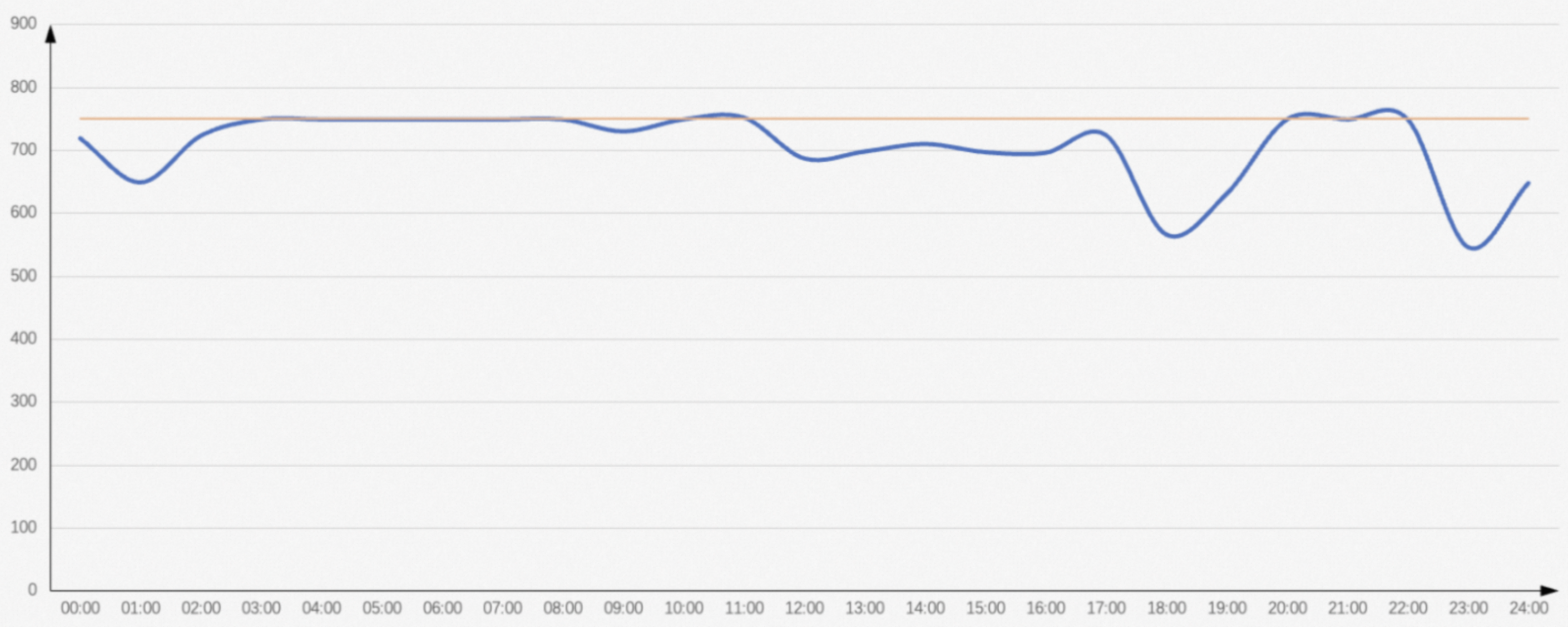
In this scenario, the typical daily CU usage trend is shown in the following figure. You purchase 750 subscription reserved compute resources. The resource utilization is high throughout the day, reaching almost 100%. The average job completion time is long. An important dataset that was previously generated before 7:00 is now required by the business to be generated before 6:00. The original monthly fee for this plan is 750 CUs × 22.0 USD/CU/month = 16,500 USD/month.
The following figure shows the usage trend of subscription reserved CUs:
Elastic reserved CU plan
The resource request trend shows that the resource request volume exceeds 750 CUs between 3:00 and 7:00. To ensure that certain jobs are completed before 6:00, you need to scale out during this peak period.
Use Information Schema to gather statistics on the CU distribution for the jobs related to this data as a reference. The preceding figure shows that the resource usage is at its maximum from 3:00 to 8:00. Therefore, you can calculate the total CU amount for the four hours from 3:00 to 7:00.
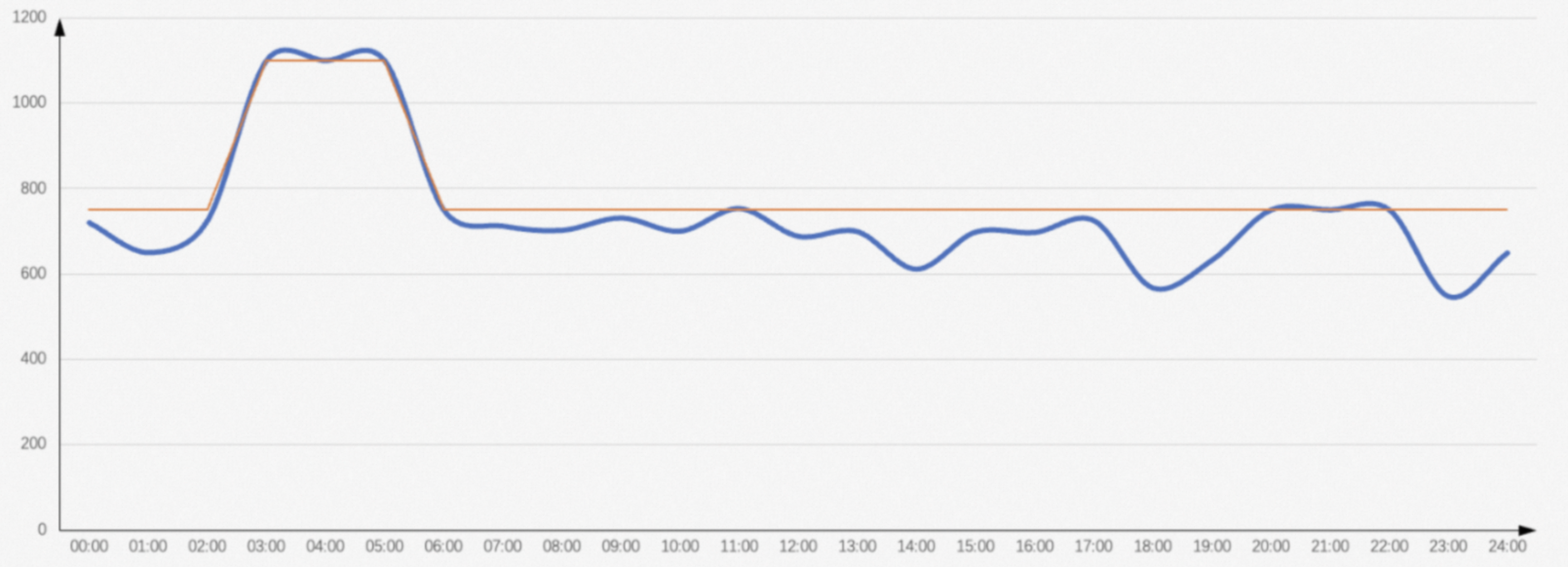
Assume that a total of 2,000 CUs are used in four hours, which means 500 CUs are required to run for four hours. To complete the jobs one hour earlier, the number of CUs required per hour is 2000 / 3 = 667 CUs. Because job dependencies may lead to fewer requests at the beginning and more requests later, you can add an extra buffer. For example, adding 30% results in a CU amount of 667 × 1.3 = 867 CUs. The final number of CUs to scale out starting from 3:00 is 867 - 500 = 367.
The step size for elastic reserved CUs is 50. Therefore, you can first set the number of elastic reserved CUs to 350 for three hours. The trend is shown in the following figure.
In this scenario, the required number of additional elastic reserved CUs is predicted based on the ideal average CU consumption. In practice, you can use this method as a reference, but you must monitor your business and make adjustments as needed.
To ensure the business runs as expected:
If you purchase subscription reserved CUs, you need to spend an extra
350 CUs × 22.0 USD/CU/month = 7,700 USD/month.With the elastic reserved CU plan, you only need to spend an extra
350 CUs × 0.0488 USD/CU/hour × 3 × 30 = 1,537.2 USDper month.
Using the elastic reserved CU plan can save you about 80% on costs per month.
Configuration steps for the elastic reserved CU plan
These steps assume that you have not used a time-based configuration before, or that you have reset any existing time-based configuration.
Log in to the MaxCompute console and select a region in the upper-left corner.
In the left-side navigation pane, choose .
Add a configuration plan
You can add a quota configuration plan for MaxCompute subscription resources by following these steps. In this example, the value of Elastically Reserved CUs for the tier-1 quota is
350.On the Quotas page, click Quota Configuration in the Actions column of the target quota.
On the Quota Configuration page, select the Scaling Configuration tab.
On the Scaling Configuration tab, click Add Configuration Plan. In the Add Configuration Plan dialog box, enter a Configuration Plan Name and configure Elastically Reserved CUs for both the level-1 and level-2 quotas.
Click OK to add the plan.
Edit the time plan
You can monitor quota resource consumption daily and adjust the amount of elastic reserved CUs at any time as needed.
On the Scaling Configuration tab, click Edit Time Plan in the Scheduled Scaling Management section.
Click Add Effective Period, and then select an Effective start time and a Configuration Plan.
The following table provides an example of a time plan:
Effective Start Time (UTC+8)
Configuration Plan
00:00
Default
03:00
The quota configuration plan added in the previous step
06:00
Default
The number of elastic reserved CUs for the Default plan is
0.