After establishing a network connection between MaxCompute and ApsaraDB for HBase, you can create an external table that maps to a table in an ApsaraDB for HBase Standard or Performance-enhanced Edition cluster. You can use these external tables to synchronize data to MaxCompute for ETL, perform federated queries, or write data from MaxCompute back to ApsaraDB for HBase. This topic describes how to create an ApsaraDB for HBase external table.
Background information
ApsaraDB for HBase is a distributed database that is compatible with the standard HBase access protocol. It is available in Standard, Performance-enhanced, and Serverless editions. MaxCompute supports access only to ApsaraDB for HBase Standard Edition or ApsaraDB for HBase Performance-enhanced Edition clusters.
You must first establish a VPC connection between them. To access ApsaraDB for HBase using an external table, you must establish a network link between MaxCompute and the VPC and add the required IP addresses to the ApsaraDB for HBase whitelist. For more information, see Set a whitelist.
You can also create an instance of ApsaraDB for HBase Performance-enhanced Edition in the Lindorm console. To create an external table in this scenario, see Lindorm external tables. This topic describes how to create an external table for an ApsaraDB for HBase instance created in the ApsaraDB for HBase console.
Prerequisites
Before you create an ApsaraDB for HBase external table, ensure the following requirements are met:
-
You have created and configured an ApsaraDB for HBase Standard Edition or ApsaraDB for HBase Performance-enhanced Edition cluster.
For more information about how to purchase and configure an ApsaraDB for HBase Standard Edition cluster, see Quick start for ApsaraDB for HBase Standard Edition.
For more information about how to purchase and configure an ApsaraDB for HBase Performance-enhanced Edition cluster, see Quick start for ApsaraDB for HBase Performance-enhanced Edition.
-
You have created a table in the ApsaraDB for HBase cluster by using an HBase client.
For more information about how to create a table in ApsaraDB for HBase, see Introduction to HBase Shell.
For demonstration purposes, this topic assumes that a table named mf_hbase_test_t has been created in the ApsaraDB for HBase Standard Edition or ApsaraDB for HBase Performance-enhanced Edition cluster using the following commands:
-- Create an HBase table. create 'mf_hbase_test_t', 'f' -- Insert data. In this example, '1' is the RowKey, 'f' is the column family, 'col1' is the column qualifier, and 'hello' is the column value. put 'mf_hbase_test_t', '1', 'f:col1', 'hello' -
You have created the target MaxCompute project to be associated with the ApsaraDB for HBase table.
For more information about how to create a MaxCompute project, see Create a MaxCompute project.
-
You have installed the MaxCompute client.
For more information about how to install the MaxCompute client, see Install and configure the MaxCompute client.
-
You have established a network connection between MaxCompute and ApsaraDB for HBase using a VPC connection solution.
For more information about VPC connection solutions, see Network connection process.
Limits
-
You can create an ApsaraDB for HBase external table to connect MaxCompute and ApsaraDB for HBase only in the following regions: China (Beijing), China (Shanghai), China (Zhangjiakou), China (Ulanqab), China (Hangzhou), China (Shenzhen), China (Hong Kong), China East 2 Finance Cloud (Zone F), Japan (Tokyo), Singapore, Malaysia (Kuala Lumpur), Indonesia (Jakarta), Germany (Frankfurt), US (Silicon Valley), and US (Virginia). For information about how to establish a network connection, see Network connection process.
-
After the network connection is established, MaxCompute can access only the specified VPC. To access another VPC in the same or a different region, you must establish a network connection from the connected VPC to the other VPC.
-
External tables can be used to access only ApsaraDB for HBase 2.x clusters.
-
ApsaraDB for HBase external tables do not support EMR HBase clusters.
-
The
clusterproperty is not supported for ApsaraDB for HBase external tables.
Usage notes
When you read data from the source ApsaraDB for HBase table, if the source table has fewer columns than the external table's schema, the missing columns are populated with NULL. If the source table has more columns, the extra columns are ignored.
HBase external table syntax
When you create an external table, you must specify HBaseStorageHandler in the DDL statement and configure information about the ApsaraDB for HBase Standard Edition or ApsaraDB for HBase Performance-enhanced Edition cluster. Queries on table and column names are case-insensitive.
-- Enable Hive compatibility mode.
set odps.sql.hive.compatible = true;
-- If you use an ApsaraDB for HBase Performance-enhanced Edition cluster, you must also set the odps.sql.hbase.version parameter to lindorm.
set odps.sql.hbase.version=lindorm;
-- Create an ApsaraDB for HBase external table.
create external table if not exists <mc_hbase_external>
(
  <col1_name> <data_type>,
  <col2_name> <data_type>,
  ......
)
-- The handler used to process data from the ApsaraDB for HBase data source.
stored by 'org.apache.hadoop.hive.hbase.HBaseStorageHandler'
with serdeproperties (
                      'hbase.columns.mapping'='<:key,col-family:col-name1,col-family:col-name2,...>')
tblproperties (
-- The hbase.table.name and hbase.zookeeper.quorum parameters are required.
'hbase.table.name'='<hbase_table_name>',
'hbase.zookeeper.quorum'='<VPC ip1|host1:port,VPC ip2|host2:port...>',
-- The hbase.client.username and hbase.client.password parameters are required only for ApsaraDB for HBase Performance-enhanced Edition clusters.
'hbase.client.username'='****',
'hbase.client.password'='****',
-- The hbase.zookeeper.property.clientPort, mcfed.zookeeper.session.timeout, and hbase.client.retries.number parameters are optional.
-- For ApsaraDB for HBase Standard Edition clusters, the default value of hbase.zookeeper.property.clientPort is 2181.
-- For ApsaraDB for HBase Performance-enhanced Edition clusters, the default value is 30020.
['hbase.zookeeper.property.clientPort'='{2181|30020}',]
['mcfed.zookeeper.session.timeout'='<value>',]
['hbase.client.retries.number'='<value>',]
'networklink'='<networklink_name>'
);-
mc_hbase_external: Required. The name of the ApsaraDB for HBase external table that you want to create.
-
col_name: Required. The name of a column in the ApsaraDB for HBase external table.
-
data_type: Required. The data type of the column.
-
with serdeproperties:
-
'hbase.columns.mapping'='<:key,col-family:col-name1,col-family:col-name2,...>': Required. The mappings between the columns of the ApsaraDB for HBase external table and the columns of the table in the ApsaraDB for HBase cluster.
-
The RowKey, which is specified as
:key, must be the first entry. -
The column format is
col-family:col-name1,col-family:col-name2. Only one column family can be specified in a job.
-
-
-
hbase://VPC ip|host:port: Required. The ZooKeeper master configured on ApsaraDB for HBase. This is the ZooKeeper connection endpoint for ApsaraDB for HBase Standard Edition or the Java API access endpoint for ApsaraDB for HBase Performance-enhanced Edition. You can also specify the VPC IP address, IP address range, or port of the associated ApsaraDB for HBase table. Examples:
192.0.2.1-192.0.2.10:9000, 192.0.2.20:70050or192.0.2.20/16:2181. To obtain this information, log on to the ApsaraDB for HBase console. On the Clusters page, click the name of the target cluster. In the left-side navigation pane, click Database Connection to view the Connection Information.-
For distributed data sources, confirm the front-end IP address and port and the DataNode IP addresses and ports that you want to access. For an ApsaraDB for HBase external table, you must specify the IP addresses and ports of ZooKeeper, HMaster, and RegionServer (2181 or 30020, 16000, and 16020). The default ZooKeeper port is 2181 for ApsaraDB for HBase Standard Edition and 30020 for ApsaraDB for HBase Performance-enhanced Edition.
-
This field supports IP address ranges. IP address mapping consumes resources. By default, you can map a maximum of 2,000 IP addresses at a time.
-
-
tblproperties:
-
'hbase.table.name'='<hbase_table_name>': Required. The name of the table in the ApsaraDB for HBase cluster that MaxCompute will map to. This table must already exist and have been created using an HBase client.
-
'hbase.zookeeper.quorum'='<VPC ip1|host1:port,VPC ip2|host2:port...>': Required. The IP address or domain name of ZooKeeper for ApsaraDB for HBase. This is the ZooKeeper connection endpoint for ApsaraDB for HBase Standard Edition or the Java API access endpoint for ApsaraDB for HBase Performance-enhanced Edition.
-
hbase.client.username: Required. This parameter is required only for ApsaraDB for HBase Performance-enhanced Edition clusters. To find the username, log on to the ApsaraDB for HBase console. On the Clusters page, click the name of the target cluster. In the left-side navigation pane, click Database Connection. Then, find the Default Username in the Connection Information section.
-
hbase.client.password: Required. This parameter is required only for ApsaraDB for HBase Performance-enhanced Edition clusters. To find the password, log on to the ApsaraDB for HBase console. On the Clusters page, click the name of the target cluster. In the left-side navigation pane, click Database Connection. Then, find the Default Password in the Connection Information section.
-
'hbase.zookeeper.property.clientPort'='{2181|30020}': Optional. The ZooKeeper port for ApsaraDB for HBase. The default ZooKeeper port is 2181 for ApsaraDB for HBase Standard Edition and 30020 for ApsaraDB for HBase Performance-enhanced Edition.
-
'mcfed.zookeeper.session.timeout'='<value>': Optional. The ZooKeeper session timeout. Unit: milliseconds. A value of 30000 is recommended.
-
'hbase.client.retries.number'='<value>': Optional. The number of connection retries for the HBase client.
-
'networklink'='<networklink_name>': Required. The name of the MaxCompute network connection that links to the VPC where the ApsaraDB for HBase instance resides.
NoteConfigurations that start with mcfed.zookeeper and hbase are ZooKeeper-related configurations.
-
Examples
-
Log on to the MaxCompute client and run the
CREATE EXTERNAL TABLEstatement to create an ApsaraDB for HBase external table.Examples:
-
ApsaraDB for HBase Standard Edition
set odps.sql.hive.compatible = true; create external table if not exists mf_hbase_test_t_ext ( key int, col1 string, col2 string ) stored by 'org.apache.hadoop.hive.hbase.HBaseStorageHandler' with serdeproperties ( 'hbase.columns.mapping'=':key,f:col1,f:col2') tblproperties ( 'hbase.table.name'='mf_hbase_test_t', 'hbase.zookeeper.quorum'='hb-2zef****-master1-001.hbase.rds.aliyuncs.com,hb-2zef****-master2-001.hbase.rds.aliyuncs.com,hb-2zef****-master3-001.hbase.rds.aliyuncs.com', 'hbase.zookeeper.property.clientPort'='2181', 'networklink'='networklink4hbase'); -
ApsaraDB for HBase Performance-enhanced Edition
set odps.sql.external.net.vpc=true;
set odps.sql.hive.compatible = true;
set odps.sql.hbase.version=lindorm;
CREATE EXTERNAL TABLE mf_hbase_test_t_ext
(
  key  int,
  col1 string,
  col2 string
)
stored by 'org.apache.hadoop.hive.hbase.HBaseStorageHandler'
with serdeproperties (
                      'hbase.columns.mapping'=':key,f:col1,f:col2')
tblproperties (
'hbase.table.name'='mf_hbase_test_t',
'hbase.zookeeper.quorum'='hb-2zef****-master1-001.hbase.rds.aliyuncs.com,hb-2zef****-master2-001.hbase.rds.aliyuncs.com,hb-2zef****-master3-001.hbase.rds.aliyuncs.com',
'hbase.zookeeper.property.clientPort'='2181',
'networklink'='networklink4hbase');
-
-
Run the
SELECTcommand to query the table and verify that the association is successful.Example:
select * from mf_hbase_test_t_ext;The following result is returned:
+------+------------+------------+ | key | col1 | col2 | +------+------------+------------+ | 1 | hello | NULL | +------+------------+------------+ -
Run the
INSERT OVERWRITEstatement to write data to the table in ApsaraDB for HBase.Example:
INSERT OVERWRITE TABLE mf_hbase_test_t_ext SELECT '2', 'hbase', 'mftestinsert'; -
Run the
SELECTstatement to verify the written data.Example:
select * from mf_hbase_test_t_ext;The following result is returned:
+------+------------+--------------------+
| key  | col1       | col2               |
+------+------------+--------------------+
| 1    | hello      | NULL               |
| 2    | hbase      | mftestinsert       |
+------+------------+--------------------+
Bulk load data to HBase
To import a large volume of data into ApsaraDB for HBase, you can use the bulk load method. This method first generates HBase underlying storage files (HFiles) and then directly moves these HFiles to the ApsaraDB for HBase storage directory. Compared with using online APIs such as HTable.put to load data, this method is more efficient and minimally impacts the running ApsaraDB for HBase cluster because it bypasses the RegionServer and Write-ahead Logging (WAL).
-
Log on to the MaxCompute client and run the
CREATE EXTERNAL TABLEstatement to create an external table that is associated with the schema of the table in ApsaraDB for HBase.The following DDL statement provides an example:
set odps.sql.hive.compatible=true; -- Enable Hive compatibility mode. create external table if not exists <mc_hfile_hbase_external> ( <col1_name> <data_type>, <col2_name> <data_type> ) stored by 'org.apache.hadoop.hive.hbase.HBaseStorageHandler' -- The handler for the ApsaraDB for HBase data source. with serdeproperties ('hbase.table.name'='<hbase_table_name>', 'hbase.columns.mapping'='<:key,col-family:col-name1,col-family:col-name2,...>', 'odps.external.net.vpc'='true', 'odps.vpc.id'='<VPC ID>', 'odps.vpc.access.ips'='<VPC ip:port,VPC ipBegin-ipEnd:port|network_segment:port>', 'odps.vpc.region'='<RegionID>') location '<hbase://VPC ip:port>' tblproperties ( 'hbase.table.name'='<hbase_table_name>', 'hbase.columns.mapping'='<:key,col-family:col-name1,col-family:col-name2,...>', 'hfile.temp.path'='<hdfs://hbase-cluster/hfiletmp>', 'hadoop.user.name'='<admin>', 'mcfed.fs.defaultFS'='<hdfs://hbase-cluster>', 'mcfed.dfs.nameservices'='<hbase-cluster>', 'mcfed.dfs.ha.namenodes.hbase-cluster'='nn1,nn2', 'mcfed.dfs.namenode.rpc-address.hbase-cluster.nn1'='j63g09343.sqa.eu95:8020', 'mcfed.dfs.namenode.rpc-address.hbase-cluster.nn2'='j63g09355.sqa.eu95:8020', 'mcfed.dfs.client.failover.proxy.provider.hbase-cluster'='org.apache.hadoop.hdfs.server.namenode.ha.ConfiguredFailoverProxyProvider', 'mcfed.zookeeper.session.timeout'='<value>', 'hbase.client.retries.number'='<value>', 'hbase.zookeeper.quorum'='<VPC ip1,VPC ip2...>', 'hbase.zookeeper.property.clientPort'='2181'tblproperties:
-
hfile.temp.path: The storage directory for temporary HFiles. Make sure that this directory is used only for MaxCompute to write HFiles. If you specify this parameter, MaxCompute first writes data to this directory and then runs the HBase bulk load command to import the HFiles into ApsaraDB for HBase.
-
hadoop.user.name: The HDFS user for writing HFiles.
-
Parameters prefixed with mcfed.fs.defaultFS and mcfed.dfs are for HDFS high availability (HA) configuration. You can refer to the DDL statement for details.
-
'hbase.zookeeper.quorum'='ip_address:port|ip_address_range:port|host_name': The IP address of ZooKeeper for ApsaraDB for HBase. You can also set this parameter to the ZooKeeper host name.
Example:
set odps.sql.hive.compatible=true; create external table if not exists test_hfile_hbase_external ( id string, cfa string, cfb string ) stored by 'org.apache.hadoop.hive.hbase.HBaseStorageHandler' with serdeproperties ('hbase.table.name'='htest', 'hbase.columns.mapping'=':key,cf:a,cf:b', 'odps.external.net.vpc'='true', 'odps.vpc.id'='vpc-uf630ldmi9l0rrr01****', 'odps.vpc.access.ips'='192.0.2.0-192.0.2.10:8020,192.0.2.15-192.0.2.20:2181', 'odps.vpc.region'='cn-shanghai') location 'hbase://192.0.2.0:2181' tblproperties ( 'hbase.table.name'='htest', 'hbase.columns.mapping'=':key,cf:a,cf:b', 'hfile.temp.path'='hdfs://hbase-cluster/hfiletmp', 'hadoop.user.name'='admin', 'mcfed.fs.defaultFS'='hdfs://hbase-cluster', 'mcfed.dfs.nameservices'='hbase-cluster', 'mcfed.dfs.ha.namenodes.hbase-cluster'='nn1,nn2', 'mcfed.dfs.namenode.rpc-address.hbase-cluster.nn1'='j63g09343.sqa.eu95:8020', 'mcfed.dfs.namenode.rpc-address.hbase-cluster.nn2'='j63g09355.sqa.eu95:8020', 'mcfed.dfs.client.failover.proxy.provider.hbase-cluster'='org.apache.hadoop.hdfs.server.namenode.ha.ConfiguredFailoverProxyProvider', 'mcfed.zookeeper.session.timeout'='30', 'hbase.client.retries.number'='1', 'hbase.zookeeper.quorum'='j63g11301.sqa.eu95,j63g11306.sqa.eu95,j63g09367.sqa.eu95', 'hbase.zookeeper.property.clientPort'='2181'); -
-
Run the
INSERT OVERWRITEstatement to write data to the table in ApsaraDB for HBase and perform a global sort.-
To perform a global sort on the MaxCompute source table, you can use the range-clustered table mechanism of MaxCompute. When the optimizer generates an execution plan and detects that data is being written to an ApsaraDB for HBase table, it treats the table as a range-clustered table. The execution plan then performs a global sort on the source table. The following sample code provides an example:
INSERT OVERWRITE TABLE test_hfile_hbase_external SELECT uuid(), a_name,a_age FROM hy_test1;The following figure shows the generated execution plan. The data in the source table (hy_test1) is globally sorted by RowKey in the M1 stage.
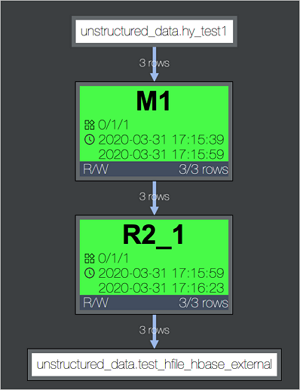
-
After you run the
INSERT OVERWRITEstatement, MaxCompute automatically writes data to HDFS in the HFile format. The temporary path for the HFiles is specified by the hfile.temp.path parameter.Each Fuxi instance corresponds to a region of the ApsaraDB for HBase external table, which is represented as R2_1 in the preceding figure. In this step, the sorted data is written to HDFS in the HFile format.
NoteNote the following limits when you write HFiles:
-
The first column must be the RowKey, which is specified as
:keyin the hbase.columns.mapping property. -
The remaining columns must belong to a single column family. This ensures that each instance writes to only one HFile.
-
-
Move the HFiles to the ApsaraDB for HBase storage directory and notify the ApsaraDB for HBase RegionServer to load them.
After MaxCompute writes the HFiles for all table regions to HDFS, it automatically performs the final bulk load. This operation moves the HFiles to the ApsaraDB for HBase storage directory and notifies the RegionServers to load them.
-
-
Run the
SELECTstatement to verify the written data.Example:
select * from cluster_test_hbase_external;