MaxCompute supports connecting to Object Storage Service (OSS), Data Lake Formation (DLF), Tablestore, and Hologres through several compute engines, including MaxCompute SQL, User-Defined Functions (UDFs), Spark, MapReduce (MR), PyODPS/Mars, external tables, and a data lakehouse architecture. The required endpoint type depends on the access method you use.
Choose an access method
| Access method | Endpoint type | Setup required |
|---|---|---|
| External tables | Internal network endpoint | No additional setup required |
| UDFs | Public endpoint | Add the public endpoint to the MaxCompute whitelist |
Usage notes
-
Supported top-level domain names: aliyun.com, amap.com, dingtalk.com, alicloudapi.com, cainiao.com, alicdn.com, taobao.com, alibaba.com, alipaydev.com, and alibabadns.com.
-
IPv6: IPv6 addresses cannot be configured.
-
Public IP addresses: The number of public IP addresses is not limited.
-
Failed automatic verification: Delete the address and resubmit it. If the address is still required, submit a request form. For more information, see Network activation process.
Access OSS and Tablestore using external tables
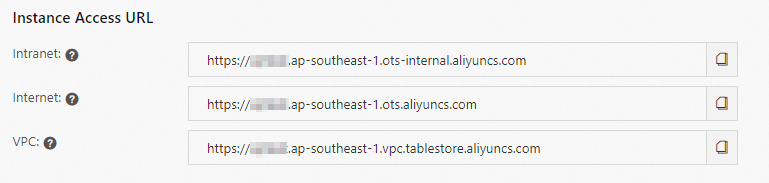
When you create an external table for OSS or Tablestore, MaxCompute connects to the service through its internal network endpoint.
Find the internal network endpoint for your region:
-
OSS: See the Internal Endpoint column in Regions and endpoints.
-
Tablestore: See the Classic Network address in Service endpoints
For an end-to-end example, see Hologres external tables.
Access OSS and Tablestore using UDFs
UDFs access OSS or Tablestore through public endpoints. Before a UDF can connect, add the target public endpoint to the MaxCompute whitelist.
-
Find the public endpoint for your target service and region:
-
OSS: See the Public Endpoint column in Regions and endpoints.
-
Tablestore: See the Public network address in Service endpoints.
-
-
Submit a ticket to add the public endpoint to the MaxCompute whitelist.
-
Use the public endpoint in your UDF to access OSS or Tablestore. For a Spark on MaxCompute example, see Spark access to OSS.