Tunnel is a command-line tool for loading large volumes of data into MaxCompute tables in bulk. It is designed for offline computing scenarios. This tutorial walks you through creating a destination table and uploading a local CSV log file using the odpscmd client.
Prerequisites
Before you begin, ensure that you have:
-
The odpscmd client installed and configured. For more information, see Install and configure the MaxCompute client.
-
A local log file ready to upload. This tutorial uses loghub.csv as the example data file.
Step 1: Create the destination table
In the odpscmd client, run the following commands to create a table named loghub.
The first command enables MaxCompute V2.0 data types. Submit it together with the CREATE TABLE statement in the same session.
set odps.sql.type.system.odps2=true;
-- Create a table named loghub.
CREATE TABLE loghub
(
  client_ip    STRING,
  receive_time STRING,
  topic        STRING,
  id           STRING,
  name         VARCHAR(32),
  salenum      STRING
);
Step 2: Upload the log data
Run the following command to upload the log file to the loghub table. Adjust the file path to match your operating system.
Windows
Tunnel u D:\loghub.csv loghub;Linux or macOS
Tunnel u /path/to/loghub.csv loghub;| Parameter | Description |
|---|---|
D:\loghub.csv or /path/to/loghub.csv |
Path to the local log data file |
loghub |
Name of the destination MaxCompute table |
Wildcards and regular expressions are not supported for Tunnel-based uploads. Specify the exact file path.
Step 3: Verify the upload
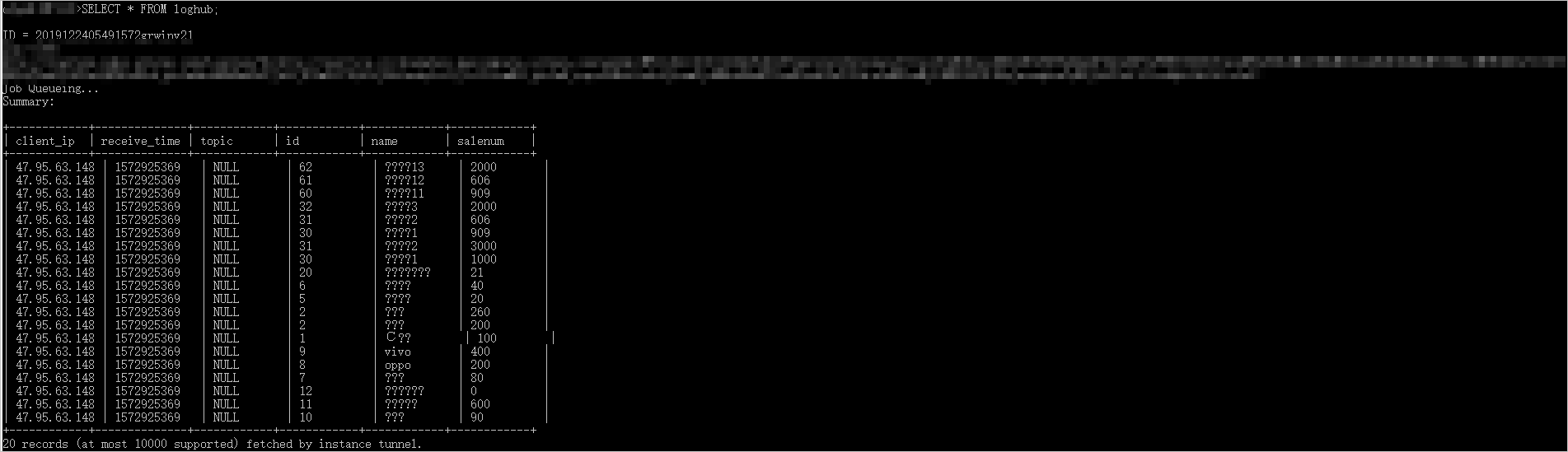
Run the following query to check whether the data was loaded into the table:
SELECT * FROM loghub;If the upload succeeded, the query returns the uploaded rows as shown below.
If the query returns no rows or an error, check the following:
-
The file path in Step 2 matches the actual location of your CSV file.
-
The table schema matches the columns in your CSV file.
-
The odpscmd client is connected to the correct MaxCompute project.
Next steps
For a full reference of Tunnel commands, including features and how to use Tunnel commands to upload or download data, see Tunnel usage notes.