MaxCompute's native PIVOT and UNPIVOT operators are the recommended approach for reshaping data — they offer concise syntax and good performance. This topic covers the manual methods using standard SQL and MaxCompute-specific built-in functions, which give you more flexibility for complex aggregation logic that the native operators do not support.
How pivoting and unpivoting work
The following diagram illustrates the concepts of pivoting and unpivoting. 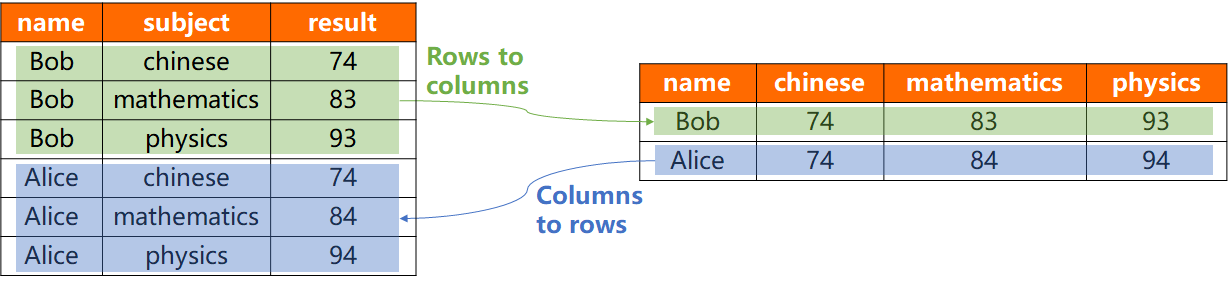
-
Pivot (rows to columns): Transforms a long-format table into a wide format. It rotates values from a single column (for example,
subject) into multiple new columns. -
Unpivot (columns to rows): Transforms a wide-format table into a long format. It collapses multiple columns (for example,
chinese,mathematics) into a single value column, using a new column to label their original source.
Sample data
The examples in this topic use the following two tables.
-
Create the source table
rowtocolumnand insert data for the pivot examples.CREATE TABLE rowtocolumn (name string, subject string, result bigint); INSERT INTO TABLE rowtocolumn VALUES ('Bob' , 'chinese' , 74), ('Bob' , 'mathematics' , 83), ('Bob' , 'physics' , 93), ('Alice' , 'chinese' , 74), ('Alice' , 'mathematics' , 84), ('Alice' , 'physics' , 94);Query the
rowtocolumntable:SELECT * FROM rowtocolumn; -- Result: +------------+-------------+------------+ | name | subject | result | +------------+-------------+------------+ | Alice | chinese | 74 | | Alice | mathematics | 83 | | Alice | physics | 93 | | Bob | chinese | 74 | | Bob | mathematics | 84 | | Bob | physics | 94 | +------------+-------------+------------+ -
Create the source table
columntorowand insert data for the unpivot examples.CREATE TABLE columntorow (name string, chinese bigint, mathematics bigint, physics bigint); INSERT INTO TABLE columntorow VALUES ('Bob' , 74, 83, 93), ('Alice', 74, 84, 94);Query the
columntorowtable:SELECT * FROM columntorow; -- Result: +------------+------------+-------------+------------+ | name | chinese | mathematics | physics | +------------+------------+-------------+------------+ | Bob | 74 | 83 | 93 | | Alice | 74 | 84 | 94 | +------------+------------+-------------+------------+
Pivot using CASE WHEN or built-in functions
The following methods pivot data from rows to columns.
| Method | Best for | Drawback |
|---|---|---|
| CASE WHEN (SQL standard) | Portability, readability, fixed column count | Verbose with many pivot columns |
| Built-in functions (MaxCompute-specific) | Conciseness with many pivot values | Platform lock-in; string manipulation overhead |
-
Method 1: CASE WHEN (SQL standard) This method uses conditional aggregation. A
CASE WHENexpression extracts the score for each subject, and an aggregate function likeMAX()consolidates the results into a single row per student.When to use:
-
Portability is a priority — standard SQL logic works across almost any database system.
-
Readability matters — the logic is explicit and easy for any SQL developer to follow.
-
The number of pivot columns is fixed and manageable.
Drawbacks:
-
Becomes verbose and hard to maintain when pivoting into a large number of columns.
SELECT
    name,
    MAX(CASE subject WHEN 'chinese' THEN result END) AS chinese,
    MAX(CASE subject WHEN 'mathematics' THEN result END) AS mathematics,
    MAX(CASE subject WHEN 'physics' THEN result END) AS physics
FROM rowtocolumn
GROUP BY name;
Result:
+--------+------------+-------------+------------+ | name | chinese | mathematics | physics | +--------+------------+-------------+------------+ | Bob | 74 | 83 | 93 | | Alice | 74 | 84 | 94 | +--------+------------+-------------+------------+ -
-
Method 2: Built-in functions (MaxCompute-specific) This method first uses CONCAT and WM_CONCAT to aggregate subjects and scores into a single key-value string per student. The KEYVALUE function then parses this string to extract each subject's score into a separate column.
When to use:
-
Code conciseness is a priority, especially with many pivot values.
-
You are working within the MaxCompute ecosystem and do not need cross-platform compatibility.
Drawbacks:
-
Platform lock-in — the code is not portable to other SQL databases.
-
Potential performance bottleneck — string manipulation on very large datasets can be less efficient than direct aggregation.
SELECT
    name,
    KEYVALUE(key_value_string, 'chinese') AS chinese,
    KEYVALUE(key_value_string, 'mathematics') AS mathematics,
    KEYVALUE(key_value_string, 'physics') AS physics
FROM (
    SELECT
        name,
        WM_CONCAT(';', CONCAT(subject, ':', result)) AS key_value_string
    FROM rowtocolumn
    GROUP BY name
) AS source_with_concat;
Result:
+--------+------------+-------------+------------+ | name | chinese | mathematics | physics | +--------+------------+-------------+------------+ | Bob | 74 | 83 | 93 | | Alice | 74 | 84 | 94 | +--------+------------+-------------+------------+ -
For data transformations that expand a single row into multiple rows, use Lateral View with functions such as EXPLODE, INLINE, or TRANS_ARRAY.
Unpivot using UNION ALL or built-in functions
The following methods unpivot data from columns to rows.
| Method | Best for | Drawback |
|---|---|---|
| UNION ALL (SQL standard) | Correctness, portability, NULL safety | Multiple table scans; verbosity grows with column count |
| Built-in functions (MaxCompute-specific) | Performance on large tables | Platform lock-in; complex syntax; NULL data loss risk |
-
Method 1: UNION ALL (SQL standard) This method combines multiple
SELECTstatements withUNION ALL, where each statement retrieves a different subject column. This effectively transforms the subject columns (chinese,mathematics,physics) into a singlesubjectcolumn.When to use:
-
Correctness and portability are paramount — this is the most reliable and universally compatible method, and it handles NULL values gracefully without extra logic.
-
Clarity over performance — the intent of the code is immediately clear, even if it is not the most performant option.
Drawbacks:
-
Performance penalty on large tables — scanning a large table multiple times can be very inefficient in a distributed environment.
-
Verbosity — code length grows linearly with the number of columns to unpivot.
SELECT name, subject, result
FROM (
    SELECT name, 'chinese' AS subject, chinese AS result FROM columntorow
    UNION ALL
    SELECT name, 'mathematics' AS subject, mathematics AS result FROM columntorow
    UNION ALL
    SELECT name, 'physics' AS subject, physics AS result FROM columntorow
) unpivoted_data
ORDER BY name;
Result:
+--------+-------------+------------+ | name | subject | result | +--------+-------------+------------+ | Bob | chinese | 74 | | Bob | mathematics | 83 | | Bob | physics | 93 | | Alice | chinese | 74 | | Alice | mathematics | 84 | | Alice | physics | 94 | +--------+-------------+------------+ -
-
Method 2: Built-in functions (MaxCompute-specific) This method uses CONCAT to create a delimited string from the subject columns. TRANS_ARRAY and SPLIT_PART then explode this string into multiple rows and parse the subject and score for each.
When to use:
-
Performance is critical on large tables — this avoids multiple table scans.
-
You are comfortable with MaxCompute-specific syntax and functions.
Drawbacks:
-
Platform lock-in — the code is highly specific to MaxCompute and not portable.
-
Complex syntax — the combination of
TRANS_ARRAYand nested subqueries can be harder to read and debug thanUNION ALL.
NoteThis method relies on
CONCAT. If any source column (chinese,mathematics, orphysics) contains a NULL, the entire concatenated string becomes NULL, causing silent data loss for that row. Wrap columns inNVL()before concatenation — for example,NVL(chinese, 0)— or use theUNION ALLmethod instead. For more information, see NVL.SELECT name, SPLIT_PART(subject,':',1) AS subject, SPLIT_PART(subject,':',2) AS result FROM ( SELECT TRANS_ARRAY(1,';',name,subject) AS (name,subject) FROM ( SELECT name, CONCAT('chinese',':',chinese,';','mathematics',':',mathematics,';','physics',':',physics) AS subject FROM columntorow ) );Result:
+--------+-------------+------------+ | name | subject | result | +--------+-------------+------------+ | Bob | chinese | 74 | | Bob | mathematics | 83 | | Bob | physics | 93 | | Alice | chinese | 74 | | Alice | mathematics | 84 | | Alice | physics | 94 | +--------+-------------+------------+ -
What's next
MaxCompute also provides native PIVOT and UNPIVOT operators that offer a more concise and often more efficient syntax for these transformations. For more information, see PIVOT and UNPIVOT.