Use case overview
This tutorial shows how to use MaxLake to build a unified data lakehouse pipeline on MaxCompute — from raw file ingestion through multi-engine analytics. Using Internet of Vehicles (IoV) data as the example, you'll process GPS location data reported by in-vehicle terminals to calculate hourly vehicle mileage and average speed, then feed that data into three downstream use cases:
-
Real-time Online Analytical Processing (OLAP) reporting with StarRocks
-
Secure cross-team data sharing with dynamic masking, accessed via the Spark engine
-
AI model training with frameworks such as PyTorch
The overall architecture is shown below:
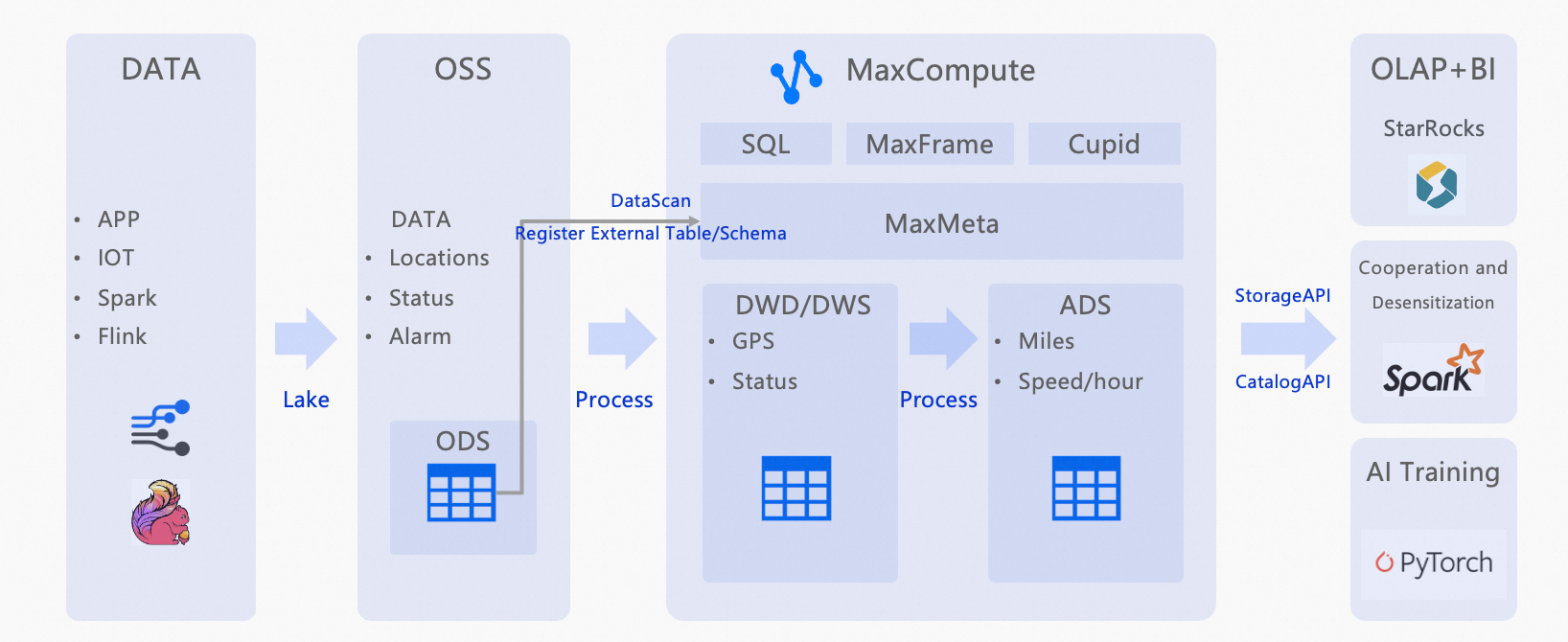
How it works
ODS layer — automated data discovery
Raw vehicle GPS files (Parquet and ORC), partitioned by hour, are stored in Object Storage Service (OSS). A DataScan task automatically discovers these files every 5 minutes and registers them as structured external tables in MaxCompute.
DWD layer — data cleansing
SQL transforms filter invalid records from the ODS layer and standardize field formats: timestamps are parsed, and longitude/latitude values are validated against expected coordinate ranges.
ADS layer — aggregation
A second SQL transform calculates total hourly mileage and average speed per vehicle from the cleaned DWD data.
Multi-engine orchestration
The processed ADS data serves as a single source for three independent use cases:
-
StarRocks connects to the ADS layer for sub-second OLAP queries and dashboard visualization.
-
A
thirdpartyrole with a dynamic masking policy shares the ADS table with an external Spark-based team, masking vehicle IDs to protect privacy. -
The cleaned DWD data serves as training data for AI model development.
What you will do in this tutorial
-
Upload sample IoV GPS data to an OSS bucket.
-
Grant the required permissions to create connections.
-
Create a CONNECTION to let MaxCompute access OSS.
-
Create a DataScan job to auto-discover files as external tables (ODS layer).
-
Run SQL to cleanse and transform data into the DWD layer.
-
Run SQL to aggregate data into the ADS layer.
-
Set up a role and masking policy for secure cross-team data sharing.
About the dataset
The sample dataset simulates GPS telemetry from three vehicles (VIN001, VIN002, VIN003). Each record contains the vehicle identifier (vin), device identifier (device_id), report timestamp (report_time), longitude (lng), latitude (lat), speed in km/h (speed), and a raw payload field. Data is partitioned by date (dt) and hour (hh). Download the sample data: Maxlake_example_parquet.zip.
Prerequisites
Before you begin, make sure you have:
-
An Alibaba Cloud account with access to MaxCompute and OSS
-
A RAM role with read permissions on OSS (required for the CONNECTION credential)
-
The
Connection_AdminandDatascan_Admintenant-level roles (see Grant permissions)
Procedure
Upload sample data
-
Log on to the OSS console.
-
In the left navigation pane, click Buckets, then click Create Bucket. Name the bucket
vehicle-raw. -
On the Buckets page, click the bucket name to open the Objects page.
-
Click Upload Object and upload the unzipped contents of Maxlake_example_parquet.zip.
Grant permissions
RAM users who manage connections must have the tenant-level Connection_Admin role. An Alibaba Cloud account or a user with the Super_Administrator and Admin roles can grant this role.
-
Log on to the MaxCompute console and select a region.MaxCompute console
-
In the left navigation pane, choose Manage Configurations > Tenants.
-
On the Tenants page, click the Roles tab.
-
Select
Connection_AdminandDatascan_Admin, then click New Authorization in the Actions column. -
In the Newly Added Authorization dialog box, add the users to authorize and click OK.
For more information, see Tenant-level role authorization.
Create a CONNECTION
A CONNECTION stores the credentials MaxCompute uses to access external storage such as OSS.
-
Log on to the MaxCompute console and select a region.
-
In the left navigation pane, choose MaxLake > Data Lake Connection.
-
On the Data Lake Connection (CONNECTION) page, click Establish a connection.
-
In the Create Data Lake Connection dialog box, set the following parameters and click OK.
Parameter Description Data Connection Name A unique name for the connection within the tenant. RAMRoleARN The ARN of a RAM role with OSS read permissions. To create a custom role, see STS mode authorization. Data Connection Description An optional description.
Create a DataScan job
A DataScan job scans an OSS path and automatically registers discovered files as external tables in a MaxCompute project.
-
Log on to the MaxCompute console and select a region.
-
In the left navigation pane, choose MaxLake > Data Discovery.
-
On the Data Discovery page, click Create a data discovery task.
-
In the Create Task dialog box, configure the following settings and click Create.
Basic configuration
Parameter Value Task Name A unique name within the tenant. Task cycle 5 minutes Lake Data Configuration
Parameter Description Connection Select the CONNECTION you created. Location The OSS path where your data is stored. Format: oss://<bucket-name>/<path>/. The OSS bucket and the DataScan task must be in the same region and belong to the same Alibaba Cloud account. Example:oss://vehicle-raw/Maxlake_example_parquetCatalog Configuration
Parameter Description Project The MaxCompute project where the external table will be created. Schema The schema to use. Make sure no user-created tables share names with the files or folders DataScan will discover — name conflicts prevent external table creation. -
The task runs every 5 minutes. After it completes, verify that the IoV tables appear and that partitions are automatically added in the selected project and schema.
If the scan fails, check your OSS bucket for system files such as
.DS_Store. These cause parsing errors and must be deleted manually. Future versions will support automatic exclusion of such files.
Run SQL data processing scripts
Run the following SQL scripts in the MaxCompute SQL editor to build each data layer.
Verify the ODS layer
The ODS layer contains the raw GPS records registered by DataScan. Run the following query to confirm data is available:
-- Verify raw data in the ODS layer
-- The ODS table stores GPS telemetry partitioned by date (dt) and hour (hh).
SHOW PARTITIONS ods_vehicle_gps_raw;
SET odps.sql.allow.fullscan=true;

SELECT * FROM ods_vehicle_gps_raw WHERE dt='2025-09-17' AND hh='23';
Your results should look similar to the following. If you see no rows, confirm that the DataScan job ran successfully and that partitions were created.
+------------+------------+---------------------+--------------------+--------------------+--------------------+-------------+------------+----+
| vin        | device_id  | report_time         | lng                | lat                | speed              | raw_payload | dt         | hh |
+------------+------------+---------------------+--------------------+--------------------+--------------------+-------------+------------+----+
| VIN001     | DEV001     | 2025-09-16 00:00:00 | 120.00023573730152 | 30.39975989605289  | 73.3843581906447   | mock_payload | 2025-09-17 | 23 |
| VIN002     | DEV002     | 2025-09-16 00:00:00 | 120.00517998985256 | 30.33811818824062  | 67.43035716350673  | mock_payload | 2025-09-17 | 23 |
| VIN003     | DEV003     | 2025-09-16 00:00:00 | 120.24295999679852 | 30.143229002199707 | 40.8918776553552   | mock_payload | 2025-09-17 | 23 |
| VIN001     | DEV001     | 2025-09-16 00:30:00 | 120.24754980497414 | 30.373484773735274 | 49.50436236779409  | mock_payload | 2025-09-17 | 23 |
| VIN002     | DEV002     | 2025-09-16 00:30:00 | 120.00510501582413 | 30.42486370328109  | 55.8400627485663   | mock_payload | 2025-09-17 | 23 |
| VIN003     | DEV003     | 2025-09-16 00:30:00 | 120.36073125682805 | 30.065016013833237 | 61.82996654036919  | mock_payload | 2025-09-17 | 23 |
| VIN002     | DEV002     | 2025-09-16 19:30:00 | 120.29488938268968 | 30.12474152125639  | 66.48209032904454  | mock_payload | 2025-09-17 | 23 |
| VIN002     | DEV002     | 2025-09-16 19:00:00 | 120.35157954057287 | 30.459823299646295 | 76.36574370617315  | mock_payload | 2025-09-17 | 23 |
| VIN001     | DEV001     | 2025-09-16 19:30:00 | 120.3113710027241  | 30.33402715522518  | 62.601762741153024 | mock_payload | 2025-09-17 | 23 |
+------------+------------+---------------------+--------------------+--------------------+--------------------+-------------+------------+----+
Build the DWD layer
The DWD layer filters invalid records and standardizes field formats. The transform applies three rules: it parses report_time into a typed DATETIME, filters out records with negative speed or null vehicle IDs, and flags each record as location-valid when longitude is between 70–140° and latitude is between 10–60°.
-- Create the DWD table
CREATE TABLE IF NOT EXISTS dwd_vehicle_gps (
  vin          STRING COMMENT 'Unique vehicle identifier',
  event_time   DATETIME COMMENT 'Report time',
  lng          DOUBLE COMMENT 'Longitude',
  lat          DOUBLE COMMENT 'Latitude',
  speed        DOUBLE COMMENT 'Speed (km/h)',
  loc_valid    BOOLEAN COMMENT 'Indicates whether the location is valid'
)
PARTITIONED BY (dt STRING, hh STRING);

-- Cleanse and load data from the ODS layer
INSERT OVERWRITE TABLE dwd_vehicle_gps PARTITION (dt='2025-09-17', hh='23')
SELECT
  vin,
  TO_DATE(report_time,'yyyy-MM-dd HH:mi:ss') AS event_time,
  lng, lat,
  speed,
  CASE WHEN lng BETWEEN 70 AND 140 AND lat BETWEEN 10 AND 60 THEN TRUE ELSE FALSE END AS loc_valid
FROM ods_vehicle_gps_raw
WHERE dt='2025-09-17' AND hh='23'
  AND speed >= 0
  AND vin IS NOT NULL;

-- Verify the results
SELECT * FROM dwd_vehicle_gps WHERE dt='2025-09-17' AND hh='23';
Your results should look similar to the following. All loc_valid values should be true for the sample dataset, confirming coordinates fall within valid ranges.
+--------+---------------------+--------------------+--------------------+--------------------+-----------+------------+----+
| vin    | event_time          | lng                | lat                | speed              | loc_valid | dt         | hh |
+--------+---------------------+--------------------+--------------------+--------------------+-----------+------------+----+
| VIN001 | 2025-09-16 00:00:00 | 120.00023573730152 | 30.39975989605289  | 73.3843581906447   | true      | 2025-09-17 | 23 |
| VIN002 | 2025-09-16 00:00:00 | 120.00517998985256 | 30.33811818824062  | 67.43035716350673  | true      | 2025-09-17 | 23 |
| VIN003 | 2025-09-16 00:00:00 | 120.24295999679852 | 30.143229002199707 | 40.8918776553552   | true      | 2025-09-17 | 23 |
| VIN001 | 2025-09-16 00:30:00 | 120.24754980497414 | 30.373484773735274 | 49.50436236779409  | true      | 2025-09-17 | 23 |
| VIN003 | 2025-09-16 00:30:00 | 120.36073125682805 | 30.065016013833237 | 61.82996654036919  | true      | 2025-09-17 | 23 |
| VIN001 | 2025-09-16 05:00:00 | 120.13891993725622 | 30.39267490566367  | 53.99676876794396  | true      | 2025-09-17 | 23 |
| VIN003 | 2025-09-16 05:30:00 | 120.04798104849084 | 30.012209889484666 | 65.01092831837522  | true      | 2025-09-17 | 23 |
| VIN002 | 2025-09-16 20:00:00 | 120.42721760246307 | 30.051330581564144 | 79.73892066615583  | true      | 2025-09-17 | 23 |
| VIN003 | 2025-09-16 20:00:00 | 120.47715870033818 | 30.302941456112517 | 58.61057150112957  | true      | 2025-09-17 | 23 |
| VIN001 | 2025-09-16 20:30:00 | 120.3067564206695  | 30.179763514166588 | 47.77533756931095  | true      | 2025-09-17 | 23 |
+--------+---------------------+--------------------+--------------------+--------------------+-----------+------------+----+
Build the ADS layer
The ADS layer calculates total hourly mileage and average speed per vehicle. The SQL uses a self-join to pair each GPS record with the preceding record for the same vehicle, then computes the Euclidean distance between consecutive points as an approximation (1 degree ≈ 111 km). For production workloads, replace this with the haversine formula for accurate geodesic distances.
-- Create the ADS table
CREATE TABLE IF NOT EXISTS ads_vehicle_hourly_stat (
  vin            STRING COMMENT 'Unique vehicle identifier',
  stat_hour      STRING COMMENT 'Statistics hour (yyyy-MM-dd HH)',
  total_distance DOUBLE COMMENT 'Total mileage (km)',
  avg_speed      DOUBLE COMMENT 'Average speed (km/h)'
)
PARTITIONED BY (dt STRING, hh STRING);

-- Calculate mileage and average speed
SET odps.sql.type.system.odps2=true;

WITH ordered AS (
  SELECT
    vin, event_time, lng, lat, speed,
    ROW_NUMBER() OVER (PARTITION BY vin ORDER BY event_time) AS rn
  FROM dwd_vehicle_gps
  WHERE dt='2025-09-17' AND hh='23' AND loc_valid = TRUE
),
with_prev AS (
  SELECT
    a.vin, a.event_time, a.speed,
    -- Euclidean approximation: 1 degree = approximately 111 km. Not precise; use haversine in production.
    ABS(a.lng - b.lng)*111 AS dx,
    ABS(a.lat - b.lat)*111 AS dy
  FROM ordered a
  LEFT JOIN ordered b
    ON a.vin = b.vin AND a.rn = b.rn + 1
)
INSERT OVERWRITE TABLE ads_vehicle_hourly_stat PARTITION (dt='2025-09-17', hh='23')
  SELECT
    vin,
    '2025-09-17 23' AS stat_hour,
    SUM( SQRT( COALESCE(dx,0)*COALESCE(dx,0) + COALESCE(dy,0)*COALESCE(dy,0) ) ) AS total_distance,
    AVG(speed) AS avg_speed
  FROM with_prev
  GROUP BY vin;

-- Query mileage and average speed for VIN001
SET odps.sql.allow.fullscan=true;
SELECT * FROM ads_vehicle_hourly_stat WHERE vin='VIN001'
  ORDER BY stat_hour DESC;
Your results should look similar to the following:
+--------+---------------+--------------------+-------------------+------------+----+
| vin    | stat_hour     | total_distance     | avg_speed         | dt         | hh |
+--------+---------------+--------------------+-------------------+------------+----+
| VIN001 | 2025-09-17 23 | 1510.7384548492398 | 59.33624859907179 | 2025-09-17 | 23 |
+--------+---------------+--------------------+-------------------+------------+----+
To format the output for reporting:
SET odps.sql.allow.fullscan=true;
SELECT
  vin AS vehicle_id,
  stat_hour AS stat_time,
  CONCAT(CAST(ROUND(total_distance, 2) AS STRING), ' km') AS mileage,
  CONCAT(CAST(ROUND(avg_speed, 2) AS STRING), ' km/h') AS avg_speed
FROM ads_vehicle_hourly_stat WHERE vin='VIN001'
  ORDER BY stat_hour DESC;
+------------+---------------+------------+------------+
| vehicle_id | stat_time | mileage | avg_speed |
+------------+---------------+------------+------------+
| VIN001 | 2025-09-17 23 | 1510.74 km | 59.34 km/h |
+------------+---------------+------------+------------+Set up secure cross-team data sharing
This section shows how to share the ADS table with an external team using the Spark engine. The MaxCompute project owner creates a thirdparty role, grants it query access to the relevant tables, and applies a dynamic masking policy so that the vin column is masked when accessed by that role — retaining only the first and last characters and replacing the rest with asterisks (*).
Step 1: Create the role and grant query permissions.
-- Create a role for the external team
CREATE role thirdparty;
GRANT CreateInstance, List ON project <project_name> TO ROLE thirdparty;
GRANT SELECT ON TABLE ods_vehicle_gps_raw TO ROLE thirdparty;

-- Add a user to the role
ADD USER RAM$<your Alibaba Cloud account>;
GRANT thirdparty TO RAM$<your Alibaba Cloud account>;
Step 2: Apply a masking policy to the vehicle ID column.
-- Enable dynamic data masking for the project
setproject odps.data.masking.policy.enable=true;

-- Create a masking policy that retains the first and last characters of the VIN
CREATE data masking policy IF NOT EXISTS masking_vin
TO role (thirdparty)
USING MASKED_STRING_UNMASKED_BA(1, 1);

-- Bind the masking policy to the vin column in the ADS table
apply data masking policy masking_vin bind TO
TABLE ads_vehicle_hourly_stat COLUMN vin;
After this configuration, users assigned the thirdparty role see masked vehicle IDs — for example, V****1 instead of VIN001 — when querying ads_vehicle_hourly_stat with the Spark engine.
What's next
After completing this tutorial, consider the following:
-
Connect StarRocks to the
ads_vehicle_hourly_stattable for sub-second OLAP queries and dashboard visualization. -
Use the cleaned
dwd_vehicle_gpsdata as training data for AI model development with frameworks such as PyTorch.