MaxCompute uses keysets to manage symmetric encryption keys. A keyset holds one or more keys, so you can rotate keys without re-encrypting existing data. This page shows how to create and manage keysets, encrypt and decrypt column data, and integrate keysets with Key Management Service (KMS) for cross-account scenarios.
Two keyset types are available:
| Type | Description | When to use |
|---|---|---|
| Standard keyset | Created and stored within MaxCompute | Single-account encryption workflows |
| Wrapped keyset | A standard keyset encrypted by a KMS key; only the wrapped (ciphertext) form is stored | Cross-account encryption, or when you want key material held outside MaxCompute |
Keep your keyset and decryption parameters confidential. If they are lost, data encrypted with that keyset cannot be decrypted and the original data cannot be recovered.
Prerequisites
Before you begin, ensure that you have:
-
A MaxCompute project with the required query permissions
-
(For KMS integration) An activated KMS instance of the software key management type, with a symmetric key created and its ARN available
Prepare test data
Create a table named mf_test_data and insert sample rows.
-- Create a table
CREATE TABLE mf_test_data (id STRING, name STRING, tel STRING);

-- Insert sample rows
INSERT INTO mf_test_data VALUES
  ('1', 'kyle', '13900001234'),
  ('2', 'tom',  '13900001111');

-- Verify the data
SELECT * FROM mf_test_data;
Expected output:
+----+------+-------------+
| id | name | tel         |
+----+------+-------------+
| 1  | kyle | 13900001234 |
| 2  | tom  | 13900001111 |
+----+------+-------------+
Use standard keysets
Standard keyset operations use the following functions: NEW_KEYSET, KEYSET_TO_JSON, ADD_KEY_TO_KEYSET, ROTATE_KEYSET, ENHANCED_SYM_ENCRYPT, and ENHANCED_SYM_DECRYPT. The encrypted output is a BINARY value — store it in a BINARY column.
Supported algorithms
| Algorithm | Type | Notes |
|---|---|---|
AES-GCM-256 |
Authenticated encryption (AEAD) | Default choice for new keysets. Provides both confidentiality and authenticity. |
AES-SIV-CMAC-128 |
Deterministic authenticated encryption | Use when you need deterministic ciphertext (same plaintext always produces same ciphertext). Add via ADD_KEY_TO_KEYSET. |
Create a keyset
SELECT NEW_KEYSET('AES-GCM-256', 'my first keyset');The result is a BINARY-encoded keyset. To inspect its contents in readable JSON, pass the result to KEYSET_TO_JSON:
SELECT KEYSET_TO_JSON(NEW_KEYSET('AES-GCM-256', 'my first keyset'));Expected output:
{
    "key": [{
            "description": "my first keyset",
            "key_id": "Ra4nZQEAoBuiGbmB",
            "key_meta_data": {
                "key_material_origin": "Origin_ALIYUN_MAXCOMPUTE",
                "key_material_type": "SYMMETRIC",
                "type": "AES-GCM-256",
                "value": "/LFKWhw18hz+OBO490YKmjQQDNVWJLOueaUAKKiem/k="},
            "output_prefix_type": "PREFIX_ALIYUN_MAXCOMPUTE",
            "status": "ENABLED"}],
    "primary_key_id": "Ra4nZQEAoBuiGbmB"}
Each key has a key_id, an algorithm type (type), Base64-encoded key material (value), and a status. The primary_key_id field identifies which key is used for new encryption operations.
Add a key for rotation
Key rotation adds a new key to an existing keyset and sets it as the primary key. All subsequent encryption uses the new primary key; existing ciphertext encrypted with the old key remains decryptable as long as the old key is still in the keyset.
Two options are available:
Option 1: Add an externally supplied key
Use ADD_KEY_TO_KEYSET to add key material you provide. The new key becomes the primary key.
SELECT KEYSET_TO_JSON(
  ADD_KEY_TO_KEYSET(
    NEW_KEYSET('AES-GCM-256', 'my first keyset'),
    'AES-SIV-CMAC-128',
    UNHEX('b75585cf321cdcad42451690cdb7bfc49c26092f60f854e72d43244c55620a3d'),
    ''
  )
);
Expected output (two keys, new one is primary):
{
    "key": [
        {
            "description": "my first keyset",
            "key_id": "+q8nZQEAgAMtJLmB",
            "key_meta_data": {
                "key_material_origin": "Origin_ALIYUN_MAXCOMPUTE",
                "key_material_type": "SYMMETRIC",
                "type": "AES-GCM-256",
                "value": "Hj//ZKxLE/t0Uq7XRJQoe2OYNwlauDdGmkaQbMfnZ80="},
            "output_prefix_type": "PREFIX_ALIYUN_MAXCOMPUTE",
            "status": "ENABLED"},
        {
            "description": "",
            "key_id": "+q8nZQEAML2VArmB",
            "key_meta_data": {
                "key_material_origin": "Origin_RAW",
                "key_material_type": "SYMMETRIC",
                "type": "AES-SIV-CMAC-128",
                "value": "t1WFzzIc3K1CRRaQzbe/xJwmCS9g+FTnLUMkTFViCj0="},
            "output_prefix_type": "PREFIX_ALIYUN_MAXCOMPUTE",
            "status": "ENABLED"}],
    "primary_key_id": "+q8nZQEAML2VArmB"}
Option 2: Let MaxCompute generate a new key
Use ROTATE_KEYSET to automatically generate a new key and set it as the primary key.
SELECT KEYSET_TO_JSON(
  ROTATE_KEYSET(
    NEW_KEYSET('AES-GCM-256', 'my first keyset'),
    'AES-GCM-256'
  )
);
Expected output (two keys, auto-generated key is primary):
{
    "key": [
        {
            "description": "my first keyset",
            "key_id": "TbEnZQEAUIEJC7mB",
            "key_meta_data": {
                "key_material_origin": "Origin_ALIYUN_MAXCOMPUTE",
                "key_material_type": "SYMMETRIC",
                "type": "AES-GCM-256",
                "value": "TLAKX8y0/aUbMAtElI+oicEw1fWSTJhZs1D2i3AAf40="},
            "output_prefix_type": "PREFIX_ALIYUN_MAXCOMPUTE",
            "status": "ENABLED"},
        {
            "key_id": "TbEnZQEAAIy0IrmB",
            "key_meta_data": {
                "key_material_origin": "Origin_ALIYUN_MAXCOMPUTE",
                "key_material_type": "SYMMETRIC",
                "type": "AES-GCM-256",
                "value": "jPewQsmbsajzM/gLNX9QFtENs2n9uvhgrgcrcGgl0A0="},
            "output_prefix_type": "PREFIX_ALIYUN_MAXCOMPUTE",
            "status": "ENABLED"}],
    "primary_key_id": "TbEnZQEAAIy0IrmB"}
Encrypt and decrypt data
This example encrypts and decrypts the tel column of mf_test_data using a keyset stored in a dedicated table.
-
Create a table to store the keyset, then generate and write the keyset.
-- Create a keyset storage table CREATE TABLE mf_keyset (id STRING, ks BINARY); -- Generate a keyset and store it INSERT INTO mf_keyset SELECT '1', NEW_KEYSET('AES-GCM-256', 'my first keyset'); -
Encrypt the
telcolumn.ENHANCED_SYM_ENCRYPTreads the keyset frommf_keysetand returns a BINARY ciphertext.SELECT t.id, t.name, ENHANCED_SYM_ENCRYPT(k.ks, t.tel) AS tel FROM (SELECT id, name, tel FROM mf_test_data) t JOIN (SELECT ks FROM mf_keyset WHERE id = '1') k;Expected output (ciphertext in the
telcolumn):+----+------+------+ | id | name | tel | +----+------+------+ | 1 | kyle | =0B=88=A5... | | 2 | tom | =0B=88=A5... | +----+------+------+ -
Decrypt the
telcolumn usingENHANCED_SYM_DECRYPT. Pass the same keyset and the ciphertext, with an empty string for the additional authenticated data (AAD) parameter.SELECT t.id, t.name, ENHANCED_SYM_DECRYPT( k.ks, ENHANCED_SYM_ENCRYPT(k.ks, t.tel), '' ) AS tel FROM (SELECT id, name, tel FROM mf_test_data) t JOIN (SELECT ks FROM mf_keyset WHERE id = '1') k;Expected output (original values restored):
+----+------+-------------+
| id | name | tel         |
+----+------+-------------+
| 1  | kyle | 13900001234 |
| 2  | tom  | 13900001111 |
+----+------+-------------+
Use keysets with KMS
How it works
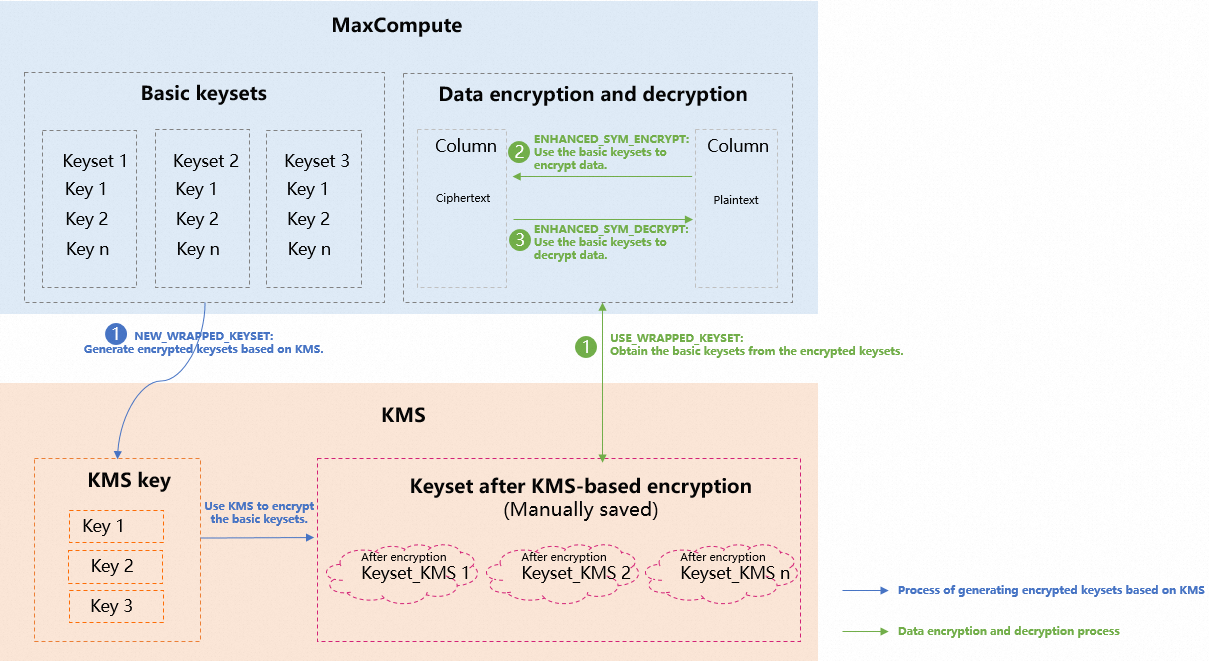
The KMS integration uses a two-layer key design to keep plaintext key material out of MaxCompute storage:
-
MaxCompute generates a standard keyset (the data encryption key, DEK).
-
KMS encrypts that keyset using your KMS key (the key-encryption key, KEK), producing a wrapped keyset. Only the wrapped keyset is stored — plaintext key material never touches your tables.
-
At encryption or decryption time, MaxCompute calls KMS to unwrap the keyset on the fly, then uses it to encrypt or decrypt column data.
This separation means that even if someone gains access to your MaxCompute tables, they cannot decrypt the data without also having access to the KMS key. The database only stores the encrypted form of the key material — plaintext keys are never exposed to the storage layer.
Set up KMS and grant permissions
-
Activate KMS and purchase an instance of the software key management type. For more information, see Purchase and enable a KMS instance.
-
Create a symmetric key and copy its Alibaba Cloud Resource Name (ARN) from the Key Details page. For more information, see the "Software-protected key" section in Getting started with Key Management. In this example, the key ARN is
acs:kms:cn-beijing:189273228874**:key/key-bjj6527b6c6465hsf**. -
Create a RAM role for MaxCompute and attach the
AliyunKMSCryptoUserAccesspolicy to it. This lets MaxCompute call KMS to wrap and unwrap keysets. In this example, the role is namedmf-secrwith ARNacs:ram::189273228874****:role/mf-secr.-
Create a RAM role. Set Select Trusted Entity to Alibaba Cloud Service and select MaxCompute from the Select Trusted Service list. For more information, see Create a RAM role for a trusted Alibaba Cloud service.
-
Attach the AliyunKMSCryptoUserAccess policy to the role. For more information, see Grant permissions to a RAM role.
ImportantAfter a KMS key encrypts a keyset in MaxCompute, MaxCompute must have this permission to run any subsequent encryption or decryption commands.
-
-
(Optional) To allow a RAM user under the same account (USER_A) to run encryption and decryption, grant the RAM user PassRole permission on the
mf-secrrole. For more information, see Grant permissions to a RAM user. Use the following policy document:{ "Statement": [ { "Effect": "Allow", "Action": "ram:PassRole", "Resource": "acs:ram:*:*:role/mf-secr" } ], "Version": "1" }
Set up cross-account access
To let a different Alibaba Cloud account (USER_B) encrypt and decrypt data using a wrapped keyset owned by USER_A, set up a role chain. In cross-account scenarios, the role_chain parameter in the encryption and decryption functions is required — for example, 'acs:ram::188538605451**:role/b-secr,acs:ram::189273228874**:role/mf-secr2b'.
Wrapped keysets are required for cross-account scenarios.
-
In USER_A's account, create a RAM role named
mf-secr2b. Set Select Trusted Entity to Alibaba Cloud Account, select Other Alibaba Cloud Account, and enter the USER_B account ID. For more information, see Create a RAM role for a trusted Alibaba Cloud account. -
Grant the
mf-secr2brole PassRole permission on themf-secrrole, using the same policy document as in step 4 above. -
In USER_B's account, create a RAM role named
b-secr. Set Select Trusted Entity to Alibaba Cloud Service and select MaxCompute from the Select Trusted Service list. For more information, see Create a RAM role for a trusted Alibaba Cloud service. -
Grant the
b-secrrole AssumeRole permission on USER_A'smf-secr2brole. Use the following policy document:{ "Version": "1", "Statement": [ { "Effect": "Allow", "Action": "sts:AssumeRole", "Resource": "acs:ram:*:189273228874****:role/mf-secr2b" } ] } -
(Optional) To let a RAM user under USER_B's account run encryption and decryption, grant that RAM user PassRole permission on the
b-secrrole. Use the following policy document:{ "Statement": [ { "Effect": "Allow", "Action": "ram:PassRole", "Resource": "acs:ram:*:*:role/b-secr" } ], "Version": "1" }
Create and manage wrapped keysets
Create a wrapped keyset
NEW_WRAPPED_KEYSET generates a standard keyset and immediately encrypts it with your KMS key. The result is a BINARY-encoded wrapped keyset. Store it in a table for reuse.
SELECT HEX(
  NEW_WRAPPED_KEYSET(
    'acs:kms:cn-beijing:189273228874****:key/key-bjj6527b6c6465hsf****',
    'acs:ram::189273228874****:role/mf-secr',
    'AES-GCM-256',
    'hello'
  )
);
Expected output:
+-----+
| _c0 |
+-----+
| 613256354C574A71616A59314D6...  |
+-----+
Re-encrypt a wrapped keyset
Use REWRAP_KEYSET to re-encrypt a wrapped keyset using a KMS key without exposing the underlying key material.
SELECT REWRAP_KEYSET(
  'acs:kms:cn-beijing:189273228874****:key/key-bjj6527b6c6465hsf****',
  'acs:ram::189273228874****:role/mf-secr',
  UNHEX('613256354C574A71616A59314D6A64694E6D4D324E44593161484E...')
);
Rotate keys in a wrapped keyset
Use ROTATE_WRAPPED_KEYSET to add a new key to a wrapped keyset. MaxCompute decrypts the wrapped keyset using KMS, adds the new key, and re-encrypts the result.
SELECT ROTATE_WRAPPED_KEYSET(
  'acs:kms:cn-beijing:189273228874****:key/key-bjj6527b6c6465hsf****',
  'acs:ram::189273228874****:role/mf-secr',
  UNHEX('613256354C574A71616A59314D6A64694E6D4D324E44593161484E...'),
  'AES-GCM-256',
  'description'
);
Encrypt and decrypt data with a wrapped keyset
This example encrypts and decrypts the tel column of mf_test_data using a wrapped keyset.
-
Create a table to store the wrapped keyset, then generate and write it.
-- Create a keyset storage table CREATE TABLE mf_keyset_kms (id STRING, ks BINARY); -- Generate a wrapped keyset and store it INSERT INTO mf_keyset_kms SELECT '1', NEW_WRAPPED_KEYSET( 'acs:kms:cn-beijing:189273228874****:key/key-bjj6527b6c6465hsf****', 'acs:ram::189273228874****:role/mf-secr', 'AES-GCM-256', 'description' ); -- Verify the stored keyset SELECT id, HEX(ks) FROM mf_keyset_kms; -
Encrypt the
telcolumn.USE_WRAPPED_KEYSETdecrypts the wrapped keyset on the fly using KMS, thenENHANCED_SYM_ENCRYPTuses the result to encrypt each value.The keyset argument to
USE_WRAPPED_KEYSETmust be a constant — it cannot be a column reference from a table join.-- Encrypt data in the tel column SELECT id, name, ENHANCED_SYM_ENCRYPT( USE_WRAPPED_KEYSET( 'acs:kms:cn-beijing:189273228874****:key/key-bjj6527b6c6465hsf****', 'acs:ram::189273228874****:role/mf-secr', UNHEX('613256354C574A71616A59314D6A64694E6D4D324E44593161484E...') ), tel ) AS tel FROM mf_test_data;Expected output (ciphertext in the
telcolumn):+----+------+------+ | id | name | tel | +----+------+------+ | 1 | kyle | =1A=B88=F7... | | 2 | tom | =1A=B88=F7... | +----+------+------+ -
Decrypt the
telcolumn.SELECT id, name, ENHANCED_SYM_DECRYPT( USE_WRAPPED_KEYSET( 'acs:kms:cn-beijing:189273228874****:key/key-bjj6527b6c6465hsf****', 'acs:ram::189273228874****:role/mf-secr', UNHEX('613256354C574A71616A59314D6A64694E6D4D324E44593161484E...') ), ENHANCED_SYM_ENCRYPT( USE_WRAPPED_KEYSET( 'acs:kms:cn-beijing:189273228874****:key/key-bjj6527b6c6465hsf****', 'acs:ram::189273228874****:role/mf-secr', UNHEX('613256354C574A71616A59314D6A64694E6D4D324E44593161484E...') ), tel ), '' ) AS tel FROM mf_test_data;Expected output (original values restored):
+----+------+-------------+
| id | name | tel         |
+----+------+-------------+
| 1  | kyle | 13900001234 |
| 2  | tom  | 13900001111 |
+----+------+-------------+
Function reference
Standard keyset functions
| Function | Parameters | Description |
|---|---|---|
NEW_KEYSET(algorithm, description) |
algorithm: 'AES-GCM-256' |
Creates a standard keyset. Returns BINARY. |
KEYSET_TO_JSON(keyset) |
keyset: BINARY |
Converts a keyset to a human-readable JSON string for inspection. |
ADD_KEY_TO_KEYSET(keyset, algorithm, key_material, description) |
algorithm: 'AES-GCM-256' or 'AES-SIV-CMAC-128'; key_material: BINARY (raw key bytes via UNHEX) |
Adds an externally supplied key to the keyset and sets it as the primary key. |
ROTATE_KEYSET(keyset, algorithm) |
algorithm: 'AES-GCM-256' |
Generates a new key, adds it to the keyset, and sets it as the primary key. |
ENHANCED_SYM_ENCRYPT(keyset, plaintext [, aad]) |
aad (optional): STRING; use '' when not needed |
Encrypts a value using the keyset's primary key. Returns BINARY. |
ENHANCED_SYM_DECRYPT(keyset, ciphertext [, aad]) |
aad: must match the value used during encryption |
Decrypts a BINARY ciphertext using the keyset. |
Wrapped keyset functions
| Function | Parameters | Description |
|---|---|---|
NEW_WRAPPED_KEYSET(kms_key_arn, role_arn, algorithm, description) |
algorithm: 'AES-GCM-256' |
Generates a standard keyset and encrypts it with the specified KMS key. Returns a BINARY wrapped keyset. |
REWRAP_KEYSET(kms_key_arn, role_arn, wrapped_keyset) |
wrapped_keyset: BINARY |
Re-encrypts a wrapped keyset using a KMS key. |
ROTATE_WRAPPED_KEYSET(kms_key_arn, role_arn, wrapped_keyset, algorithm, description) |
algorithm: 'AES-GCM-256' or 'AES-SIV-CMAC-128' |
Adds a new key to a wrapped keyset and sets it as the primary key. |
USE_WRAPPED_KEYSET(kms_key_arn, role_arn, wrapped_keyset [, role_chain]) |
wrapped_keyset: must be a constant expression, not a column reference; role_chain: required for cross-account scenarios |
Decrypts a wrapped keyset using KMS and returns a standard keyset for use in ENHANCED_SYM_ENCRYPT or ENHANCED_SYM_DECRYPT. |
Usage notes
-
ENHANCED_SYM_ENCRYPTreturns a BINARY value. Store encrypted columns as BINARY type in your tables. -
Always pass the same AAD string to
ENHANCED_SYM_DECRYPTthat was used during encryption. An empty string ('') is valid. -
After rotating keys with
ROTATE_KEYSETorROTATE_WRAPPED_KEYSET, new encryption uses the new primary key. Existing ciphertext encrypted with previous keys remains decryptable as long as those keys are still present in the keyset. -
The
wrapped_keysetargument toUSE_WRAPPED_KEYSETmust be a constant expression, not a column reference.