PyODPS is the MaxCompute software development kit (SDK) for Python. It provides a simple programming interface for writing MaxCompute jobs, querying tables and views, and managing resources using Python. PyODPS offers features similar to the ODPS command line interface, such as uploading and downloading files, creating tables, and running ODPS SQL queries. It also includes advanced features, such as submitting MapReduce jobs and using MaxCompute user-defined functions (UDFs). This topic describes the scenarios, supported tools, and important considerations for using PyODPS.
Function Introduction
Supported tools
PyODPS runs in local environments, DataWorks, and PAI Notebooks.
Regardless of the tool you use, avoid downloading full data to your local machine to run PyODPS jobs. This approach can consume a large amount of memory and cause an out-of-memory (OOM) error. Instead, submit jobs to MaxCompute for distributed execution. For a comparison, see Notes: Do not download full data to a local machine and run PyODPS.
-
Local environment: You can install and use PyODPS in your local environment. For more information, see Use PyODPS in a local environment.
-
DataWorks: PyODPS is pre-installed on PyODPS nodes in DataWorks. You can directly develop and periodically run PyODPS jobs on these nodes. For more information, see Use PyODPS in DataWorks.
-
PAI Notebooks: You can install and run PyODPS in the PAI Python environment. PyODPS is pre-installed in the built-in PAI images, such as the custom Python component of PAI-Designer, and is ready to use. Using PyODPS in PAI Notebooks is similar to its standard usage. For more information, see Basic operations overview and DataFrame (not recommended).
Notes: Do not download full data to a local machine and run PyODPS
PyODPS is an SDK that runs on various clients, including PCs, DataWorks PyODPS nodes in Data Studio, and PAI Notebook environments.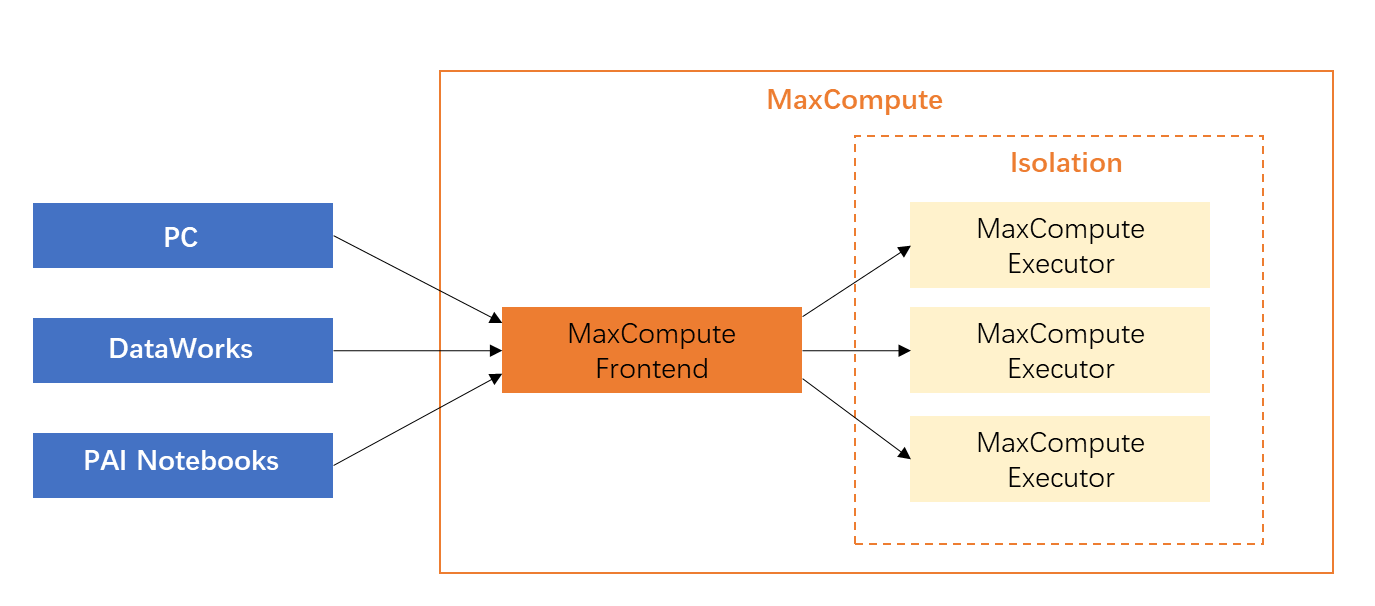 PyODPS provides several convenient operations to pull data to a local machine, such as the tunnel download operation, execute operation, and to_pandas operation. As a result, many new users try to pull data locally, process it, and then upload it back to MaxCompute. However, this method is often highly inefficient. Pulling data locally prevents you from taking advantage of MaxCompute's large-scale parallel computing capabilities.
|
Data processing method |
Description |
Example scenario |
|
Pulling data to a local machine for processing (Not recommended. This can cause OOM errors.) |
For example, a PyODPS node in DataWorks includes a built-in PyODPS package and the necessary Python environment. This node is a resource-constrained client runtime container. It does not use MaxCompute computing resources and has strict memory limits. |
PyODPS provides the |
|
Submitting jobs to MaxCompute for distributed execution (Recommended) |
Use the distributed DataFrame feature of PyODPS. Submit major computations to MaxCompute for distributed execution instead of downloading and processing data on the PyODPS client node. This is the key to using PyODPS correctly. Note
If you want to convert SQL execution results to a DataFrame, first use the
|
Use the PyODPS DataFrame interface for data processing. For common tasks, such as processing each row and writing it back to a table or splitting one row into multiple rows, use the These interfaces translate your code into SQL for distributed execution on the MaxCompute compute cluster. This consumes almost no local memory and significantly improves performance compared to single-machine computation. |
The following tokenization example compares the code for both methods.
-
Example scenario
You need to extract information by analyzing daily log strings. You have a table that contains a single column of the string type. You must use the jieba library to tokenize the Chinese text, find the keywords you want, and store the keywords in an information table.
-
Inefficient processing code demo
import jieba
t = o.get_table('word_split')
out = []
with t.open_reader() as reader:
    for r in reader:
        words = list(jieba.cut(r[0]))
        #
        # Processing logic to generate processed_data
        #
        out.append(processed_data)
out_t = o.get_table('words')
with out_t.open_writer() as writer:
    writer.write(out)
This approach follows a single-machine processing mindset: read data row by row, process it row by row, and then write it to the destination table row by row. The entire process consumes a large amount of time for data download and upload. The machine that runs the script also needs a large amount of memory to process all the data. For users of DataWorks nodes, this approach can easily cause an OOM error by exceeding the default allocated memory.
-
Efficient processing code demo
from odps.df import output
out_table = o.get_table('words')
df = o.get_table('word_split').to_df()

# Assume the following fields and types need to be returned
out_names = ["word", "count"]
out_types = ["string", "int"]

@output(out_names, out_types)
def handle(row):
    import jieba
    words = list(jieba.cut(row[0]))
    #
    # Processing logic to generate processed_data
    #
    yield processed_data
df.apply(handle, axis=1).persist(out_table.name)
Use the apply method for distributed execution:
-
The complex logic is placed in the handle function. This function is automatically serialized to the server-side to be used as a UDF, where it is invoked and executed. Because the handle function also processes data row by row during server-side execution, the logic is identical. The difference is that when this program is submitted to MaxCompute for execution, multiple machines process the data simultaneously. This saves a large amount of time.
-
Calling the persist interface writes the generated data directly to another MaxCompute table. All data generation and consumption occurs within the MaxCompute cluster. This saves local network and memory resources.
-
This example also uses a third-party package. MaxCompute supports third-party packages, such as
jiebain this example, in UDFs. Therefore, you do not need to worry about the cost of code changes. You can leverage the large-scale computing capabilities of MaxCompute with almost no changes to your main logic.
-
Limits
-
Due to sandbox restrictions, some programs that you debug locally using the pandas compute backend cannot be debugged on MaxCompute.