MaxCompute SQL provides encryption and decryption functions to secure your data. This topic details the syntax, parameters, and examples for the encryption functions.
Data encryption in MaxCompute
Single-key encryption: Lets you generate a single key to randomly encrypt or decrypt specific columns. You are responsible for storing the generated key.
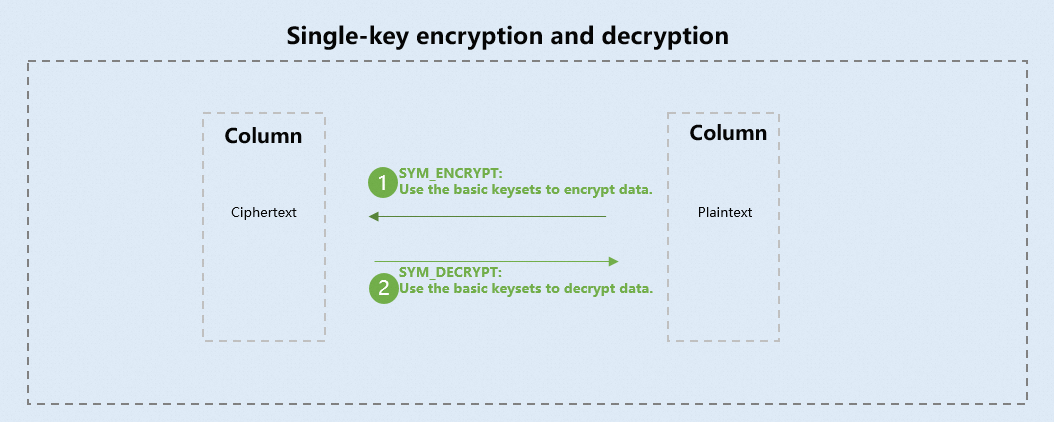
The following table describes the functions for single-key encryption and decryption in MaxCompute SQL.
Function
Description
Decrypts a specified, randomly encrypted column and returns the plaintext as a BINARY type.
Randomly encrypts a specified column and returns the ciphertext as a BINARY type.
Multi-key encryption: A keyset is a key management object in MaxCompute that can hold one or more keys. You can manually add keys to a keyset, perform key rotation, and view the original keys.
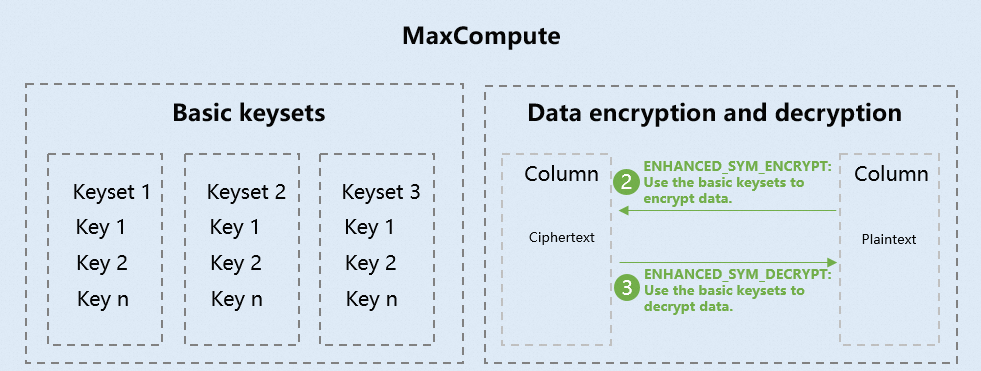
The following table describes the functions for multi-key encryption and decryption in MaxCompute SQL.
Function
Description
Creates a keyset based on a specified algorithm type.
Adds a new key to a keyset and sets it as the master key.
Converts a keyset of the BINARY type to a human-readable JSON format so you can view its details.
Converts a keyset string from JSON format to the BINARY type.
Generates a new key and sets it as the master key.
Multi-key encryption with KMS integration: MaxCompute integrates with KMS for data encryption. MaxCompute generates a basic keyset and encrypts it with a customer master key (CMK) from KMS to create a wrapped keyset. You are responsible for storing this wrapped keyset. To decrypt data, you must provide the wrapped keyset. MaxCompute then uses the KMS CMK to decrypt the wrapped keyset into the basic keyset, which it then uses to decrypt the data.
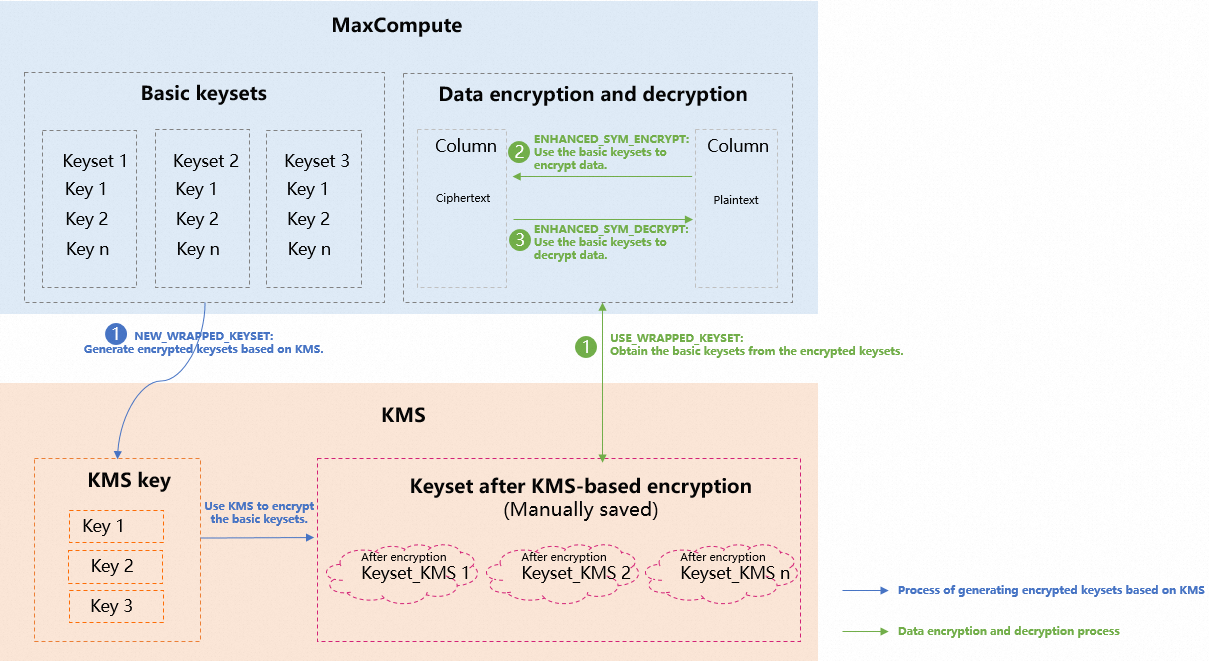
The following table describes the functions for KMS-integrated multi-key encryption and decryption in MaxCompute SQL.
Function
Description
Creates a new wrapped keyset. This operation requires a role (specified by
role_arn) that has permission to use a KMS customer master key (CMK). Optionally, you can specify a role chain (specified byrole_chain) to allow other Alibaba Cloud accounts to decrypt the keyset.Re-encrypts a wrapped keyset using a specified KMS key.
Decrypts an existing wrapped keyset, performs key rotation on its internal keys, and then re-encrypts it with the original KMS key.
Decrypts a wrapped keyset into a basic keyset for use as a parameter in encryption or decryption functions. You can also use this function to view the wrapped keyset's metadata for maintenance.
Encrypts data using a specified keyset.
Decrypts data using a specified keyset.
Notes
After you upgrade to MaxCompute 2.0, some functions have been extended. To use functions that involve the new data types (TINYINT, SMALLINT, INT, FLOAT, VARCHAR, TIMESTAMP, or BINARY), run the following statement to enable the new data type system:
At the session level: To use the new data types, add
set odps.sql.type.system.odps2=true;before your SQL statement and submit them together.At the project level: A project owner can configure this setting as needed. It takes 10 to 15 minutes for the configuration to take effect. Use the following command:
setproject odps.sql.type.system.odps2=true;For more information about
setproject, see Project operations. For notes on enabling data types at the project level, see Data type version guide.
SYM_DECRYPT
Syntax
binary sym_decrypt(binary <value_to_decrypt>,
                   binary <key>
                   [,string <encryption_method> ,
                    [ string <additional_authenticated_data> ]
                   ]
                  )
Description
Decrypts randomly encrypted data in a specified table column.
Parameters
value_to_decrypt: Required. The data to decrypt, which must be of the
BINARYtype.key: Required. The decryption key. It must be a 256-bit
BINARYvalue.encryption_method: Optional. The encryption method. You must specify the same method that was used to encrypt the data.
additional_authenticated_data: Optional. The additional authenticated data (AAD) for verifying the data's authenticity and integrity. If you provided AAD during encryption, you must also provide it for decryption.
Return value
Returns the plaintext as a
BINARYtype. If needed, you can use theCASTfunction to convert theBINARYdata to theSTRINGtype.Examples
The following examples show how to decrypt data in a table that was encrypted with the SYM_ENCRYPT function.
Example 1: Decrypt data encrypted with a plaintext key.
-- Decrypt the id_card_no column.
INSERT OVERWRITE TABLE mf_user_info
SELECT id,
       name,
       gender,
       CAST(sym_decrypt(unbase64(id_card_no),
                        CAST('b75585cf321cdcad42451690cdb7bfc4' AS BINARY)
                       ) AS STRING) AS id_card_no,
       tel
FROM mf_user_info;

-- Query the decrypted data.
SELECT * FROM mf_user_info;
Example 2: Decrypt data encrypted with a key table.
-- Decrypt the id_card_no column with AAD verification.
INSERT OVERWRITE TABLE mf_user_info
SELECT id,
       name,
       gender,
       CAST(sym_decrypt(unbase64(id_card_no),
                        CAST('b75585cf321cdcad42451690cdb7bfc4' AS BINARY),
                        'AES-GCM-256',
                        'test'
                       ) AS STRING) AS id_card_no,
       tel
FROM mf_user_info;

-- Query the decrypted data.
SELECT * FROM mf_user_info;
The command returns the following result:
+------------+------+--------+------------+-------------+
| id         | name | gender | id_card_no | tel         |
+------------+------+--------+------------+-------------+
| 1          | bob  | male   | 0001       | 13900001234 |
| 2          | allen| male   | 0011       | 13900001111 |
| 3          | kate | female | 0111       | 13900002222 |
| 4          | annie| female | 1111       | 13900003333 |
+------------+------+--------+------------+-------------+
SYM_ENCRYPT
Syntax
binary sym_encrypt(string|binary <value_to_encrypt>,
                   binary <key>
                   [,string <encryption_method> ,
                      [ string <additional_authenticated_data> ]
                    ]
                  )
Description
Encrypts a specified column using randomized encryption.
Parameters
value_to_encrypt: Required. The data to encrypt. Only the STRING and BINARY types are supported.
key: Required. The encryption key. It must be 256 bits long and of the BINARY type.
encryption_method: Optional. The encryption method. The only supported algorithm is AES-GCM-256, which is the default.
additional_authenticated_data: Optional. The additional authenticated data (AAD) used to verify the data's authenticity and integrity. This parameter is supported only by Authenticated Encryption with Associated Data (AEAD) algorithms, such as AES-GCM.
Return value
Returns the ciphertext as a BINARY value.
The return value contains the initialization vector (IV), the ciphertext, and the AEAD tag, in that order.
The function is non-deterministic, meaning it returns a different ciphertext for each encryption, even with the same plaintext and key.
Sample data
-- Create the table.
create table mf_user_info(id bigint,
                          name string,
                          gender string,
                          id_card_no string,
                          tel string);

-- Insert sample data.
insert overwrite table mf_user_info values(1,"bob","male","0001","13900001234"),
                                           (2,"allen","male","0011","13900001111"),
                                           (3,"kate","female","0111","13900002222"),
                                           (4,"annie","female","1111","13900003333");

-- Query the table.
select * from mf_user_info;
Example 1: Encrypt data by using a plaintext key
Encrypt columns in the
mf_user_infotable based on the sample data. Run the following command:Encrypt with AES-GCM-256 (no AAD)
-- Encrypt the id_card_no column.
insert overwrite table mf_user_info
select id,
       name,
       gender,
       base64(sym_encrypt(id_card_no,
                cast('b75585cf321cdcad42451690cdb7bfc4' as binary)
              )) as id_card_no,
       tel
from mf_user_info;

select * from mf_user_info;
Result:
+------------+------+--------+------------+-----+
| id         | name | gender | id_card_no | tel |
+------------+------+--------+------------+-----+
| 1          | bob  | male   | frgJZAEAQMeEuHqpS8lK9VxQhgPYpZ317V+oUla/xEc= | 13900001234|
| 2          | allen| male   | frgJZAIAQMeEuHqpLeXQfETsFSLJxBwHhPx6tpzWUg4= | 13900001111|
| 3          | kate | female | frgJZAMAQMeEuHqpdphXAU6iWelWenlDnVy+R0HMvAY= | 13900002222|
| 4          | annie| female | frgJZAQAQMeEuHqpR5c8bj21dYCeM0C25bLRZIrP71c= | 13900003333|
+------------+------+--------+------------+-----+
Encrypt with AES-GCM-256 and AAD
Pass an AAD value to bind the ciphertext to a specific context. Decryption fails if the AAD does not match.
-- Encrypt the id_card_no column with AAD.
insert overwrite table mf_user_info
select id,
       name,
       gender,
       base64(sym_encrypt(id_card_no,
                cast('b75585cf321cdcad42451690cdb7bfc4' as binary),
                'AES-GCM-256',
                'test'
              )) as id_card_no,
       tel
from mf_user_info;

select * from mf_user_info;
Result:
+------------+------+--------+------------+-----+
| id         | name | gender | id_card_no | tel |
+------------+------+--------+------------+-----+
| 1          | bob  | male   | gJ0QaAEAoGGWVw90H/zETg... | 13900001234|
| 2          | allen| male   | gJ0QaAIAoGGWVw90TpNFC0... | 13900001111|
| 3          | kate | female | gJ0QaAMAoGGWVw90KaQ8Vm... | 13900002222|
| 4          | annie| female | gJ0QaAQAoGGWVw90nYCAS1... | 13900003333|
+------------+------+--------+------------+-----+
Example 2: Encrypt data by using a key table
To avoid passing plaintext keys in SQL, store keys in a MaxCompute table and join it with the target table at encryption time.
Key management notes:
Keys are your responsibility to create and manage. MaxCompute does not store keys or any mapping between keys and ciphertext. If a key is lost, the encrypted data cannot be recovered.
To prevent key exposure, do not grant direct access to the key table. Instead, create a secure view that calls the decryption function—users access data through the view without ever seeing the plaintext key.
If the data to encrypt is of the BINARY type, run
set odps.sql.type.system.odps2=true;to enable the MaxCompute V2.0 data type edition.
-- Create a key table.
create table mf_id_key(id bigint, key binary);

-- Insert a key.
insert overwrite table mf_id_key
  values (1, cast('b75585cf321cdcad42451690cdb7bfc4' as binary));

-- Verify the key table.
select * from mf_id_key;
Result:
+------------+----------------------------------+
| id         | key                              |
+------------+----------------------------------+
| 1          | b75585cf321cdcad42451690cdb7bfc4 |
+------------+----------------------------------+
-- Encrypt the id_card_no column using the key table. insert overwrite table mf_user_info select /*+mapjoin(b)*/ a.id, a.name, a.gender, base64(sym_encrypt(a.id_card_no, b.key)) as id_card_no, a.tel from mf_user_info as a join mf_id_key as b on a.id >= b.id; -- Query the encrypted result. select * from mf_user_info;Result:
+------------+------+--------+------------+-----+
| id         | name | gender | id_card_no | tel |
+------------+------+--------+------------+-----+
| 1          | bob  | male   | 9esKZAEAoBquXVJo3ZptvoI09XuM4bSFTqF1mXH1BO4= | 13900001234|
| 2          | allen| male   | 9esKZAIAoBquXVJoJYqnXieAANih7FR59luePvdHB9U= | 13900001111|
| 3          | kate | female | 9esKZAMAoBquXVJoppwxgVwPYBnvjIMklWLmJ/sU0Y8= | 13900002222|
| 4          | annie| female | 9esKZAQAoBquXVJoB85RUFCLMbdyEBSz7LdS4M3Guvk= | 13900003333|
+------------+------+--------+------------+-----+
NEW_KEYSET
Syntax
binary NEW_KEYSET(string <key_type>, [string <description>])Description
Creates a keyset based on the specified algorithm type.
Parameters
key_type: Required. The algorithm type used to create a data key. Supported algorithms include AES-GCM-256, AES-SIV-CMAC-128, and AES-SIV-CMAC-256.
description: Optional. The description of the data key.
Return value
Returns a keyset of type BINARY.
Example
select hex(NEW_KEYSET('AES-GCM-256', 'hello world'));The following result is returned.
+------------+
| _c0        |
+------------+
| 0A10577567735A514541554D42776E684C4212580A330A0B4145532D47434D2D323536122017F7A430B9D4B59B55454FD4B486216059F1B748CE0502D901EBEACEAB6569191801200210011A10577567735A514541554D42776E684C4220022A0B68656C6C6F20776F726C64 |
+------------+
ADD_KEY_TO_KEYSET
Syntax
binary ADD_KEY_TO_KEYSET(binary <keyset>, string <key_type>, binary <raw_key>, [string <description>])Description
Adds a key to a keyset and configures the key as the master key.
Parameters
keyset: required. This parameter specifies an existing keyset of the BINARY type.
key_type: required. This parameter specifies the algorithm type of the key that you want to add. Valid values: AES-GCM-256, AES-SIV-CMAC-128, and AES-SIV-CMAC-256.
raw_key: required. This parameter specifies the key that you want to add and configure as the master key. The key is of the BINARY type.
description: optional. This parameter provides a description of the data key.
Return value
Returns a BINARY keyset.
Example
select hex(ADD_KEY_TO_KEYSET(unhex ('0A1072384D715A414541385044643351534C12580A330A0B4145532D47434D2D323536122026A8FB1126DF4F5B5DD03C180E6919565D7716CBB291815EFB5BBF30F8BEF9AF1801200210011A1072384D715A414541385044643351534C20022A0B68656C6C6F20776F726C64'), 'AES-SIV-CMAC-128', unhex('b75585cf321cdcad42451690cdb7bfc49c26092f60f854e72d43244c55620a3d'),'description') );The following result is returned:
+------------+
| _c0        |
+------------+
| 0A10596530735A5145414150447273424C4212580A330A0B4145532D47434D2D323536122026A8FB1126DF4F5B5DD03C180E6919565D7716CBB291815EFB5BBF30F8BEF9AF1801200210011A1072384D715A414541385044643351534C20022A0B68656C6C6F20776F726C64125D0A380A104145532D5349562D434D41432D3132381220B75585CF321CDCAD42451690CDB7BFC49C26092F60F854E72D43244C55620A3D1801200110011A10596530735A5145414150447273424C4220022A0B6465736372697074696F6E |
+------------+
KEYSET_FROM_JSON
Syntax
BINARY KEYSET_FROM_JSON(STRING <json_keyset>)Description
The KEYSET_FROM_JSON function converts a JSON-formatted keyset string to the BINARY type.
Parameters
json_keyset: Required. STRING. A JSON-formatted keyset string.
Return value
Returns the keyset as a BINARY value.
Example
SELECT HEX(KEYSET_FROM_JSON('{
    "key": [{
            "description": "hello world",
            "key_id": "r8MqZAEA8PDd3QSL",
            "key_meta_data": {
                "key_material_origin": "Origin_ALIYUN_MAXCOMPUTE",
                "key_material_type": "SYMMETRIC",
                "type": "AES-GCM-256",
                "value": "Jqj7ESbfT1td0DwYDmkZVl13FsuykYFe+1u/MPi++a8="},
            "output_prefix_type": "PREFIX_ALIYUN_MAXCOMPUTE",
            "status": "ENABLED"}],
    "primary_key_id": "r8MqZAEA8PDd3QSL"}')) ;
The query returns the following:
+------------+
| _c0        |
+------------+
| 0A1072384D715A414541385044643351534C12580A330A0B4145532D47434D2D323536122026A8FB1126DF4F5B5DD03C180E6919565D7716CBB291815EFB5BBF30F8BEF9AF1801200210011A1072384D715A414541385044643351534C20022A0B68656C6C6F20776F726C64 |
+------------+
KEYSET_TO_JSON
Syntax
STRING KEYSET_TO_JSON(BINARY <keyset>)Description
Converts a keyset of the BINARY type into a readable JSON string. After the conversion, you can view the details of the keyset.
Parameters
keyset: required. A value of the BINARY type. This parameter specifies an existing keyset.
Return value
A keyset in the JSON format is returned. Parameter description:
key_id: the ID of the key.
key_material_origin: the origin of the key.
key_material_type: the encryption type of the key.
type: the algorithm type of the key.
value: the value of the key.
output_prefix_type: the format of the ciphertext after the encryption.
Examples
SELECT KEYSET_TO_JSON(unhex ('0A1072384D715A414541385044643351534C12580A330A0B4145532D47434D2D323536122026A8FB1126DF4F5B5DD03C180E6919565D7716CBB291815EFB5BBF30F8BEF9AF1801200210011A1072384D715A414541385044643351534C20022A0B68656C6C6F20776F726C64')) ;The following result is returned:
 +------------+
| _c0        |
+------------+
| {
    "key": [{
            "description": "hello world",
            "key_id": "r8MqZAEA8PDd3QSL",
            "key_meta_data": {
                "key_material_origin": "Origin_ALIYUN_MAXCOMPUTE",
                "key_material_type": "SYMMETRIC",
                "type": "AES-GCM-256",
                "value": "Jqj7ESbfT1td0DwYDmkZVl13FsuykYFe+1u/MPi++a8="},
            "output_prefix_type": "PREFIX_ALIYUN_MAXCOMPUTE",
            "status": "ENABLED"}],
    "primary_key_id": "r8MqZAEA8PDd3QSL"} |
+------------+
ROTATE_KEYSET
Syntax
binary ROTATE_KEYSET(binary <keyset>, string <key_type>, [string <description> ])Description
Allows the system to automatically produce a new key and configures the new key as the master key.
Parameters
keyset: required. A value of the BINARY type. This parameter specifies the keyset that you want to update.
key_type: required. This parameter specifies the algorithm type of the new key. Valid values: AES-GCM-256, AES-SIV-CMAC-128, and AES-SIV-CMAC-256.
description: optional. This parameter provides a description of the new data key.
Return value
Returns a BINARY keyset.
Example
select ROTATE_KEYSET(unhex ('0A1072384D715A414541385044643351534C12580A330A0B4145532D47434D2D323536122026A8FB1126DF4F5B5DD03C180E6919565D7716CBB291815EFB5BBF30F8BEF9AF1801200210011A1072384D715A414541385044643351534C20022A0B68656C6C6F20776F726C64'), 'AES-SIV-CMAC-256', 'hello world') ;The following result is returned:
+------------+
| _c0        |
+------------+
| =0A=10BVIuZQEAcHHPLfn1=12X=0A3=0A=0BAES-GCM-256=12=20&=A8=FB=11&=DFO[]=D0<=18=0Ei=19V]w=16=CB=B2=91=81^=FB[=BF0=F8=BE=F9=AF=18=01=20=02=10=01=1A=10r8MqZAEA8PDd3QSL=20=02*=0Bhello=20world=12}=0AX=0A=10AES-SIV-CMAC-256=12@=9D=AD=B7=D6=AF=01=B2=9D=CE=C3=02y=A9=DB=E1=17q>'F=DC=F5=EF=FFI=7F=F0w)=95F=07>=9C=EDqn=DF=0E=1E=16bP&=D3=7F>gV=CBl=8AGJCm=93=FF=F9=96=AD=1A=C0=BC=18=01=20=02=10=01=1A=10BVIuZQEAcHHPLfn1=20=02*=0Bhello=20world |
+-----------
NEW_WRAPPED_KEYSET
Syntax
binary NEW_WRAPPED_KEYSET(string <kms_cmk_arn> , string <role-arn>, string <key_type>
[, string <description>, [string <role_chain>]])
Description
You can use MaxCompute with KMS to manage keys. You can generate a wrapped keyset by encrypting a keyset based on a KMS key. After you generate a wrapped keyset, you must manually record and store the wrapped keyset for subsequent data encryption and decryption based on KMS keys. In the encryption or decryption process, all keys are automatically generated by the system. You cannot view the original key that is used for encryption and decryption. This way, data can be encrypted or decrypted in a more secure manner. The
NEW_WRAPPED_KEYSETfunction assumes the Alibaba Cloud Resource Name (ARN) of a role that can use KMS customer master key (CMK) ARNs to MaxCompute and create a wrapped keyset. The role ARN is specified by role_arn. The KMS CMK ARN is specified by kms_cmk_arn. The function is also used to grant other Alibaba Cloud accounts the permissions to use wrapped keysets based on role_chain.Before you use the
NEW_WRAPPED_KEYSETfunction, make sure that the following prerequisites are met:KMS is activated and a KMS instance is created.
A KMS key is created and the key ARN specified by kms_cmk_arn is obtained.
A RAM role is created and MaxCompute is authorized to access KMS. The ARN of the RAM role is obtained. The role ARN is specified by role_arn.
For more information, see the "Activate KMS and grant permissions on KMS" section in Activate KMS and configure permissions.
Parameters
kms_cmk_arn: required. This parameter specifies the ARN of the KMS CMK that is used to encrypt a keyset. The parameter value is in the format of
'acs:kms:<RegionId>:<UserId>:key/<CmkId>'. RegionId specifies the region ID, UserId specifies the user ID, and CmkId specifies the CMK ID. You can obtain the ARN from the Key Details page in the KMS console.role_arn: required. This parameter specifies the ARN of the RAM role that has permissions on KMS. The role needs to be assumed by MaxCompute. The parameter value is in the format of
'acs:ram:${<userAID>}:role/${<roleName>}'. userAID specifies the user ID, and roleName specifies the role name.key_type: required. This parameter specifies the algorithm type of the key in the newly generated keyset. Valid values: AES-GCM-256, AES-SIV-CMAC-128, and AES-SIV-CMAC-256.
description: optional. This parameter provides a description of the key.
role_chain: optional. This parameter specifies the role chain for user authorization. The parameter value is in the format of
'acs:ram:<userAID>:role/<roleName2>,acs:ram:<userBID>:role/<roleName3>},...'. You can use role chains to call wrapped keysets across Alibaba Cloud accounts.
Return value
A wrapped keyset of the BINARY type is returned. You can use the HEX function to convert the wrapped keyset of the BINARY type into a keyset of the STRING type based on your business requirements. For more information about the HEX function, see HEX.
Examples
Create a wrapped keyset.
select hex(NEW_WRAPPED_KEYSET('acs:kms:cn-hangzhou:1**************7:key/key-hzz****************1t','acs:ram::1**************7:role/kms', 'AES-GCM-256', 'hello'));The following result is returned:
+-----+
| _c0 |
+-----+
| 613256354C576836656A59314D6D59344E7A6B7A624452754D6D3434627A49786443317A655859786358426F4E6A4D78434A373434582F54756C5A547A4E69337562786F4B3543412F616655573262786D345A41306B464C674A2F5758324F4E514E346746306F303236376D35335A6471797237366E57565A6836387A52687A4A673945784B6E677568794A376E6F4A68573677684B5A555A42786E4A383742536C4D46326A374F71474F4C414A6B665779694557394D58664876576E306C6D49777052746A77325643707A4259517277327944354343396C50586F31346A4351506253612F3044394C4C6E6E622F747A6B57316E4F564A6C5359354B35526130537565584F33507856773D |
+-----+
Create a wrapped keyset and allow other roles to call the wrapped keyset.
select hex(NEW_WRAPPED_KEYSET('acs:kms:cn-hangzhou:1**************7:key/key-hzz****************1t','acs:ram::1**************7:role/kms', 'AES-GCM-256', 'hello','acs:ram::1**************7:role/kms1'));The following result is returned:
+-----+
| _c0 |
+-----+
| 613256354C576836656A59314D6D59344E7A6B7A624452754D6D3434627A49786443317A655859786358426F4E6A4D784D59716D4C767954716B3562444779574C7A387965774966432F516B4A59616F57623648364A546A62434F7A7A42634F517A687A6E526F36543866714E4E63555546566874696C4A3947713556667A2F7851757A55686467504C517A2B6C433337485A535449744B53714E396B6639587666487A4D7957643842334D3179392F67423774726835437A556F786A74614571612F5A3543447668524A7731426566525647796A77574974476243475A4E594550714E767963532B333432743347396B714777626C54336F57706939706E437A667A4E4D6F4C63714F453D |
+-----+
REWRAP_KEYSET
Syntax
binary REWRAP_KEYSET(string <kms_cmk_arn> , string <role-arn>, string <wrapped_keyset>, [string <role_chain>])Description
MaxCompute integrates with KMS to manage keys. A KMS key encrypts a generated keyset to create a wrapped keyset. The
REWRAP_KEYSETfunction re-encrypts a wrapped keyset that was generated by theNEW_WRAPPED_KEYSETfunction with a new KMS key.Before you use the
REWRAP_KEYSETfunction, complete the following tasks:You have an encapsulated keyset generated by the
NEW_WRAPPED_KEYSETfunction. For more information, see NEW_WRAPPED_KEYSET.Create a new KMS key and obtain its Alibaba Cloud Resource Name (ARN) (kms_cmk_arn). Grant the RAM role the permission to use the new key. For more information, see Enable KMS and complete the configuration.
Parameters
kms_cmk_arn: Required.
The ARN of the KMS customer master key (CMK) used to re-encrypt the keyset. The format is
'acs:kms:<RegionId>:<UserId>:key/<CmkId>'. The ARN contains the region ID, user ID, and CMK ID. Obtain the ARN from the key details page in the Key Management Service console. For more information, see Enable KMS and complete the configuration.role_arn: Required.
The ARN of the RAM role that has permissions on both the old and new KMS keys. This role must be granted to MaxCompute. The format is
'acs:ram:${<userAID>}:role/${<roleName>}'. The ARN contains the user ID and role name. To obtain the ARN, see Enable KMS and complete the configuration.wrapped_keyset: Required.
The wrapped keyset to re-encrypt.
role_chain: optional. This parameter specifies the role chain for user authorization. The parameter value is in the format of
'acs:ram:<userAID>:role/<roleName2>,acs:ram:<userBID>:role/<roleName3>},...'. You can use role chains to call wrapped keysets across Alibaba Cloud accounts.
Return value
A wrapped keyset of the BINARY type is returned. You can use the HEX function to convert the wrapped keyset of the BINARY type into a keyset of the STRING type based on your business requirements. For more information about the HEX function, see HEX.
Examples
NoteYou can run the following sample code that contains variables in the code editor, or you can inline the variables into the SQL statement. MaxCompute does not support variable scopes across SQL statements.
Re-encrypt a wrapped keyset:
SELECT hex(REWRAP_KEYSET('acs:kms:cn-hangzhou:1**************7:key/key-hzz******************', 'acs:ram::1**************7:role/kms', unhex('<wrapped_keyset>')));Re-encrypt a wrapped keyset and allow roles of other Alibaba Cloud accounts to call it:
SELECT hex(REWRAP_KEYSET('acs:kms:cn-hangzhou:1**************7:key/key-hzz******************', 'acs:ram:${<UserId>}:role/${<roleName>}', unhex('<wrapped_keyset>'), 'acs:ram:${<UserAId>}:role/${<roleName2>},acs:ram:${<UserBId>}:role/${<roleName3>}')));
ROTATE_WRAPPED_KEYSET
Syntax
binary ROTATE_WRAPPED_KEYSET(string <kms_cmk_arn> , string <role-arn>, string <wrapped_keyset>,string <key_type> [,string description,[string <role_chain>]])Description
You can use MaxCompute with KMS to manage keys. You can generate a wrapped keyset by encrypting a keyset based on a KMS key. The
ROTATE_WRAPPED_KEYSETfunction uses a new KMS key and a new key algorithm to re-encrypt a wrapped keyset that is generated by using theNEW_WRAPPED_KEYSETfunction. Compared with theREWRAP_KEYSETfunction, theROTATE_WRAPPED_KEYSETfunction can use a new key algorithm for re-encryption.Before you use the
ROTATE_WRAPPED_KEYSETfunction, make sure that the following prerequisites are met:A wrapped keyset is generated by using the
NEW_WRAPPED_KEYSETfunction. For more information, see NEW_WRAPPED_KEYSET.A KMS key is created and the key ARN specified by kms_cmk_arn is obtained. A RAM role is granted permissions to use the new key.
Parameters
kms_cmk_arn: required. This parameter specifies the ARN of the KMS customer master key (CMK) that you want to use to re-encrypt a wrapped keyset. The parameter value is in the format of
'acs:kms:<RegionId>:<UserId>:key/<CmkId>'. RegionId specifies the region ID, UserId specifies the user ID, and CmkId specifies the CMK ID. You can obtain the ARN from the Key Details page in the KMS console.role_arn: required. This parameter specifies the ARN of the RAM role that has permissions on both the old and new KMS keys. The parameter value is in the format of
'acs:ram:${<userAID>}:role/${<roleName>}'. userAID specifies the user ID, and roleName specifies the role name.wrapped_keyset: required. This parameter specifies the wrapped keyset that you want to re-encrypt.
key_type: required. This parameter specifies the algorithm type of the key in the newly generated keyset. Valid values: AES-GCM-256, AES-SIV-CMAC-128, and AES-SIV-CMAC-256.
description: optional. This parameter provides a description of the key.
role_chain: optional. This parameter specifies the role chain for user authorization. The parameter value is in the format of
'acs:ram:<userAID>:role/<roleName2>,acs:ram:<userBID>:role/<roleName3>},...'. You can use role chains to call wrapped keysets across Alibaba Cloud accounts.
Return value
A wrapped keyset of the BINARY type is returned. You can use the HEX function to convert the wrapped keyset of the BINARY type into a keyset of the STRING type based on your business requirements. For more information about the HEX function, see HEX.
Examples
NoteYou can run the following sample code that contains variables in the code editor, or you can inline the variables into the SQL statement. MaxCompute does not support variable scopes across SQL statements.
Re-encrypt a wrapped keyset.
@kms_resource_keyId := 'acs:kms:${<RegionId>}:${<UserId>}:key/${<CmkId>}';
@role_arn := 'acs:ram:${<UserId>}:role/${<roleName>}';
@origin_key := unhex('<wrapped_keyset>');
select hex(ROTATE_WRAPPED_KEYSET(@kms_resource_keyId, @role_arn, @origin_key, 'AES-GCM-256', 'hello world'));
Re-encrypt a wrapped keyset, and allow other roles to call the wrapped keyset.
@kms_resource_keyId := 'acs:kms:${<RegionId>}:${<UserId>}:key/${<CmkId>}';
@role_arn := 'acs:ram:${<UserId>}:role/${<roleName>}';
@origin_key := unhex('<wrapped_keyset>');
@role_chain := 'acs:ram:${<UserAId>}:role/${<roleName2>},acs:ram:${<UserBId>}:role/${<roleName3>}';
select hex(ROTATE_WRAPPED_KEYSET(@kms_resource_keyId, @role_arn, @origin_key, 'AES-GCM-256', 'hello world', @role_chain));
USE_WRAPPED_KEYSET
Syntax
binary USE_WRAPPED_KEYSET(string <kms_cmk_arn> , string <role-arn>, string <wrapped_keyset> [,string <role_chain>])Description
You can use MaxCompute with KMS to manage keys. You can generate a wrapped keyset by encrypting an existing keyset based on a KMS key. The
USE_WRAPPED_KEYSETfunction converts a wrapped keyset generated by using theNEW_WRAPPED_KEYSETfunction into a basic keyset. The basic keyset is used as a parameter in the encryption or decryption function to encrypt or decrypt data. You can also use the USE_WRAPPED_KEYSET function to obtain the information about a wrapped keyset and save the information for subsequent maintenance.Before you use the
USE_WRAPPED_KEYSETfunction, make sure that the following prerequisites are met:A wrapped keyset is generated by using the
NEW_WRAPPED_KEYSETfunction. For more information, see NEW_WRAPPED_KEYSET.A KMS key is created and the Alibaba Cloud Resource Name (ARN) of the key is obtained. The key ARN is specified by kms_cmk_arn. A RAM role is granted permissions to use the new key.
Parameters
kms_cmk_arn: required. This parameter specifies the KMS customer master key (CMK) ARN of the keyset that you want to encrypt. The parameter value is in the format of
'acs:kms:<RegionId>:<UserId>:key/<CmkId>'. RegionId specifies the region ID, UserId specifies the user ID, and CmkId specifies the CMK ID. You can obtain the ARN from the Key Details page in the KMS console.role_arn: required. This parameter specifies the ARN of the RAM role that has permissions on KMS. The role needs to be assumed by MaxCompute. The parameter value is in the format of
'acs:ram:${<userAID>}:role/${<roleName>}'. userAID specifies the user ID, and roleName specifies the role name.wrapped_keyset: required. This parameter specifies an existing wrapped keyset.
role_chain: optional. This parameter specifies the role chain for user authorization. The parameter value is in the format of
'acs:ram:<userAID>:role/<roleName2>,acs:ram:<userBID>:role/<roleName3>},...'. You can use role chains to call wrapped keysets across Alibaba Cloud accounts.
Return value
A desensitized keyset of the STRUCT type is returned. You can use the
get_json_objectfunction to obtain keyset-related fields based on your business requirements.Example
NoteYou can run the following sample code that contains variables in the code editor, or you can inline the variables into the SQL statement. MaxCompute does not support variable scopes across SQL statements.
Obtain the key algorithm information of a wrapped keyset.
@kms_resource_keyId := 'acs:kms:${<RegionId>}:${<UserId>}:key/${<CmkId>}';
@role_arn := 'acs:ram:${<UserId>}:role/${<roleName>}';
@origin_key := unhex('<wrapped_keyset>');
@role_chain := 'acs:ram:${<UserAId>}:role/${<roleName2>},acs:ram:${<UserBId>}:role/${<roleName3>}';
@use_keyset_new := USE_WRAPPED_KEYSET(@kms_resource_keyId, @role_arn, @origin_key, @role_chain);

select get_json_object(get_json_object(use_keyset_new.wrapped_keyset_info,'$.masked_keyset'), '$.key[0].key_meta_data.type');
The following result is returned:
+-----+
| _c0 |
+-----+
| AES-GCM-256 |
+-----+
ENHANCED_SYM_ENCRYPT
Syntax
binary ENHANCED_SYM_ENCRYPT(binary <keyset> , string|binary <plaintext> [,string <additional_data>])Description
MaxCompute allows you to use the
ENHANCED_SYM_ENCRYPTfunction to encrypt data by using a specified basic keyset or wrapped keyset. You can create a wrapped keyset by encrypting an existing keyset based on a Key Management Service (KMS) key. Compared with basic keysets, you can use wrapped keysets with KMS to manage keys in a more secure manner.Before you use the
ENHANCED_SYM_ENCRYPTfunction, make sure that the following prerequisites are met:A basic keyset or wrapped keyset is generated by using the
NEW_KEYSETorNEW_WRAPPED_KEYSETfunction. For more information, see NEW_KEYSET or NEW_WRAPPED_KEYSETA basic keyset is obtained from a wrapped keyset by using the
USE_WRAPPED_KEYSETfunction. This prerequisite must be met if you want to use a wrapped keyset to encrypt data. The basic keyset is used as a parameter in theENHANCED_SYM_ENCRYPTfunction to encrypt data. In addition, your account is assigned the role that has permissions to use the wrapped keyset.
Parameters
keyset: required. This parameter specifies a basic keyset of the BINARY type or a wrapped keyset of the STRUCT type.
plaintext: required. This parameter specifies the plaintext of the STRING or BINARY type that you want to encrypt.
additional_data: optional. This parameter specifies the verification information supported by the algorithm. The verification information is of the STRING type.
Return value
Ciphertext of the BINARY type is returned.
Sample data
-- Create a table.
create table mf_user_info(id bigint,
                          name string,
                          gender string,
                          id_card_no string,
                          tel string);
-- Insert data into the table.
insert overwrite table mf_user_info values(1,"bob","male","0001","13900001234"),
                                       (2,"allen","male","0011","13900001111"),
                                     (3,"kate","female","0111","13900002222"),
                                     (4,"annie","female","1111","13900003333");
-- Query data from the table.
select * from mf_user_info;
+------------+------+--------+------------+------------+
| id         | name | gender | id_card_no |    tel     |
+------------+------+--------+------------+------------+
| 1          | bob  | male   | 0001       | 13900001234|
| 2          | allen| male   | 0011       | 13900001111|
| 3          | kate | female | 0111       | 13900002222|
| 4          | annie| female | 1111       | 13900003333|
+------------+------+--------+------------+------------+
Examples
Encrypt the
id_card_nocolumn in themf_user_infotable by using a basic keyset.insert overwrite table mf_user_info select id, name, gender, base64(ENHANCED_SYM_ENCRYPT(unhex ('0A1072384D715A414541385044643351534C12580A330A0B4145532D47434D2D323536122026A8FB1126DF4F5B5DD03C180E6919565D7716CBB291815EFB5BBF30F8BEF9AF1801200210011A1072384D715A414541385044643351534C20022A0B68656C6C6F20776F726C64'), id_card_no ))as id_card_no, tel from mf_user_info;The following sample statement queries the encryption result:
select * from mf_user_info;

-- The following result is returned:
+------------+------+--------+------------+-----+
| id         | name | gender | id_card_no | tel |
+------------+------+--------+------------+-----+
| 1          | bob  | male   | nLcdDFdjO2T4aATtirvDMVeBD8oSuu4BfM3t+Y8ny0kwQjJlAQAwkVhYOocPQll8LmdzSwkRf3v2iTow+TAmnQ== | 13900001234 |
| 2          | allen | male   | nLcdDFdjO2T4aATtirvDMVeBD8oSuu4BfM3t+Y8ny0kwQjJlAQBgj1hYOodIPdnyZ0ijZ9RmT+50xbxXh5cwcg== | 13900001111 |
| 3          | kate | female | nLcdDFdjO2T4aATtirvDMVeBD8oSuu4BfM3t+Y8ny0kwQjJlAQCwp1hYOoentQgkfUqctPbmX96k9eD018xg9Q== | 13900002222 |
| 4          | annie | female | nLcdDFdjO2T4aATtirvDMVeBD8oSuu4BfM3t+Y8ny0kwQjJlAQDQqFhYOodexhRmfh6VieEwePZscC4nUVTJXQ== | 13900003333 |
+------------+------+--------+------------+-----+
Encrypt the
telcolumn in themf_user_infotable by using a wrapped keyset.Generate a wrapped keyset and write it to a table.
-- Create a table.
create table mf_keyset_kms (id string,ks binary);
-- Create a wrapped keyset and write it to the table.
insert into mf_keyset_kms
      select '1',
             NEW_WRAPPED_KEYSET(
                'acs:kms:cn-hangzhou:1**************7:key/key-hzz****************1t',
                'acs:ram::1**************7:role/kms',
                'AES-GCM-256',
               'description');
-- Query data from the table.
select id,hex(ks) from mf_keyset_kms;

-- The following result is returned:
+----+-----+
| id | _c1 |
+----+-----+
| 1  | 613256354C576836656A59314D6D59344E7A6B7A624452754D6D3434627A49786443317A655859786358426F4E6A4D78447654524C4632635077766E74554654584579715242583953724167446D2F397131786F57456E6F5474516739633853766242674456773565736674714A4D5435524455382F6F6A2B4E61766D774344494C734B6A416B6B675A42496F5568656F566D38564C4F30506D4778767137646956517453447A5467395147775639533161305A464A6D6A45562B6742722F56386653444D6E424D2B71493779784668303866594E6D336578775744423949726B645A3469784F2B532B476E6750523854524A58326E5768666478347034473468687248684A514D615071332F526C342B67427652773D3D |
+----+-----+
Encrypt the
telcolumn by using the wrapped keyset.select /*+ MAPJOIN(a) */ id, name, gender, id_card_no, ENHANCED_SYM_ENCRYPT( USE_WRAPPED_KEYSET('acs:kms:cn-hangzhou:1**************7:key/key-hzz****************1t', 'acs:ram::1**************7:role/kms', unhex('613256354C576836656A59314D6D59344E7A6B7A624452754D6D3434627A49786443317A655859786358426F4E6A4D78447654524C4632635077766E74554654584579715242583953724167446D2F397131786F57456E6F5474516739633853766242674456773565736674714A4D5435524455382F6F6A2B4E61766D774344494C734B6A416B6B675A42496F5568656F566D38564C4F30506D4778767137646956517453447A5467395147775639533161305A464A6D6A45562B6742722F56386653444D6E424D2B71493779784668303866594E6D336578775744423949726B645A3469784F2B532B476E6750523854524A58326E5768666478347034473468687248684A514D615071332F526C342B67427652773D3D') ), tel ) as tel FROM mf_user_info;The following result is returned:
+------------+------+--------+------------+------+
| id         | name | gender | id_card_no | tel  |
+------------+------+--------+------------+------+
| 1          | bob  | male   | 0001       | =F1=EEa=13V9=CCsB=90=E7=F3fl=D2=CB=F31=D8=3D=88=B7=F7=0CnG=E3\R=FC)=F2=10=3D2e=01=00=90=86=05=94z;=18=A6j=1CN=E5=9F=AC)=8D=D6=D8=0D=A2Y{kq=EE=F4~=C4=A7=9BS=A1w |
| 2          | allen | male   | 0011       | =F1=EEa=13V9=CCsB=90=E7=F3fl=D2=CB=F31=D8=3D=88=B7=F7=0CnG=E3\R=FC)=F2=10=3D2e=01=00=20=AA=05=94z;=85=D8=08a=A2]=02d=20=B1=C3=AE=AF=1C{=EB=EA=C4=81=B5A=15=1BR=F7g=9B |
| 3          | kate | female | 0111       | =F1=EEa=13V9=CCsB=90=E7=F3fl=D2=CB=F31=D8=3D=88=B7=F7=0CnG=E3\R=FC)=F2=10=3D2e=01=00=20=B6=05=94z;[C=12=81=8B<=C1=9D=E2=CF=CE=BC=AE=A7=84=0F[=7CI=B9=B7=9D=DD=89=A8=FD! |
| 4          | annie | female | 1111       | =F1=EEa=13V9=CCsB=90=E7=F3fl=D2=CB=F31=D8=3D=88=B7=F7=0CnG=E3\R=FC)=F2=10=3D2e=01=00=00=A2=05=94z;E=03A=BC=7C=88=CFJ=14=B9=BD=A1=BF=ED=20=11=A3=A6/+%=0Fe=DD=C7=C8=0A |
+------------+------+--------+------------+------+
ENHANCED_SYM_DECRYPT
Syntax
BINARY ENHANCED_SYM_DECRYPT(BINARY <keyset> , BINARY <ciphertext> [,string <additional_data>])Description
You can use the
ENHANCED_SYM_DECRYPTfunction in MaxCompute to decrypt data with a specified basic or wrapped keyset. The keyset used for decryption must be the same as the one used for encryption. A wrapped keyset is created by encrypting an existing keyset with a Key Management Service (KMS) key. You can use wrapped keysets with KMS to manage keys more securely than with basic keysets.Before you use the
ENHANCED_SYM_DECRYPTfunction, complete the following operations:Generate a basic keyset or a wrapped keyset using the
NEW_KEYSETorNEW_WRAPPED_KEYSETfunction. For more information, see NEW_KEYSET and NEW_WRAPPED_KEYSET.If you use a wrapped keyset to decrypt data, you must have the permissions for the role that is associated with the wrapped keyset. For more information, see Activate KMS and complete configurations.
Parameters
keyset: Required. The user keyset, which can be of the BINARY or STRUCT type.
ImportantThe basic or wrapped keyset used for decryption must be the same as the one used for encryption.
ciphertext: Required. The ciphertext of the BINARY type to decrypt. The ciphertext must have been encrypted with the specified keyset.
additional_data: optional. This parameter specifies the verification information supported by the algorithm. The verification information is of the STRING type.
Return value
Returns plaintext of the BINARY type.
Sample data
-- Create a table.
create table mf_user_info(id bigint,
                          name string,
                          gender string,
                          id_card_no string,
                          tel string);
-- Insert data into the table.
insert overwrite table mf_user_info values(1,"bob","male","0001","13900001234"),
                                       (2,"allen","male","0011","13900001111"),
                                     (3,"kate","female","0111","13900002222"),
                                     (4,"annie","female","1111","13900003333");
-- Query data from the table.
select * from mf_user_info;
+------------+------+--------+------------+------------+
| id         | name | gender | id_card_no |    tel     |
+------------+------+--------+------------+------------+
| 1          | bob  | male   | 0001       | 13900001234|
| 2          | allen| male   | 0011       | 13900001111|
| 3          | kate | female | 0111       | 13900002222|
| 4          | annie| female | 1111       | 13900003333|
+------------+------+--------+------------+------------+
Examples
Decrypt the
id_card_nocolumn in themf_user_infotable using a plain keyset:ImportantBefore you decrypt the data, ensure that it has been encrypted. The basic or wrapped keyset used for decryption must be the same as the one used for encryption. For an example of an encryption operation, see ENHANCED_SYM_ENCRYPT.
INSERT OVERWRITE TABLE mf_user_info
SELECT id,
       name,
       gender,
       CAST(ENHANCED_SYM_DECRYPT(unhex('0A1072384D715A414541385044643351534C12580A330A0B4145532D47434D2D323536122026A8FB1126DF4F5B5DD03C180E6919565D7716CBB291815EFB5BBF30F8BEF9AF1801200210011A1072384D715A414541385044643351534C20022A0B68656C6C6F20776F726C64'), UNBASE64(id_card_no)) AS STRING) AS id_card_no,
       tel
FROM mf_user_info;
The following result is returned:
SELECT * FROM mf_user_info;

-- Sample result
+------------+------+--------+------------+------------+
| id         | name | gender | id_card_no |    tel     |
+------------+------+--------+------------+------------+
| 1          | bob  | male   | 0001       | 13900001234|
| 2          | allen| male   | 0011       | 13900001111|
| 3          | kate | female | 0111       | 13900002222|
| 4          | annie| female | 1111       | 13900003333|
+------------+------+--------+------------+------------+
Use a wrapped keyset to decrypt the encrypted
mf_user_infocolumn in theteltable:SELECT /*+ MAPJOIN(a) */ id, name, gender, id_card_no, ENHANCED_SYM_DECRYPT( USE_WRAPPED_KEYSET('acs:kms:cn-hangzhou:1**************7:key/key-hzz****************1t', 'acs:ram::1**************7:role/kms', unhex('613256354C576836656A59314D6D59344E7A6B7A624452754D6D3434627A49786443317A655859786358426F4E6A4D78447654524C4632635077766E74554654584579715242583953724167446D2F397131786F57456E6F5474516739633853766242674456773565736674714A4D5435524455382F6F6A2B4E61766D774344494C734B6A416B6B675A42496F5568656F566D38564C4F30506D4778767137646956517453447A5467395147775639533161305A464A6D6A45562B6742722F56386653444D6E424D2B71493779784668303866594E6D336578775744423949726B645A3469784F2B532B476E6750523854524A58326E5768666478347034473468687248684A514D615071332F526C342B67427652773D3D') ), ENHANCED_SYM_ENCRYPT( USE_WRAPPED_KEYSET('acs:kms:cn-hangzhou:1**************7:key/key-hzz****************1t', 'acs:ram::1**************7:role/kms', unhex('613256354C576836656A59314D6D59344E7A6B7A624452754D6D3434627A49786443317A655859786358426F4E6A4D78447654524C4632635077766E74554654584579715242583953724167446D2F397131786F57456E6F5474516739633853766242674456773565736674714A4D5435524455382F6F6A2B4E61766D774344494C734B6A416B6B675A42496F5568656F566D38564C4F30506D4778767137646956517453447A5467395147775639533161305A464A6D6A45562B6742722F56386653444D6E424D2B71493779784668303866594E6D336578775744423949726B645A3469784F2B532B476E6750523854524A58326E5768666478347034473468687248684A514D615071332F526C342B67427652773D3D') ), tel ), '' ) AS tel FROM mf_user_info;The following result is returned:
+------------+------+--------+------------+------+
| id         | name | gender | id_card_no | tel  |
+------------+------+--------+------------+------+
| 1          | bob  | male   | 0001       | 13900001234 |
| 2          | allen | male   | 0011       | 13900001111 |
| 3          | kate | female | 0111       | 13900002222 |
| 4          | annie | female | 1111       | 13900003333 |
+------------+------+--------+------------+------+