DISCLAIMER
Please note that all content presented on this page is provided by Tuya (HK) Limited. Alibaba Cloud makes no representations and warranties, explicit or implied, as to the authenticity or accuracy of any such content, nor makes any guarantee to the condition, quality, durability, performance, reliability, merchantability or fitness for a particular purpose, or non-infringement of any products and/or services made available by Tuya (HK) Limited.
The server can directly subscribe to multiple types of messages under the product, such as device reporting messages, device status change notifications, device lifecycle changes, Gateway discovery sub-device reporting, and device topology changes. After configuring the server subscription, IoT Platform forwards the subscribed messages of all devices under the product to your server.
Use Scenario
Server subscription can be applied to the following scenarios: ●The server simply receives device data and is suitable for high concurrency scenarios. ●The server receives the subscription data of all devices under the product.
Use the AMQP server to subscribe to messages
AMQP(Advanced Message Queuing Protocol) is the Advanced Message Queuing Protocol. After you configure AMQP Server Subscription, IoT platform pushes all subscribed messages to your server through AMQP channel. The following figure shows the AMQP Server subscription message flow process.
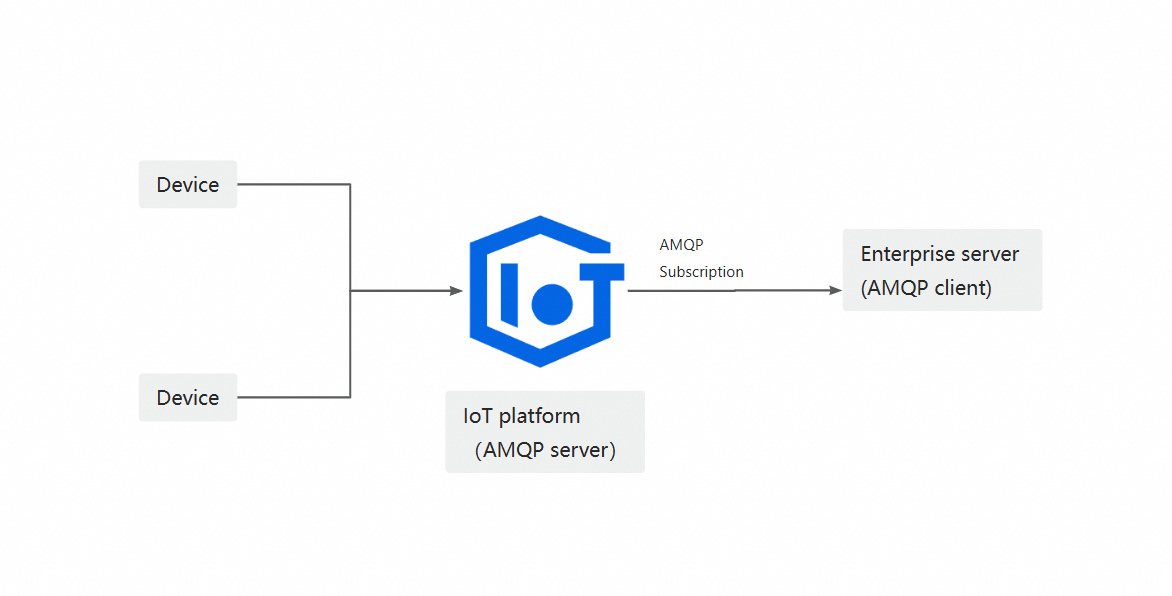
AMQP Server subscription advantages: ●Supports multiple consumer groups. With the same account, consumer group A can subscribe to product A in the development environment, and consumer group B can subscribe to product B in the formal environment. Description if multiple different consumer groups subscribe to product B at the same time, the different consumer groups may receive the same information from device B at the same time. ●Linear expansion. In the case of sufficient consumer capacity, that is, sufficient client machines, the push capacity can be easily extended linearly. ●Real-time messages are pushed first, and message accumulation will not affect the service. The device directly pushes real-time messages, and enters the accumulation queue when the push is limited or fails. The accumulation State messages use the degraded mode, which does not affect the real-time push capability. Even if the consumer's client is down or messages are piled up due to insufficient spending power, after the consumer is restored, the messages generated by the device can be sent in parallel with the piled messages, so that the device will first restore the real-time push message state. To use AMQP Server subscription, you need to configure AMQP Server subscription in the console, and then develop an AMQP client to connect to IoT platform and receive messages.
Use the kafka server to subscribe to messages
IoT platform pushes the subscribed messages to the kafka queue. Your server kafka client listens to the kafka queue to receive the device messages. The following figure shows the kafka Server subscription message flow process.