This topic describes how to integrate the ApsaraVideo Player SDK with the Native RTS SDK on Android to enable RTS.
SDK integration
Add the ApsaraVideo Player SDK and Native RTS SDK dependencies using one of the following methods:
-
-
-
Copy the required
.aarfiles to the app/libs directory.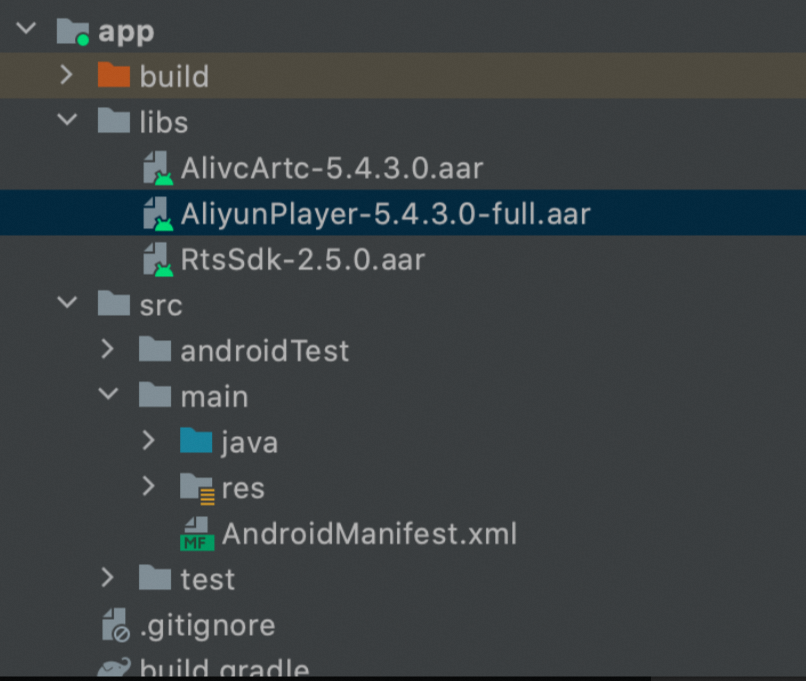
-
In the app/build.gradle file, add the following code:
dependencies{
    implementation fileTree(dir: 'libs', include: ['*.aar'])
}
-
SDK API usage
Call the ApsaraVideo Player SDK API to use the RTS feature. For more information about other features of the ApsaraVideo Player SDK, see Advanced features and API reference.
-
The following code snippets are for demonstration only. For the complete source code, see our open-source project.
-
When playing an RTS stream with the ApsaraVideo Player SDK, you cannot call the
pause()method to pause the live stream. Instead, you must callstop()to stop the playback, and then callprepare()to restart it. -
The
seekoperation is not supported.
-
Load the library
Add
System.loadLibrary("RtsSDK");to the appropriate Activity.static { System.loadLibrary("RtsSDK"); } -
Create a player
The
AliPlayerFactoryclass provides two player types:AliPlayerandAliListPlayer. To play a single media source, useAliPlayer. The following code shows how to create anAliPlayerinstance:AliPlayer aliyunVodPlayer; ..... aliyunVodPlayer = AliPlayerFactory.createAliPlayer(getApplicationContext()); -
Set player listeners
The player provides various listeners to handle events, such as
onPreparedandonCompletion. The following code shows how to set these listeners:aliyunVodPlayer.setOnErrorListener(new IPlayer.OnErrorListener() { @Override public void onError(ErrorInfo errorInfo) { // Called when an error occurs. } }); aliyunVodPlayer.setOnPreparedListener(new IPlayer.OnPreparedListener() { @Override public void onPrepared() { // Called when the player is prepared. } }); aliyunVodPlayer.setOnVideoSizeChangedListener(new IPlayer.OnVideoSizeChangedListener() { @Override public void onVideoSizeChanged(int width, int height) { // Called when the video resolution changes. } }); aliyunVodPlayer.setOnRenderingStartListener(new IPlayer.OnRenderingStartListener() { @Override public void onRenderingStart() { // Called when the first frame is rendered. } }); aliyunVodPlayer.setOnInfoListener(new IPlayer.OnInfoListener() { @Override public void onInfo(int type, long extra) { // Called for playback information events, such as loop start, buffering progress, or current position. } }); aliyunVodPlayer.setOnLoadingStatusListener(new IPlayer.OnLoadingStatusListener() { @Override public void onLoadingBegin() { // Called when buffering starts. } @Override public void onLoadingProgress(int percent, float kbps) { // Buffering progress. } @Override public void onLoadingEnd() { // Called when buffering finishes. } }); aliyunVodPlayer.setOnSubtitleDisplayListener(new IPlayer.OnSubtitleDisplayListener() { @Override public void onSubtitleShow(long id, String data) { // Called when a subtitle is displayed. } @Override public void onSubtitleHide(long id) { // Called when a subtitle is hidden. } }); aliyunVodPlayer.setOnTrackChangedListener(new IPlayer.OnTrackChangedListener() { @Override public void onChangedSuccess(TrackInfo trackInfo) { // Called when the track or resolution is switched successfully. } @Override public void onChangedFail(TrackInfo trackInfo, ErrorInfo errorInfo) { // Called when switching the track or resolution fails. } }); aliyunVodPlayer.setOnStateChangedListener(new IPlayer.OnStateChangedListener() { @Override public void onStateChanged(int newState) { // Called when the player state changes. } }); aliyunVodPlayer.setOnSnapShotListener(new IPlayer.OnSnapShotListener() { @Override public void onSnapShot(Bitmap bm, int with, int height) { // Called when a snapshot is captured. } }); -
Create a data source
The player supports four types of playback sources:
VidSts,VidAuth,VidMps, andUrlSource. To use the RTS feature for direct URL playback, you must use theartc://protocol in the URL when usingUrlSource.UrlSource urlSource = new UrlSource(); urlSource.setUri("artc://"); aliyunVodPlayer.setDataSource(urlSource); -
Set the display view
If the playback source contains video, you must set a display view to render the video frames. Both
SurfaceViewandTextureVieware supported. The following example uses aSurfaceView:surfaceView = (SurfaceView) findViewById(R.id.playview); surfaceView.getHolder().addCallback(new SurfaceHolder.Callback() { @Override public void surfaceCreated(SurfaceHolder holder) { aliyunVodPlayer.setDisplay(holder); } @Override public void surfaceChanged(SurfaceHolder holder, int format, int width, int height) { aliyunVodPlayer.surfaceChanged(); } @Override public void surfaceDestroyed(SurfaceHolder holder) { aliyunVodPlayer.setDisplay(null); } }); -
Playback control
You need to create your own UI for playback controls and call the corresponding player methods in button event handlers. The following example shows basic control operations such as play and stop:
// Prepare the player. In the onPrepared callback, call start() to begin playback. aliyunVodPlayer.prepare(); // Start playback. aliyunVodPlayer.start(); // Stop playback. aliyunVodPlayer.stop(); // Reset the player. aliyunVodPlayer.reset(); // Release the player. Once released, the player instance cannot be reused. aliyunVodPlayer.release(); -
Configure playback parameters
Configure playback parameters to optimize the RTS performance.
// Get the current configuration. PlayerConfig config = mAliyunVodPlayer.getConfig(); // Set the maximum latency to 1,000 ms. Latency is managed by the ARTC protocol. config.mMaxDelayTime = 1000; // Set the start buffer and high buffer duration to 10 ms. Buffering is managed by the ARTC protocol. config.mHighBufferDuration = 10; config.mStartBufferDuration = 10; ....// Other settings // Apply the configuration to the player. mAliyunVodPlayer.setConfig(config); -
Logging
// Enable logging Logger.getInstance(context).enableConsoleLog(true); Logger.getInstance(context).setLogLevel(Logger.LogLevel.AF_LOG_LEVEL_TRACE); // Disable logging Logger.getInstance(context).enableConsoleLog(false); Logger.getInstance(context).setLogLevel(Logger.LogLevel.AF_LOG_LEVEL_NONE); -
Live stream degradation
Live stream degradation is a fallback strategy that changes a playback URL with an
artc://prefix to an HTTP-FLV URL. You can then update the player'sUrlSourceand restart the playback./** * Degradation strategy */ private void willBeDemoted() { mRtsAliPlayer.stop(); if (mUrl.startsWith("artc://")) { setDataSource("http://xxxx.flv"); mRtsAliPlayer.prepare(); } } -
Obtaining TraceId
The
InfoCode.DirectComponentMSGevent in theonInfocallback indicates a pass-through message from the underlying RTS component. To obtain theTraceId, parse theextraMsgstring of this event. When the message containscode=104(the trace ID event), you can extract theTraceIdby parsing the substring that follows the-sub-delimiter.private static final int TRACE_ID_CODE = 104; // Listen for the player's onInfo callback and parse the RTS event message. mRtsAliPlayer.setOnInfoListener(infoBean -> { if (infoBean.getCode() == InfoCode.DirectComponentMSG) { String extraMsg = infoBean.getExtraMsg(); parseDirectComponentMSG(extraMsg); } }); private void parseDirectComponentMSG(String msg) { if (msg.contains("code=" + TRACE_ID_CODE)) { parseTraceId(msg); } } /** * Parses the TraceId. */ private void parseTraceId(String msg) { String[] split = msg.split("-sub-"); if (split.length >= 1) { mTraceId = "RequestId:" + (split[1].substring(0, split[1].length() - 1)); mTraceId = mTraceId.replace("\"", "").replace("\\", ""); } }