This document describes how to quickly run the ARTC Linux SDK C++ sample project and try out its real-time audio and video features.
Get the sample source code
Download the latest version of the ARTC Linux SDK from SDK download. Extract the Linux SDK archive and open the Cpp folder. The folder contains the following items:
├── Release
│   ├── include ## This folder contains header files to include
│   │   ├── AliRTCEngineCentralInterface.h ## For multi-process mode
│   │   ├── AliRTCSdkDefineCentral.h ## For multi-process mode
│   │   ├── AliRTCEngineInterface.h ## For single-process mode
│   │   ├── AliRTCLinuxSdkDefine.h ## For single-process mode
│   │   ├── AliRTCMediaPlayerInterface.h
│   │   └── IAliRTCEngine.h
│   └── lib ## This folder contains dynamic libraries to link
│       ├── AliRtcCoreService ## For multi-process mode
│       ├── libAliRtcCentralEngine.so ## For multi-process mode
│       ├── libAliRtcLinuxEngine.so ## For single-process mode
│       └── libonnxruntime.so.1.16.3
└── Demo ## Simple sample
    ├── CMakeLists.txt
    ├── fake_linux_event_listener.cc ## Contains callbacks for audio and video stream pulling
    ├── fake_linux_event_listener.h
    └── simple_main.cc ## Main demo file. Includes initialization, joining a channel, and stream ingest
The Release folder contains header files in the include folder and dynamic libraries in the lib folder. All APIs and data structures are declared in the header files. You must set the correct library path for linking. For example: export LD_LIBRARY_PATH=./lib
The Demo folder contains a simple sample project. The main file, simple_main.cc, demonstrates initialization, joining a channel, and stream ingest. The fake_linux_event_listener file contains callbacks for audio and video stream pulling.
Prerequisites
Before you run the sample project, make sure that the following requirements are met.
App setup: Obtain an AppID and AppKey for your ApsaraVideo Real-time Communication application. For more information, see Get development parameters.
Development environment: Make sure that g++ version 4.8 or later is installed.
Procedure
Configure the project
Edit Demo/simple_main.cc and set the AppID and AppKey.

Set the path to the core service library:
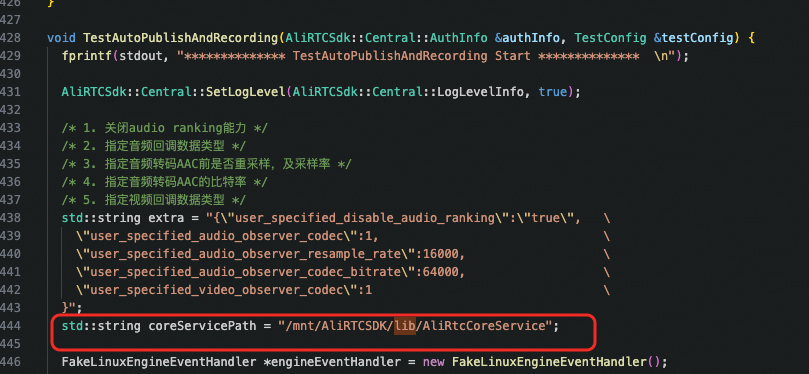
The library is located at the following path: AliRTCSDK_Linux-7.10.2/Cpp/Release/lib/AliRtcCoreService
Go to the Demo folder and build the app
Navigate to the Demo folder and run the following commands. A successful build generates the executable file linux_sdk_simple_demo.
# Go to the Cpp/Demo folder
cd Cpp/Demo
# Create a build directory
mkdir build && cd build
# Build the app
cmake ..
make
Run the app
Run ./linux_sdk_simple_demo.
If the terminal displays the following output, the application has successfully joined the channel and started stream ingest and stream pulling.
# Joined the channel successfully
[JoinChannelStateChanged] state: success

# Stream ingest succeeded
[AudioPublishStateChanged] oldState:0, newState:2, elapseSinceLastState:0, channelId:9090
[VideoPublishStateChanged] oldState:0, newState:2, elapseSinceLastState:0, channelId:9090
[DualStreamPublishStateChanged] oldState:0, newState:2, elapseSinceLastState:0, channelId:9090
[AudioPublishStateChanged] oldState:2, newState:3, elapseSinceLastState:292, channelId:9090
[VideoPublishStateChanged] oldState:2, newState:3, elapseSinceLastState:293, channelId:9090
[DualStreamPublishStateChanged] oldState:2, newState:3, elapseSinceLastState:293, channelId:9090

# Remote user abcd joined the channel
OnRemoteUserOnLineNotify userid: abcd

# Received audio and video streams from remote user abcd
[AudioSubscribeStateChanged] uid:abcd, oldState:3, newState:1, elapseSinceLastState:38865, channelId:9090
[VideoSubscribeStateChanged] uid:abcd, oldState:3, newState:1, elapseSinceLastState:38865, channelId:9090
Note: When you select AudioFormatMixedPcm, audio callbacks start as soon as the application joins the channel, even if no remote users are present. When you select AudioFormatPcmBeforeMixing, audio callbacks start only when other users join the channel and publish their audio streams.
Leave Meeting
To leave the channel, type exit in the terminal and wait for the application to exit.