Before making API requests with the Key Management Service (KMS) instance SDK, initialize an SDK client with your instance credentials.
Prerequisites
Before you begin, ensure that you have:
A KMS instance (Software Key Management or Hardware Key Management)
A ClientKey file (
clientKey_****.json) and its password file (clientKey_****_Password.txt)The instance CA certificate (
PrivateKmsCA_kst-******.pem)
Initialize the client
Always configure the CA certificate in production. It verifies the SSL/TLS certificate authenticity of your KMS instance, preventing man-in-the-middle attacks. For offline testing only, you can skip verification by setting IgnoreSSL to true in the RuntimeOptions parameter.
<?php

use AlibabaCloud\Dkms\Gcs\Sdk\Client as AlibabaCloudDkmsGcsSdkClient;
use AlibabaCloud\Dkms\Gcs\OpenApi\Models\Config as AlibabaCloudDkmsGcsOpenApiConfig;


function getDkmsGcsSdkClient()
{
    global $clientKeyContent, $password, $endpoint;

    // Construct the KMS instance SDK client configuration.
    $config = new AlibabaCloudDkmsGcsOpenApiConfig();
    // The connection protocol. Set the value to https. The KMS instance service only allows access through the HTTPS protocol.
    $config->protocol = 'https';
    // Client Key.
    $config->clientKeyContent = $clientKeyContent;
    // Client Key security token.
    $config->password = $password;
    // The endpoint of your KMS instance. Set the value in the following format: <ID of your KMS instance >.cryptoservice.kms.aliyuncs.com.
    $config->endpoint = $endpoint;
    // Instance CA certificate.
    $config->caFilePath = 'path/to/caCert.pem';

    // Construct the KMS instance SDK client object.
    return new AlibabaCloudDkmsGcsSdkClient($config);
}
The following table describes each configuration parameter and where to get its value.
| Parameter | Description | Where to get it |
|---|---|---|
protocol | Connection protocol. Must be set to https — KMS only allows HTTPS connections. | Fixed value: 'https' |
clientKeyContent | Content of the ClientKey file, which holds the application's identity credentials. | Downloaded automatically when you create a ClientKey. Default filename: clientKey_****.json |
password | Security token for the ClientKey. | Downloaded automatically when you create a ClientKey. Default filename: clientKey_****_Password.txt |
endpoint | Dedicated gateway endpoint of your KMS instance. Format: <ID of your KMS instance>.cryptoservice.kms.aliyuncs.com | See Find your endpoint |
caFilePath | File path to the CA certificate associated with your KMS instance. | See Download the CA certificate |
Find your endpoint
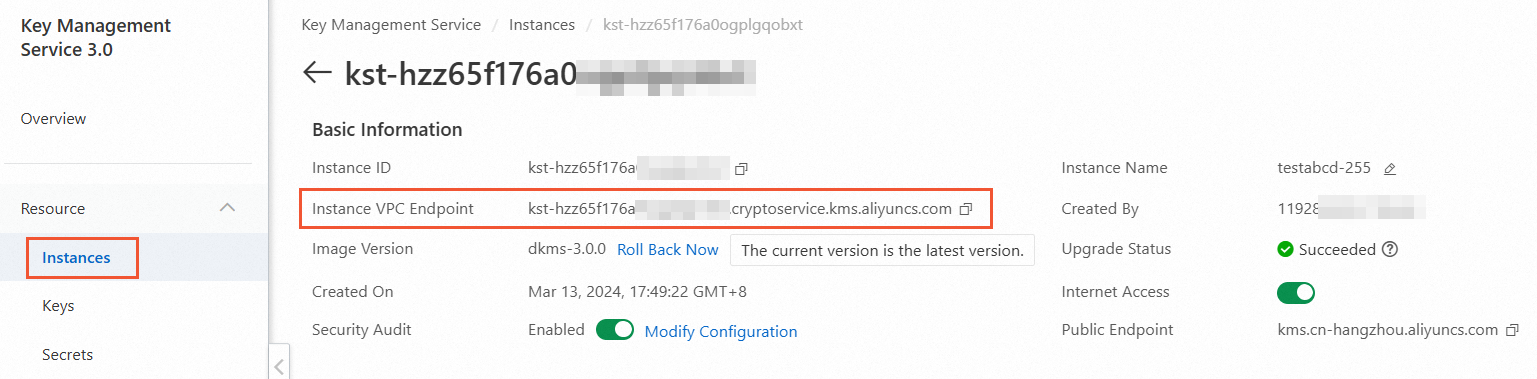
The Endpoint is the dedicated gateway endpoint representing the domain address of your KMS instance.
Go to the Instances page and click the Software Key Management or Hardware Key Management tab.
Click the target KMS instance.
In the Basic Information section, copy the value from the Instance VPC Endpoint field.
Download the CA certificate
Go to the Instances page and click the Software Key Management or Hardware Key Management tab.
Click the instance ID or click Details in the Actions column.
On the details page, click download next to Instance CA Certificate.
The downloaded file is named
PrivateKmsCA_kst-******.pemby default. Store it securely.
What's next
After initializing the client, use it to call KMS instance SDK operations such as encrypting data, decrypting data, or generating data keys.