Create and manage KMS keys with Terraform.
Overview
KMS lets you create a default master key without a dedicated instance, or create keys within a KMS instance (Key service overview).
You can run the sample code with a single click. Run with one click
Prerequisites
-
Using your Alibaba Cloud account directly poses security risks if credentials leak. Create a Resource Access Management (RAM) user with an AccessKey instead. For more information, see Create a RAM user and Create an AccessKey.
-
Attach the AliyunKMSFullAccess policy to the RAM user for full KMS permissions. Manage RAM user permissions.
{ "Version": "1", "Statement": [ { "Effect": "Allow", "Action": [ "kms:*" ], "Resource": [ "*" ], "Condition": {} } ] } -
Prepare a Terraform environment using one of the following methods:
Use Terraform in Explorer: A browser-based Terraform environment. No installation required. Best for quick testing at no cost.
Create resources with Terraform: Terraform is pre-installed with auto-configured credentials. Run commands directly in the browser.
Install and configure Terraform locally: Best for limited network connectivity or custom development environments.
Terraform 0.12.28 or later is required. Run terraform --version to check.
Resources used
-
alicloud_kms_key: Creates and manages keys.
-
alicloud_kms_alias: Creates and manages aliases.
Create a key in a KMS instance
The following example creates a key in a KMS instance.
-
Create a directory with a
main.tfconfiguration file. main.tf defines the resources to deploy. Ensure you have already created a KMS instance.variable "region" { default = "cn-shanghai" } provider "alicloud" { region = var.region } variable "instance_name" { default = "tf-kms-vpc-172-16" } variable "instance_type" { default = "ecs.n1.tiny" } # Use a data source to obtain information about available zones. Resources can be created only in the specified zones. data "alicloud_zones" "default" { available_disk_category = "cloud_efficiency" available_resource_creation = "VSwitch" available_instance_type = var.instance_type } # Create a VPC. resource "alicloud_vpc" "vpc" { vpc_name = var.instance_name cidr_block = "172.16.0.0/12" } # Create a vSwitch with the CIDR block 172.16.0.0/21. resource "alicloud_vswitch" "vsw" { vpc_id = alicloud_vpc.vpc.id cidr_block = "172.16.0.0/21" zone_id = data.alicloud_zones.default.zones.0.id vswitch_name = "terraform-example-1" } # Create another vSwitch with the CIDR block 172.16.128.0/17. resource "alicloud_vswitch" "vsw1" { vpc_id = alicloud_vpc.vpc.id cidr_block = "172.16.128.0/17" zone_id = data.alicloud_zones.default.zones.1.id vswitch_name = "terraform-example-2" } # Create a software key management instance and start it with network parameters. resource "alicloud_kms_instance" "default" { timeouts { delete = "20m" # Set a timeout period for deletion. } # A software key management instance. product_version = "3" vpc_id = alicloud_vpc.vpc.id # Specify the zones for the KMS instance using the obtained zone IDs. zone_ids = [ data.alicloud_zones.default.zones.0.id, data.alicloud_zones.default.zones.1.id ] # The vSwitch IDs. vswitch_ids = [ alicloud_vswitch.vsw.id,alicloud_vswitch.vsw1.id ] # The computing performance, number of keys, number of credentials, and number of access management operations. vpc_num = "1" key_num = "1000" secret_num = "100" spec = "1000" # Associate the KMS instance with other VPCs. This parameter is optional. # If the VPC and the VPC of the KMS instance belong to different Alibaba Cloud accounts, you must first share the vSwitch. #bind_vpcs { #vpc_id = "vpc-j6cy0l32yz9ttxfy6****" #vswitch_id = "vsw-j6cv7rd1nz8x13ram****" #region_id = "cn-shanghai" #vpc_owner_id = "119285303511****" #} #bind_vpcs { #vpc_id = "vpc-j6cy0l32yz9ttd7g3****" #vswitch_id = "vsw-3h4yrd1nz8x13ram****" #region_id = "cn-shanghai" #vpc_owner_id = "119285303511****" #} } # Save the CA certificate of the KMS instance to a local file. resource "local_file" "ca_certificate_chain_pem" { content = alicloud_kms_instance.default.ca_certificate_chain_pem filename = "ca.pem" }Create a key in the KMS instance:
# The key specification is Aliyun_AES_256, and the key is used for encryption and decryption (ENCRYPT/DECRYPT). resource "alicloud_kms_key" "kms_software_key_encrypt_decrypt" { timeouts { delete = "20m" # Set a timeout period for deletion. } description = "default_key_encrypt_decrypt description" # The usage of the key. Default value: ENCRYPT/DECRYPT. Valid value: ENCRYPT/DECRYPT, which indicates that the key is used to encrypt or decrypt data. key_usage = "ENCRYPT/DECRYPT" # The specification of the key. Default value: Aliyun_AES_256. key_spec = "Aliyun_AES_256" # The source of the key material. Default value: Aliyun_KMS. Valid values: Aliyun_KMS and EXTERNAL. origin = "Aliyun_KMS" # The ID of the KMS instance. # If you add this parameter, a key is created in the KMS instance. Otherwise, a default master key is created. dkms_instance_id = alicloud_kms_instance.default.id # The number of days before the CMK is deleted. pending_window_in_days = 7 # The mapping of tags to assign to the resource. This is optional. #tags = { #"Environment" = "Production" #"Name" = "KMS-01" #"SupportTeam" = "PlatformEngineering" #"Contact" = "aliyun@test.com" #} } # The key alias is alias/kms_software_key_encrypt_decrypt, which must be unique within an Alibaba Cloud account. resource "alicloud_kms_alias" "kms_software_key_encrypt_decrypt_alias" { # The alias. alias_name = "alias/kms_software_key_encrypt_decrypt" # The key ID. key_id = alicloud_kms_key.kms_software_key_encrypt_decrypt.id } -
Initialize
Terraform:terraform initExpected output on success:
Initializing the backend... Initializing provider plugins... - Reusing previous version of hashicorp/alicloud from the dependency lock file - Using previously-installed hashicorp/alicloud v1.231.0 Terraform has been successfully initialized! You may now begin working with Terraform. Try running "terraform plan" to see any changes that are required for your infrastructure. All Terraform commands should now work. If you ever set or change modules or backend configuration for Terraform, rerun this command to reinitialize your working directory. If you forget, other commands will detect it and remind you to do so if necessary. -
Create an execution plan and preview the changes.
terraform plan -
Create the key:
terraform applyEnter
yeswhen prompted and press Enter. Expected output on success:Do you want to perform these actions? Terraform will perform the actions described above. Only 'yes' will be accepted to approve. Enter a value: yes ... alicloud_kms_key.kms_software_key_encrypt_decrypt: Creating... alicloud_kms_key.kms_software_key_encrypt_decrypt: Creation complete after 0s [id=key-shh6715c21812y8i7z***] alicloud_kms_alias.kms_software_key_encrypt_decrypt_alias: Creating... alicloud_kms_alias.kms_software_key_encrypt_decrypt_alias: Creation complete after 0s [id=alias/kms_secret] ... Apply complete! Resources: 2 added, 0 changed, 0 destroyed. -
Verify the results.
Run the terraform show command
View the resource details:
terraform show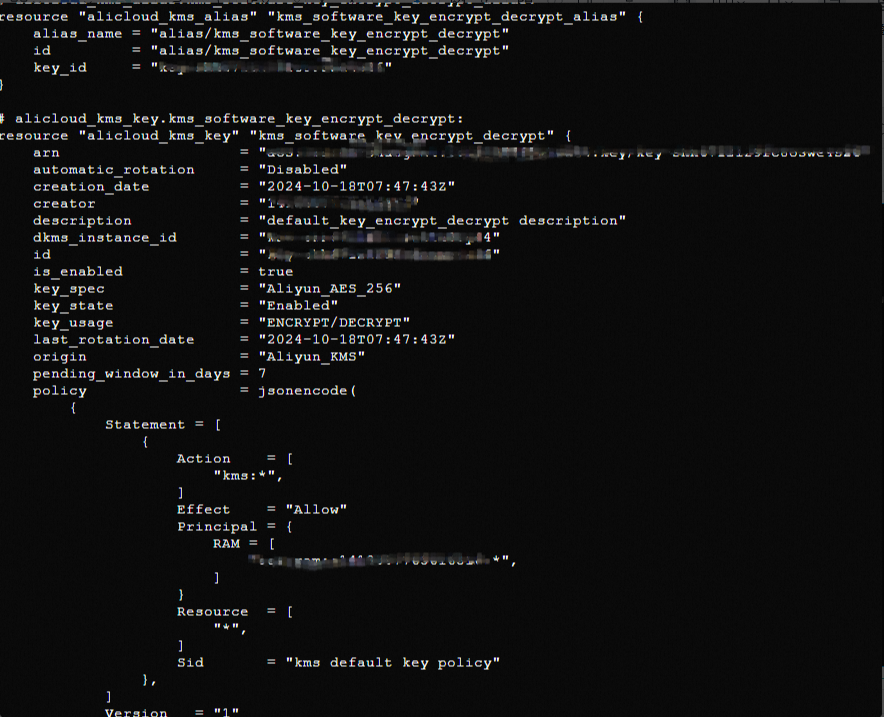
Log on to the Key Management Service console
Log on to the Key Management Service console to view the key.
Clean up resources
To release resources you no longer need, run the following command. For more information about terraform destroy, see Common commands.
terraform destroyComplete example
You can run the sample code with a single click. Run with one click