The GB/T 32960 cloud gateway connects vehicle devices over TCP or TLS using the GB/T 32960 protocol (Technical specifications for remote service and management system of electric vehicles). TCP is not recommended due to low security. TLS is recommended and supports server-side one-way authentication, device-side OCSP, and mutual authentication.
Supported regions and instances
The GB/T 32960 cloud gateway is available only for Premium Enterprise instances in the China (Shanghai) regions.
Features
Cloud gateway features
|
Feature |
Description |
|
Custom port number |
The default port number for a GB/T 32960 protocol cloud gateway URL is 8999. You can specify a custom port number from 1024 to 65535. |
|
First-party authentication |
IoT Platform manages device authentication and unregistration. Create a first-party authentication cloud gateway product, import devices in batches, and connect them after GB/T 32960 logon authentication. |
|
Third-party authentication |
The developer manages device authentication and unregistration through FC functions and grants IoT Platform permission to call them. Create an FC service and function for device authentication, then create a third-party authentication cloud gateway product and grant IoT Platform access. Devices are automatically created and authenticated through the FC functions. |
|
Transport protocol |
Supports TCP and TLS. For TCP connections, use a highly secure leased line instead of the public network. |
|
Device X.509 authentication |
Supports server-side one-way authentication and device-server mutual authentication for identity verification. |
|
SM certificate |
With TLS 1.3, devices support SM certificates, SM2/SM3/SM4 cryptographic algorithms, and the SM SSL protocol. Note
Only single SM certificates with TLS_SM4_GCM_SM3 and TLS_SM4_CCM_SM3 cipher suites are supported. Dual SM certificates (TLCP) are not supported. |
|
OCSP |
Supports OCSP for both device and server certificates. OCSP (Online Certificate Status Protocol) queries the issuing Certificate Authority (CA) to check whether a certificate has been revoked. |
GB/T 32960 protocol capabilities
Device messages must use the standard GB/T 32960 data format.
The default connection timeout is 180 seconds. IoT Platform disconnects the device if no data or heartbeat is received within this period.
IoT Platform supports the 2016 version of the GB/T 32960 protocol with these features:
-
Vehicle logon.
-
Vehicle logoff.
-
Heartbeat.
-
Real-time information upload.
-
Reissued information upload.
-
Parameter query.
-
Parameter setting.
-
On-board terminal control.
-
Terminal time calibration.
GB/T 32960 protocol specifications: 2016 version of the GB/T 32960 protocol (General), 2016 version of the GB/T 32960 protocol (On-board terminal), and 2016 version of the GB/T 32960 protocol (Communication protocol and data format).
Before you begin
First-party authentication
-
Create a cloud gateway product (GB/T 32960). Set Authentication Type to First-party Authentication.
-
Create a cloud gateway device (GB/T 32960). Import devices in batches. Each record must include the Vehicle Identification Number (VIN).
IoT Platform uses the VIN as the device name.
-
Configure the cloud gateway access domain name on the device to connect to IoT Platform.
-
If the device already has an access domain name, create a CNAME record pointing to the cloud gateway URL. Authoritative DNS resolution for public networks.
-
If the device does not have an access domain name, configure the cloud gateway URL directly on the device.
-
-
(Optional) Configure message forwarding to route device logon, logoff, and data upload messages to your server.
Third-party authentication
-
Create an FC service and create an FC function for third-party device authentication.
The FC authentication function parameters must comply with the specifications. You can specify a custom function name. FC authentication function parameters.
-
Create a cloud gateway product (GB/T 32960). Set Authentication Type to Third-party Authentication. For Device Authentication FC Service and Device Authentication FC Function, select the FC service and function you created.
-
When a device connects for the first time, IoT Platform uses the vin parameter from the FC authentication function as the device name. IoT Platform automatically creates and authenticates the device.
-
(Optional) Configure message forwarding to route device logon, logoff, and data upload messages to your server.
Connection and communication flow
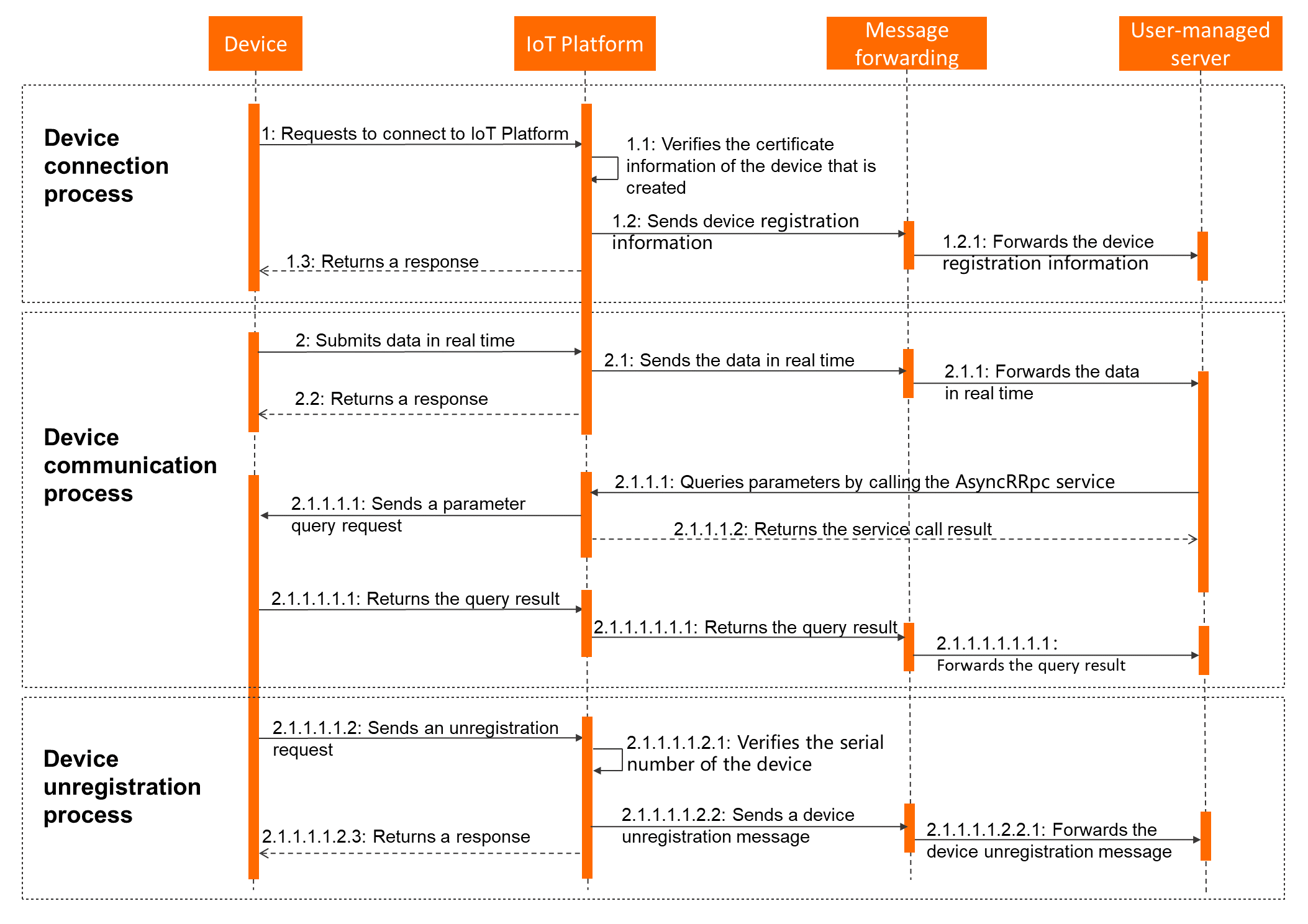
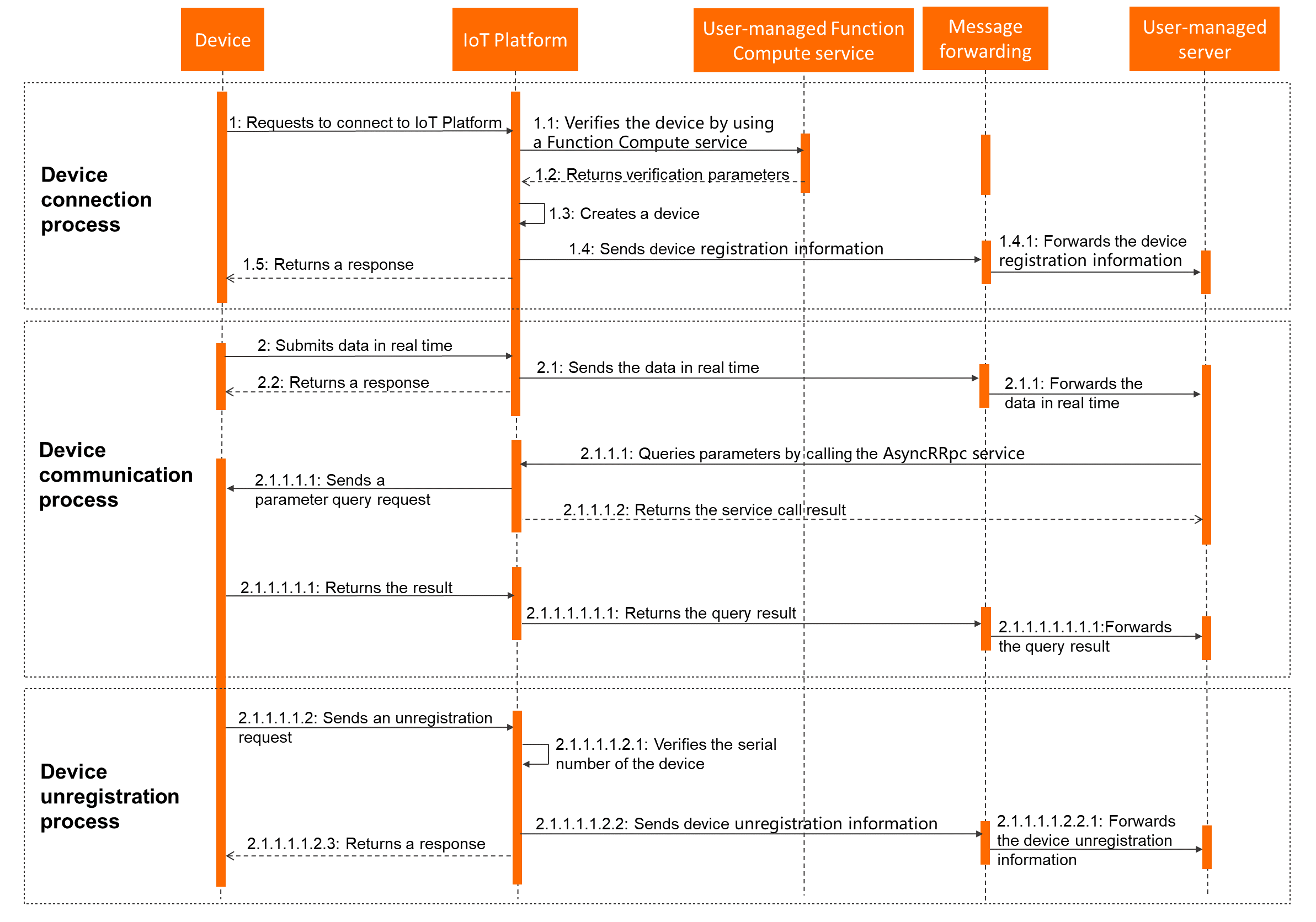
The following figures show the connection and communication flow. Upstream and downstream messaging details are in the Message communication section below.
First-party authentication
Third-party authentication
Message communication
Cloud gateway devices communicate with IoT Platform using the GB/T 32960 protocol, as defined in the 2016 version of the GB/T 32960 protocol (Communication protocol and data format).
Upstream communication: Device to server
Forward device logon, logoff, and data upload messages to your server using the data forwarding feature. Data uploads also support AMQP subscription.
Downstream communication: Server to device
Call the AsyncRRpc API operation from your server to send messages to a device.