Device shadow data flows through predefined MQTT topics. The data flow covers four scenarios: a device reporting its current status, an application sending a desired state to a device, a device retrieving shadow content after coming back online, and a device deleting shadow properties.
Device shadow topics
IoT Platform predefines two topics per device to handle device shadow data flow.
-
/shadow/update/${YourProductKey}/${YourDeviceName}Devices and applications publish messages to this topic. When IoT Platform receives a message on this topic, it updates the device shadow with the status in the message.
-
/shadow/get/${YourProductKey}/${YourDeviceName}The device shadow publishes status updates to this topic. A device subscribes to this topic to receive the latest messages.
Usage examples
The following examples use a light bulb to illustrate how a device, its device shadow, and an application interact. The examples cover all four data flow scenarios: reporting status, changing device status from an application, retrieving shadow content on reconnect, and deleting shadow properties.
In the examples, the ProductKey is a1PbRCF**** and the DeviceName is lightbulb. The device publishes and subscribes to both device shadow topics with a Quality of Service (QoS) of 1.
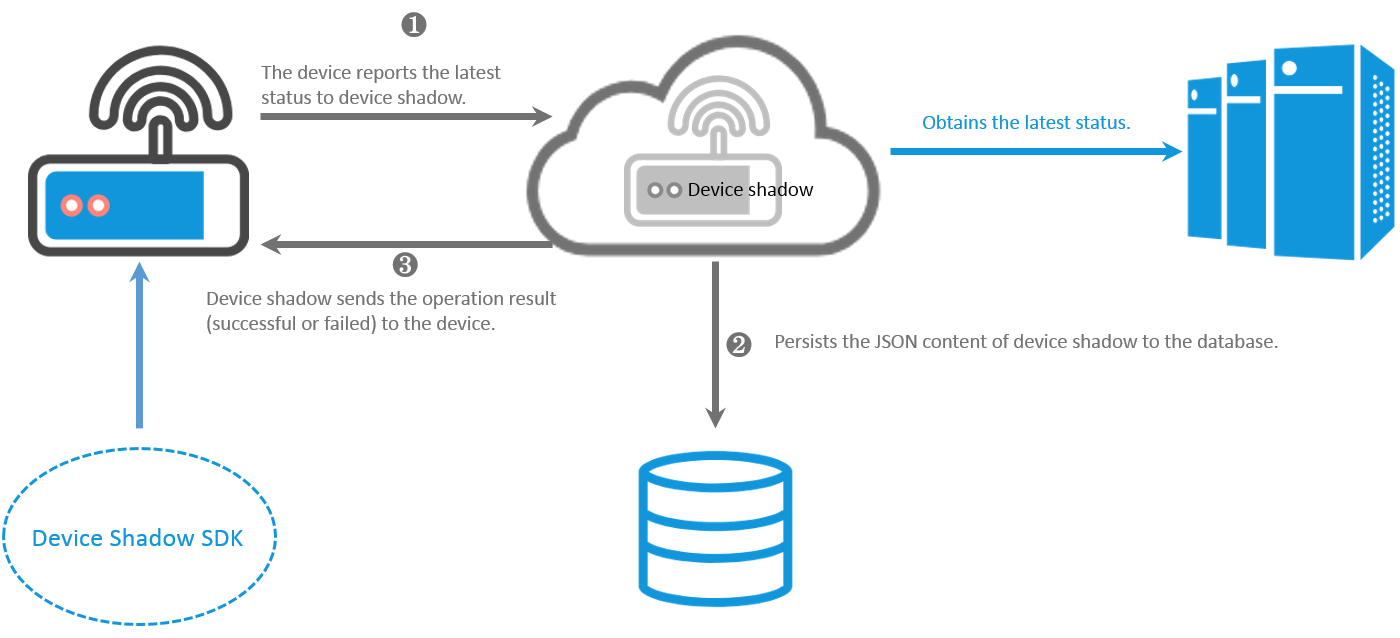
A device reports its status
When a device comes online, it reports its current status to the device shadow. Applications can then read the device status from the shadow at any time.
The following figure shows the data flow.
-
The light bulb comes online and publishes its current status to the
/shadow/update/a1PbRCF****/lightbulbtopic.The JSON message format is:
{
    "method": "update",
    "state": {
        "reported": {
            "color": "red"
        }
    },
    "version": 1
}
Table 1. Parameter description
Parameter
Description
method
The operation type. When performing an update, method is required. Set it to update.
state
The status data sent to the device shadow. reported is required. The value is written to the reported section of the shadow document.
version
The request version. The device shadow accepts the update only if the new version is greater than the current version. If version is set to
-1, all shadow data is cleared and the version resets to0. -
The device shadow updates its shadow document with the reported status.
{ "state": { "reported": { "color": "red" } }, "metadata": { "reported": { "color": { "timestamp": 1469564492 } } }, "timestamp": 1469564492, "version": 1 } -
After updating the shadow document, the device shadow sends a result to the
/shadow/get/a1PbRCF****/lightbulbtopic. Subscribe to this topic before publishing to the update topic to make sure the result is received.-
If the update succeeds:
{ "method": "reply", "payload": { "status": "success", "version": 1 }, "timestamp": 1469564576 } -
If the update fails:
{
    "method": "reply",
    "payload": {
        "status": "error",
        "content": {
            "errorcode": "${errorcode}",
            "errormessage": "${errormessage}"
        }
    },
    "timestamp": 1469564576
}
Table 2. Error codes
errorCode
errorMessage
400
Invalid JSON format.
401
The shadow data is missing the method field.
402
The shadow data is missing the state field.
403
The value of the version field is not a number.
404
The shadow data is missing the reported field.
405
The reported field is empty.
406
The method value is invalid.
407
The shadow content is empty.
408
The number of properties in the reported field exceeds 128.
409
Version conflict.
500
Server-side processing error.
-
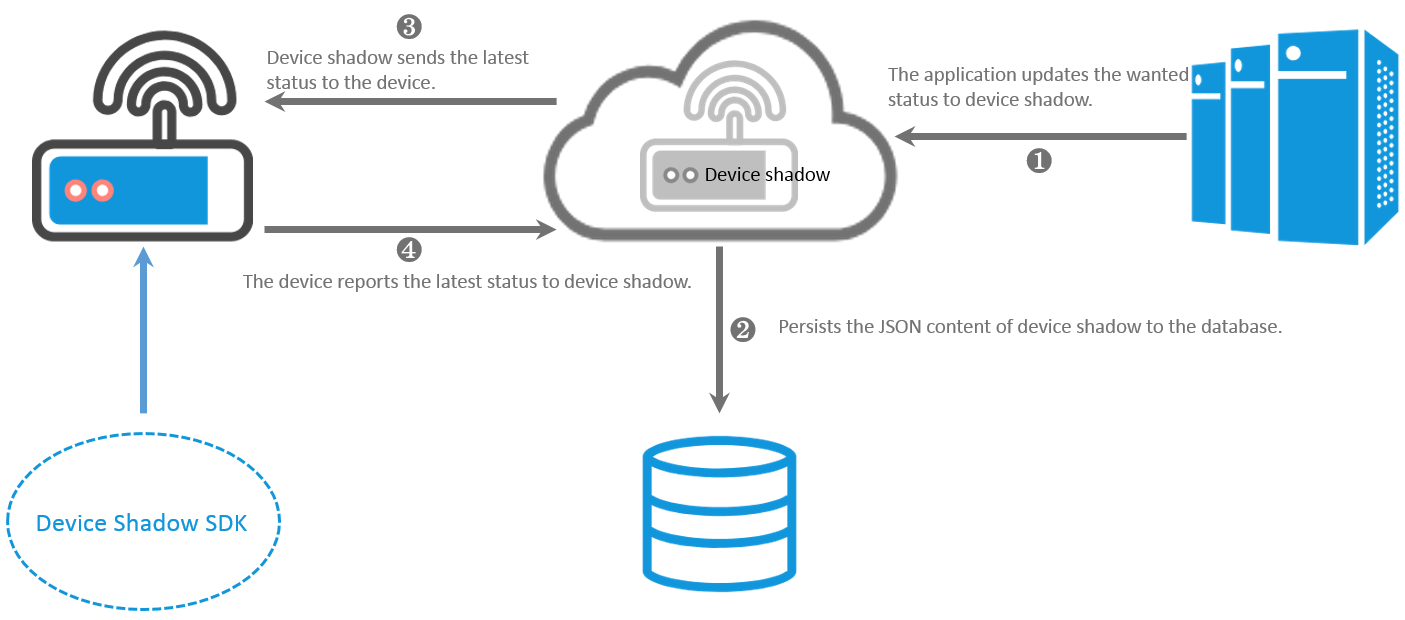
An application changes the device status
An application calls the UpdateDeviceShadow API to write a desired state to the device shadow. The shadow pushes the desired state to the device, which then applies the change and reports back its updated status.
The following figure shows the data flow.
-
An application calls the UpdateDeviceShadow API to set the color property to green.
The ShadowMessage parameter value is:
{ "method": "update", "state": { "desired": { "color": "green" } }, "version": 2 } -
The device shadow receives the update and writes the desired state to its shadow document:
{ "state": { "reported": { "color": "red" }, "desired": { "color": "green" } }, "metadata": { "reported": { "color": { "timestamp": 1469564492 } }, "desired": { "color": { "timestamp": 1469564576 } } }, "timestamp": 1469564576, "version": 2 } -
The device shadow publishes the updated document to the
/shadow/get/a1PbRCF****/lightbulbtopic withmethodset tocontrol, signaling the device to apply the desired change.{ "method": "control", "payload": { "state": { "reported": { "color": "red" }, "desired": { "color": "green" } }, "metadata": { "reported": { "color": { "timestamp": 1469564492 } }, "desired": { "color": { "timestamp": 1469564576 } } } }, "version": 2, "timestamp": 1469564576 } -
If the light bulb is online and has subscribed to the
/shadow/get/a1PbRCF****/lightbulbtopic, it receives the message immediately.The device reads the desired field and changes the light bulb color to green.
After updating its status, the light bulb reports the latest status to IoT Platform.
{ "method": "update", "state": { "reported": { "color": "green" } }, "version": 3 }NoteIf a timestamp is used to determine that the command has expired, you can choose not to perform the update.
The device shadow sends a response to the device on the
/shadow/get/a1PbRCF****/lightbulbtopic. For the response format, see Step 3 in "A device reports its status".-
After the status is reported successfully, the device and the device shadow clean up the desired state.
-
The device publishes a message to the
/shadow/update/a1PbRCF****/lightbulbtopic to clear the desiredfield:{ "method": "update", "state": { "desired": "null" }, "version": 4 } -
The device shadow updates its document. The
desiredfield is cleared and the shadow document reflects the final state:{ "state": { "reported": { "color": "green" } }, "metadata": { "reported": { "color": { "timestamp": 1469564577 } }, "desired": { "timestamp": 1469564576 } }, "version": 4 }
-
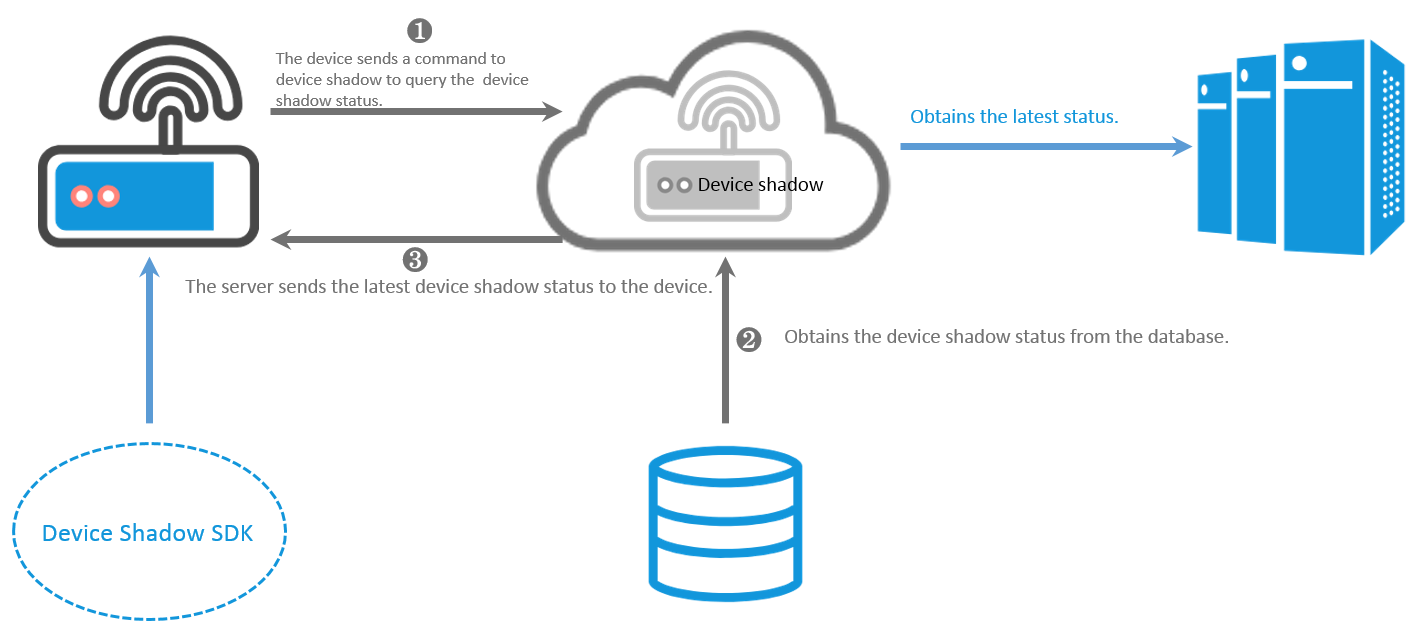
A device gets the shadow content
If a device is offline when an application sends a command, it can retrieve the shadow content after reconnecting.
The following figure shows the data flow.
-
After reconnecting, the light bulb publishes a
getrequest to the/shadow/update/a1PbRCF****/lightbulbtopic to retrieve the latest shadow content.{ "method": "get" } -
The device shadow responds by publishing the latest shadow content to the
/shadow/get/a1PbRCF****/lightbulbtopic. Subscribe to this topic before sending thegetrequest to make sure the response is received.{ "method": "reply", "payload": { "status": "success", "state": { "reported": { "color": "red" }, "desired": { "color": "green" } }, "metadata": { "reported": { "color": { "timestamp": 1469564492 } }, "desired": { "color": { "timestamp": 1469564492 } } } }, "version": 2, "timestamp": 1469564576 }
A device deletes shadow properties
If the device already has the latest status, it can delete specific properties from the device shadow.
The following figure shows the data flow.
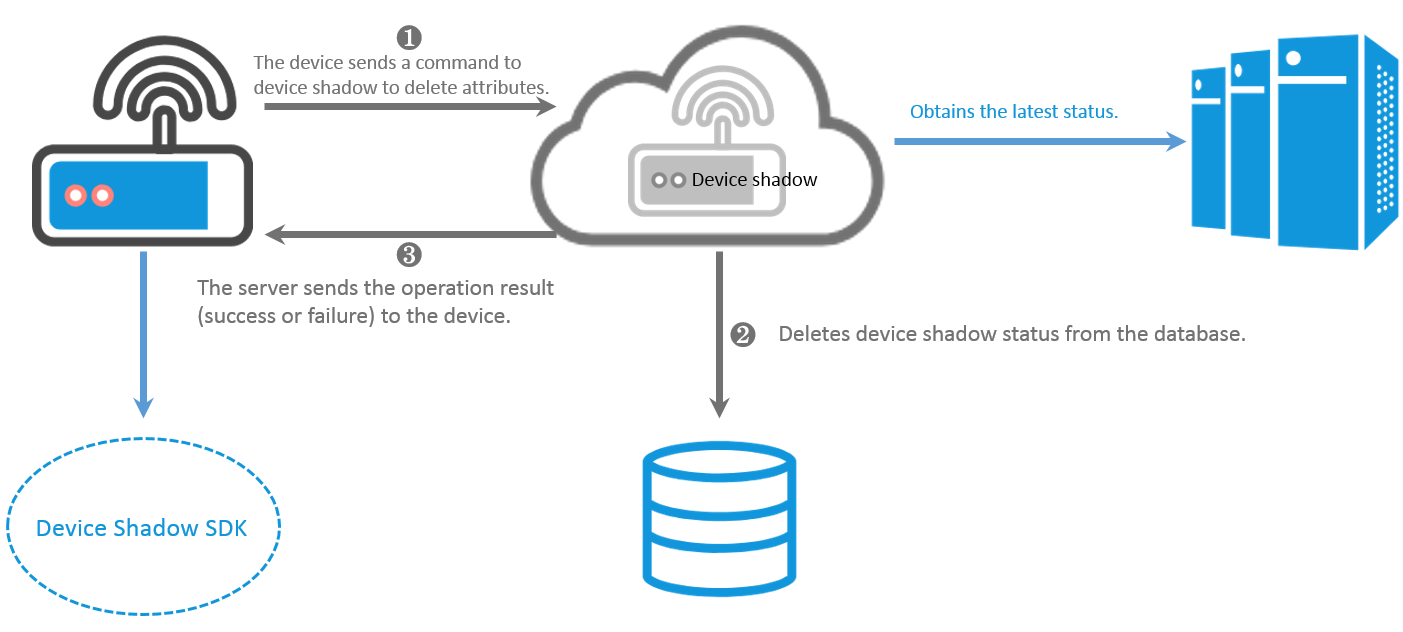
To delete shadow properties, publish to the /shadow/update/a1PbRCF****/lightbulb topic with method set to delete and the target property value set to null.
-
Delete specific properties from the shadow.
{ "method": "delete", "state": { "reported": { "color": "null", "temperature": "null" } }, "version": 1 } -
Delete all properties from the shadow.
{
    "method": "delete",
    "state": {
        "reported": "null"
    },
    "version": 1
}