After you define a TSL model for a product, devices must use the Alink JSON format to report properties and events. The server-side also uses Alink JSON to set properties and invoke services. If devices use a custom format, configure data parsing to convert it.
Background information
The TSL model data format (properties, events, and services) is defined in What is a TSL model?.
A device reports data in either the standard Alink JSON format (recommended) or a pass-through/custom format. You must select one of these methods.
-
Standard data format (Alink JSON): The device generates and reports data in the Alink JSON format defined by IoT Platform. See the format examples in the sections below.
-
Pass-through/custom: The device reports raw data, such as a binary data stream. Alibaba Cloud IoT Platform runs the data parsing script that you submitted in the console to convert the raw data into the standard data format before processing. The cloud returns data in the standard Alink JSON format. The response is then parsed and pushed to the device.
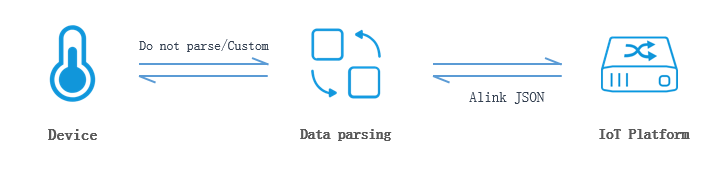
-
When a TSL model property is defined as float or double, the reported value must include at least one decimal place (for example, 10.0 instead of 10).
-
Devices can only report property and event data with a time value within the next 24 hours. Reports outside this range fail.
-
The message ID (id) must be unique per device per day for both uplink and downlink messages.
For downlink messages, IoT Platform uses the id to match the device's response to an asynchronous message and ensures uniqueness. For uplink messages, the device must ensure id uniqueness.
Device reports properties
The Diagram of device property reporting in the Alink protocol illustrates the property reporting flow.
Topic and data format (mobile originated):
-
Pass-through/custom
Topic
Data format
Request topic:
/sys/${productKey}/${deviceName}/thing/model/up_rawThe request data is the raw message reported by the device.
Note-
Data transmitted in pass-through mode over the Message Queuing Telemetry Transport (MQTT) protocol is in hexadecimal format.
-
The uploaded pass-through data must include the method parameter, whose value must match the corresponding request method defined in the data parsing script. For example, in the JavaScript script example, the value of
ALINK_PROP_REPORT_METHODisthing.event.property.postwhen a device uploads property data to the cloud.
Example:
0x00002233441232013fa00000Response topic:
/sys/${productKey}/${deviceName}/thing/model/up_raw_replyThe cloud returns data in the following format:
-
Successful response example
{ "code": 200, "data": {}, "id": "123", "message": "success", "version": "1.0" } -
Failed response example
{
    "code": 6813,
    "data": {},
    "id": "123",
    "message": "topic illegal",
    "version": "1.0"
}
-
-
Alink JSON
Topic
Data format
Request topic:
/sys/${productKey}/${deviceName}/thing/event/property/postRequest data format:
{
    "id": "123",
    "version": "1.0",
    "sys":{
        "ack":0
    },
    "params": {
        "Power": {
            "value": "on",
            "time": 1524448722000
        },
        "WF": {
            "value": 23.6,
            "time": 1524448722000
        }
    },
    "method": "thing.event.property.post"
}
Response topic:
/sys/${productKey}/${deviceName}/thing/event/property/post_replyThe cloud returns data in the following format:
-
Successful response example
{ "code": 200, "data": {}, "id": "123", "message": "success", "method": "thing.event.property.post", "version": "1.0" } -
Failed response example
{
    "code": 6813,
    "data": {},
    "id": "123",
    "message": "The format of result is error!",
    "method": "thing.event.property.post",
    "version": "1.0"
}
-
Parameter description:
|
Parameter |
Type |
Description |
|
id |
String |
Message ID. A string of digits with a value from 0 to 4294967295. Each message ID must be unique for the current device. |
|
version |
String |
Protocol version number. The only valid value is 1.0. |
|
sys |
Object |
Extended feature parameters. Note
If you use a device-side SDK without setting extended features, this parameter is omitted and defaults apply. |
|
ack |
Integer |
Whether the cloud returns a response. A field under sys.
Important
Thing Specification Language model usage examples. If not configured, this parameter is omitted and a response is returned by default. |
|
method |
String |
Request method. For example: |
|
params |
Object |
The property data to report. In this example, the device reports the Power (power supply) and WF (operating current) properties, each with a value and an optional timestamp. If you pass only property values, you do not need to upload the time and value fields. The following is an example of the params parameter: If it is a custom module property, the identifier format is |
|
time |
Long |
The UNIX timestamp when the property is reported, in UTC milliseconds. Optional. Include a timestamp when message ordering matters.
|
|
value |
Object |
The reported property value. If you do not include time, you can omit value and report the parameter value directly. |
|
Parameter |
Type |
Description |
|
id |
String |
Message ID. A string of digits with a value from 0 to 4294967295. Each message ID must be unique for the current device. |
|
code |
Integer |
Result status code. Device-side general codes. Note
IoT Platform validates reported properties against the product's TSL definition. Properties that fail validation are filtered out and an error code is returned. |
|
data |
Object |
If the request is successful, an empty object is returned. |
|
message |
String |
The response message. If the request is successful, `success` is returned. |
|
method |
String |
The request method that corresponds to the response. This is the same as the method in the request parameters. |
|
version |
String |
Protocol version number. This is the same as the version in the request parameters. |
Error codes: Error codes received by devices.
Message forwarding: Reported properties can be forwarded to your server or other cloud products via server-side subscription or data forwarding. Topics and data formats: Device property reporting.
Set device properties
Invoke the SetDeviceProperty or SetDevicesProperty API operation to send instructions to a device to set its properties. To understand how to set device properties, see Diagram of setting properties in the Alink protocol.
A successful response for setting device properties indicates only that IoT Platform sent the request, not that the device executed it. After the device SDK responds, the device must report the new property values to confirm the change. See the "Device reports properties" section above.
Topic and data format (mobile terminated):
|
Data format (mobile terminated) |
Request and response topics |
|
Pass-through/custom |
|
|
Alink JSON |
|
Request data format:
{
    "id": "123",
    "version": "1.0",
    "params": {
        "temperature": "30.5"
    },
    "method": "thing.service.property.set"
}
Response data format:
-
Successful response example
{ "code": 200, "data": {}, "id": "123", "message": "success", "version": "1.0" } -
Failed response example
{
    "code": 9201,
    "data": {},
    "id": "123",
    "message": "device offLine",
    "version": "1.0"
}
Parameter description:
|
Parameter |
Type |
Description |
|
id |
String |
Message ID. A string of digits with a value from 0 to 4294967295. Each message ID must be unique for the current device. |
|
version |
String |
Protocol version number. The only valid value is 1.0. |
|
params |
Object |
Property setting parameters. In the example, the property is set as follows: If it is a custom module property, the identifier format is |
|
method |
String |
Request method. For example: |
|
Parameter |
Type |
Description |
|
id |
String |
Message ID. A string of digits with a value from 0 to 4294967295. Each message ID must be unique for the current device. |
|
code |
Integer |
Result status code. Device-side general codes. |
|
data |
Object |
If the request is successful, an empty object is returned. |
|
message |
String |
The response message. If the request is successful, `success` is returned. |
|
version |
String |
Protocol version number. This is the same as the version in the request parameters. |
Error codes: Error codes received by devices.
Message forwarding: Property setting results can be forwarded to your server or other cloud products via server-side subscription or data forwarding. Topics and data formats: Device mobile terminated instruction results.
Device reports events
The Diagram of device event reporting in the Alink protocol illustrates the event reporting flow.
Topic and data format (mobile originated):
-
Pass-through/custom
Topic
Data format
Request topic:
/sys/${productKey}/${deviceName}/thing/model/up_rawThe request data is the raw message reported by the device.
NoteThe pass-through data must include the method parameter. The value must be consistent with the corresponding request method defined in the data parsing script. For example, the value can be
thing.event.${tsl.event.identifier}.post.Example:
0xff0000007b00Response topic:
/sys/${productKey}/${deviceName}/thing/model/up_raw_replyThe cloud returns data in the following format:
-
Successful response example
{ "code": 200, "data": {}, "id": "123", "message": "success", "version": "1.0" } -
Failed response example
{
    "code": 6813,
    "data": {},
    "id": "123",
    "message": "topic illegal",
    "version": "1.0"
}
-
-
Alink JSON
TSL model module
Topic
Data format
Default module
-
Request topic:
/sys/${productKey}/${deviceName}/thing/event/${tsl.event.identifier}/post -
Response topic:
/sys/${productKey}/${deviceName}/thing/event/${tsl.event.identifier}/post_reply
Using the default TSL model module as an example, the Alink request data format is as follows:
{
    "id": "123",
    "version": "1.0",
    "sys":{
        "ack":0
    },
    "params": {
        "value": {
            "Power": "on",
            "WF": "2"
        },
        "time": 1524448722000
    },
    "method": "thing.event.${tsl.event.identifier}.post"
}
Alink response data format:
{
    "code": 200,
    "data": {},
    "id": "123",
    "message": "success",
    "method": "thing.event.${tsl.event.identifier}.post",
    "version": "1.0"
}
If the request fails,
{}is returned.Custom module
-
Request topic:
/sys/${productKey}/${deviceName}/thing/event/${tsl.functionBlockId}:${tsl.event.identifier}/post -
Response topic:
/sys/${productKey}/${deviceName}/thing/event/${tsl.functionBlockId}:${tsl.event.identifier}/post_reply
-
Parameter description:
|
Parameter |
Type |
Description |
|
id |
String |
Message ID. A string of digits with a value from 0 to 4294967295. Each message ID must be unique for the current device. |
|
version |
String |
Protocol version number. The only valid value is 1.0. |
|
sys |
Object |
Extended feature parameters. Note
If you use a device-side SDK without setting extended features, this parameter is omitted and defaults apply. |
|
ack |
Integer |
Whether the cloud returns a response. A field under sys.
Important
Thing Specification Language model usage examples. If not configured, this parameter is omitted and a response is returned by default. |
|
method |
String |
Request method.
Note
|
|
params |
Object |
The output parameters of the reported event. |
|
value |
Object |
The information of the event's output parameters. The example shows information for two parameters: Power and WF (operating current). |
|
time |
Long |
The UNIX timestamp when the event is reported, in UTC milliseconds. This is an optional field. Decide whether to include a timestamp based on your business scenario. If messages are frequent and you need to determine the message order by timestamp, we recommend that you include a timestamp.
|
|
Parameter |
Type |
Description |
|
id |
String |
Message ID. A string of digits with a value from 0 to 4294967295. Each message ID must be unique for the current device. |
|
code |
Integer |
Result status code. Device-side general codes. Note
IoT Platform validates reported events against the product's TSL definition. Events that fail validation are filtered out and an error code is returned. |
|
data |
Object |
If the request is successful, an empty object is returned. |
|
message |
String |
The response message. If the request is successful, `success` is returned. |
|
method |
String |
The request method that corresponds to the response. This is the same as the method in the request parameters. |
|
version |
String |
Protocol version number. This is the same as the version in the request parameters. |
Alink format example: Assume that an `alarm` event is defined in a product. Its TSL description is as follows. For more information about the parameters, see What is a TSL model?.
{
    "schema": "https://iot-tsl.oss-cn-shanghai.aliyuncs.com/schema.json",
    "link": "/sys/${productKey}/airCondition/thing/",
    "profile": {
        "productKey": "${productKey}",
        "deviceName": "airCondition"
    },
    "events": [
        {
            "identifier": "alarm",
            "name": "alarm",
            "desc": "Fan alarm",
            "type": "alert",
            "required": true,
            "outputData": [
                {
                    "identifier": "errorCode",
                    "name": "Error code",
                    "dataType": {
                        "type": "text",
                        "specs": {
                            "length": "255"
                        }
                    }
                }
            ],
            "method": "thing.event.alarm.post"
        }
    ]
}
When the device reports the event, the Alink request data format is as follows:
{
    "id": "123",
    "version": "1.0",
    "params": {
        "value": {
            "errorCode": "error"
        },
        "time": 1524448722000
    },
    "method": "thing.event.alarm.post"
}
Error codes: Error codes received by devices.
Message forwarding: Reported events can be forwarded to your server or other cloud products via server-side subscription or data forwarding. Topics and data formats: Device event reporting.
Device service invocation (asynchronous)
IoT Platform supports synchronous and asynchronous invocations. You must specify the invocation method when you define a service in a TSL model. To understand how device services are invoked, see Diagram of service invocation in the Alink protocol.
-
Synchronous: Invoke the InvokeThingService or InvokeThingsService API operation. IoT Platform uses revert-RPC (RRPC) to synchronously push the request. The service must be set to synchronous invocation, and IoT Platform subscribes to the corresponding RRPC topic. What is RRPC?.
-
Asynchronous: Invoke the InvokeThingService or InvokeThingsService API operation to invoke a service. IoT Platform asynchronously pushes the request, and the device asynchronously returns the result. In this case, the service is set to asynchronous invocation, and IoT Platform subscribes to the asynchronous response topic described in this section.
Topic and data format (mobile terminated):
|
Downlink data format |
Request and response topics |
|
Pass-through/custom |
|
|
Alink JSON |
|
Alink request data format:
{
    "id": "123",
    "version": "1.0",
    "params": {
        "Power": "on",
        "WF": "2"
    },
    "method": "thing.service.${tsl.service.identifier}"
}
Response data format:
-
Successful response example:
{ "code": 200, "data": {}, "id": "123", "message": "success", "version": "1.0" } -
Failed response example:
{
    "code": 9201,
    "data": {},
    "id": "123",
    "message": "device offLine",
    "version": "1.0"
}
Parameter description:
|
Parameter |
Type |
Description |
|
id |
String |
Message ID. A string of digits with a value from 0 to 4294967295. Each message ID must be unique for the current device. |
|
version |
String |
Protocol version number. The only valid value is 1.0. |
|
params |
Object |
Service invocation parameters. Includes the service identifier and service value. The example shows two parameters: Power and WF (operating current). |
|
method |
String |
Request method.
Note
|
|
Parameter |
Type |
Description |
|
id |
String |
Message ID. A string of digits with a value from 0 to 4294967295. Each message ID must be unique for the current device. |
|
code |
Integer |
Result status code. Device-side general codes. |
|
data |
Object |
The response information. The value of the data parameter depends on the TSL model definition. If the service does not return a result, the value of data is empty. If the service returns a result, the returned data strictly follows the service definition. |
|
message |
String |
The response message. If the request is successful, `success` is returned. |
|
version |
String |
Protocol version number. This is the same as the version in the request parameters. |
Alink format example: Assume that a service named SetWeight is defined in a product. Its TSL description is as follows:
{
    "schema": "https://iotx-tsl.oss-ap-southeast-1.aliyuncs.com/schema.json",
    "profile": {
        "productKey": "testProduct01"
    },
    "services": [
        {
            "outputData": [
                {
                    "identifier": "OldWeight",
                    "dataType": {
                        "specs": {
                            "unit": "kg",
                            "min": "0",
                            "max": "200",
                            "step": "1"
                        },
                        "type": "double"
                    },
                    "name": "OldWeight"
                },
                {
                    "identifier": "CollectTime",
                    "dataType": {
                        "specs": {
                            "length": "2048"
                        },
                        "type": "text"
                    },
                    "name": "CollectTime"
                }
            ],
            "identifier": "SetWeight",
            "inputData": [
                {
                    "identifier": "NewWeight",
                    "dataType": {
                        "specs": {
                            "unit": "kg",
                            "min": "0",
                            "max": "200",
                            "step": "1"
                        },
                        "type": "double"
                    },
                    "name": "NewWeight"
                }
            ],
            "method": "thing.service.SetWeight",
            "name": "Set weight",
            "required": false,
            "callType": "async"
        }
    ]
}
When the service is invoked, the Alink request data format is as follows:
{
    "method": "thing.service.SetWeight",
    "id": "105917531",
    "params": {
        "NewWeight": 100.8
    },
    "version": "1.0"
}
Alink response data format:
{
    "id": "105917531",
    "code": 200,
    "data": {
        "CollectTime": "1536228947682",
        "OldWeight": 100.101
    }
    "message": "success",
    "version": "1.0"
}
Error codes: Error codes received by devices.
Message forwarding: Asynchronous invocation results can be forwarded to your server or other cloud products via server-side subscription or data forwarding. Topics and data formats: Device mobile terminated instruction results.
Gateway batch data reporting
Gateway devices can report properties and events in batches. They can also report properties and events for their sub-devices in batches.
-
You can report up to 200 properties and 20 events at a time.
-
You can report data for up to 20 sub-devices at a time.
Topic and data format (mobile originated):
-
Pass-through/custom
Topic
Data format
Request topic:
/sys/${productKey}/${deviceName}/thing/model/up_rawThe request data is the raw message reported by the device.
NoteThe pass-through data must include the method parameter. The value must be consistent with the corresponding request method defined in the data parsing script. For example, the value can be
thing.event.property.pack.post.Example:
0xff0000007b00Response topic:
/sys/${productKey}/${deviceName}/thing/model/up_raw_replyThe cloud returns data in the following format:
-
Successful response example
{ "code": 200, "data": {}, "id": "123", "message": "success", "version": "1.0" } -
Failed response example
{
    "code": 6813,
    "data": {},
    "id": "123",
    "message": "topic illegal",
    "version": "1.0"
}
-
-
Alink JSON
Request and response topics
Request and response data
Request topic:
/sys/${productKey}/${deviceName}/thing/event/property/pack/postAlink request data format:
{
    "id": "123",
    "version": "1.0",
    "sys":{
        "ack":0
    },
    "params": {
        "properties": {
            "Power": {
                "value": "on",
                "time": 1524448722000
            },
            "WF": {
                "value": { },
                "time": 1524448722000
            }
        },
        "events": {
            "alarmEvent1": {
                "value": {
                    "param1": "on",
                    "param2": "2"
                },
                "time": 1524448722000
            },
            "alertEvent2": {
                "value": {
                    "param1": "on",
                    "param2": "2"
                },
                "time": 1524448722000
            }
        },
        "subDevices": [
            {
                "identity": {
                    "productKey": "",
                    "deviceName": ""
                },
                "properties": {
                    "Power": {
                        "value": "on",
                        "time": 1524448722000
                    },
                    "WF": {
                        "value": { },
                        "time": 1524448722000
                    }
                },
                "events": {
                    "alarmEvent1": {
                        "value": {
                            "param1": "on",
                            "param2": "2"
                        },
                        "time": 1524448722000
                    },
                    "alertEvent2": {
                        "value": {
                            "param1": "on",
                            "param2": "2"
                        },
                        "time": 1524448722000
                    }
                }
            }
        ]
    },
    "method": "thing.event.property.pack.post"
}
Response topic:
/sys/${productKey}/${deviceName}/thing/event/property/pack/post_replyAlink response data format:
{
    "code": 200,
    "data": {},
    "id": "123",
    "message": "success",
    "method": "thing.event.property.pack.post",
    "version": "1.0"
}
If the request fails,
{}is returned.
Parameter description:
|
Parameter |
Type |
Description |
|
id |
String |
Message ID. A string of digits with a value from 0 to 4294967295. Each message ID must be unique for the current device. |
|
version |
String |
Protocol version number. The only valid value is 1.0. |
|
sys |
Object |
Extended feature parameters. Note
If you use a device-side SDK without setting extended features, this parameter is omitted and defaults apply. |
|
ack |
Integer |
Whether the cloud returns a response. A field under sys.
Important
Thing Specification Language model usage examples. If not configured, this parameter is omitted and a response is returned by default. |
|
params |
Object |
Request parameters. |
|
properties |
Object |
Properties. Includes the property identifier, property value value, and the time time when the property was generated. The time parameter is optional. Decide whether to include a timestamp based on your business scenario. If messages are frequent and you need to determine the message order by timestamp, we recommend that you include a timestamp. In the example, the device reports information for two properties: Power and WF (operating current). If it is a custom module property, the identifier format is |
|
events |
Object |
Events. Includes the event identifier, event output parameters value, and the time time when the event was generated. The time parameter is optional. Decide whether to include a timestamp based on your business scenario. If messages are frequent and you need to determine the message order by timestamp, we recommend that you include a timestamp. In the example, two events, alarmEvent1 and alarmEvent2, are reported with their corresponding parameters param1 and param2. If it is a custom module event, the identifier format is |
|
subDevices |
Object |
Sub-device information. |
|
productKey |
String |
The ProductKey of the sub-device's product. |
|
deviceName |
String |
The name of the sub-device. |
|
method |
String |
Request parameter. Value: |
|
Parameter |
Type |
Description |
|
id |
String |
Message ID. A string of digits with a value from 0 to 4294967295. Each message ID must be unique for the current device. |
|
code |
Integer |
The response code. A value of 200 indicates success. Note
The system validates the device, topology, and reported properties and events against the product's TSL model definition. If any of these checks fail, the data reporting fails. |
|
data |
Object |
If the request is successful, an empty object is returned. |
|
message |
String |
The response message. If the request is successful, `success` is returned. |
|
method |
String |
The request method that corresponds to the response. This is the same as the method in the request parameters. |
|
version |
String |
Protocol version number. This is the same as the version in the request parameters. |
Error codes: Error codes received by devices.
Message forwarding: Batch TSL model data from gateways can be forwarded to your server or other cloud products via server-side subscription or data forwarding. Messages for sub-devices and the gateway are split into individual property or event messages before forwarding. Topics and data formats: Device property reporting and Device event reporting.
TSL model historical data reporting
Topic and data format (mobile originated):
-
Request topic:
/sys/${productKey}/${deviceName}/thing/event/property/history/post -
Response topic:
/sys/${productKey}/${deviceName}/thing/event/property/history/post_reply
Alink request data format:
{
    "id": "123",
    "version": "1.0",
    "sys":{
        "ack":0
    },
    "method": "thing.event.property.history.post",
    "params": [
        {
            "identity": {
                "productKey": "",
                "deviceName": ""
            },
            "properties": [
                {
                    "Power": {
                        "value": "on",
                        "time": 1524448722000
                    },
                    "WF": {
                        "value": "3",
                        "time": 1524448722000
                    }
                },
                {
                    "Power": {
                        "value": "on",
                        "time": 1524448722000
                    },
                    "WF": {
                        "value": "3",
                        "time": 1524448722000
                    }
                }
            ],
            "events": [
                {
                    "alarmEvent": {
                        "value": {
                            "Power": "on",
                            "WF": "2"
                        },
                        "time": 1524448722000
                    },
                    "alertEvent": {
                        "value": {
                            "Power": "off",
                            "WF": "3"
                        },
                        "time": 1524448722000
                    }
                }
            ]
        },
        {
            "identity": {
                "productKey": "",
                "deviceName": ""
            },
            "properties": [
                {
                    "Power": {
                        "value": "on",
                        "time": 1524448722000
                    },
                    "WF": {
                        "value": "3",
                        "time": 1524448722000
                    }
                }
            ],
            "events": [
                {
                    "alarmEvent": {
                        "value": {
                            "Power": "on",
                            "WF": "2"
                        },
                        "time": 1524448722000
                    },
                    "alertEvent": {
                        "value": {
                            "Power": "off",
                            "WF": "3"
                        },
                        "time": 1524448722000
                    }
                }
            ]
        }
    ]
}
Alink response data format:
-
Successful response example
{ "code": 200, "data": {}, "id": "123", "message": "success", "method": "thing.event.property.history.post", "version": "1.0" } -
Failed response example
{
    "code": 5092,
    "data": {},
    "id": "123",
    "message": "property not found",
    "method": "thing.event.property.history.post",
    "version": "1.0"
}
Parameter description:
|
Parameter |
Type |
Description |
|
id |
String |
Message ID. A string of digits with a value from 0 to 4294967295. Each message ID must be unique for the current device. |
|
version |
String |
Protocol version number. The only valid value is 1.0. |
|
sys |
Object |
Extended feature parameters. Note
If you use a device-side SDK without setting extended features, this parameter is omitted and defaults apply. |
|
ack |
Integer |
Whether the cloud returns a response. A field under sys.
Important
Thing Specification Language model usage examples. If not configured, this parameter is omitted and a response is returned by default. |
|
method |
String |
Request method. This is a static field. Value: |
|
params |
Object |
Request parameters. |
|
identity |
String |
The certificate information of the device to which the data belongs. It includes the productKey and deviceName parameters. Note
A directly connected device can only report its own historical TSL model data. A gateway device can report historical TSL model data for its sub-devices. When a gateway reports historical data for a sub-device, identity contains the sub-device's information. |
|
properties |
Object |
Properties. Includes the property identifier, property value value, and the time time when the property was generated. In the example, the device reports historical information for two properties: Power and WF (operating current). If it is a custom module property, the identifier format is |
|
events |
Object |
Events. Includes the event identifier, event output parameters value, and the time time when the event was generated. In the example, historical information for the alarmEvent is reported with its corresponding parameters Power and WF (operating current). If it is a custom module event, the identifier format is |
|
Parameter |
Type |
Description |
|
id |
String |
Message ID. A string of digits with a value from 0 to 4294967295. Each message ID must be unique for the current device. |
|
code |
Integer |
Result status code. Device-side general codes. |
|
data |
Object |
If the request is successful, an empty object is returned. |
|
message |
String |
The response message. If the request is successful, `success` is returned. |
|
method |
String |
The request method that corresponds to the response. This is the same as the method in the request parameters. |
|
version |
String |
Protocol version number. This is the same as the version in the request parameters. |
Error codes: Error codes received by devices.
Message forwarding: Historical TSL model data can be forwarded to your server or other cloud products via server-side subscription or data forwarding. Topics and data formats: Historical property reporting and Historical event reporting.
When historical TSL model data from a device is forwarded, the platform creates separate messages for the items that are listed under properties and events. The historical data for each property or event is then forwarded separately.
Device batch property and event reporting
Topic and data format (mobile originated):
-
Request topic:
/sys/${productKey}/${deviceName}/thing/event/property/batch/post -
Response topic:
/sys/${productKey}/${deviceName}/thing/event/property/batch/post_reply
Alink request data format:
{
    "id": "123",
    "version": "1.0",
    "sys":{
        "ack":0
    },
    "method": "thing.event.property.batch.post",
    "params": {
        "properties": {
            "Power": [
                {
                    "value": "on",
                    "time": 1524448722000
                },
                {
                    "value": "off",
                    "time": 1524448722001
                }
            ],
            "WF": [
                {
                    "value": 3,
                    "time": 1524448722000
                },
                {
                    "value": 4,
                    "time": 1524448722009
                }
            ]
        },
        "events": {
            "alarmEvent": [
                {
                    "value": {
                        "Power": "on",
                        "WF": "2"
                    },
                    "time": 1524448722000
                },
                {
                    "value": {
                        "Power": "on",
                        "WF": "2"
                    },
                    "time": 1524448722000
                }
            ]
        }
    }
}
Alink response data format:
-
Successful response example:
{ "code": 200, "data": {}, "id": "123", "message": "success", "method": "thing.event.property.batch.post", "version": "1.0" } -
Failed response example:
{
    "code": 9201,
    "data": {},
    "id": "123",
    "message": "device offLine",
    "method": "thing.event.property.batch.post",
    "version": "1.0"
}
Parameter description:
|
Parameter |
Type |
Description |
|
id |
String |
Message ID. A string of digits with a value from 0 to 4294967295. Each message ID must be unique for the current device. |
|
version |
String |
Protocol version number. The only valid value is 1.0. |
|
sys |
Object |
Extended feature parameters. Note
If you use a device-side SDK without setting extended features, this parameter is omitted and defaults apply. |
|
ack |
Integer |
Whether the cloud returns a response. A field under sys.
Important
Thing Specification Language model usage examples. If not configured, this parameter is omitted and a response is returned by default. |
|
method |
String |
Request method. This is a static field. Value: |
|
params |
Object |
Request parameters. |
|
properties |
Object |
Properties. Includes the property identifier, property value value, and the time time when the property was generated. In the example, the device reports batch information for two properties: Power and WF (operating current). If it is a custom module property, the identifier format is |
|
events |
Object |
Events. Includes the event identifier, event output parameters value, and the time time when the event was generated. In the example, batch information for the alarmEvent is reported with its corresponding parameters Power and WF (operating current). If it is a custom module event, the identifier format is |
|
Parameter |
Type |
Description |
|
id |
String |
Message ID. A string of digits with a value from 0 to 4294967295. Each message ID must be unique for the current device. |
|
code |
Integer |
Result status code. Device-side general codes. |
|
data |
Object |
If the request is successful, an empty object is returned. |
|
message |
String |
The response message. If the request is successful, `success` is returned. |
|
method |
String |
The request method that corresponds to the response. This is the same as the method in the request parameters. |
|
version |
String |
Protocol version number. This is the same as the version in the request parameters. |
Error codes: Error codes received by devices.
Message forwarding: Batch TSL model data can be forwarded to your server via server-side subscription. Property and event data are forwarded as separate messages. Topics and data formats: Batch property reporting from devices and Batch event reporting from devices.