MediaConvert provides a scalable, broadcast-grade transcoding engine to transcode media files into various outputs for multiscreen delivery. You can create and manage transcoding tasks in the console or by calling API operations.
Before you begin
File source
MediaConvert supports source media files stored in Object Storage Service (OSS) and the media library of Intelligent Media Services (IMS).
Transcoding templates
MediaConvert supports both system preset templates and custom templates. System presets are ready-to-use templates optimized for common use cases such as education, e-commerce, and short dramas. Custom templates let you define transcoding settings including codecs, bitrates, and resolutions. To create a custom template, see Template management.
Create a transcoding task
You can create a transcoding task in the console or by calling an API operation.
Console
-
Go to the Intelligent Media Services console.
-
In the left navigation pane, choose Media Convert > Task Management.
-
On the Transcoding tab, click Create Transcoding Task.
-
Configure the following parameters:
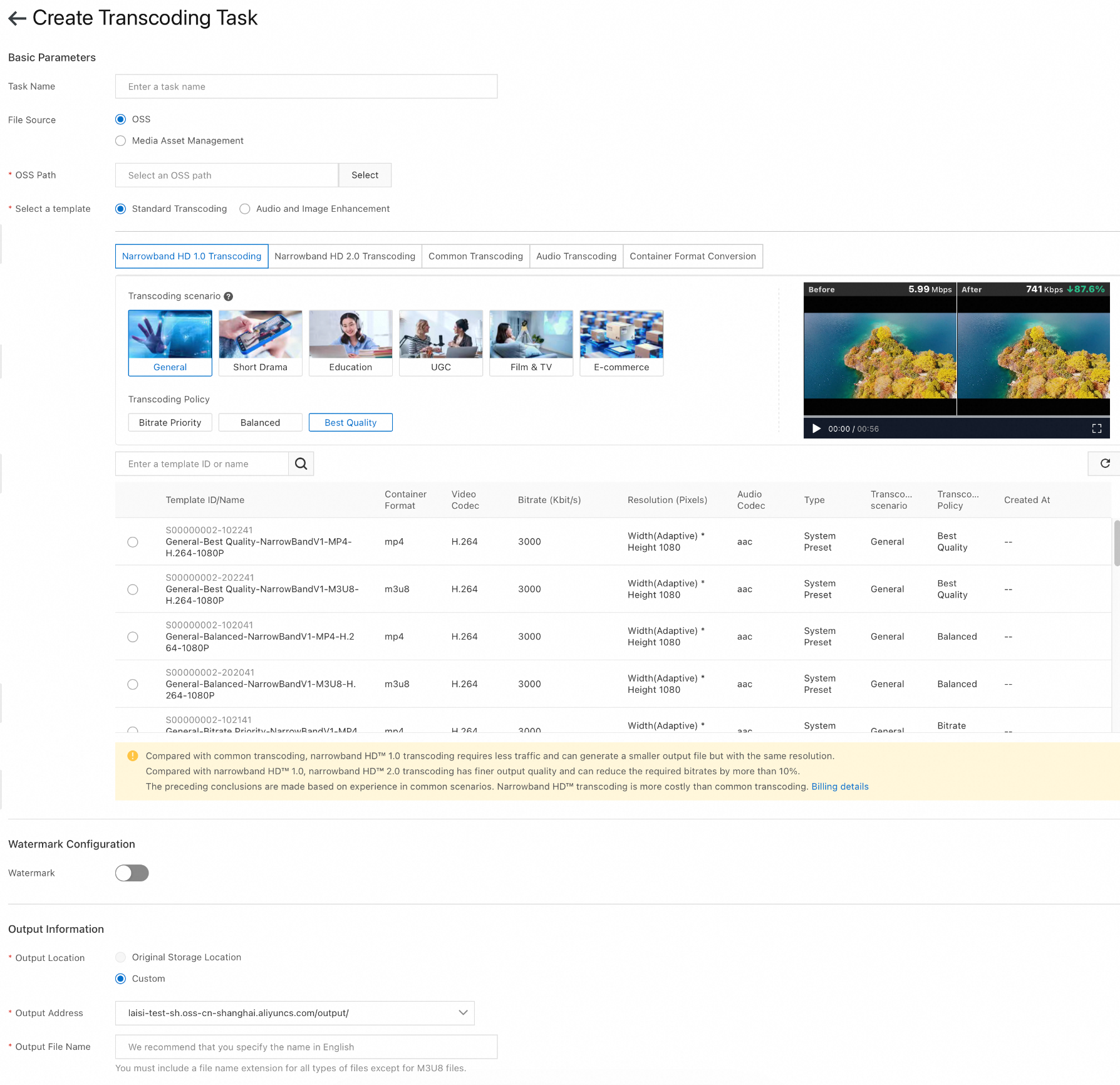
Basic Parameters
Parameter
Description
Task Name
Enter a name for the transcoding task.
File Source
Select the input source.
-
OSS: Select a file from Object Storage Service.
-
Media Asset Management: Select a media asset from the IMS media library.
OSS Path
If you select OSS as the file source, click Select to specify the path to the file.
Storage Address
If you select Media Asset Management as the file source, select a storage location from the drop-down list, then click Add File to select a media asset.
Select a template
Select a transcoding template from the list. Both system preset and custom templates are displayed.
You can filter templates by scenario, transcoding policy, and transcoding type (standard transcoding, Narrowband HD 1.0, Narrowband HD 2.0, audio transcoding, container format conversion, audio/video enhancement, and more)
Watermark Configuration
Parameter
Description
Watermark
Turn on this switch to add a watermark to the output file.
Watermark Template
Select a watermark type (image watermark or text watermark), then select a watermark template from the list.
If no template is available, click Create to create one. For detailed instructions, see Watermark template.
Output Information
Parameter
Description
Output Location
-
Original Storage Location: Save the output to the same location as the source file. This option is available only when the file source is Media Asset Management.
-
Custom: Specify a custom output location.
Output Address
If you select Custom for Output Location, select an output path from the drop-down list.
Output File Name
Enter a name for the output file. Include a file extension for all formats except M3U8.
-
-
Click Save to submit the transcoding task.
After you submit the task, you can view its progress on the Task Management page.
API
Call the SubmitMediaConvertJob operation to submit a transcoding task programmatically.
View task status
After you submit a transcoding task, you can monitor its progress and view results on the Task Management page. You can also configure callbacks or call an API operation.
Callbacks
You can configure callbacks to receive notifications when transcoding events occur. Use these notifications to trigger downstream workflows or update your application. The following callback events are available:
|
Event |
Description |
|
TranscodeComplete |
Triggered when an individual output within the task finishes processing. |
|
TranscodeParentComplete |
Triggered when the entire transcoding task finishes, including all outputs. |
To configure and handle callbacks, see Callback event overview.
API
Call the GetMediaConvertJob operation to query the status and details of a transcoding task.