Human detection
The human detection feature identifies all humans in an image and returns the bounding box and confidence level for each. It applies to security monitoring and people counting.
Scenarios
-
Security monitoring: Detect unauthorized individuals entering restricted or private areas. The system can automatically trigger alerts and notify security personnel.
-
People counting: Count people in shopping malls, public venues, or large events to analyze crowding and support crowd management and evacuation planning.
-
Accuracy may decrease in poor lighting, obstructed views, or high-density crowds.
-
Complex backgrounds or dynamic scenes may cause false positives where other objects are mistaken for humans.
Prerequisites
-
You have created an AccessKey pair. For more information, see Create an AccessKey pair.
-
You have activated OSS, created a bucket, and uploaded files to the bucket. For more information, see Upload files.
-
You have activated IMM. For more information, see Activate IMM.
-
You have created a project in the IMM console. For more information, see Create a project.
Note-
You can also call the CreateProject operation to create a project. For more information, see Create a project.
-
You can call the ListProjects operation to list all projects in a specified region.
-
Usage
Call the DetectImageBodies operation to detect humans in an image and retrieve each person's bounding box and confidence level.
Request parameters
|
Parameter |
Type |
Required |
Description |
|
ProjectName |
String |
Yes |
The IMM project name. |
|
SourceURI |
String |
Yes |
The OSS URI of the source image, in the format |
|
Sensitivity |
Float |
No |
Detection sensitivity. Valid values: 0 to 1. Default: 0.6. Higher values detect more details. |
All parameters are documented in the DetectImageBodies API reference.
Response fields
|
Field |
Type |
Description |
|
RequestId |
String |
The request ID. |
|
Bodies |
Array |
List of detected human bodies. |
|
Bodies[].Confidence |
Float |
Detection confidence, from 0 to 1. Higher values indicate greater certainty. |
|
Bodies[].Boundary |
Object |
Bounding box of the detected human, in pixel coordinates relative to the source image. |
|
Bodies[].Boundary.Left |
Integer |
X-coordinate of the bounding box top-left corner, in pixels from the left edge. |
|
Bodies[].Boundary.Top |
Integer |
Y-coordinate of the bounding box top-left corner, in pixels from the top edge. |
|
Bodies[].Boundary.Width |
Integer |
Width of the bounding box in pixels. |
|
Bodies[].Boundary.Height |
Integer |
Height of the bounding box in pixels. |
Example
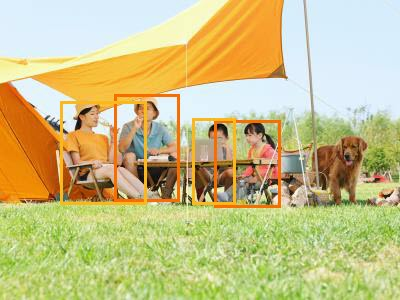
The following example uses the test image below.
-
IMM project: test-project
-
Image location: oss://test-bucket/test-object.jpg

Sample request
{
  "ProjectName": "test-project",
  "SourceURI": "oss://test-bucket/test-object.jpg",
  "Sensitivity": 1
}
Sample response
{
  "RequestId": "E9BDE106-1436-5077-9F6E-65D81DC6FEC8",
  "Bodies": [
    {
      "Confidence": 0.733,
      "Boundary": {
        "Left": 115,
        "Top": 97,
        "Height": 103,
        "Width": 63
      }
    },
    {
      "Confidence": 0.732,
      "Boundary": {
        "Left": 214,
        "Top": 121,
        "Height": 86,
        "Width": 63
      }
    },
    {
      "Confidence": 0.596,
      "Boundary": {
        "Left": 63,
        "Top": 102,
        "Height": 100,
        "Width": 82
      }
    },
    {
      "Confidence": 0.566,
      "Boundary": {
        "Left": 194,
        "Top": 123,
        "Height": 82,
        "Width": 40
      }
    }
  ]
}
Detection result
Four humans were detected. Each bounding box is marked in the following figure.
Sample code
The following example uses the IMM SDK for Python to detect humans in an image.
# -*- coding: utf-8 -*-
import os

from alibabacloud_imm20200930.client import Client as imm20200930Client
from alibabacloud_tea_openapi import models as open_api_models
from alibabacloud_imm20200930 import models as imm_20200930_models
from alibabacloud_tea_util import models as util_models
from alibabacloud_tea_util.client import Client as UtilClient


def create_client(access_key_id, access_key_secret):
    """Initialize the IMM client with your AccessKey pair."""
    config = open_api_models.Config(
        access_key_id=access_key_id,
        access_key_secret=access_key_secret
    )
    # Specify the IMM endpoint.
    config.endpoint = 'imm.cn-beijing.aliyuncs.com'
    return imm20200930Client(config)


def main():
    # The AccessKey pair of an Alibaba Cloud account has permissions on all API operations.
    # To prevent security risks, we recommend that you call API operations or perform
    # routine O&M as a Resource Access Management (RAM) user.
    # We recommend that you do not include your AccessKey pair (AccessKey ID and AccessKey
    # secret) in your project code. Otherwise, the AccessKey pair may be leaked and the
    # security of all resources within your account may be compromised.
    # In this example, the AccessKey pair is read from environment variables to implement
    # identity verification for API access. For more information about how to configure
    # environment variables, see https://www.alibabacloud.com/help/document_detail/2361894.html.
    access_key_id = os.getenv("AccessKeyId")
    access_key_secret = os.getenv("AccessKeySecret")
    client = create_client(access_key_id, access_key_secret)

    request = imm_20200930_models.DetectImageBodiesRequest(
        project_name='test-project',
        source_uri='oss://test-bucket/test-object.jpg',
        sensitivity=1
    )
    runtime = util_models.RuntimeOptions()

    try:
        response = client.detect_image_bodies_with_options(request, runtime)

        # Process the detection results
        for body in response.body.bodies:
            print(f"Confidence: {body.confidence:.3f}, "
                  f"Position: ({body.boundary.left}, {body.boundary.top}), "
                  f"Size: {body.boundary.width}x{body.boundary.height}")
    except Exception as error:
        # Print the error message if necessary.
        UtilClient.assert_as_string(error.message)


if __name__ == '__main__':
    main()
Billing
Human detection incurs costs on both the OSS and IMM sides.
-
OSS side: OSS Pricing.
API
Billing item
Description
GetObject
GET request
Billed by the number of successful requests.
Infrequent Access data retrieval
If the data uses the Infrequent Access storage class, retrieval fees apply based on the volume of retrieved data.
Real-time access of Archive objects
If the object uses Archive storage and the bucket has real-time access enabled, real-time access fees apply based on the retrieved data size.
Transfer acceleration
If transfer acceleration is enabled and you use an acceleration endpoint, transfer acceleration fees apply based on the data size.
HeadObject
GET request
Billed by the number of successful requests.
-
IMM side: IMM billing items.
ImportantStarting from 11:00 UTC+8 on July 28, 2025, the IMM human detection service will merge into the image detection service, and the free tier will switch to a paid model. IMM billing adjustment announcement.
API
Billing item
Description
DetectImageBodies
ImageDetect
Billed by the number of successful requests.