After completing the Android SDK integration process, follow this guide to integrate HTTPDNS with WebView.
1. Overview
WebView is an Android component for embedding web content. Using HTTPDNS when WebView loads pages improves network security and performance.
This topic covers applying HTTPDNS-resolved IP addresses to Android WebView network requests. The Android SDK integration process covers the HTTPDNS resolution basics.
2. Current technology and challenges
2.1 Network request limitations of Android WebView
Android WebView uses the system's Chromium-based browser kernel to load web pages. Its network request pipeline is separate from the application's network library, and DNS resolution uses the kernel's native process. Because many requests cannot be intercepted at the Java layer, integrating HTTPDNS is inherently challenging.
2.2 Evolution of technical solutions
As Android and WebView evolve, so do the approaches for integrating HTTPDNS.
Interception solution:
This solution intercepts resource requests in the shouldInterceptRequest() callback and re-issues them through an in-app network library (such as OkHttp) with HTTPDNS resolution, bypassing system DNS.
This method is simple to implement but only fully intercepts GET requests — POST and other methods are not supported because the request body is not exposed, limiting overall WebView traffic coverage.
Proxy solution (Recommended):
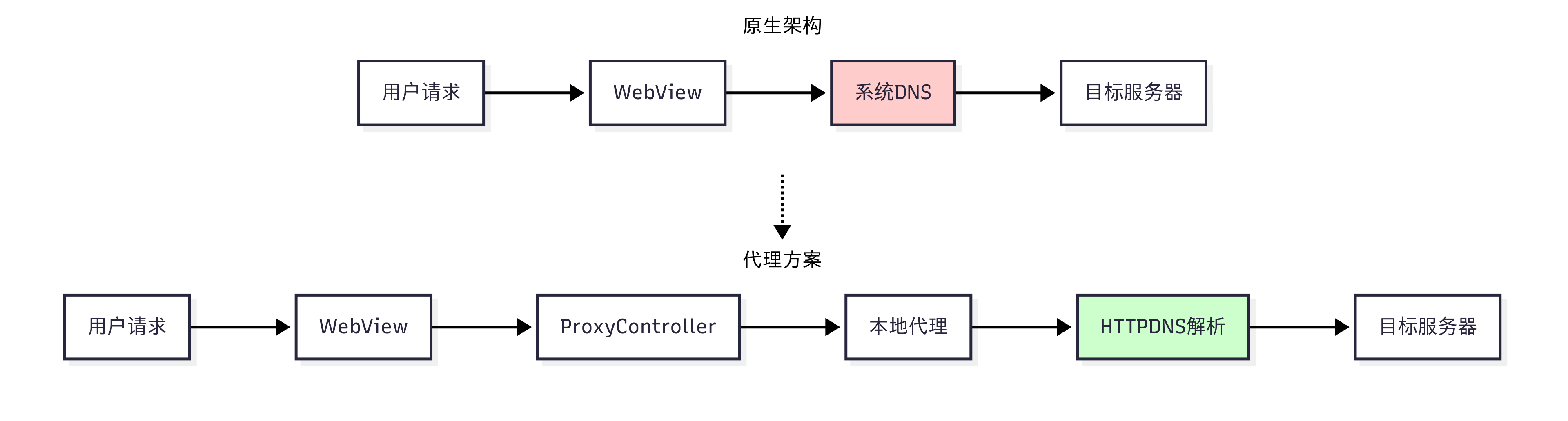
This solution starts a local proxy server and uses ProxyController from AndroidX WebKit to route all WebView HTTP, HTTPS, and WebSocket traffic through the application's network stack. This enables HTTPDNS resolution for all protocols and request methods, overcoming the coverage limitation of shouldInterceptRequest().
3. Local proxy solution (Recommended)
3.1 Solution overview
This solution starts a local HTTP proxy server that receives all WebView network requests via AndroidX WebKit's `ProxyController`. The proxy resolves domain names through HTTPDNS and forwards requests to the target server.
Workflow:
3.2 Dependencies
Add the following dependencies to your app/build.gradle file:
// Adjust the dependency versions as needed
dependencies {
    implementation 'androidx.webkit:webkit:1.7.0'
    implementation 'com.aliyun.ams:alicloud-android-httpdns:2.6.5'
    implementation 'io.github.littleproxy:littleproxy:2.4.4'
    implementation 'io.netty:netty-all:4.1.42.Final'
    implementation 'com.google.guava:guava:30.1.1-android'
    implementation 'org.slf4j:slf4j-android:1.7.30'
}
3.3 Integration steps
Integration involves three steps:
Step 1: Initialize HTTPDNS
Initialize the HTTPDNS service in your `Application` class:
public class WebviewProxyApplication extends Application {
    public static String accountId = "your_account_id";
    public static String secretKey = "your_secret_key"; // Optional
    @Override
    public void onCreate() {
        super.onCreate();
        initHttpDns();
    }

    private void initHttpDns() {
        try {
            InitConfig config = new InitConfig.Builder()
                .setContext(this)
                .setTimeout(5000)
                .setEnableCacheIp(true)
                .setEnableExpiredIp(true)
                .setSecretKey(secretKey) // Optional, for authentication
                .build();
            HttpDns.init(accountId, config);
            Log.i("HTTPDNS", "Initialization successful");
        } catch (Exception e) {
            Log.e("HTTPDNS", "Initialization failed", e);
        }
    }
}
Step 2: Start the LittleProxy proxy service
Create a `ProxyService` to manage the proxy server:
public class ProxyService extends Service {
    private HttpProxyServer proxyServer;
    private HttpDnsResolver httpDnsResolver;
    private boolean isRunning = false;

    public boolean startProxyServer() {
        if (isRunning) return true;

        try {
            // Create an HTTPDNS resolver
            httpDnsResolver = new HttpDnsResolver(this);

            // Start the LittleProxy server
            int port = generateRandomPort();
            proxyServer = DefaultHttpProxyServer.bootstrap()
                .withPort(port)
                .withAddress(new InetSocketAddress("127.0.0.1", port))
                .withServerResolver(httpDnsResolver) // Use the HTTPDNS resolver
                .withConnectTimeout(10000)
                .withIdleConnectionTimeout(30000)
                .start();

            isRunning = true;
            Log.i("Proxy", "Proxy server started successfully: 127.0.0.1:" + port);
            return true;
        } catch (Exception e) {
            Log.e("Proxy", "Failed to start proxy server", e);
            return false;
        }
    }

    public void stopProxyServer() {
        if (proxyServer != null) {
            proxyServer.stop();
            isRunning = false;
            Log.i("Proxy", "Proxy server stopped");
        }
    }

    public boolean isProxyRunning() {
        return isRunning;
    }
}

// HTTPDNS resolver implementation
class HttpDnsResolver implements HostResolver {
    private HttpDnsService httpDnsService;

    public HttpDnsResolver(Context context) {
        httpDnsService = HttpDns.getService(WebviewProxyApplication.accountId);
    }

    @Override
    public InetSocketAddress resolve(String host, int port) throws UnknownHostException {
        try {
            // Use HTTPDNS for resolution
            HTTPDNSResult result = httpDnsService.getHttpDnsResultForHostSyncNonBlocking(
                host, RequestIpType.auto);

            if (result != null && result.getIps() != null && result.getIps().length > 0) {
                String ip = result.getIps()[0];
                Log.d("DNS", "HTTPDNS resolution: " + host + " -> " + ip);
                return new InetSocketAddress(ip, port);
            }

            // Fall back to system DNS
            return new InetSocketAddress(InetAddress.getByName(host), port);
        } catch (Exception e) {
            Log.w("DNS", "Resolution failed, using system DNS: " + host);
            return new InetSocketAddress(InetAddress.getByName(host), port);
        }
    }
}
Step 3: Configure the WebView proxy
In your Activity, configure WebView to use the local proxy:
public class MainActivity extends AppCompatActivity {
    private WebView webView;
    private ProxyService proxyService;
    private boolean isProxyRunning = false;

    // Main thread Executor for ProxyController
    private final Executor mainExecutor = ContextCompat.getMainExecutor(this);

    private void configureWebViewProxy() {
        // Check if the system supports proxy configuration
        if (!WebViewFeature.isFeatureSupported(WebViewFeature.PROXY_OVERRIDE)) {
            Log.w("WebView", "Proxy configuration is not supported on the current system");
            return;
        }

        if (isProxyRunning) {
            String proxyAddress = proxyManager.getProxyAddress();

            // Configure WebView to use the local proxy
            ProxyConfig proxyConfig = new ProxyConfig.Builder()
                .addProxyRule(proxyAddress, ProxyConfig.MATCH_HTTP)
                .addProxyRule(proxyAddress, ProxyConfig.MATCH_HTTPS)
                .addDirect(ProxyConfig.MATCH_ALL_SCHEMES) // Connect directly for other protocols
                .build();

            ProxyController.getInstance().setProxyOverride(proxyConfig, mainExecutor, () -> {
                Log.i("WebView", "Proxy configured successfully");
            });
        } else {
            // Clear the proxy configuration
            ProxyController.getInstance().clearProxyOverride(mainExecutor, () -> {
                Log.i("WebView", "Proxy configuration cleared");
            });
        }
    }

    private void loadUrl(String url) {
        // Make sure the proxy configuration is applied before loading the URL
        configureWebViewProxy();
        webView.loadUrl(url);
    }
}
3.4 Reference implementation
A complete open-source implementation is available on GitHub: HTTPDNS WebView Demo.
Core components:
-
HttpDnsResolver: Implements LittleProxy's `HostResolver` interface for HTTPDNS resolution.
-
ProxyService: Manages the proxy server lifecycle as an Android Service.
-
ProxyManager: Manages the proxy status and service binding.
-
MainActivity: Handles UI interaction and WebView proxy configuration.
The solution includes a multilayer fallback mechanism: it skips `ProxyController` on unsupported system versions, falls back to system DNS if HTTPDNS resolution fails, and switches to another IP if the resolved one is unavailable.
4. Traditional interception solution
For older systems that do not support `ProxyController` (WebView < 72), use the traditional interception solution as a fallback.
4.1 Solution overview
This solution overrides WebViewClient.shouldInterceptRequest() to intercept WebView network requests and re-issues them through OkHttp with HTTPDNS.
Key features:
-
Supports GET request interception only.
-
Requires manual cookie handling.
-
Higher implementation complexity and maintenance cost.
-
Compatible with older WebView versions.
4.2 Detailed implementation
The interception solution involves many edge cases. The complete implementation is covered in Best practices for using HTTPDNS with OkHttp on Android.
5. Verification
After integration, verify the setup through hijacking simulation or fault injection testing. Detailed steps are in Verify the network library integration.
6. Solution comparison and summary
|
Dimension / Solution |
Proxy solution |
Interception solution |
|
Official support |
Official long-term API from Google in AndroidX WebKit. |
Public `WebViewClient` API, limited to GET requests. |
|
Effective versions |
Android 5.0+ WebView 72+ |
Android 5.0+ |
|
Protocol coverage |
HTTP, HTTPS, and WebSocket |
HTTP/HTTPS GET requests only |
|
Implementation complexity |
Medium: Local proxy, port management, and bidirectional forwarding. |
Medium: OkHttp integration, request reconstruction, and DNS resolution. |
|
Intrusiveness to business code |
Low: Proxy configuration only. |
Low: `WebViewClient` replacement only. |
|
Cookies, cache, and CORS |
Transparent at the proxy layer. No extra handling needed. |
Manual cookie handling required. |
|
Maintenance cost |
Low: Official API with minimal upgrade risk. |
Low: Stable `WebViewClient` API. |
|
Failure backoff strategy |
Built-in: Falls back to system network on proxy failure. |
Developer-implemented. |
|
Recommended scenarios |
Apps requiring full protocol support. |
Quick integration for GET-only scenarios. |
Given its full protocol support, transparent integration, built-in fallback mechanism, and low maintenance cost, the local proxy solution is highly recommended.
Choose an integration strategy based on your requirements, and test thoroughly to ensure HTTPDNS does not negatively affect the user experience.