This topic describes how to write data from Simple Log Service (SLS) to Hologres in real time, using Flink and DataWorks data integration as examples.
Prerequisites
-
Activate Simple Log Service (SLS) and create a project and a Logstore. For more information, see Use Logtail to collect and analyze text logs from an ECS instance.
-
Activate Hologres and connect to a development tool. For more information, see Hologres usage process.
-
If you want to use Flink to write SLS data to Hologres, activate Realtime Compute for Apache Flink and create a project. For more information, see Activate fully managed Flink and Create and manage projects.
-
If you want to use DataWorks data integration to write SLS data to Hologres, activate DataWorks and create a workspace. For more information, see Activate DataWorks and Create a workspace.
Background information
SLS is a cloud-native observability platform that provides a large-scale, low-cost, and real-time service for handling data such as logs, metrics, and traces. It offers one-stop capabilities for data collection, processing, query and analysis, visualization, alerting, consumption, and delivery, enhancing your digital capabilities in scenarios such as R&D, O&M, operations, and security.
Hologres is a high-performance, reliable, low-cost, and scalable real-time computing engine that delivers a real-time data warehouse solution and sub-second interactive search services for massive datasets. It is widely used in scenarios such as building real-time data mid-ends, fine-grained analysis, self-service analysis, marketing profiles, audience segmentation, and real-time risk control. You can quickly write SLS data to Hologres for real-time analysis and queries, which improves your ability to explore business data.
Write SLS data to Hologres using Flink
-
Prepare SLS data.
The SLS data in this example comes from simulated data on the SLS platform, which simulates game logon and consumption logs. If you have business data, use it directly.
-
Log on to the Simple Log Service console.
-
In the Data Ingestion section, click Simulate Data.
-
On the Simulate Data tab, click Simulate under Game Operation Logs.
-
On the Select Log Space page, select a Project and a Logstore, and then click Next.
-
On the Simulate Data page, set the scope and frequency, and then click Start Import.
-
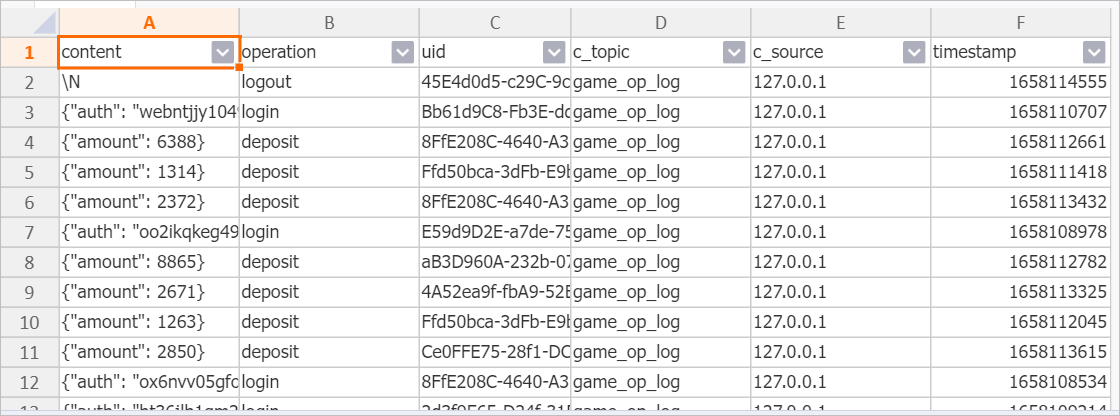
The fields and data generated by the simulation are shown below. For more information, see Quick start for query and analysis.
The
contentcolumn is of the JSON type.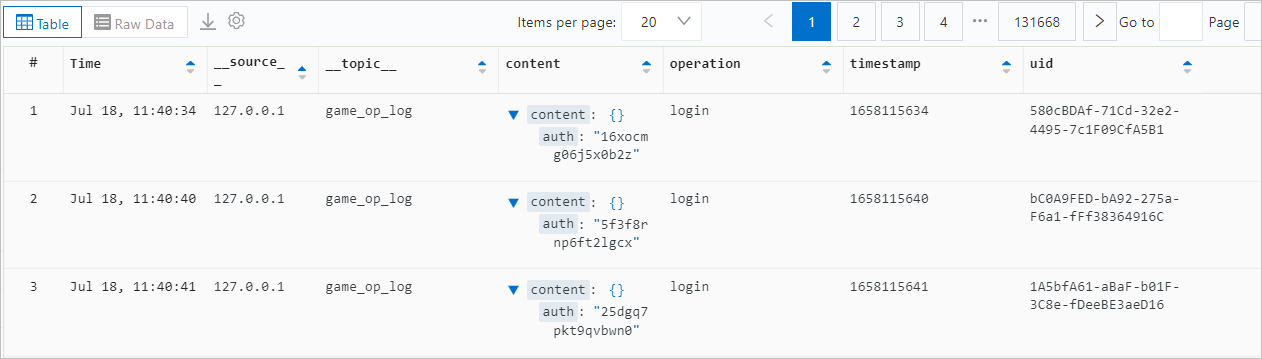
-
-
Create a Hologres table.
Create a table in Hologres to receive the data. You can create indexes for specific fields based on your query needs to improve query efficiency. For more information about indexes, see Create a table. The Data Definition Language (DDL) statement for this example is as follows.
CREATE TABLE sls_flink_holo ( content JSONB , operation TEXT, uid TEXT, topic TEXT , source TEXT , c__timestamp TIMESTAMPTZ, receive_time BIGINT, PRIMARY KEY (uid) ); -
Write data using Flink.
To write SLS data to Hologres using Flink, see the following documents:
-
Read SLS data in Flink: SLS source table.
-
Write data to Hologres in Flink: Hologres sink table.
The following SQL job is an example of writing SLS data to Hologres using Flink. The JSON field is written directly to a JSON field in Hologres. Because Flink does not support a native JSON type, the VARCHAR type is used as a substitute.
Note-
For detailed steps on how to develop and run SQL jobs in Flink, see Job development map and Start a job.
-
SLS contains JSON data. You can parse the JSON data in Flink before writing it, or write the JSON data directly to Hologres, depending on your needs.
CREATE TEMPORARY TABLE sls_input ( content STRING, operation STRING, uid STRING, `__topic__` STRING METADATA VIRTUAL, `__source__` STRING METADATA VIRTUAL, `__timestamp__` BIGINT METADATA VIRTUAL, `__tag__` MAP<VARCHAR, VARCHAR> METADATA VIRTUAL ) WITH ( 'connector' = 'sls', 'endpoint' = 'sls_private_endpoint',--The private endpoint of SLS. 'accessid' = 'your_access_id',--Your AccessKey ID. 'accesskey' = 'your_access_key',--Your AccessKey secret. 'starttime' = '2024-08-30 00:00:00',--The start time to consume logs. 'project' = 'your_project_name',--The name of the SLS project. 'logstore' = 'your_logstore_name'--The name of the Logstore. ); CREATE TEMPORARY TABLE hologres_sink ( content VARCHAR, operation VARCHAR, uid VARCHAR, topic STRING , source STRING , c__timestamp TIMESTAMP , receive_time BIGINT ) WITH ( 'connector' = 'hologres', 'dbname' = 'your_holo_db_name', --The name of the Hologres database. 'tablename' = 'your_holo_table_name', --The name of the Hologres table that receives data. 'username' = 'your_access_id', --The AccessKey ID of your Alibaba Cloud account. 'password' = 'your_access_key', --The AccessKey secret of your Alibaba Cloud account. 'endpoint' = 'your_holo_vpc_endpoint' --The VPC endpoint of the Hologres instance. ); INSERT INTO hologres_sink SELECT content, operation, uid, `__topic__` , `__source__` , CAST ( FROM_UNIXTIME (`__timestamp__`) AS TIMESTAMP ), CAST (__tag__['__receive_time__'] AS BIGINT) AS receive_time FROM sls_input; -
-
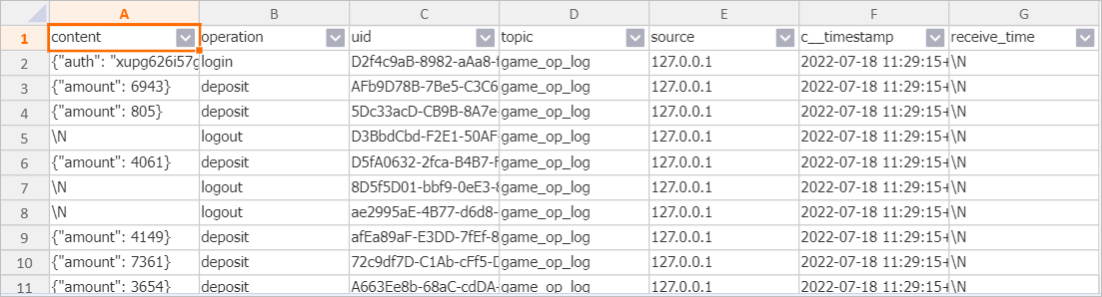
Query the data.
Query the SLS data that was written to Hologres using Flink. You can then perform data development as needed.
Write SLS data to Hologres using DataWorks data integration
-
Prepare SLS data.
The SLS data in this example comes from simulated data on the SLS platform, which simulates game logon and consumption logs. If you have business data, use it directly.
-
Log on to the Simple Log Service console.
-
In the Data Ingestion section, click Simulate Data.
-
On the Simulate Data tab, click Simulate under Game Operation Logs.
-
On the Select Log Space page, select a Project and a Logstore, and then click Next.
-
On the Simulate Data page, set the scope and frequency, and then click Start Import.
-
The fields and data generated by the simulation are shown below. For more information, see Quick start for query and analysis.
The
contentcolumn is of the JSON type.
-
-
Create a Hologres table.
Create a table in Hologres to receive the data. Create indexes for specific fields based on your query needs to improve query efficiency. For more information about indexes, see Create a table. The DDL statement for this example is as follows.
Note-
In this example,
uidis set as the primary key to ensure data uniqueness. You can change this setting as needed. -
Set
uidas the distribution key. This ensures that data with the sameuidis written to the same shard, improving query performance.
BEGIN; CREATE TABLE sls_dw_holo ( content JSONB , operation TEXT, uid TEXT, C_Topic TEXT , C_Source TEXT , timestamp BIGINT, PRIMARY KEY (uid) ); CALL set_table_property('sls_dw_holo', 'distribution_key', 'uid'); CALL set_table_property('sls_dw_holo', 'event_time_column', 'timestamp'); COMMIT; -
-
Configure data sources.
Before you synchronize data, add data sources for data integration to your DataWorks workspace.
-
For the SLS data source, use a Loghub data source. For more information, see Configure a LogHub (SLS) data source.
-
Configure a Hologres data source. For more information, see Configure a Hologres data source.
-
-
Synchronize data in real time.
Create and run a real-time sync task in data integration. For more information, see Configure a real-time synchronization task for incremental data in a single table and O&M for real-time sync tasks.
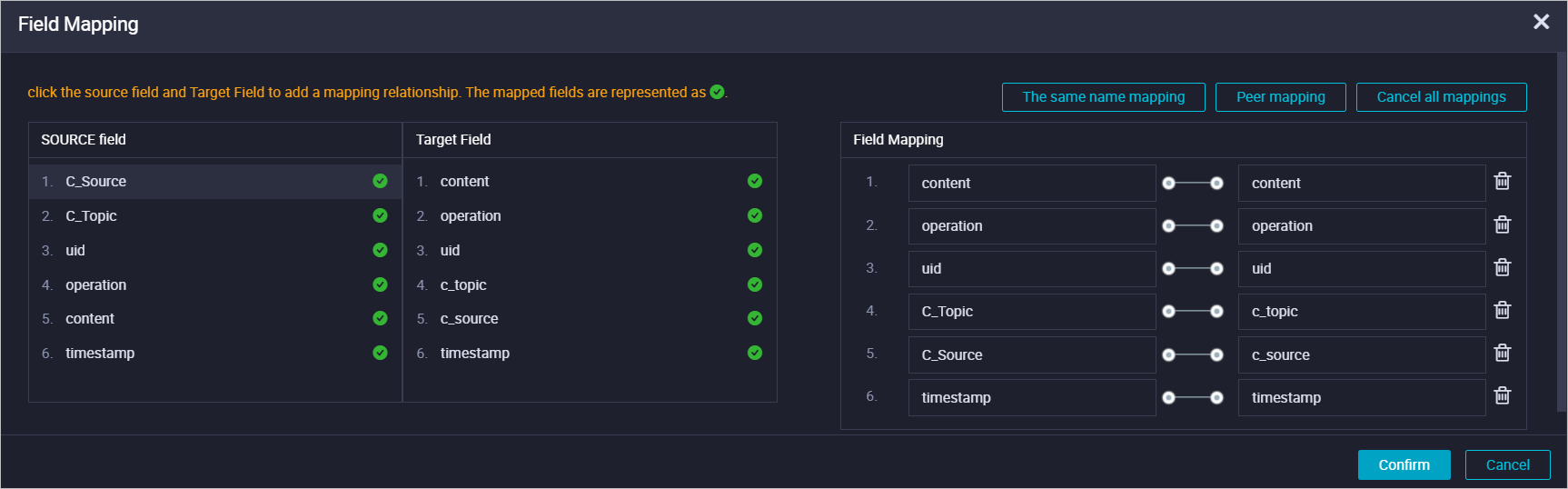
In the real-time sync task created for this example, the input is set to the Loghub data source and the output is set to the Hologres data source. The field mapping for synchronization is configured as shown in the following figure.
-
Query the data.
After the real-time sync task starts, you can query the SLS data that was written to Hologres using DataWorks data integration.