Hologres V2.0.21 and later supports the Rebalance function, which triggers a shard rebalancing operation. This topic describes how to use the Rebalance function to rebalance shards.
Background information
Normally, Hologres worker nodes load shards evenly. However, in some scenarios, such as after a fast recovery, shards can become unevenly distributed across worker nodes. In this case, you need to trigger a shard rebalancing operation to redistribute the shards. This ensures that all worker nodes in the instance load shards evenly.
Limitations
The Rebalance function is supported only in Hologres V2.0.21 and later. If your instance runs a version earlier than V2.0.21, use Upgrade an instance or join the Hologres chat group to request an instance upgrade. For more information, see How do I get more online support?.
Command syntax
General-purpose and secondary instances
On general-purpose or secondary instances, the Rebalance function redistributes shards among worker nodes. The syntax is as follows:
SELECT hg_rebalance_instance();-
Return values:
-
true: The shard rebalancing operation was triggered successfully. -
false: Indicates that shard rebalancing is not required. -
Error: The shard rebalancing operation failed to trigger, for example, due to a faulty pod.
-
-
A balanced state is one where the number of shards on each worker node differs by one at most. For example:
-
If an instance has two worker nodes and two shards, each worker node is assigned one shard.
-
If an instance has two worker nodes and three shards, one worker node is assigned one shard, and the other is assigned two shards.
-
-
A shard rebalancing operation typically takes 2 to 3 minutes. The actual duration depends on the number of table groups in the instance. The more table groups, the longer the rebalancing takes. Write operations are interrupted for approximately 15 seconds during this process.
-
Because shard rebalancing is an asynchronous operation, you can run the following SQL statement to check its progress.
SELECT hg_get_rebalance_instance_status();Return values:
-
DOING: The shard rebalancing operation is in progress. -
DONE: The shard rebalancing operation is complete.
Virtual warehouse instances
Unlike general-purpose and secondary instances, a virtual warehouse instance can split compute resources into multiple virtual warehouses. Therefore, to rebalance shards for a virtual warehouse instance, you must rebalance each virtual warehouse separately. For more information, see Rebalance shards in a virtual warehouse.
FAQ
Identifying unbalanced shard distribution
When you run a query, the load should be evenly distributed across all worker nodes. If a worker node is not assigned any shards, its load will be significantly lower than that of other worker nodes.
-
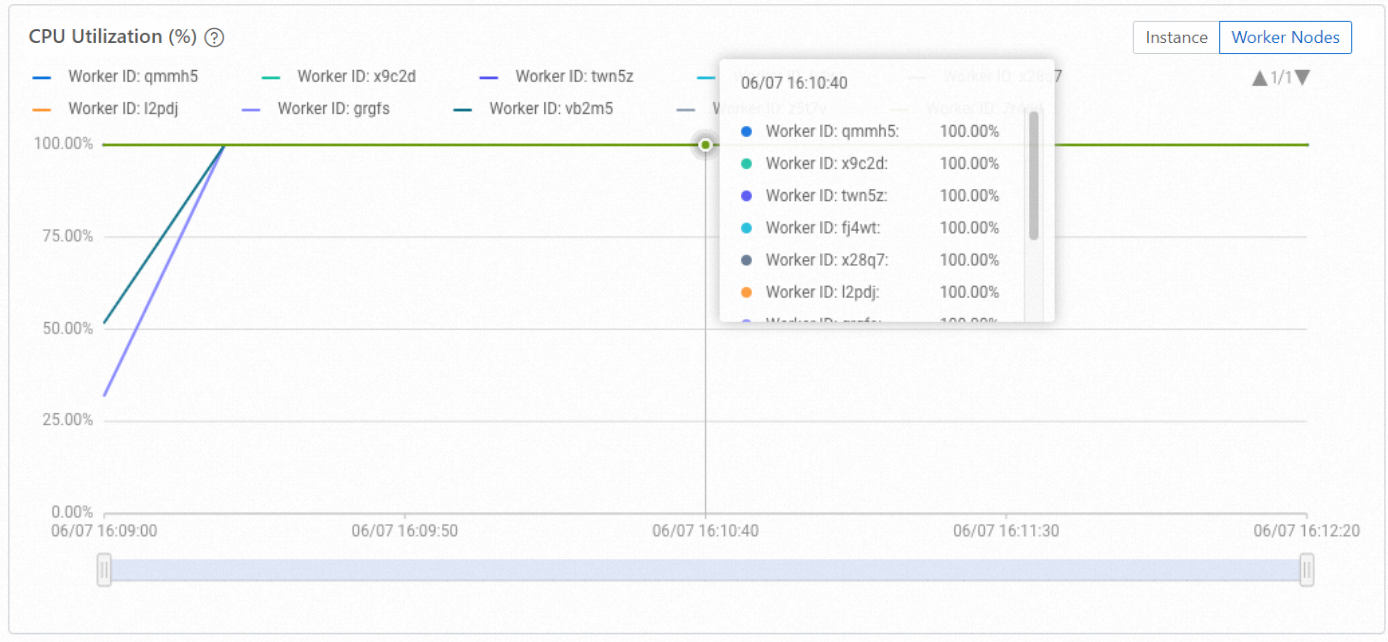
Example of balanced shard distribution: The following figure shows an instance with 10 worker nodes. When query and write operations are performed, the monitoring dashboard shows that the CPU utilization is similar across all 10 worker nodes.
-
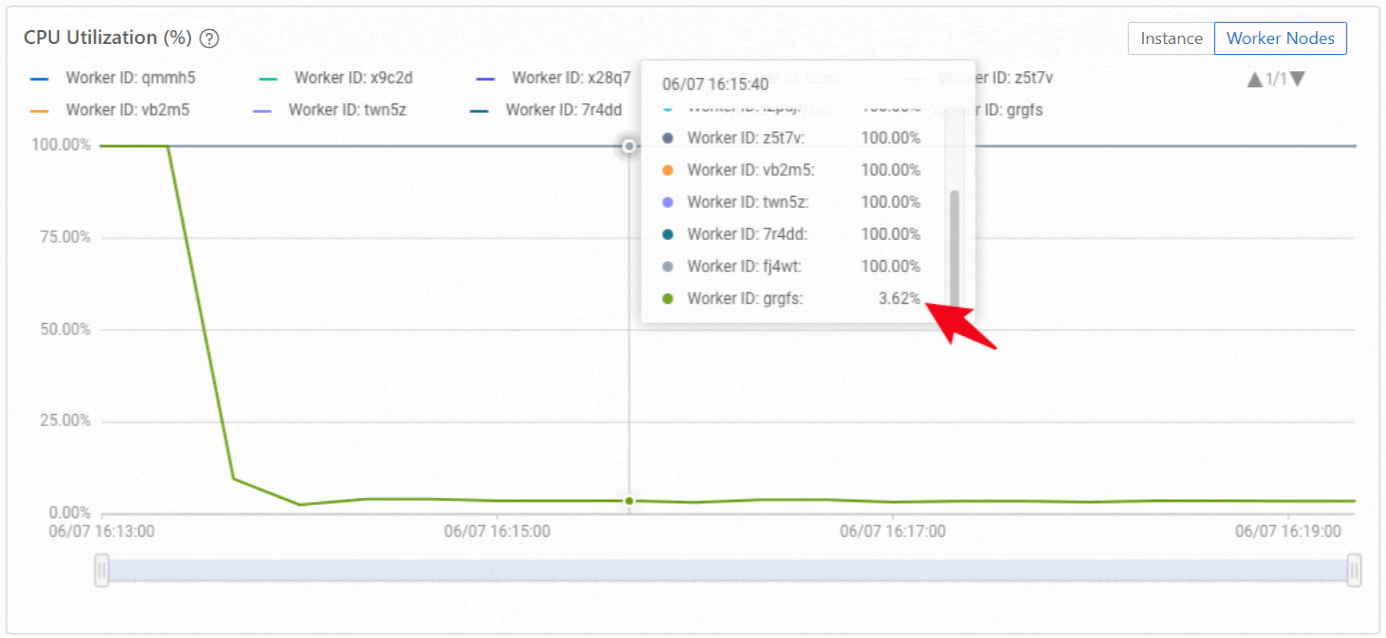
Example of unbalanced shard distribution: If a worker node has no shards, the monitoring dashboard will display a pattern similar to the one in the following figure, where one worker node has a much lower load than the others.
Run the following SQL statement to check which worker nodes have loaded shards:
SELECT DISTINCT worker_id FROM hologres.hg_worker_info;-
Result analysis: The results show that only nine worker nodes have loaded shards, leaving one with none.
-
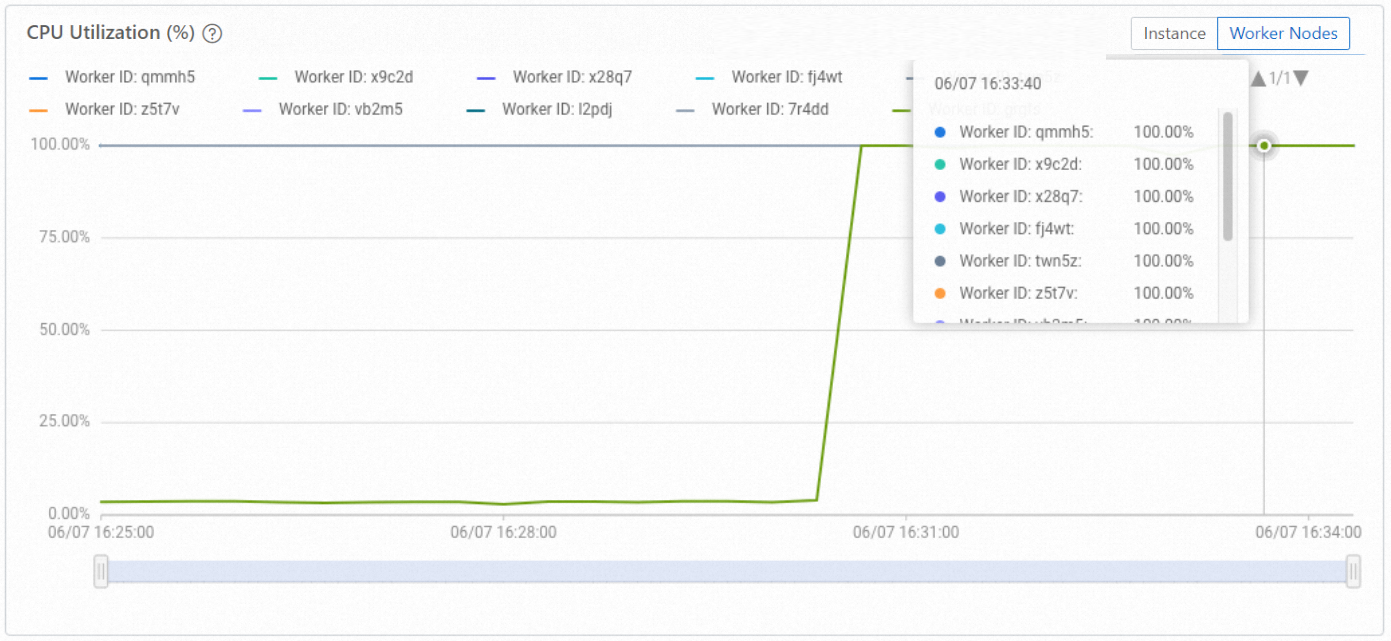
Action: Trigger shard rebalancing. After the operation completes, the monitoring dashboard shows that the CPU utilization of the previously underutilized worker node increases to a level comparable to the others.
-
Run the query again to check which worker nodes have loaded shards. The results will show that all 10 worker nodes have loaded shards. The query returns the worker_id column with 10 worker ID values (for example,
grgfs,fj4wt, andtwn5z).
-