This topic describes how to use shard-level replication in Hologres.
How it works
Starting from Hologres V1.1, you can improve the query concurrency and availability of a table group by setting its replica count. You can enable replication by specifying the replica count when you create a table group or by modifying the replica count of an existing one. The added replicas are in-memory copies and do not incur storage costs.
Details about the replica count:
-
Data is distributed across shards. Each shard manages a subset of the data. Together, all shards form a complete dataset.
-
By default, each shard has only one replica, that is,
replica_count = 1. This replica is the leader shard. You can increase the replica count to create multiple replicas for the same data. These additional replicas are follower shards. -
Write requests are handled by the leader shard. Read requests are balanced among all replicas, including the leader and follower shards. When you query a follower shard, you may experience a data latency of 10 ms to 20 ms.
-
Due to an anti-affinity policy that prevents multiple replicas of the same shard from being deployed on the same worker node, the
replica_countvalue must not exceed the number of worker nodes. In Hologres V1.3.53 and later, an error is reported if this limit is exceeded. For the number of worker nodes for different instance specifications, see Instance management. -
To ensure a balanced computing load across worker nodes, when you increase the replica count, you should decrease the shard count. Optimal performance is achieved when
shard_count * replica_count = recommended shard count for the instance. -
Hologres supports high availability (HA) for queries since V1.3.45.
-
If your instance monitoring page shows the following:
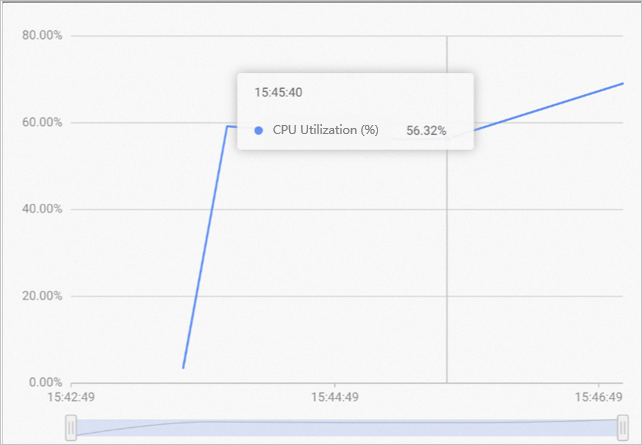
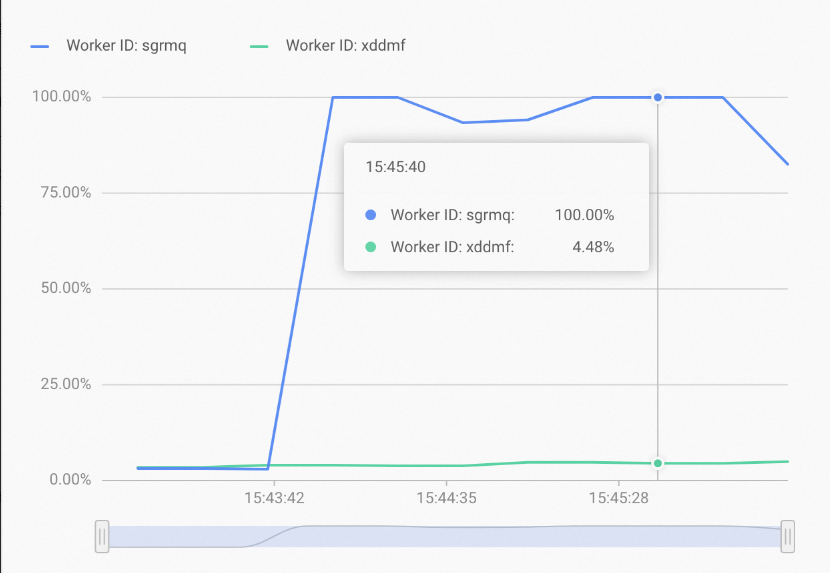
The overall resource utilization of the instance is not high, but a few worker nodes show high resource usage while others have low usage. This may be caused by uneven query distribution, where most queries are answered by only a few shards. In this case, you can increase the replica count to distribute replicas across more workers. This strategy can effectively improve resource utilization and queries per second (QPS).
Note-
Synchronizing metadata between leader shards and follower shards consumes resources. The more replicas you have, the more resources are consumed. Therefore, we do not recommend using this method to increase QPS unless you have confirmed that uneven resource usage is caused by uneven query distribution.
-
In addition, there is a millisecond-level data latency between leader shards and follower shards.
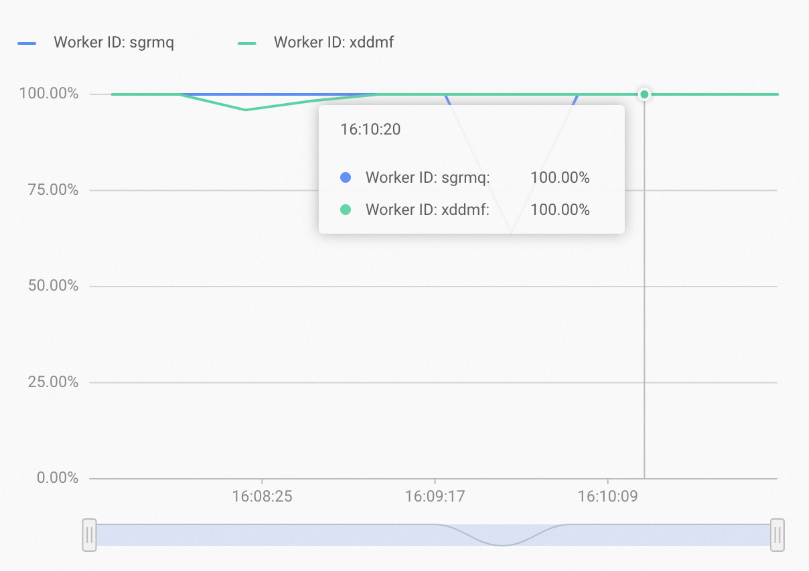
After you increase the replica count, the resources of each worker are more evenly utilized under the same query conditions, as shown in the following figure.
-
Limitations
-
Shard-level replication is supported only in Hologres V1.1 and later.
NoteYou can check your current instance version on the instance details page in the Hologres console. If your instance is earlier than V0.10, see Instance upgrades for upgrade instructions or join the Hologres DingTalk group for support. For more information, see How to get online support?.
-
The
replica_countmust be less than or equal to the number of worker nodes. You can view the number of worker nodes for your instance on the instance details page in the Hologres console.
Manage shard replication
-
Query table groups in the current database
Use the following statement to view the table groups in the current database:
select * from hologres.hg_table_group_properties ; -
Query the replica count of an existing table group
-
Example
select property_value from hologres.hg_table_group_properties where tablegroup_name = 'table_group_name' and property_key = 'replica_count'; -
Parameters
Parameter
Description
table_group_name
The name of the target table group.
replica_count
This is a fixed parameter name and should not be modified.
-
-
Enable replication
-
Example
Use the following statement to adjust the replica count of a table group:
-- Adjust the replica count of a table group. call hg_set_table_group_property ('<table_group_name>', 'replica_count', '<replica_count>'); -
Parameters
Parameter
Description
hg_set_table_group_property
Modifies the
replica_countof a table group.-
table_group_name: The name of the table group that you want to modify. -
replica_count: The desired number of replicas for the table group. The value must not exceed the number of worker nodes. A typical value is 2. -
The default is 1 (replication disabled). A value greater than 1 enables replication.
-
-
-
Disable replication
-
Example
-- Modify replica_count to disable replication. call hg_set_table_group_property ('table_group_name', 'replica_count', '1'); -
Parameters
Parameter
Description
hg_set_table_group_property
Modifies the
replica_countof a table group.-
table_group_name: The name of the table group that you want to modify. -
replica_count: The desired number of replicas for the table group. -
The default is 1 (replication disabled). A value greater than 1 enables replication.
-
-
-
Check the loading status
After you set multiple replicas, you can run the following SQL statement to view the shard loading status on each worker:
SELECT * FROM hologres.hg_worker_info;NoteThe
worker_idcolumn may be empty before a worker finishes loading shard metadata.The query result includes the
worker_id,table_group_name, andshard_idcolumns. In addition toolap_replica_2, the result also contains shard distribution information for other table groups likeolap_replica_2_tg_inte.For the
olap_replica_2table group, which has two shards withshard_idvalues of 0 and 1, a copy of the data for each shard exists on both the7tn8kand9c8slworkers.
Query routing for high availability and throughput
Behavior
-
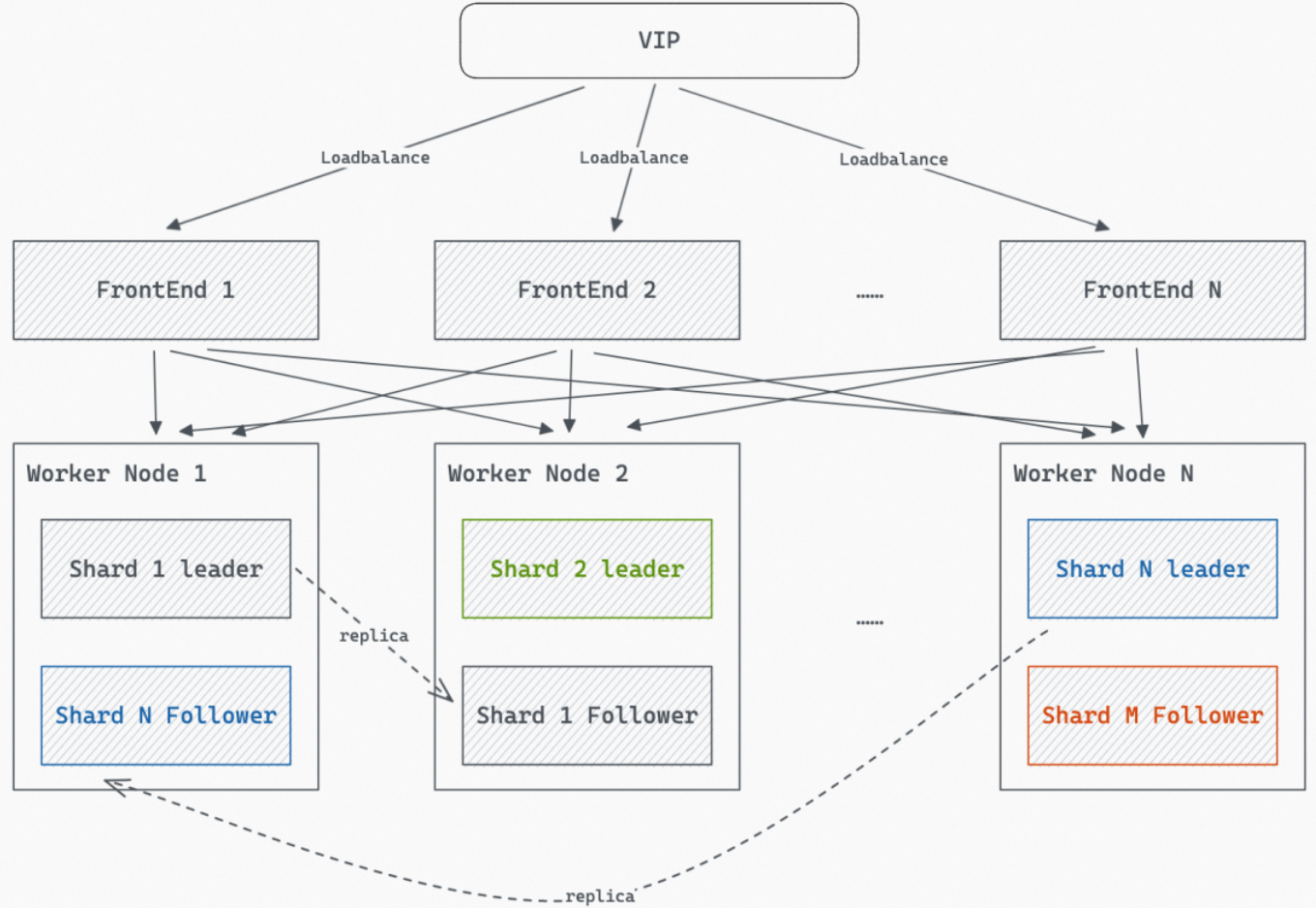
When multiple shard replicas are configured, the replicas of a shard are loaded onto multiple workers, as shown in the following figure. Queries are then randomly routed to a shard replica on one of the workers for processing.
-
For point query (fixed-plan query) scenarios, a retry mechanism is in place to ensure that results are returned whenever possible. If a query does not return a result within a certain period, it is retried on a replica on another worker.
Parameters
-
hg_experimental_query_replica_mode: Specifies the shard policy for answering queries.Use case
Default
Type
Valid values
Example
All queries
leader_follower
TEXT
-
leader_follower(default): Indicates that both leader shards and follower shards are used proportionally to respond to queries. -
leader_only: Indicates that only the leader shard is used to respond to queries. With this setting, you cannot scale out throughput or achieve high availability, even ifreplicas > 1. -
follower_only: Specifies that only follower shards are used to answer queries, and requiresreplicas > 3to ensure that there aretwo or more follower shardsfor increased throughput and high availability.
-- Session-level setting SET hg_experimental_query_replica_mode = leader_follower; -- Database-level setting ALTER DATABASE <database_name> SET hg_experimental_query_replica_mode = leader_follower; -
-
hg_experimental_query_replica_leader_weight: Specifies the weight for the leader shard that answers queries.Use case
Default
Type
Valid values
Example
All queries
100
INT
-
Maximum: 10000
-
Minimum: 1
-
Default: 100
-- Session-level setting
SET hg_experimental_query_replica_leader_weight = 100;

-- Database-level setting
ALTER DATABASE <database_name>
SET hg_experimental_query_replica_leader_weight = 100;
When the
replica_countof a table's Table Group is greater than 1 and the query is an OLAP point query, Leader Shards and Follower Shards answer the query in a specific ratio based on thehg_experimental_query_replica_modeandhg_experimental_query_replica_leader_weightsettings. This occurs in the following scenarios:-
Scenario 1: If a table's table group has a
replica_countgreater than 1 andhg_experimental_query_replica_mode=leader_follower, the system routes queries to the leader shard and follower shards. The routing is based on a weighting system. The weight for the leader shard is defined by thehg_experimental_query_replica_leader_weightparameter, which defaults to 100. By default, the weight for each follower shard is also 100. For example, ifreplica_count=4, each shard has one leader shard and three follower shards. The probability of a query being routed to any one of them is25%. -
Scenario 2: When a table's table group has
replica_count>1andhg_experimental_query_replica_mode=leader_only, the system uses only the leader shard to answer queries, regardless of thereplica_countvalue. -
Scenario 3: When the table group corresponding to a table has
replica_count>1andhg_experimental_query_replica_mode='follower_only', the system uses only follower shards to answer queries. By default, the weight for each follower shard to answer a query is 100. For example, ifreplica_count=4, there is one leader shard and three follower shards. In this case, only the three follower shards are used to answer queries, and the probability of hitting each follower shard is one-third.
-
-
hg_experimental_query_replica_fixed_plan_ha_mode: Specifies the high-availability mode for point query (fixed-plan query) scenarios.Use case
Default
Type
Valid values
Example
Point query (fixed-plan query)
any
TEXT
-
any(Default): Randomly distributes queries to shard replicas based on the shard scope defined byhg_experimental_query_replica_modeand the weight defined byhg_experimental_query_replica_leader_weight. -
leader_first: The default value. This setting takes effect only whenhg_experimental_query_replica_modeis set toleader_follower. It prioritizes sending queries to the leader shard and falls back to a follower shard only if the leader shard is unavailable, such as due to a timeout. -
off: The query is performed only once without any retries.
-- Session-level setting SET hg_experimental_query_replica_fixed_plan_ha_mode = any; -- Database-level setting ALTER DATABASE <database_name> SET hg_experimental_query_replica_fixed_plan_ha_mode = any; -
-
hg_experimental_query_replica_fixed_plan_first_query_timeout_ms: Specifies the timeout for the initial query in high-availability mode for point queries (fixed-plan queries). If a timeout occurs, the query is sent to another available Shard for a retry. For example,hg_experimental_query_replica_fixed_plan_first_query_timeout_ms=60indicates that if a query does not return a result within 60 ms, the system retries the query on another Worker.Use case
Default
Type
Valid values
Example
All queries
60
INT
-
Maximum: 10000
-
Minimum: 0
-
Default: 60
-- Session-level setting SET hg_experimental_query_replica_fixed_plan_first_query_timeout_ms = 60; -- Database-level setting ALTER DATABASE <database_name> SET hg_experimental_query_replica_fixed_plan_first_query_timeout_ms = 60; -
Use cases
Use case 1: High throughput with multiple replicas
-
Scenario: You observe from monitoring that the overall resource utilization of your instance is not high, but a few worker nodes have high resource usage while others are underutilized. This is likely due to uneven query distribution, where most queries are processed by a few shards. In this case, you can increase the number of shard replicas to place replicas on more workers, which effectively improves resource utilization and QPS.
-
Procedure:
-
Increase the replica count:
For example, if you have a table group named
tg_replicain your database, you can use the following SQL statement to set its replica count to 2.-- Set the replica count of the 'tg_replica' table group to 2. call hg_set_table_group_property ('tg_replica', 'replica_count', '2');The system uses the following default configuration:
-
hg_experimental_query_replica_mode=leader_follower -
hg_experimental_query_replica_leader_weight=100
After you increase the replica count, the system randomly distributes queries to the worker nodes hosting the leader shard and follower shards. This resolves the issue where QPS cannot be increased due to query hotspots.
-
-
Check whether workers have loaded shards:
Use the following command to check if the shards are loaded on the workers:
SELECT * FROM hologres.hg_worker_info WHERE table_group_name = 'tg_replica';The result includes the
worker_id,table_group_name, andshard_idcolumns.The configuration is successful if the output shows the same shard_id loaded on multiple worker_ids.
-
Use case 2: High availability with multiple replicas
-
Scenario: Prevent query failures caused by a single-shard failover.
-
Procedure:
-
Increase the replica count:
For example, if you have a table group named
tg_replicain your database, you can use the following SQL statement to set its replica count to 2.-- Set the replica count of the 'tg_replica' table group to 2. call hg_set_table_group_property ('tg_replica', 'replica_count', '2');The system uses the following default configuration:
-
hg_experimental_query_replica_mode=leader_follower -
hg_experimental_query_replica_fixed_plan_ha_mode=any -
hg_experimental_query_replica_fixed_plan_first_query_timeout_ms=60
After you increase the replica count:
-
For OLAP scenarios, the system randomly distributes queries to the worker nodes of the leader and follower shards. The Master process periodically checks the availability of each shard and automatically removes unavailable shards from the query candidate list. Once a shard becomes available again, it is added back to the list. It takes 5 seconds to detect an unavailable shard and 10 seconds to remove the corresponding worker from the frontend (FE). Therefore, query failures may occur for up to 15 seconds during this detection and recovery process. Queries resume normally afterward.
-
For fixed-plan query scenarios, the retry mechanism prevents query failures during a worker failover, though response time may increase.
-
For some fixed-plan query scenarios that are sensitive to read-after-write consistency and cannot tolerate the latency between the leader shard and a follower shard, you can set the
hg_experimental_query_replica_fixed_plan_ha_modeparameter toleader_first. This means that for fixed-plan queries, the leader shard is always used to answer the query first. If the query to the leader shard times out, a follower shard is then used to answer the query.NoteIn this case, the fixed-plan scenario cannot resolve QPS bottlenecks caused by query hotspots.
-
-
Check whether workers have loaded shards:
Use the following command to check if the shards are loaded on the workers:
SELECT * FROM hologres.hg_worker_info WHERE table_group_name = 'tg_replica';If the same shard is loaded by multiple workers, the configuration is successful.
-
Troubleshooting
-
Problem: After configuring parameters as described in Use case 1, queries are not distributed to follower shards. The worker load shown in the Hologres console remains as high as it was before you configured multiple replicas.
-
In Hologres versions earlier than V1.3, the
hg_experimental_enable_read_replicaGUC parameter is used to control whether follower shards can participate in queries, and this parameter is disabled by default. You can use the following SQL statement to check whether this parameter is enabled. If the returned value is on, the parameter is enabled. If the returned value is off, the parameter is disabled.SHOW hg_experimental_enable_read_replica; -
To resolve this issue, if
hg_experimental_enable_read_replicais disabled, you can use the following SQL statement to enable it at the database level.ALTER DATABASE <database_name> SET hg_experimental_enable_read_replica = on;Replace database_name with the name of your database.