The vector processing feature in Hologres is ideal for similarity searches, image retrieval, and scene recognition. You can use this feature to enhance data processing and analysis, enabling more accurate search and recommendation capabilities. This topic describes how to use Proxima for vector processing in Hologres and provides a complete example.
Procedure
-
Connect to a Hologres instance.
Use a development tool to connect to a Hologres instance. For more information, see Connect to a development tool. If you connect by using JDBC, use the
PreparedStatementmode. -
Install the Proxima extension.
Proxima connects to Hologres as an extension. Before you use Proxima, a superuser must run the following command to install the Proxima extension.
--Install the Proxima extension.
CREATE EXTENSION proxima;
The Proxima extension is installed at the database level. You only need to install it once for each database. To uninstall the extension, run the following command.
DROP EXTENSION proxima;ImportantDo not use the
DROP EXTENSION <extension_name> CASCADE;command to uninstall an extension. TheCASCADEoption not only deletes the specified extension but also removes all extension data, such as PostGIS, RoaringBitmap, Proxima, Binlog, and BSI data, and any objects that depend on the extension, including metadata, tables, views, and server data. -
Create a vector table and a vector index.
In Hologres, vectors are typically represented as
FLOAT4arrays. The syntax for creating a vector table is as follows.Note-
Vector indexes are supported only for column-oriented tables and row-column hybrid tables. Row-oriented tables are not supported.
-
When you define a vector, you must set the array dimension to
1. The second parameter of botharray_ndimsandarray_lengthmust be set to1. -
Starting from Hologres V2.0.11, you can import data before creating a vector index. This approach reduces index creation time by eliminating the need to build indexes during file compaction.
-
Create a vector index before you import data: This method is suitable for real-time data scenarios.
--Set a single index BEGIN; CREATE TABLE feature_tb ( id BIGINT, feature_col FLOAT4[] CHECK(array_ndims(feature_col) = 1 AND array_length(feature_col, 1) = <value>) --Define a vector ); CALL set_table_property( 'feature_tb', 'proxima_vectors', '{"<feature_col>":{"algorithm":"Graph", "distance_method":"<value>", "builder_params":{"min_flush_proxima_row_count" : 1000, "min_compaction_proxima_row_count" : 1000, "max_total_size_to_merge_mb" : 2000}}}'); --Build a vector index COMMIT; --Set multiple indexes BEGIN; CREATE TABLE t1 ( f1 INT PRIMARY KEY, f2 FLOAT4[] NOT NULL CHECK(array_ndims(f2) = 1 AND array_length(f2, 1) = 4), f3 FLOAT4[] NOT NULL CHECK(array_ndims(f3) = 1 AND array_length(f3, 1) = 4) ); CALL set_table_property( 't1', 'proxima_vectors', '{"f2":{"algorithm":"Graph", "distance_method":"InnerProduct", "builder_params":{"min_flush_proxima_row_count" : 1000, "min_compaction_proxima_row_count" : 1000, "max_total_size_to_merge_mb" : 2000}}, "f3":{"algorithm":"Graph", "distance_method":"InnerProduct", "builder_params":{"min_flush_proxima_row_count" : 1000, "min_compaction_proxima_row_count" : 1000, "max_total_size_to_merge_mb" : 2000}}}'); COMMIT; -
Import data before you create a vector index: This method is suitable for offline analytics scenarios.
NoteStarting from Hologres V2.1.17, Serverless Computing is supported. For scenarios such as offline import of large vector datasets or large-scale vector queries, you can use Serverless Computing to leverage additional serverless resources. This approach avoids using the instance's own resources, which significantly improves instance stability and reduces the risk of out-of-memory (OOM) errors. You are charged only for the task. For more information about Serverless Computing, see Serverless Computing. To learn how to use this feature, see Use Serverless Computing.
--Set a single index
BEGIN;
CREATE TABLE feature_tb (
    id BIGINT,
    feature_col FLOAT4[] CHECK(array_ndims(feature_col) = 1 AND array_length(feature_col, 1) = <value>) --Define a vector
);
COMMIT;
-- (Optional) We recommend using Serverless Computing for large-scale offline imports and ETL.
SET hg_computing_resource = 'serverless';
-- Import data
INSERT INTO feature_tb ...;
VACUUM feature_tb;
-- Build the vector index
CALL set_table_property(
'feature_tb',
'proxima_vectors',
'{"<feature_col>":{"algorithm":"Graph",
"distance_method":"<value>",
"builder_params":{"min_flush_proxima_row_count" : 1000,
"min_compaction_proxima_row_count" : 1000,
"max_total_size_to_merge_mb" : 2000}}}');
-- Reset the configuration to ensure that non-essential SQL statements do not use serverless resources.
RESET hg_computing_resource;
The following table describes the parameters.
Category
Parameter
Description
Example
Basic vector properties
feature_col
The name of the vector column.
feature
array_ndims
The dimension of the vector. Only one-dimensional vectors are supported.
The following example shows how to create a one-dimensional vector with a length of 4.
feature float4[] check(array_ndims(feature) = 1 and array_length(feature, 1) = 4)array_length
The length of the vector. The maximum value is 1,000,000.
Vector index settings
proxima_vectors
Specifies the vector index properties. This is a JSON string that contains the following parameters:
-
algorithm: The algorithm used to build the vector index. Currently, only
Graphis supported. -
distance_method: The distance function used to build the vector index. The following distance functions are supported:
-
(Recommended)
SquaredEuclidean: Calculates the squared Euclidean distance. This function offers the highest query performance and is suitable for queries that use thepm_approx_squared_euclidean_distancefunction. -
Euclidean: Calculates the Euclidean distance. This function is suitable only for queries that use thepm_approx_euclidean_distancefunction. -
(Use with caution)
InnerProduct: Calculates the inner product distance. Internally, this calculation is converted to a Euclidean distance calculation involving a square root. This conversion adds computational overhead to both index creation and queries, reducing efficiency. Avoid using this function unless your business requires it. It is suitable only for queries that use thepm_approx_inner_product_distancefunction.
-
-
builder_params: A JSON-formatted string that specifies parameters to control the index build process. It includes the following parameters:-
min_flush_proxima_row_count: The minimum number of rows required to build an index when data is flushed to disk. The recommended value is 1,000. -
min_compaction_proxima_row_count: The minimum number of rows required to build an index when data is compacted on disk. The recommended value is 1,000. -
max_total_size_to_merge_mb: The maximum size of files to be merged during data compaction, in megabytes (MB). The recommended value is 2,000.
-
-
proxima_builder_thread_count: The number of threads used to build the vector index during data writes. The default value is 4. You typically do not need to change this value.
NoteThe following example shows how to build a vector index for queries that use the squared Euclidean distance.
call set_table_property( 'feature_tb', 'proxima_vectors', '{"feature":{"algorithm":"Graph", "distance_method":"SquaredEuclidean", "builder_params":{"min_flush_proxima_row_count" : 1000, "min_compaction_proxima_row_count" : 1000, "max_total_size_to_merge_mb" : 2000}}}'); -
-
Import vector data.
You can import data into the vector table in either offline or real-time mode. After a batch import, you must run the
VACUUMandANALYZEcommands to improve query performance.-
The
VACUUMcommand improves query efficiency by compacting backend files into larger files. This process consumes CPU resources, and its duration increases with table size. If aVACUUMprocess is running, wait for it to complete.VACUUM <tablename>; -
The
ANALYZEcommand collects statistics that the Query Optimizer (QO) uses to generate more efficient execution plans.analyze <tablename>;
-
-
Query vector data.
Hologres supports both exact match queries and approximate match queries. User-defined functions (UDFs) prefixed with
pm_perform exact match queries, while UDFs prefixed withpm_approx_perform approximate match queries. Only approximate match queries can use a vector index. For scenarios where a vector index is built, we recommend using approximate match queries for better performance. A vector index can be used only in single-table queries. Prioritize single-table vector queries and avoid join operations.-
Approximate match queries (using a vector index)
Approximate queries can hit the vector index and are more suitable for scenarios that require scanning large amounts of data with high execution efficiency. By default, the recall accuracy is 99% or higher. To use a vector index, you only need to add the
approx_prefix to the corresponding distance calculation function. The corresponding distance calculation functions are as follows:Note-
For approximate match queries using squared Euclidean distance and Euclidean distance, the vector index is used only when
ORDER BY distance ASCis specified. Descending order is not supported. -
For approximate match queries using inner product distance, the vector index is used only when
ORDER BY distance DESCis specified. Ascending order is not supported.
FLOAT4 pm_approx_squared_euclidean_distance(FLOAT4[], FLOAT4[])
FLOAT4 pm_approx_euclidean_distance(FLOAT4[], FLOAT4[])
FLOAT4 pm_approx_inner_product_distance(FLOAT4[], FLOAT4[])
The function used in a query must match the
proxima_vectorparameter'sdistance_methodspecified during table creation. The following example shows how to query the Top N results. In an approximate match query, the second parameter must be a constant value.NoteIndex-based queries are lossy, which may result in some precision loss. The default recall rate is typically above 99%.
-- Calculate the top K results based on the squared Euclidean distance. The distance_method parameter in the proxima_vector property of the table must be set to SquaredEuclidean. SELECT pm_approx_squared_euclidean_distance(feature, '{0.1,0.2,0.3,0.4}') AS distance FROM feature_tb ORDER BY distance ASC limit 10 ; -- Calculate the top K results based on the Euclidean distance. The distance_method parameter in the proxima_vector property of the table must be set to Euclidean. SELECT pm_approx_euclidean_distance(feature, '{0.1,0.2,0.3,0.4}') AS distance FROM feature_tb ORDER BY distance ASC limit 10 ; -- Calculate the top K results based on the inner product distance. The distance_method parameter in the proxima_vector property of the table must be set to InnerProduct. SELECT pm_approx_inner_product_distance(feature, '{0.1,0.2,0.3,0.4}') AS distance FROM feature_tb ORDER BY distance DESC limit 10 ; -
-
Exact match queries (without using a vector index)
Exact match queries are suitable for small datasets or when a 100% recall rate is required. The three distance calculation methods—Euclidean distance, squared Euclidean distance, and inner product distance—correspond to the following three distance functions.
FLOAT4 pm_squared_euclidean_distance(FLOAT4[], FLOAT4[])
FLOAT4 pm_euclidean_distance(FLOAT4[], FLOAT4[])
FLOAT4 pm_inner_product_distance(FLOAT4[], FLOAT4[])
To find the top K nearest neighbors to a target vector, you can use the following SQL queries.
NoteThe following examples show SQL queries for exact match calculations. During execution, the system scans all vectors in the feature column, calculates the distance for each, sorts the results, and returns the top 10. This approach is suitable for small datasets or when a perfect recall rate is required.
-- Find the 10 nearest neighbors based on squared Euclidean distance.
SELECT pm_squared_euclidean_distance(feature, '{0.1,0.2,0.3,0.4}') AS distance FROM feature_tb ORDER BY distance ASC limit 10 ;
-- Find the 10 nearest neighbors based on Euclidean distance.
SELECT pm_euclidean_distance(feature, '{0.1,0.2,0.3,0.4}') AS distance FROM feature_tb ORDER BY distance ASC limit 10 ;
-- Find the 10 neighbors with the greatest inner product distance.
SELECT pm_inner_product_distance(feature, '{0.1,0.2,0.3,0.4}') AS distance FROM feature_tb ORDER BY distance DESC limit 10 ;
-
Complete example
The following example shows how to use a Proxima Graph index to find the 40 nearest neighbors in a 4-dimensional vector table with 100,000 entries, based on squared Euclidean distance.
-
Create a vector table.
CREATE EXTENSION proxima; BEGIN; -- Create a table group with a shard count of 4. CALL HG_CREATE_TABLE_GROUP ('test_tg_shard_4', 4); CREATE TABLE feature_tb ( id BIGINT, feature FLOAT4[] CHECK (array_ndims(feature) = 1 AND array_length(feature, 1) = 4) ); CALL set_table_property ('feature_tb', 'table_group', 'test_tg_shard_4'); CALL set_table_property ('feature_tb', 'proxima_vectors', '{"feature":{"algorithm":"Graph","distance_method":"SquaredEuclidean","builder_params": {"min_flush_proxima_row_count" : 1000, "min_compaction_proxima_row_count" : 1000, "max_total_size_to_merge_mb" : 2000}}}'); COMMIT; -
Import data.
-- (Optional) We recommend using Serverless Computing for large-scale offline imports and ETL. SET hg_computing_resource = 'serverless'; INSERT INTO feature_tb SELECT i, ARRAY[random(), random(), random(), random()]::FLOAT4[] FROM generate_series(1, 100000) i; ANALYZE feature_tb; VACUUM feature_tb; -- Reset the configuration to ensure that non-essential SQL statements do not use serverless resources. RESET hg_computing_resource; -
Run a query.
-- (Optional) Use Serverless Computing to run large-scale vector query jobs.
SET hg_computing_resource = 'serverless';
SELECT
    pm_approx_squared_euclidean_distance (feature, '{0.1,0.2,0.3,0.4}') AS distance
FROM
    feature_tb
ORDER BY
    distance
LIMIT 40;
-- Reset the configuration to ensure that non-essential SQL statements do not use serverless resources.
RESET hg_computing_resource;
Performance tuning
-
Scenarios for using a vector index
For small datasets (e.g., tens of thousands of entries) or low-volume queries on well-resourced instances, direct calculation without an index is often sufficient. Consider using a Proxima Graph index only when direct calculation fails to meet your latency and throughput requirements. Keep the following points in mind:
-
Proxima indexes are lossy and do not guarantee the accuracy of results. The calculated distances might be inexact.
-
A Proxima Graph index may return fewer results than requested. For example, a query with
LIMIT 1000might return only 500 entries. -
Using a Proxima Graph index can be complex.
-
-
Set an appropriate shard count
A higher shard count results in more files being created for the Proxima Graph index, which can decrease query throughput. We recommend setting a reasonable shard count based on your instance resources. A general guideline is to set the shard count equal to the number of worker nodes. For example, for a 64-core instance, a shard count of 4 is recommended. To reduce the latency of a single query, you can decrease the shard count, but this will degrade write performance.
-- Create a vector table and place it in a table group with a shard count of 4. BEGIN; CALL HG_CREATE_TABLE_GROUP ('test_tg_shard_4', 4); CREATE TABLE proxima_test ( id BIGINT NOT NULL, vectors FLOAT4[] CHECK (array_ndims(vectors) = 1 AND array_length(vectors, 1) = 128), PRIMARY KEY (id) ); CALL set_table_property ('proxima_test', 'proxima_vectors', '{"vectors":{"algorithm":"Graph","distance_method":"SquaredEuclidean","builder_params":{}, "searcher_init_params":{}}}'); CALL set_table_property ('proxima_test', 'table_group', 'test_tg_shard_4'); COMMIT; -
(Recommended) Queries without filter conditions
Using a
WHEREclause can negatively impact index usage and may result in worse performance. Therefore, we recommend running queries without filter conditions. For vector searches without filters, the ideal state is to have only one vector index file per shard. This minimizes I/O and improves query performance within each shard.For this scenario, use a table creation statement similar to the following:
BEGIN; CREATE TABLE feature_tb ( uuid text, feature FLOAT4[] NOT NULL CHECK (array_ndims(feature) = 1 AND array_length(feature, 1) = N) --Define a vector ); CALL set_table_property ('feature_tb', 'shard_count', '?'); --Specify the shard count based on your business needs. You can omit this if not needed. CALL set_table_property ('feature_tb', 'proxima_vectors', '{"feature":{"algorithm":"Graph","distance_method":"InnerProduct"}}'); --Build a vector index END; -
Queries with filter conditions
For vector searches with filter conditions, consider the following common scenarios.
-
Scenario 1: Filtering by a string column
A common use case is to search for vector data within a specific group, such as finding face data within a class. An example query is as follows:
SELECT pm_xx_distance(feature, '{1,2,3,4}') AS d FROM feature_tb WHERE uuid = 'x' ORDER BY d limit 10;We recommend the following optimizations:
-
Set
uuidas the distribution key. This ensures that data with the same filter value is stored on the same shard, so a query is routed to only one shard. -
Set
uuidas the clustering key for the table. This sorts the data within each file by the clustering key.
-
-
Scenario 2: Filtering by a time field
You typically filter vector data based on a time field. We recommend setting the time field
time_fieldas the table's segment key to quickly locate the files where the data is stored. An example query is as follows:SELECT pm_xx_distance(feature, '{1,2,3,4}') AS d FROM feature_tb WHERE time_field BETWEEN '2020-08-30 00:00:00' AND '2020-08-30 12:00:00' ORDER BY d limit 10;
For vector searches with filter conditions, the table creation statement is typically as follows:
BEGIN; CREATE TABLE feature_tb ( time_field timestamptz NOT NULL, uuid text, feature FLOAT4[] NOT NULL CHECK (array_ndims(feature) = 1 AND array_length(feature, 1) = N) ); CALL set_table_property ('feature_tb', 'distribution_key', 'uuid'); CALL set_table_property ('feature_tb', 'segment_key', 'time_field'); CALL set_table_property ('feature_tb', 'clustering_key', 'uuid'); CALL set_table_property ('feature_tb', 'proxima_vectors', '{"feature":{"algorithm":"Graph","distance_method":"InnerProduct"}}'); COMMIT; -- If you do not filter by time, you can remove the indexes related to time_field. -
FAQ
-
What do I do if the error
ERROR: function pm_approx_inner_product_distance(real[], unknown) does not existis reported?Cause: This error usually occurs because the
CREATE EXTENSION proxima;statement was not run in the database to initialize the Proxima extension.Solution: Run the
CREATE EXTENSION proxima;statement to initialize the Proxima extension. -
What do I do if the error
Writing column: feature with array size: 5 violates fixed size list (4) constraint declared in schemais reported?Cause: The dimension of the data being written to the vector column does not match the dimension defined in the table schema.
Solution: Check your input data for vectors with incorrect dimensions.
-
What do I do if the error
The size of two arrays must be the same in DistanceFunction, size of left array: 4, size of right array:is reported?Cause: In the
pm_xx_distance(left, right)function, the dimension of theleftarray does not match the dimension of therightarray.Solution: Ensure that the dimensions of the
leftandrightarrays in thepm_xx_distance(left, right)function are the same. -
What do I do if the error
BackPressure Exceed Reject Limit ctxId: XXXXXXXX, tableId: YY, shardId: ZZis reported during real-time writes?Cause: The real-time write job encountered a bottleneck and generated a backpressure exception. This indicates that the write job has high overhead and is slow. This issue is typically caused by a small value for the min_flush_proxima_row_count parameter combined with a high real-time write speed. This configuration results in high overhead for real-time index building, which in turn blocks the write process.
Set min_flush_proxima_row_count to a larger value.
-
How do I write vector data by using Java?
The following example shows how to write vector data by using Java.
private static void insertIntoVector(Connection conn) throws Exception { try (PreparedStatement stmt = conn.prepareStatement("insert into feature_tb values(?,?);")) { for (int i = 0; i < 100; ++i) { stmt.setInt(1, i); Float[] featureVector = {0.1f,0.2f,0.3f,0.4f}; Array array = conn.createArrayOf("FLOAT4", featureVector); stmt.setArray(2, array); stmt.execute(); } } } -
How do I check if a Proxima Graph index is used from the execution plan?
You can check the execution plan to verify that the Proxima Graph index is used. Run the
EXPLAIN ANALYZEstatement. If the output includesProxima Filter: ProximaCond, it confirms that the query is using the Proxima Graph index. If you do not see this filter, the index was not used, which usually indicates a mismatch between your table definition and query statement. The following is an example of anexecution planthat uses a Proxima Graph index:test=# explain analyze select pm_approx_squared_euclidean_distance(feature, array[0.1,0.1,0.1,0.1,0.2]::float4[]) from test_get_ordered_array_according_to_docs order by 1 limit 10; QUERY PLAN --------------------------------------------------------------------------------------------------------------------------------------- Limit (cost=0.00..27.64 rows=0 width=4) -> Sort (cost=0.00..27.56 rows=10 width=4) Sort Key: (ProximaDistanceRef) [node_id=7; Row_count=10; Avg_Open_Time=0ms; Max_Open_Time=0ms; Min_Open_Time=0ms; Avg_Get_Next_Time=0ms; Max_Get_Next_Time=0ms; Min_Get_Next_Time=0ms] -> Exchange (Gather Exchange) (cost=0.00..1.68 rows=10 width=4) [node_id=6; Row_count=10; Avg_Open_Time=0ms; Max_Open_Time=0ms; Min_Open_Time=0ms; Avg_Get_Next_Time=0ms; Max_Get_Next_Time=0ms; Min_Get_Next_Time=0ms] -> Decode (cost=0.00..1.68 rows=10 width=4) [node_id=4; Row_count=10; Avg_Open_Time=0ms; Max_Open_Time=0ms; Min_Open_Time=0ms; Avg_Get_Next_Time=0ms; Max_Get_Next_Time=0ms; Min_Get_Next_Time=0ms] -> Result (cost=0.00..1.58 rows=10 width=4) -> Index Scan using holo_index:[1] on test_get_ordered_array_according_to_docs (cost=0.00..0.53 rows=10 width=1) Proxima Filter: ProximaCond -> KNN: $5 distance_method: pm_approx_squared_euclidean_distance search_params: {NULL} args: {featureARRAY[$1, $2, $3, $4]}
Distance functions
Hologres supports the following three vector distance functions:
-
Squared Euclidean distance (
SquaredEuclidean). The formula is as follows.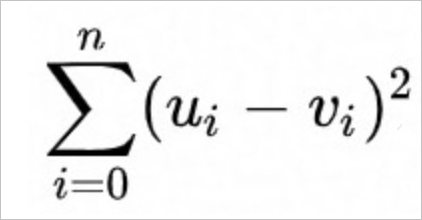
-
Euclidean distance (
Euclidean). The formula is as follows.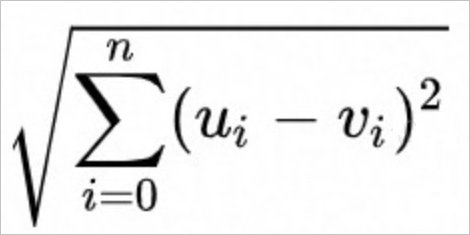
-
Inner product distance (
InnerProduct). The formula is as follows.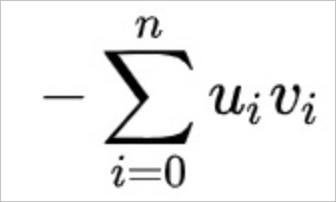
When using a Euclidean-based distance, squared Euclidean distance is more performant than Euclidean distance because it avoids a costly square root operation while still producing the same top-K ranking. Therefore, we recommend using squared Euclidean distance whenever it fits your use case.