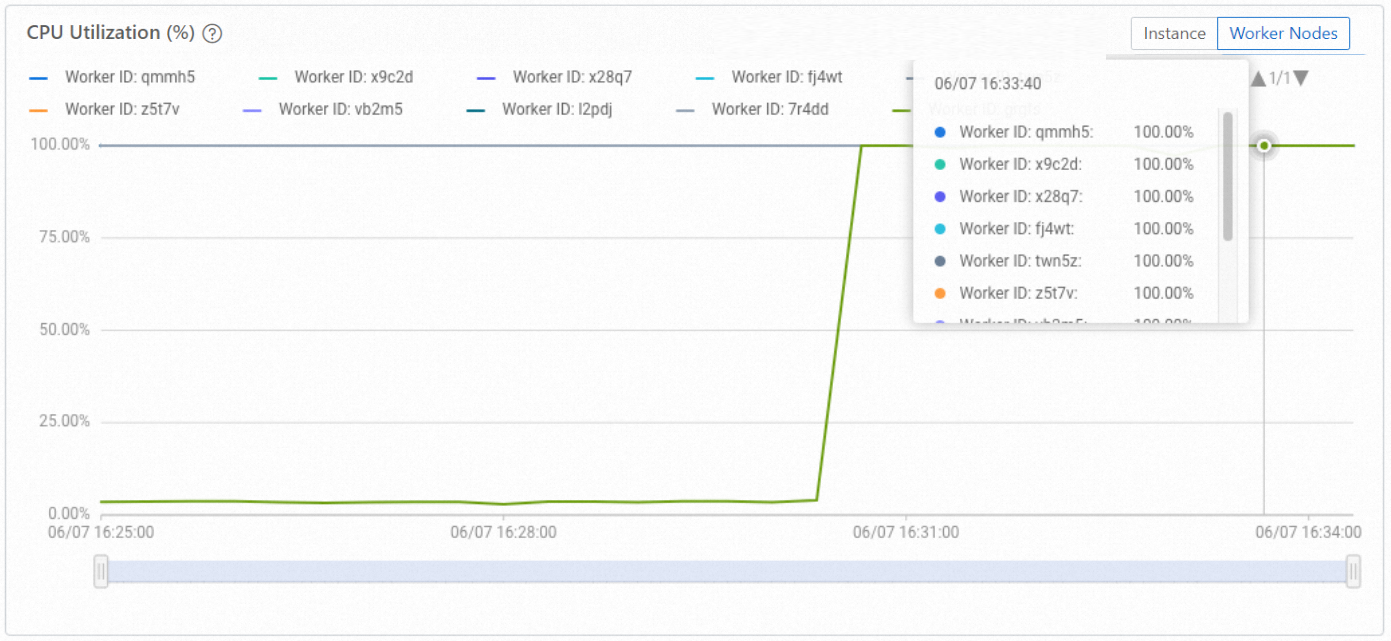
After events such as fast recovery or node restarts, shard metadata can become concentrated on a subset of worker nodes, leaving others idle. Use hg_rebalance_instance() to redistribute shards evenly and restore balanced CPU utilization across all workers.
Shard rebalancing redistributes shard metadata assignments across worker nodes. It does not directly rebalance hot-spot query load or CPU utilization. After rebalancing, previously idle workers begin receiving queries, which typically equalizes CPU utilization across all workers.
When to rebalance
Hologres does not rebalance automatically. Run a rebalancing operation manually when any of the following occur:
After fast recovery: A worker restarts and rejoins the cluster without picking up its previous shard assignments.
After a planned restart: Instance maintenance or manual restarts can leave shards unevenly distributed.
Persistent CPU imbalance: One or more workers show consistently lower CPU utilization than others while queries are running.
Prerequisites
Before you begin, make sure that:
Your instance runs Hologres V2.0.21 or later. To upgrade, use self-service upgrade or join the Hologres DingTalk group. For details, see How do I get more online support?
Your instance is a general-purpose instance or a read-only replica instance.
No pods are currently in a faulty state. Attempting to rebalance while a pod is faulty returns an error.
How it works
A balanced state is reached when the number of shards assigned to each worker differs by no more than 1.
| Workers | Shards | Balanced distribution |
|---|---|---|
| 2 | 2 | 1 shard per worker |
| 2 | 3 | 1 worker gets 1 shard, 1 worker gets 2 shards |
Rebalancing is asynchronous and typically takes 2–3 minutes. The actual duration depends on the number of table groups in your instance—more table groups means longer rebalancing. Write operations are interrupted for approximately 15 seconds during the process.
Rebalance your instance
Run the following SQL statement to trigger shard rebalancing:
SELECT hg_rebalance_instance();Return values:
| Value | Meaning |
|---|---|
true | Rebalancing triggered successfully. The operation is now running. |
false | Rebalancing is not needed. Shards are already balanced. |
Error | Rebalancing failed to start. This typically indicates a faulty pod. Resolve the pod issue before retrying. |
Check rebalancing status
Because the operation runs asynchronously, run the following statement to monitor progress:
SELECT hg_get_rebalance_instance_status();Return values:
| Value | Meaning |
|---|---|
DOING | Rebalancing is in progress. |
DONE | Rebalancing is complete. |
FAQ
How can I tell if shards are unevenly distributed?
Check CPU utilization in the monitoring dashboard. On a balanced instance, all workers show similar CPU utilization while queries are running.
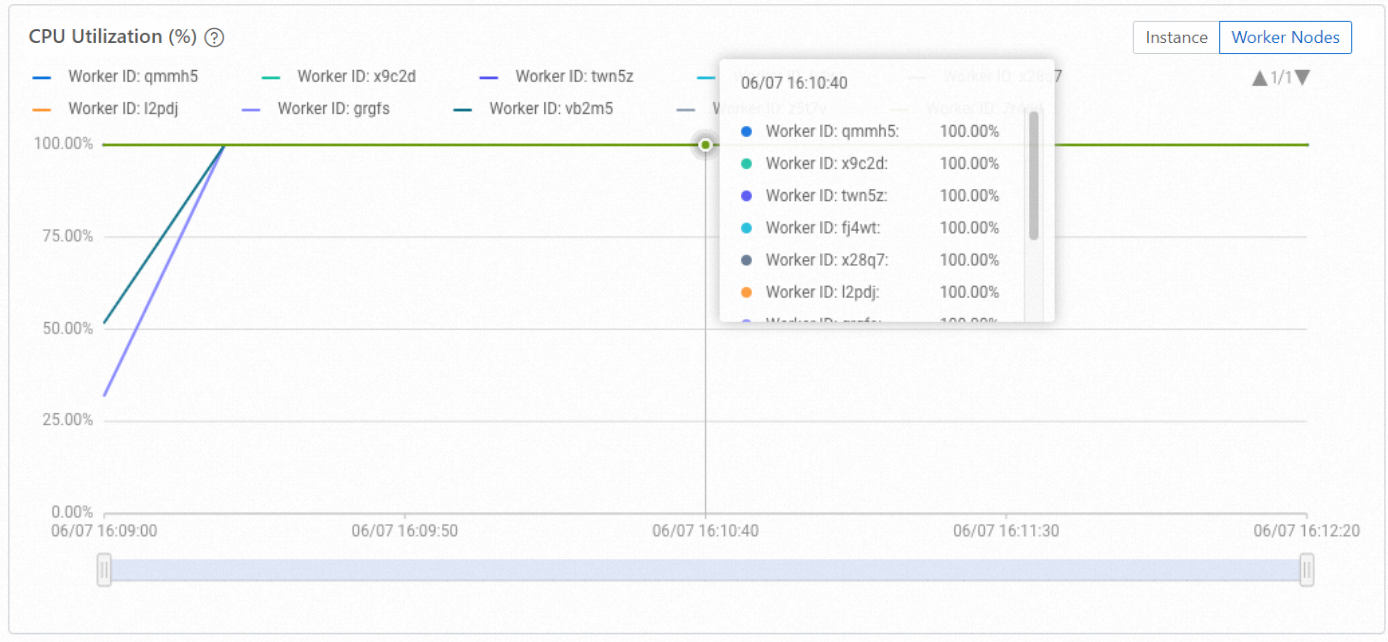
Balanced distribution: The following figure shows CPU utilization across 10 worker nodes during active query and write operations. All workers are loaded.
Unbalanced distribution: The following figure shows the same instance with uneven shard distribution. Some workers have no shards and show near-zero CPU utilization.
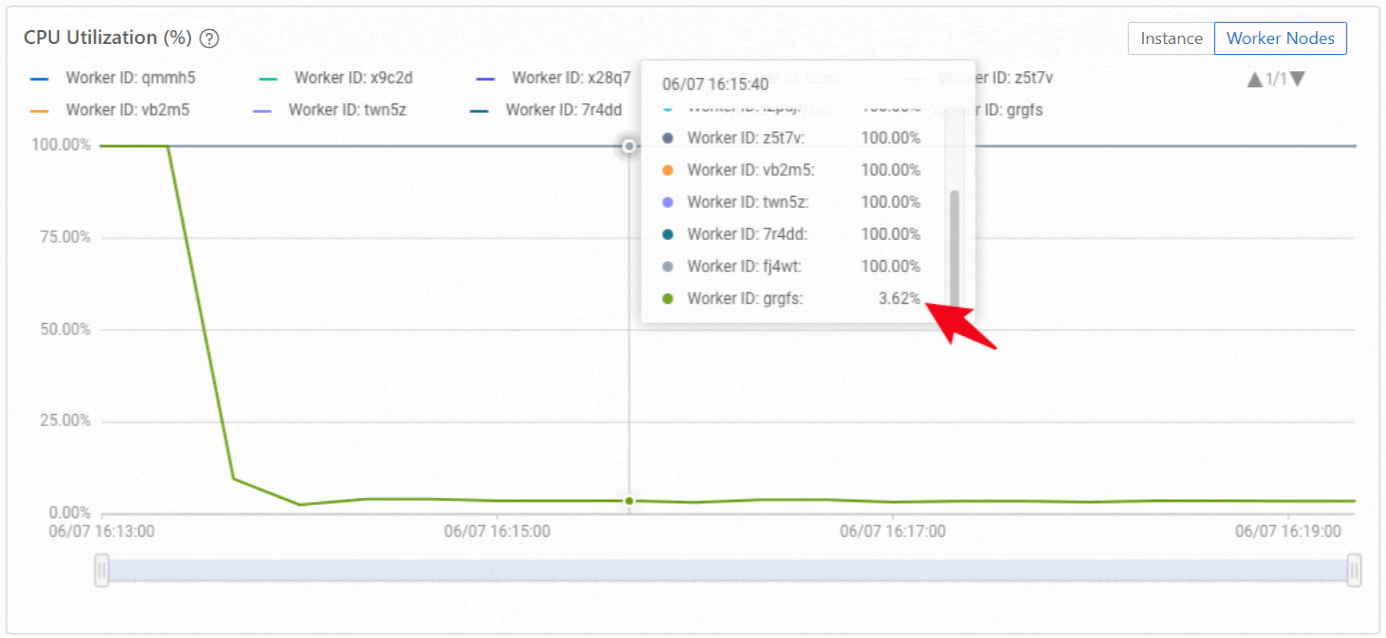
To confirm which workers have loaded shard metadata, run:
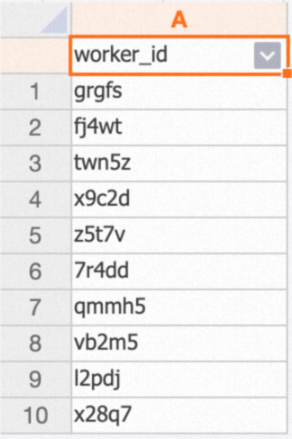
SELECT DISTINCT worker_id FROM hologres.hg_worker_info;The result lists all worker IDs that have shard metadata loaded. If the count is less than the total number of workers in your instance, shards are unevenly distributed.
In the example above, only 9 out of 10 workers appear in the result, confirming that one worker has no shard assignments.
After rebalancing, run the same query again. All 10 workers should appear, and CPU utilization across all workers should equalize.