Filtering users by multiple tags requires joining several tables on every query — too expensive for real-time profile analysis. Wide tables eliminate that cost by pre-aggregating stable property tables into a single table offline, so every filter operates on one table at query time.
How it works
In a typical offline data warehouse, user tag data is spread across multiple theme- and dimension-oriented tables. This structure works well for data management and building a tag system, but it breaks down for online profile analysis: every query must join several tables to filter by multiple tags, which is too expensive for real-time serving.
The wide table approach shifts that cost from query time to write time. Stable property tables are aggregated into a single wide table offline. JOINs disappear from the query path. When new tags are needed, add columns to the wide table.
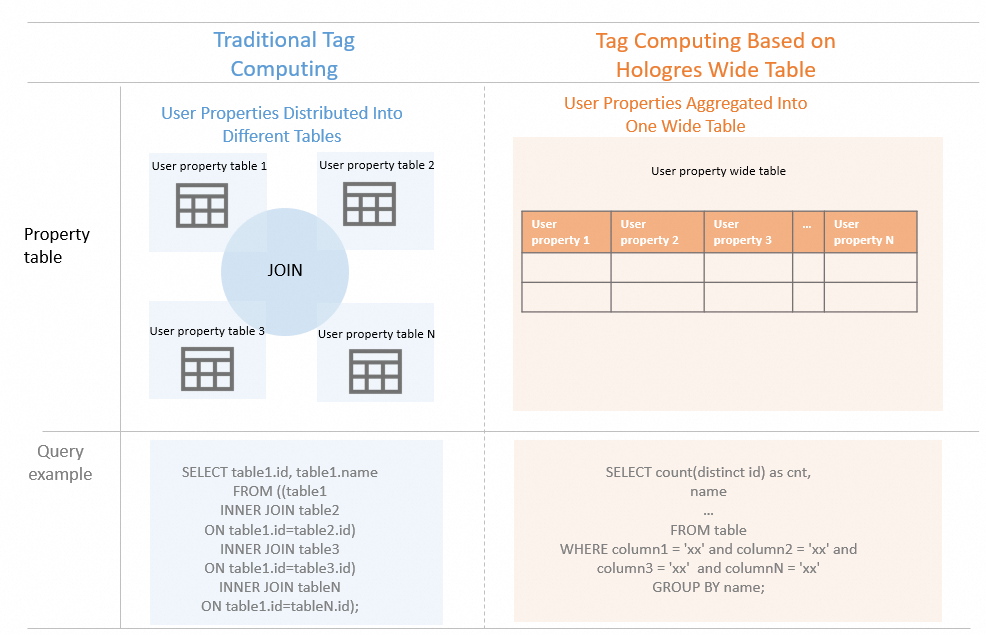
Hologres column-oriented storage handles AND, OR, and NOT filter combinations through its built-in optimization mechanism. Because only the queried columns are read, I/O stays flat even as the table grows wider. Traditional database modeling and development approaches apply without modification.
When to use wide tables
Wide tables work best when both of the following conditions are met:
Fewer than 1,000 tags.
Data is infrequently updated.
If your tag count exceeds 1,000 or your source data changes frequently, consider a different data model.
Example
The following example creates a wide table for profile analysis and queries all married men in Zhejiang province from the dws_userbase table.
-- Create the wide table
BEGIN;
CREATE TABLE dws_userbase
(
  uid text not null primary key,
  province text,
  gender text,
  married text
  ...             -- Other property columns.
);
call set_table_property('dws_userbase', 'distribution_key', 'uid');
call set_table_property('dws_userbase', 'bitmap_columns', 'province,gender,married');
END;

-- Query based on basic properties
SELECT count(distinct uid) as cnt,
       married
FROM dws_userbase ub
WHERE province = 'Zhejiang' and gender = 'Male'
GROUP BY married;
Set proper indexes for the table based on your query patterns to improve query performance. For index configuration guidance, see CREATE TABLE.