Hologres uses a layered authentication model. Before users can run queries or manage instances, they must pass the authentication checks that apply to their scenario.
This topic describes each authentication layer, when it applies, and what permissions are required.
How authentication works
The following figure shows the complete authentication flow, from accessing Alibaba Cloud to using Hologres.
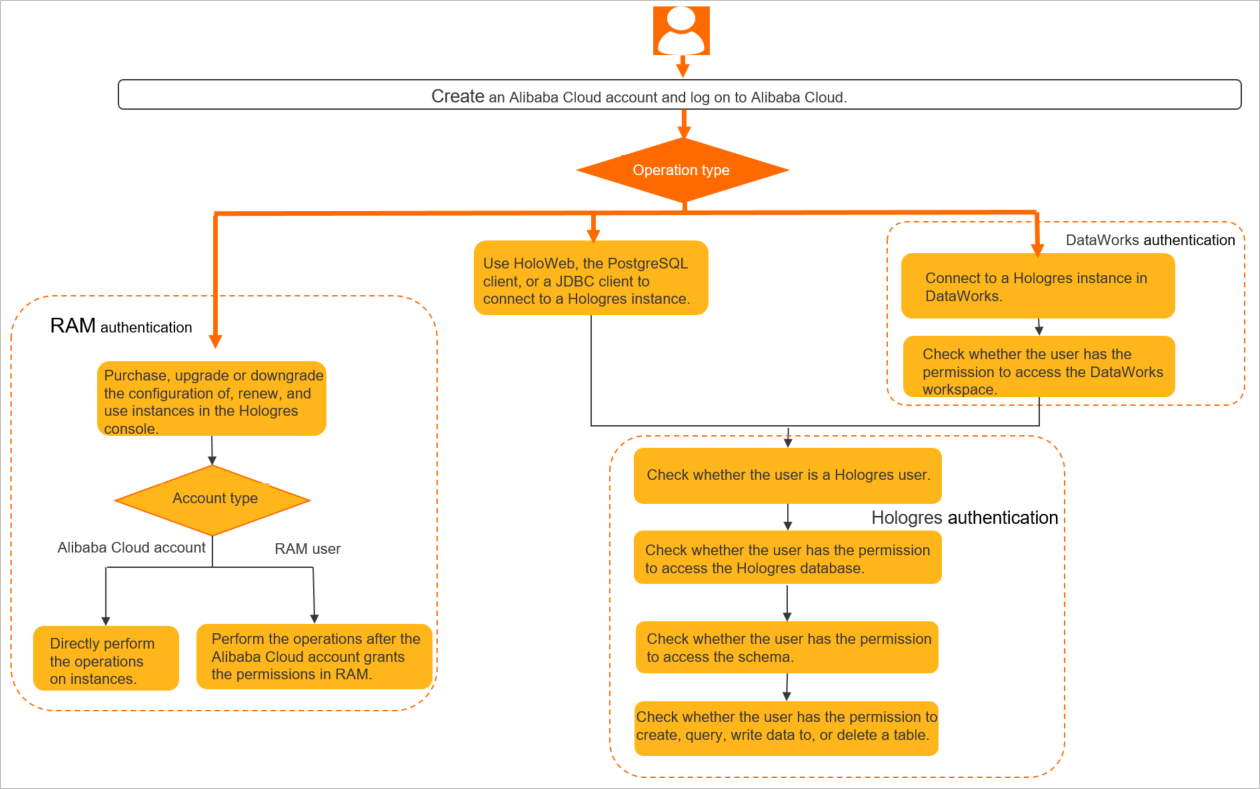
Four authentication layers exist in Hologres:
| Layer | Applies when |
|---|---|
| RAM authentication | Managing instances in the Hologres console (purchase, upgrade, shut down, and so on) |
| Hologres authentication | Connecting to an instance and running queries |
| DataWorks authentication | Using DataWorks for Hologres development |
| MaxCompute authentication | Accelerating queries on MaxCompute table data through Hologres |
Most users only need RAM authentication and Hologres authentication. DataWorks and MaxCompute authentication are required only when using those specific products.
RAM authentication
Resource Access Management (RAM) controls who can perform operations in the Hologres console. Console operations that require RAM permissions include:
Purchasing, upgrading, downgrading, or shutting down instances
Deleting instances
Renewing instances
Changing the network type
Viewing instance details
If a RAM user lacks the required permissions, the user cannot view instance details in the Hologres console. This does not affect the user's ability to connect to the instance directly.
For details on granting RAM permissions, see Grant access to Hologres for RAM users.
Hologres authentication
Hologres (compatible with PostgreSQL 11) authenticates users at three levels when they connect to an instance:
1. Account authentication
Log on using an Alibaba Cloud account or a RAM user. When connecting with tools such as psql or Java Database Connectivity (JDBC), use your AccessKey ID as the username and your AccessKey secret as the password.
For details, see Account system.
2. User authentication
After account authentication passes, Hologres checks whether the account has been registered as a Hologres user in the instance. A user is added to an instance only after an administrator runs the create user "xxx" command.
For details on user concepts and how to create users, see User concepts.
3. Instance authentication
After a user is created, the user must be granted the relevant permissions to perform operations on the instance.
For details on permission models, see Development permission models.
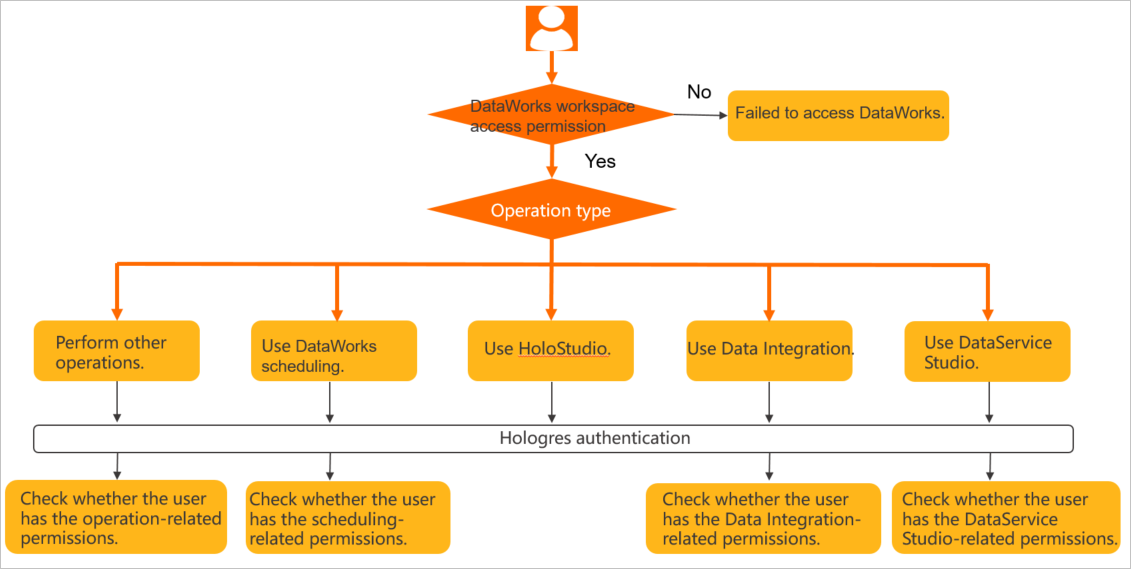
DataWorks authentication
Applies to: Users who use DataWorks for Hologres development.
Hologres integrates with DataWorks, and their permission systems are partially compatible. The following requirements apply:
Accessing DataWorks requires project access permissions.
Developing in DataStudio requires permissions on the Hologres instance.
Other DataWorks operations — such as data integration and DataService Studio — require DataWorks authentication in addition to Hologres authentication.
The following figure shows the DataWorks authentication flow.
For details on DataWorks permissions, see Appendix: Permissions of built-in workspace-level roles.
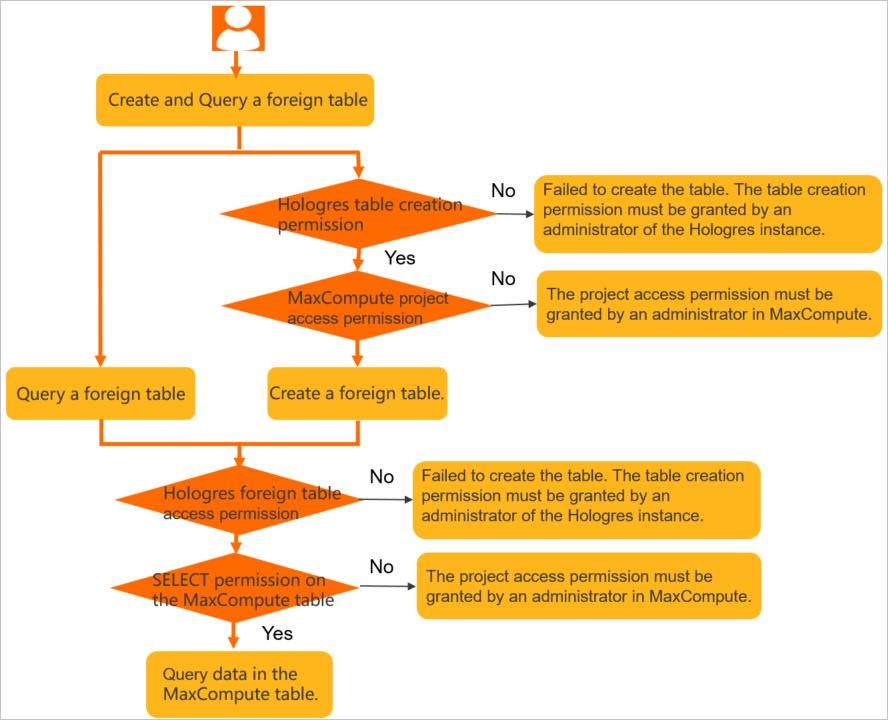
MaxCompute authentication
Applies to: Users who use Hologres to accelerate queries on MaxCompute table data.
The Hologres account must have permissions to access the corresponding MaxCompute project and tables. The following figure shows the authentication flow.
For frequently asked questions about MaxCompute permissions, see MaxCompute permission FAQ.