This topic describes how Hologres authenticates users and introduces the three permission models that you can use to grant development permissions: the standard PostgreSQL model, SPM, and SLPM.
Hologres authentication flow
The following figure shows the complete authentication flow: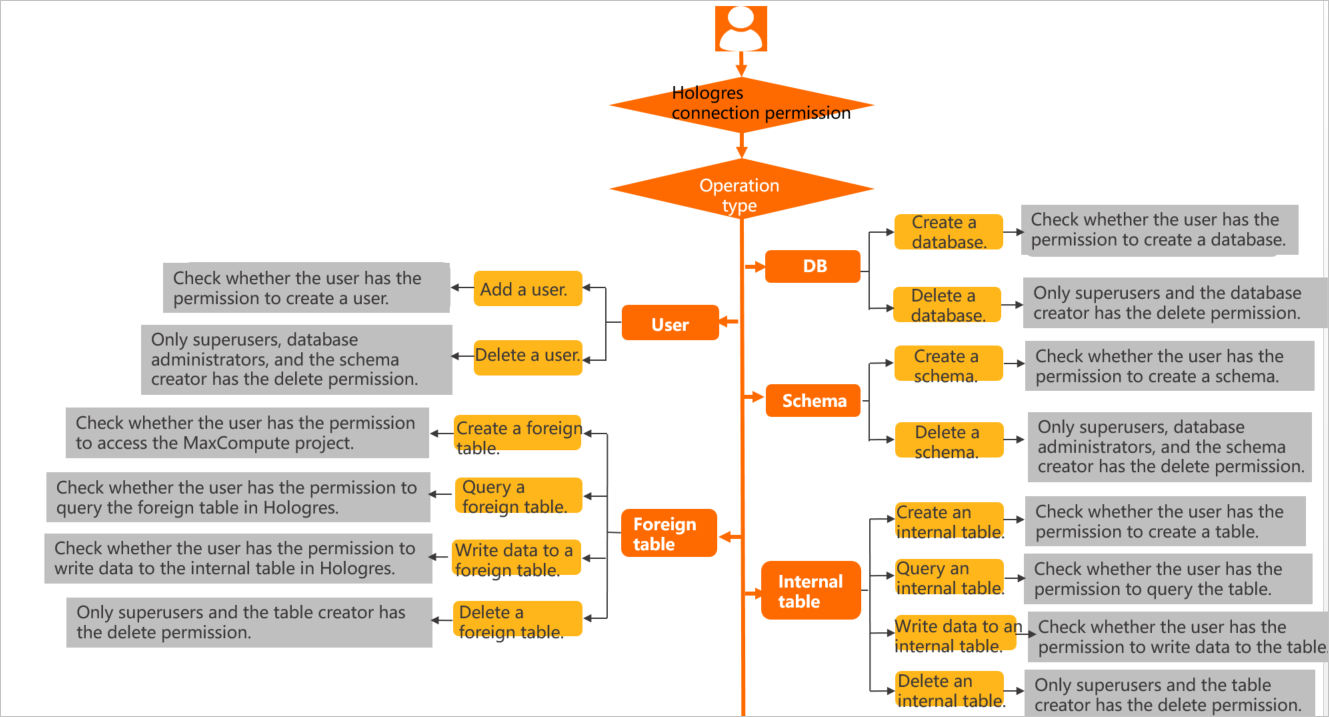
Users
Before an Alibaba Cloud account can access Hologres, an administrator must run create user "xxx" to register it as a Hologres user. Otherwise, the error role "xxx" does not exist is returned. Users exist at the instance level. Adding or deleting a user adds the user to or removes the user from the instance. Operations such as creating tables require database-level permissions, which are granted within a specific database and cannot be used across databases.
Run select * from pg_user; to view the superuser of the current instance.
Permission models
Hologres is compatible with PostgreSQL 11 and supports standard PostgreSQL authorization (the expert model). Because PostgreSQL permissions are fine-grained and its authorization syntax is complex, Hologres also provides two simplified models: the Simple Permission Model (SPM) and the Schema-level Permission Model (SLPM).
The following table compares the three models.
|
Permission model |
Scenarios |
Description |
|
Standard PostgreSQL authorization model (expert model) |
Strict access control, down to a specific user on a specific table. |
Fine-grained and flexible, but the authorization syntax is complex. For more information about how to grant permissions, see Expert permission model. |
|
Simple Permission Model (SPM) |
Coarse-grained, database-level access control. |
Pre-packaged database-level roles with fixed permissions per user group. Covers most use cases with simpler syntax. For more information about how to grant permissions, see Manage permissions using SPM. |
|
Schema-level Permission Model (SLPM) |
Fine-grained, schema-level access control with simplified authorization. |
Pre-packaged schema-level roles with fixed permissions per user group. Finer-grained than SPM. For more information about how to grant permissions, see Manage permissions using SLPM. |
Grant permissions
The following tables list required permissions for each operation under the standard PostgreSQL model and the simplified models (SPM/SLPM).
Superusers have all the following permissions by default.
|
Operations in the standard PostgreSQL authorization model |
Required permissions |
Authorization statement |
|
CREATE USER(ROLE) DROP USER(ROLE) |
CREATEROLE |
Grant user A the CREATEROLE permission: |
|
CREATE TABLE VIEW TABLE FOREIGN TABLE |
CONNECT on the database and CREATE on the target schema |
Grant user A the CREATE permission on schema xx: By default, all users can create tables in the public schema. |
|
SELECT |
USAGE on the corresponding schema and SELECT on the target table |
Example: |
|
INSERT UPDATE DELETE TRUNCATE |
USAGE on the corresponding schema and the relevant DML permission (INSERT/UPDATE/DELETE/TRUNCATE) on the target table |
Example: |
|
ALTER TABLE |
Table owner (changeable via ALTER OWNER) |
GRANT cannot transfer table ownership. Run |
|
DROP TABLE |
||
|
CREATE DATABASE |
CREATEDB |
Grant user A the CREATEDB permission: |
|
DROP DATABASE |
DB owner |
GRANT cannot transfer database ownership. Run |
|
CREATE EXTENSION |
DB owner |
- |
|
GRANT REVOKE |
A user with the relevant permission and GRANT OPTION |
Grant user A the GRANT OPTION: |
|
Authorization by permission model |
Simple Permission Model (SPM) |
Schema-level Permission Model (SLPM) |
||
|
Operation |
Required permissions |
Authorization statement |
Required permissions |
Authorization statement |
|
CREATE USER(ROLE) DROP USER(ROLE) |
DB admin |
Grant admin permissions to a user:
Important
The SPM does not support granting permissions to custom users whose usernames end with |
DB admin |
Grant admin permissions to a user:
Important
The SLPM does not support granting permissions to custom users whose usernames end with |
|
CREATE TABLE VIEW TABLE FOREIGN TABLE |
Permissions of the superuser, admin, or developer user group |
Grant admin or developer permissions using the SPM statements above. |
Permissions of the superuser, or the schema's admin or developer user group |
Grant the schema's admin or developer permissions using the SLPM statements above. |
|
SELECT |
Permissions of the superuser, admin, developer, writer, or viewer user group |
Grant admin, developer, writer, or viewer permissions using the SPM statements above. |
Permissions of the superuser, or the schema's admin, developer, writer, or viewer user group |
Grant the schema's admin, developer, writer, or viewer permissions using the SLPM statements above. |
|
INSERT UPDATE DELETE TRUNCATE |
Permissions of the superuser, admin, developer, or writer user group |
Grant admin, developer, or writer permissions using the SPM statements above. |
Permissions of the superuser, or the schema's admin, developer, or writer user group |
Grant the schema's admin, developer, or writer permissions using the SLPM statements above. |
|
ALTER TABLE |
Permissions of the superuser, admin, or developer user group |
Grant admin or developer permissions using the SPM statements above. |
Permissions of the superuser, or the schema's admin or developer user group |
Grant the schema's admin or developer permissions using the SLPM statements above. |
|
DROP TABLE |
||||
|
CREATE DATABASE DROP DATABASE CREATE EXTENSION |
DB admin |
Grant admin permissions using the SPM statements above. |
DB admin |
Grant the schema's admin permissions using the SLPM statements above. |
|
GRANT REVOKE |
DB admin |
Grant and revoke permissions for user A: |
DB admin |
Grant and revoke permissions for user A: |