Encrypt data at rest in Hologres using KMS-managed keys to protect stored data and meet compliance requirements. This topic describes how encryption at rest works, its limits, how to enable it at the database level and the table level, and how to replace a KMS key by migrating data to a new database.
Why encrypt data at rest with KMS
Key Management Service (KMS) is an Alibaba Cloud service that creates, stores, and manages encryption keys to protect sensitive data at rest and in transit.
Hologres uses KMS keys to encrypt the data that you store in a database. Encryption at rest protects data at the storage layer against external attacks and helps meet enterprise regulatory and compliance requirements.
How it works
Hologres encrypts and decrypts data with keys managed by KMS. The encryption mechanism works as follows:
-
Hologres encrypts and decrypts stored data per database through KMS. Data is encrypted into ciphertext at the storage layer, and only the corresponding key can decrypt the data.
-
KMS generates and manages your keys and keeps them secure.
-
Hologres supports the AES256, AESCTR, and RC4 encryption algorithms.
-
Hologres encrypts and decrypts data only with a Bring Your Own Key (BYOK). Two types of key material are supported: key material that KMS generates when you create a customer master key (CMK), and key material that you import.
You create a BYOK key in KMS and select it in Hologres to encrypt a database. For more information about how to create a BYOK key in KMS, see Create a key.
-
During data reads and writes, Hologres calls KMS API operations to get key information and caches the information for 24 hours by default.
Usage notes
-
Encryption scope — Encryption at rest applies only to tables that you create after you enable the feature. Tables created before you enable the feature are not encrypted.
-
Supported table types — Only column-oriented tables and the column-oriented part of row-column hybrid tables are encrypted. Other table types are not encrypted. After you enable encryption at rest, you can still create Hologres foreign tables in MaxCompute to read and write data.
-
Table-level keys — Hologres V2.0 and later support a separate encryption setting for each table, so you can encrypt different tables with different KMS keys. For more information, see Table-level encryption settings.
-
Performance — Encryption and decryption add processing overhead. Encryption at rest reduces query and write performance by about 20% to 40%, depending on query characteristics.
-
Key operations — KMS key operations such as disabling or deleting a BYOK affect Hologres encryption and decryption. Because Hologres caches key information, these operations take effect within 24 hours.
-
Key availability — If the KMS key used by an encrypted table is disabled or invalid, the table becomes unreadable and unwritable.
-
Key replacement — Hologres does not support switching the KMS key of a database that is already encrypted. To encrypt data with a different key, create a new database and migrate the data to it. For more information, see Rotate the KMS key and migrate data.
-
Disabling encryption — Disabling encryption at rest for a database does not decrypt data that is already encrypted. For more information, see Disable encryption at rest for a database.
Billing
Encryption at rest incurs KMS fees because Hologres calls KMS API operations to get key information. For pricing information, see KMS billing.
Prerequisites
-
Your Hologres instance runs V1.1 or later. Only Hologres V1.1 and later support encryption at rest. If your instance runs an earlier version, upgrade the instance. For upgrade preparation errors, see Troubleshooting upgrade preparation errors, or join the Hologres DingTalk group for support. For more information, see How do I get more online support?.
-
Instances earlier than V1.3.31 require backend configurations for encryption at rest. Instances of V1.3.31 and later do not. (Recommended) Upgrade your instance.
-
KMS is activated in your region.
-
A RAM role is created. You specify the name of this role in the encryption setting.
Enable encryption at rest for a database
-
Create a custom policy that grants Hologres the required KMS permissions.
-
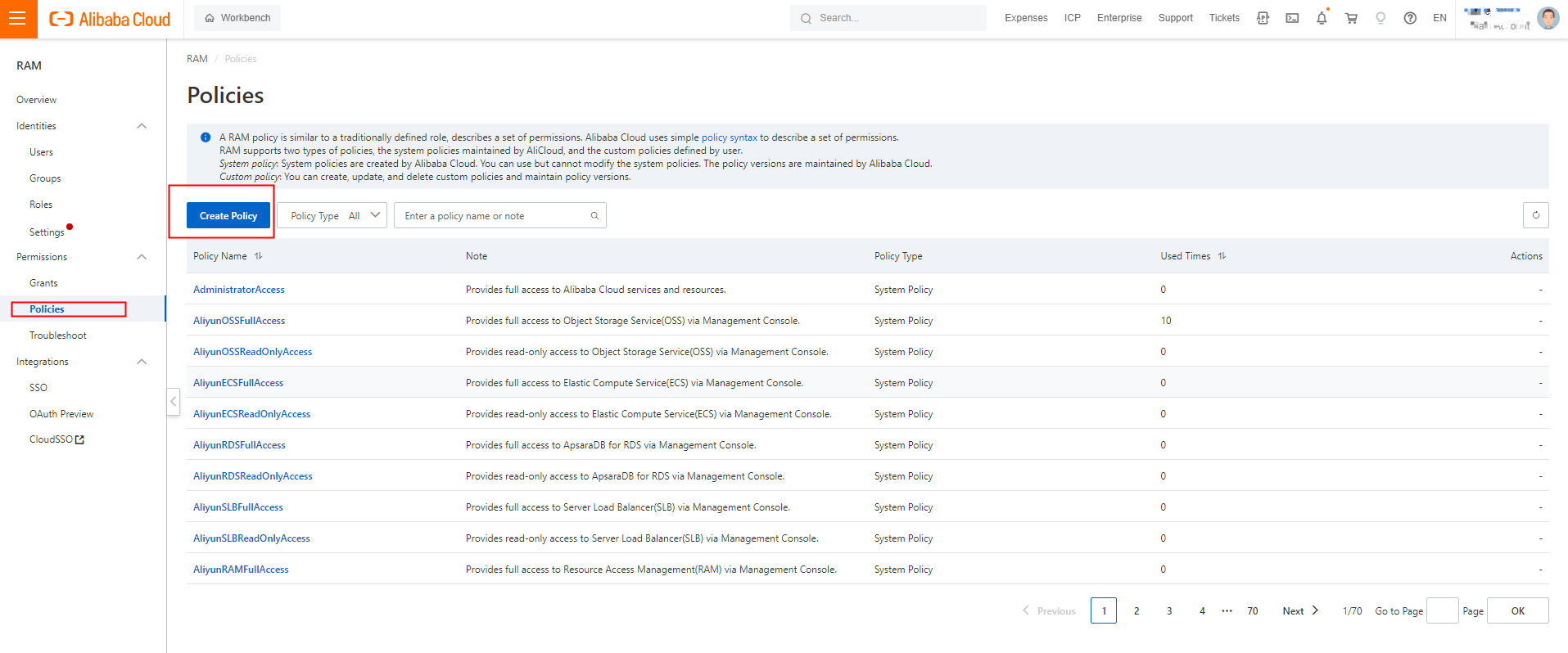
Log on to the RAM console. In the left-side navigation pane, choose Permissions > Policies. On the Policies page, click Create Policy.
-
On the Create Policy page, click JSON. In the code editor, enter the following policy, then set Name to
AliyunHologresEncryptionDefaultRolePolicy.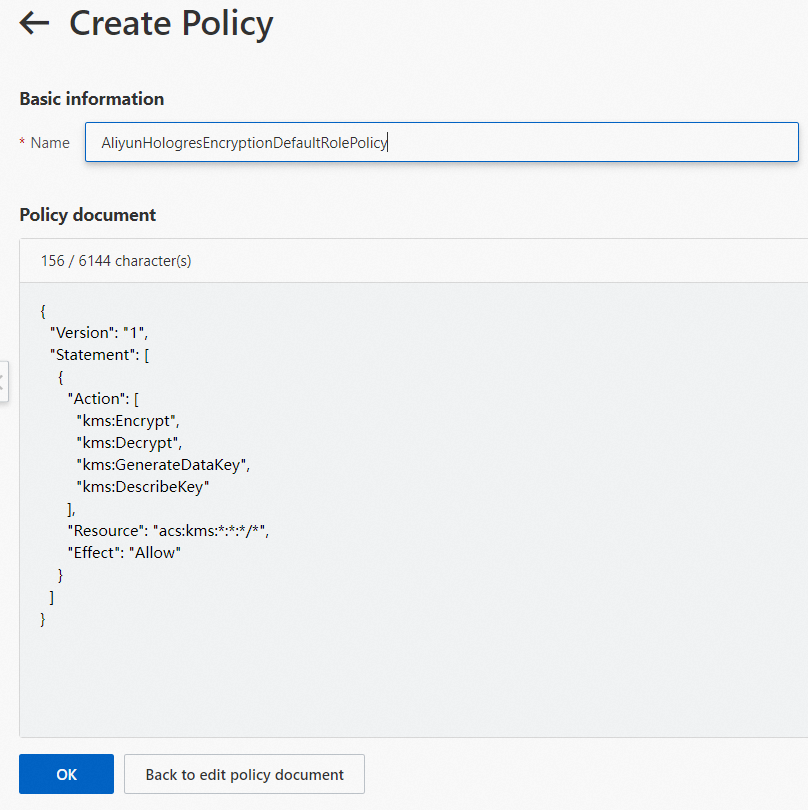
This policy grants Hologres the KMS permissions it needs to obtain and decrypt data keys when querying encrypted MaxCompute data.
{ "Version": "1", "Statement": [ { "Action": [ "kms:Encrypt", "kms:Decrypt", "kms:GenerateDataKey", "kms:DescribeKey" ], "Resource": "acs:kms:*:*:*/*", "Effect": "Allow" } ] } -
Click OK. The custom policy is created.
-
-
Create a RAM role for Hologres and attach the policy.
Hologres needs a RAM role to call KMS APIs on your behalf. Create the role and attach the policy created in step 1.
-
Log on to the RAM console. In the left navigation pane, choose Identities > Roles.
-
On the Roles page, click Create Role. Set Principal Type to Cloud Service and Principal Name to Hologres.
-
Click OK. In the dialog, enter
AliyunHologresEncryptionDefaultRolein the Role Name field, then click OK.
-
On the role details page, click Grant Permission.
-
In the Grant Permission panel, set Resource Scope to Account. For Policy, select
AliyunHologresEncryptionDefaultRolePolicy.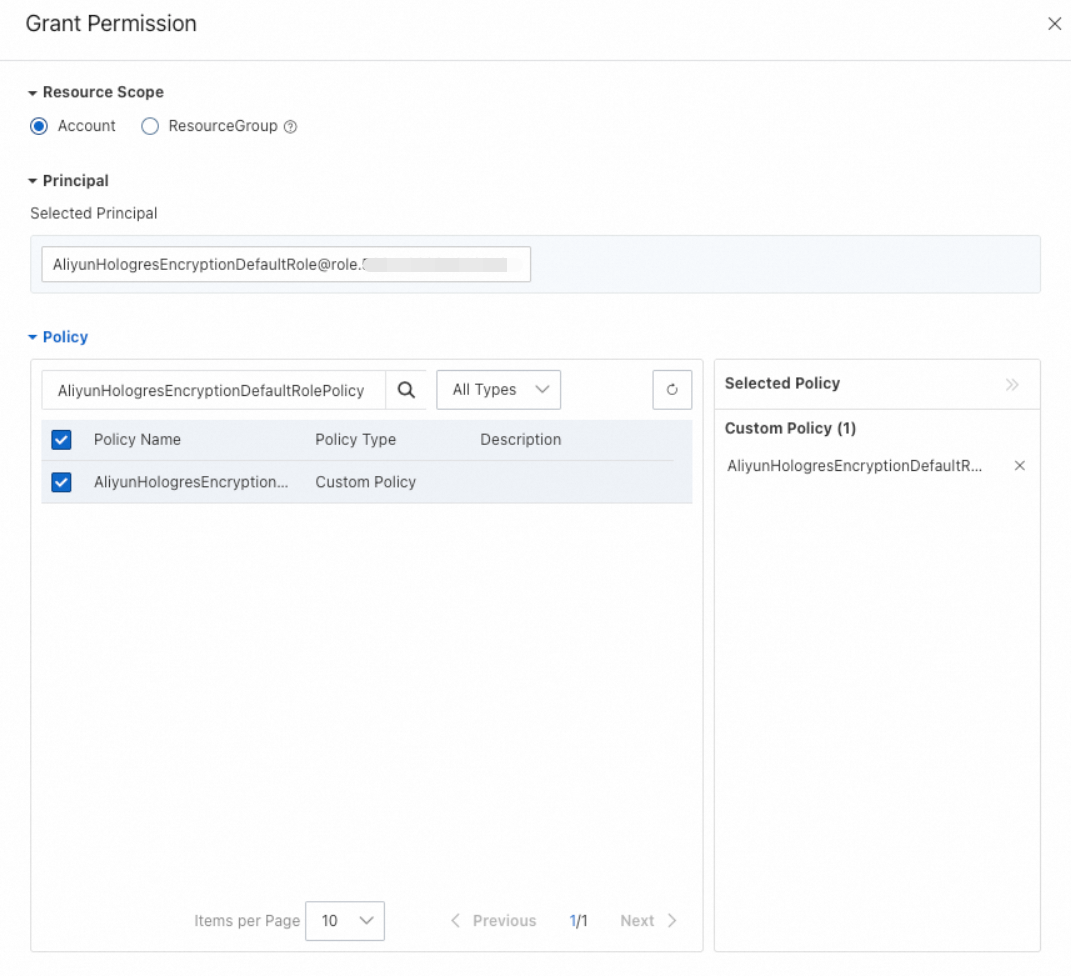
-
Click OK. On the role details page, click the Trust Policy tab to verify the trust policy.
-
-
Create a key.
For details, see Create a key.
Hologres supports only symmetric keys of the
Aliyun_AES_256type. -
Configure the encryption setting.
-
Connect to the database instance for which you want to enable encryption at rest. For instructions, see Connect to a database instance.
-
On the Ad-hoc Query page, set Instance Name and Database, enter the following statement in the SQL query editor, and then click Run.
-
ALTER DATABASE <db_name> SET hg_experimental_encryption_options='<encryption_type>,<cmk_id>,<ram_role>,<uid>';The following table describes the parameters.
|
Parameter |
Description |
|
db_name |
The name of the database that you want to encrypt. |
|
encryption_type |
The encryption algorithm. Valid values: |
|
cmk_id |
The key ID. Log on to the Key Management Service console and get the ID from the key details page. |
|
ram_role |
The name of the RAM role that you created. |
|
uid |
Your Alibaba Cloud account ID. For more information about how to get it, see View the account ID. |
The following example configures an encryption setting and then queries the data.
-
Enable encryption at rest for the database.
ALTER DATABASE hoxxxx set hg_experimental_encryption_options= 'AES256,623c26ee-xxxx-xxxx-xxxx-91d323cc4855,AliyunHologresEncryptionDefaultRole,187xxxxxxxxxxxxx'; -
Create a table and insert data.
DROP TABLE IF EXISTS a; CREATE TABLE a(id int); INSERT INTO a values(1); SELECT hg_admin_command('flush'); -- For testing only. This lets you see the result immediately. -
Query the data.
SELECT * FROM a;
If you disable the key in KMS, an error is reported when you query table a after the instance restarts or after 24 hours.
In Hologres V2.0 and later, you can also view the encryption setting that applies to each table. For instructions, see View encryption settings.
Disable encryption at rest for a database
If you run the following statement to disable encryption at rest for a database, data in tables created before you disabled it remains encrypted. Only tables created after you disable it are unencrypted.
ALTER DATABASE <database_name> set hg_experimental_encryption_options='';Table-level encryption settings
Starting from Hologres V2.0, after encryption at rest is enabled for a database, you can configure a different encryption policy for individual tables. Tables can remain unencrypted or use a KMS key other than the database default.
Configure a table-level encryption setting when tables in the same database must use different KMS keys, or when specific tables must remain unencrypted.
Set a table-level encryption setting
Note the following before you set a table-level encryption setting:
-
If you do not configure a separate encryption setting for a table, the table uses the setting specified by
hg_experimental_encryption_options. -
Configure the setting when you create the table. You cannot configure it after the table is created.
Run the following statement to set the encryption setting of a table:
CALL SET_TABLE_PROPERTY('<table_name>', 'encryption_options', '<encryption_type>,<cmk_id>,<ram_role>,<uid>');The following table describes the parameters. Except for table_name, these parameters are the same as those of the database-level encryption setting.
|
Parameter |
Description |
|
table_name |
The name of the table that you want to encrypt. |
|
encryption_type |
The encryption algorithm. Valid values: |
|
cmk_id |
The key ID. Log on to the Key Management Service console and get the ID from the key details page. |
|
ram_role |
The name of the RAM role that you created. |
|
uid |
Your Alibaba Cloud account ID. For more information about how to get it, see View the account ID. |
The following example creates a table named lineitem and encrypts it with the AES256 algorithm and the key 623c26ee-xxxx-xxxx-xxxx-91d323cc4855.
BEGIN;
CREATE TABLE LINEITEM
(
    L_ORDERKEY      BIGINT      NOT NULL,
    L_PARTKEY       INT         NOT NULL,
    L_SUPPKEY       INT         NOT NULL,
    L_LINENUMBER    INT         NOT NULL,
    L_QUANTITY      DECIMAL(15,2) NOT NULL,
    L_EXTENDEDPRICE DECIMAL(15,2) NOT NULL,
    L_DISCOUNT      DECIMAL(15,2) NOT NULL,
    L_TAX           DECIMAL(15,2) NOT NULL,
    L_RETURNFLAG    TEXT        NOT NULL,
    L_LINESTATUS    TEXT        NOT NULL,
    L_SHIPDATE      TIMESTAMPTZ NOT NULL,
    L_COMMITDATE    TIMESTAMPTZ NOT NULL,
    L_RECEIPTDATE   TIMESTAMPTZ NOT NULL,
    L_SHIPINSTRUCT  TEXT        NOT NULL,
    L_SHIPMODE      TEXT        NOT NULL,
    L_COMMENT       TEXT        NOT NULL,
    PRIMARY KEY (L_ORDERKEY,L_LINENUMBER)
);
CALL SET_TABLE_PROPERTY('LINEITEM', 'encryption_options', 'AES256,623c26ee-xxxx-xxxx-xxxx-91d323cc4855,AliyunHologresEncryptionDefaultRole,153xxxxxxxxxxxxx');
COMMIT;
View encryption settings
In Hologres V2.0 and later, run the following SQL statement to view the encryption setting of each table:
SELECT
    *
FROM
    hologres.hg_table_properties
WHERE
    property_key = 'encryption_options';
Sample result:
The result contains four columns: table_namespace, table_name, property_key, and property_value. The property_value column records the encryption algorithm (for example, AES256), the CMK ID, the RAM role (for example, AliyunHologresEncryptionDefaultRole), and the UID.
Rotate the KMS key and migrate data
Hologres does not support switching the KMS key of a database that is already encrypted. Data encrypted with a key can be decrypted only by that key, and a database can have only one effective encryption setting at the database level. If you run ALTER DATABASE on an encrypted database to point to a new key, the statement may return successfully without an error, but the key is not switched and existing data is still decrypted with the original key.
To replace the KMS key, for example when the current key is about to be deactivated, create a database with the new encryption setting and migrate the data to it. This procedure applies to the database-level encryption setting.
Do not disable or delete the original key until the migration is complete. If the KMS key used by an encrypted table is disabled or invalid, the table becomes unreadable and unwritable.
Configure the encryption setting for the new database before you migrate data. Encryption at rest applies only to tables created after encryption is enabled. If you migrate data first and configure the encryption setting afterwards, the tables created during migration are not encrypted.
Migrate the data in the following order:
-
Create a new database.
-
Configure the new KMS encryption setting for the new database. Use the same syntax as in Enable encryption at rest for a database.
ALTER DATABASE <db_name> SET hg_experimental_encryption_options='<encryption_type>,<cmk_id>,<ram_role>,<uid>'; -
Use a data synchronization task, such as a Flink or DataWorks task, to migrate data from the old database to the new database.