When a Hologres subscription instance expires or any instance has an overdue payment, its service is suspended. To resume service, renew the instance or pay the outstanding bill.
If a Hologres instance expires or has an overdue payment, its service is suspended. To resume the service, you can pay the overdue amount or renew the instance.
Expiration and overdue payment alerts
Instance billing method | Alert type | Instance status description | Recommended action | Notes |
Subscription | Instance expiration | After the instance expires, its service is immediately suspended. You can no longer access the instance. | Renew the subscription instance. The service resumes immediately. | The system sends you reminders by text message or email when your instance is about to expire. Renew the instance as soon as possible to avoid service suspension.
|
From day 1 to day 14 after expiration, the instance is locked and cannot be accessed. No bills are generated during this period. | Renew the subscription instance. The service resumes immediately. | Alibaba Cloud sends you reminders by text message or email when your instance is about to be released. Renew the instance as soon as possible to prevent data loss.
| ||
On day 15 after expiration, the instance is released. The instance is deleted from the console, and its data is erased and cannot be recovered. | The instance cannot be recovered. | |||
Overdue payment | If your account has an overdue payment, the instance continues to run. | Pay the bill as soon as possible to avoid service suspension. | Alibaba Cloud sends you reminders by text message or email when your instance is about to be locked due to an overdue payment. Pay the bill as soon as possible.
| |
24 hours after your account has an overdue payment, the service is immediately suspended. You can no longer access the instance. | ||||
From 24 hours after the payment becomes overdue until the instance expires, the instance is locked and cannot be accessed. | ||||
Pay-as-you-go | Overdue payment | If the accumulated overdue payment for your account is less than 1,000 USD, the instance continues to run. | Pay the bill as soon as possible to avoid service suspension. | If you enable low balance alerts, the system sends you a reminder by text message or email when your account balance falls below the threshold you set. |
When the accumulated overdue payment for your account reaches 1,000 USD, a deduction is attempted. If the deduction fails, the instance continues to run for 14 days. | Alibaba Cloud sends you reminders by text message or email when your instance is about to be locked due to an overdue payment. Pay the bill as soon as possible.
| |||
On the 15th day after the deduction fails, the service is suspended. The instance is locked and cannot be accessed. No bills are generated during this period. | After you pay the bill, the service resumes immediately. | Alibaba Cloud sends you reminders by text message or email when your instance is about to be locked due to an overdue payment. Pay the bill as soon as possible.
| ||
On the 15th day after the service is suspended due to an overdue payment, the instance is released. The instance is deleted from the console, and its data is erased and cannot be recovered. | The data cannot be recovered. | Alibaba Cloud sends you reminders by text message or email when your instance is about to be released. Pay the bill as soon as possible to prevent data loss.
|
The following tables describe how Hologres handles expiration and overdue payments for each billing method, along with the alerts Alibaba Cloud sends before key status changes.
Subscription — Instance expiration
| Stage | Instance status | Data status | What to do |
|---|---|---|---|
| At expiration | Service immediately suspended; instance inaccessible | Data retained | Renew the instance. Service resumes immediately. |
| Days 1–14 after expiration | Instance locked and inaccessible; no charges generated | Data retained | Renew the instance. Service resumes immediately. |
| Day 15 after expiration | Instance released and removed from the console | Permanently deleted and irrecoverable | Data cannot be recovered. |
Expiration alerts: Alibaba Cloud sends text message and email reminders at 7 days, 3 days, and 1 day before service suspension, and again at 7 days, 3 days, and 1 day before the instance is released. Renew as early as possible to avoid data loss.
Subscription — Overdue payment
| Stage | Instance status | Data status | What to do |
|---|---|---|---|
| Account has an overdue payment | Instance continues to run | Data retained | Pay the bill promptly to avoid service suspension. |
| 24 hours after the payment becomes overdue | Service immediately suspended; instance inaccessible | Data retained | Pay the bill. Service resumes immediately. |
| From 24 hours after overdue until the instance expires | Instance locked and inaccessible | Data retained | Pay the bill. Service resumes immediately. |
Overdue payment alerts: Alibaba Cloud sends text message and email reminders at 18 hours, 12 hours, and 6 hours before service suspension.
Pay-as-you-go — Overdue payment
| Stage | Instance status | Data status | What to do |
|---|---|---|---|
| Accumulated overdue balance is less than 1,000 USD | Instance continues to run | Data retained | Pay the bill promptly to avoid service suspension. |
| Accumulated overdue balance reaches 1,000 USD; deduction attempted but fails | Instance continues to run for 14 days | Data retained | — |
| Day 15 after the deduction fails | Service suspended; instance locked and inaccessible; no charges generated | Data retained | Pay the bill. Service resumes immediately. |
| Day 15 after service is suspended | Instance released and removed from the console | Permanently deleted and irrecoverable | Data cannot be recovered. |
Overdue payment alerts: Alibaba Cloud sends text message and email reminders at 7 days, 3 days, and 1 day before service suspension, and again at 7 days, 3 days, and 1 day before the instance is released. Pay the bill as early as possible to avoid data loss.
Low balance alerts: To receive an early warning before your balance runs out, enable low balance alerts. When your account balance drops below the threshold you set, Alibaba Cloud sends a text message or email reminder.
Configure overdue payment alert recipients
By default, expiration and overdue payment alerts go to the mobile phone number and email address associated with your Alibaba Cloud account. To add a Resource Access Management (RAM) user as an additional alert recipient, follow these steps.
Log on to the Alibaba Cloud Management Console with your Alibaba Cloud account. Click Message > Message Receiving Management.

On the Message Center page, in the navigation pane on the left, choose Message Receiving Management > Basic Receiving Management.
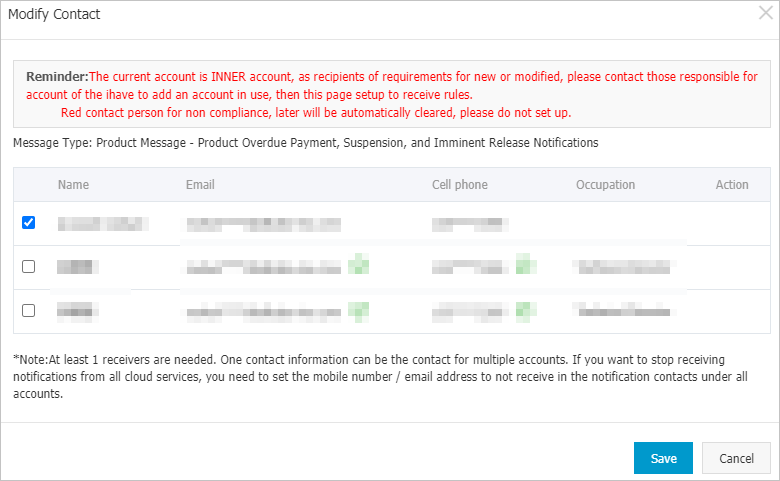
Find the message type Notification of Overdue Payment, Service Suspension, and Impending Release and click Modify in the Message Recipient column.
In the Modify Message Recipient dialog box, add a message recipient, check the new contact to set them as a recipient, and then click Save.