Schemas organize tables within a Hologres database, letting multiple users or applications share the same database without interfering with each other.
How it works
Hologres is compatible with PostgreSQL, and its schema behavior follows the PostgreSQL standard. Schemas change the table addressing structure from database.table to database.schema.table, so tables or data types in different schemas can share the same name without conflict.
Every Hologres database includes a public schema by default. Tables created without an explicit schema name are stored in public.
The following figure shows the object hierarchy in a Hologres instance.
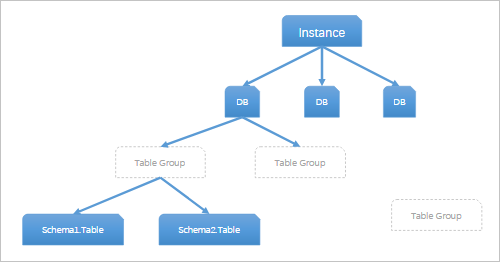
Hologres currently supports:
Creating schemas
Renaming schemas
Creating tables within a schema
Syntax
CREATE SCHEMA schema_name;Create a schema
Create the schema.
CREATE SCHEMA schemaname;--Create a schema.Switch to the new schema and create a table in it.
SET search_path TO schemaname;--Switch to the target schema.
CREATE TABLE blink_demo (id text); --Create a table in the target schema.
Verify that the active schema has switched.
SELECT CURRENT_SCHEMA();--View the current schema.The query returns
schemaname, confirming the switch was successful.
To check which schema a table belongs to, run the following command in a terminal:
\d tablename; --View the schema to which the target table belongs. This statement applies only to the terminal.Create tables across schemas
To create a table in a specific schema without switching your search_path, prefix the table name with the schema name: schema.table.
Create a table in the public schema:
CREATE TABLE public.mytest (
  name text,
  id INT);
Create a table in another schema while connected to public:
SET search_path TO public;
CREATE TABLE my_schema.mytest (
  name text,
  id INT,
  age INT
);
View schema storage size
To view the total storage size of all tables in a schema, run:
SELECT table_schema, pg_size_pretty(SUM(pg_relation_size(quote_ident(table_schema) || '.' || quote_ident(table_name))::decimal)) AS schema_size
FROM information_schema.tables
WHERE table_schema = '<schema_name>'--Replace <schema_name> with the name of your schema.
GROUP BY table_schema;