This topic describes how to configure Hive in ApsaraDB for HBase. You can use Hive to read data from and write data to tables in ApsaraDB for HBase.
Prerequisites
All node IP addresses in a Hadoop cluster on which Hive runs are added to the whitelist of an ApsaraDB for HBase instance.
The ZooKeeper endpoint of your ApsaraDB for HBase instance is obtained. You can obtain the endpoint in the ApsaraDB for HBase console.
Modify the Hive configuration file
Go to the Hive configuration path
/etc/ecm/hive-conf/.Modify the
hbase-site.xmlfile. Sethbase.zookeeper.quorumto the ZooKeeper endpoint of the ApsaraDB for HBase instance.<property> <name>hbase.zookeeper.quorum</name> <value>hb-xxx-001.hbase.rds.aliyuncs.com,hb-xxx-002.hbase.rds.aliyuncs.com,hb-xxx-003.hbase.rds.aliyuncs.com</value> </property>NoteIf no file exists in
/etc/ecm/hive-conf/, create a configuration file namedhbase-site.xml.
Use Hive to read data from and write data to tables in ApsaraDB for HBase
If no table exists in ApsaraDB for HBase, you can use Hive to create a table that is associated with ApsaraDB for HBase.
Open a Hive CLI.

Execute the following statement to create a table in ApsaraDB for HBase:
CREATE TABLE hive_hbase_table(key int, value string) STORED BY 'org.apache.hadoop.hive.hbase.HBaseStorageHandler' WITH SERDEPROPERTIES ("hbase.columns.mapping" = ":key,cf1:val") TBLPROPERTIES ("hbase.table.name" = "hive_hbase_table", "hbase.mapred.output.outputtable" = "hive_hbase_table");NoteIf no file exists in
/etc/ecm/hive-conf/, create a configuration file namedhbase-site.xml.Execute the following statement to use Hive to insert data into the table in ApsaraDB for HBase:
insert into hive_hbase_table values(212,'bab');
Check whether the table is created in ApsaraDB for HBase and whether the data is inserted into the table.
If the following information appears, the table is created.

If the following information appears, the data is inserted into the table.

Use Hive to insert data into the table in ApsaraDB for HBase and query the inserted data.
 Use Hive to query data.
Use Hive to delete the table from ApsaraDB for HBase.
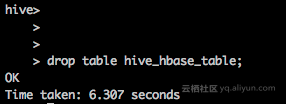 Query the table in ApsaraDB for HBase. An error message is returned. The error message indicates that the table does not exist.
If a table exists in ApsaraDB for HBase, you can associate the table with another table in Hive. In this case, the table in Hive is an external table to ApsaraDB for HBase. If you delete the external table from Hive, the table in ApsaraDB for HBase is not deleted.
Create a table in ApsaraDB for HBase and use the PUT method to test table data.
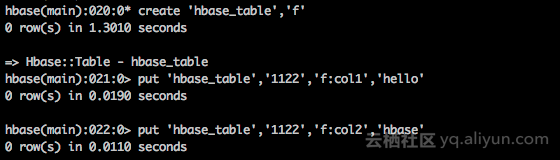
Associate the table in ApsaraDB for HBase with another table in Hive and query the external table.

Delete the external table from Hive.
 When you delete the external table from Hive, the table in ApsaraDB for HBase is not deleted.
In this example, Hive runs on the ApsaraDB for HBase instance that is associated with E-MapReduce (EMR). For a self-managed MapReduce cluster that is hosted on an Elastic Compute Service (ECS) instance, you can perform similar operations to use Hive to interact with ApsaraDB for HBase. However, some configuration items in the hbase-site.xml file can be different. In this scenario, the settings of hbase.zookeeper.quorum must be consistent.
References
For more information about how to use Hive to interact with ApsaraDB for HBase, see Hive official documentation.