Overview
Solution overview
Off-site disaster recovery refers to a scenario where applications are deployed in different regions. When one region fails, Global Traffic Manager (GTM) can redirect user traffic from the failed region to an off-site disaster recovery center, ensuring continuous and uninterrupted user access.
This topic explains how to deploy off-site disaster recovery using the three data centers across two regions architecture. This disaster recovery architecture establishes a backup disaster recovery center in a different city based on dual data centers in the same city. This backup center is used for data backup of the dual data centers. When the dual data centers fail due to natural disasters or other reasons, the off-site disaster recovery center can recover services using the backup data.
Target audience
Enterprise network department and business operations department staff.
Scenarios
This solution is applicable to scenarios where applications are deployed across multiple data centers and regions.
Terms
Term | Definition |
GTM | Global Traffic Manager (GTM) supports intelligent resolution, health checks, fault isolation, and failover. It helps enterprises quickly build disaster recovery architectures such as dual data centers in the same city and three data centers across two regions. |
Intelligent resolution | This refers to resolving the IP address of the nearest application server based on the user request source address (ISP, region, etc.), enabling proximity-based service. |
Health check | This provides Layer 3-7 checks for servers to promptly detect abnormal applications. |
Primary and secondary address pools | This supports primary and secondary address pools, configuring service endpoints for different data centers to implement data center-level fault isolation and failover. |
Architecture
Architecture diagram
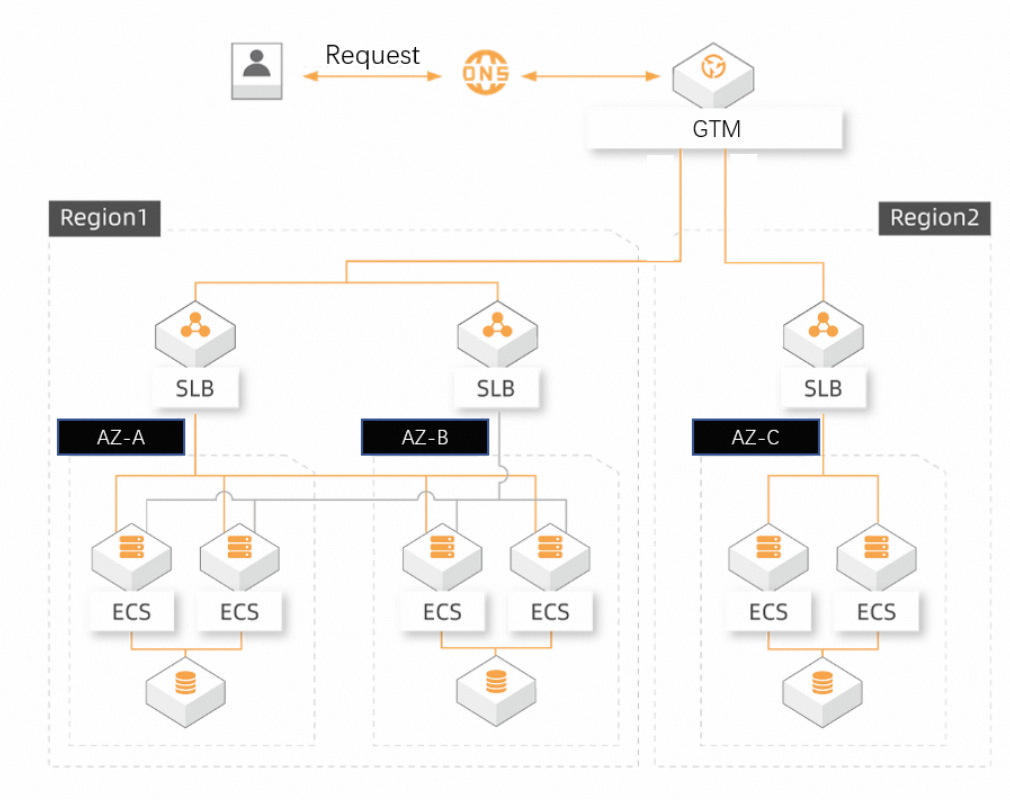
Benefits
Health check: Real-time detection, failover supports both manual and automatic switching modes, ensuring continuous and uninterrupted user access.
Unified management: Supports unified management of IP addresses and traffic for multiple data centers (different ISPs, regions, and vendors).
Simplicity: Ready to use without modifying existing architecture, helping enterprises quickly build multi-active architectures in the same city and off-site disaster recovery architectures.
Implementation
Preparations
Create a GTM instance, Global Traffic Manager.
NoteThe Ultimate Edition detects failures and switches faster, in about 1 minute. The Standard Edition takes about 3 minutes. Users with high availability requirements are recommended to choose the Ultimate Edition.
Prepare resources: China (Beijing) 192.0.2.0, China (Beijing) 192.0.2.1, China (Hangzhou) 192.0.2.2.
Operation guide
Access Alibaba Cloud DNS - Global Traffic Manager, find the target instance in the Global Traffic Manager instance list, and click the Operation area's Configure button.
Basic configuration: You can add configurations according to your business requirements. It is recommended to set Global TTL to 10 minutes (or according to your own requirements).
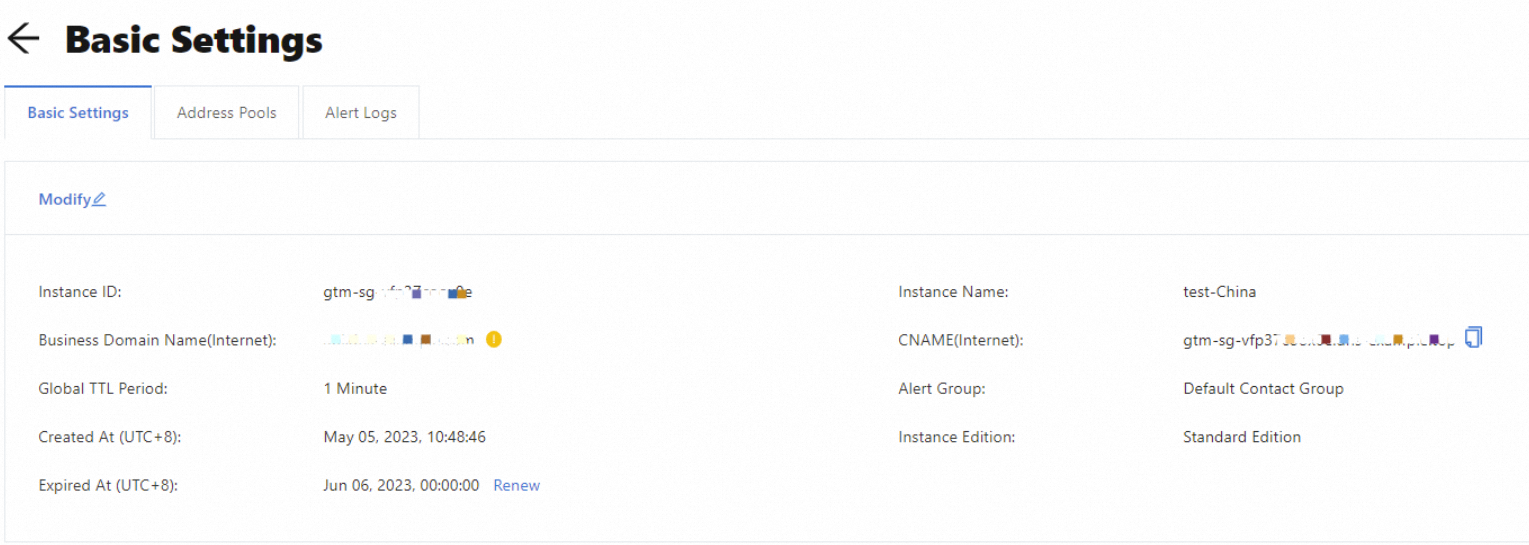
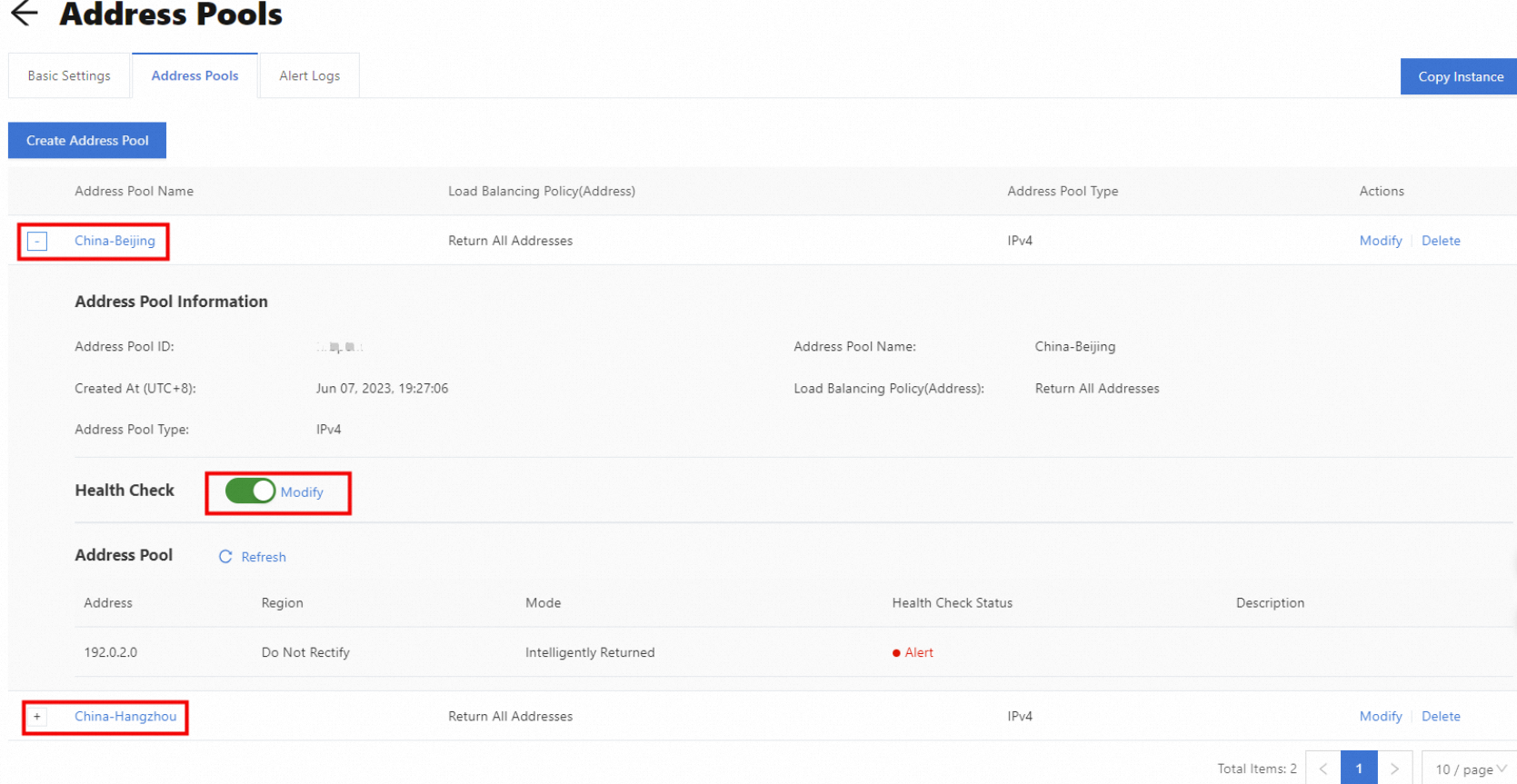
Address pool configuration: Click Add Address Pool to create two address pools, "Beijing" and "Hangzhou", and enable Health Check.
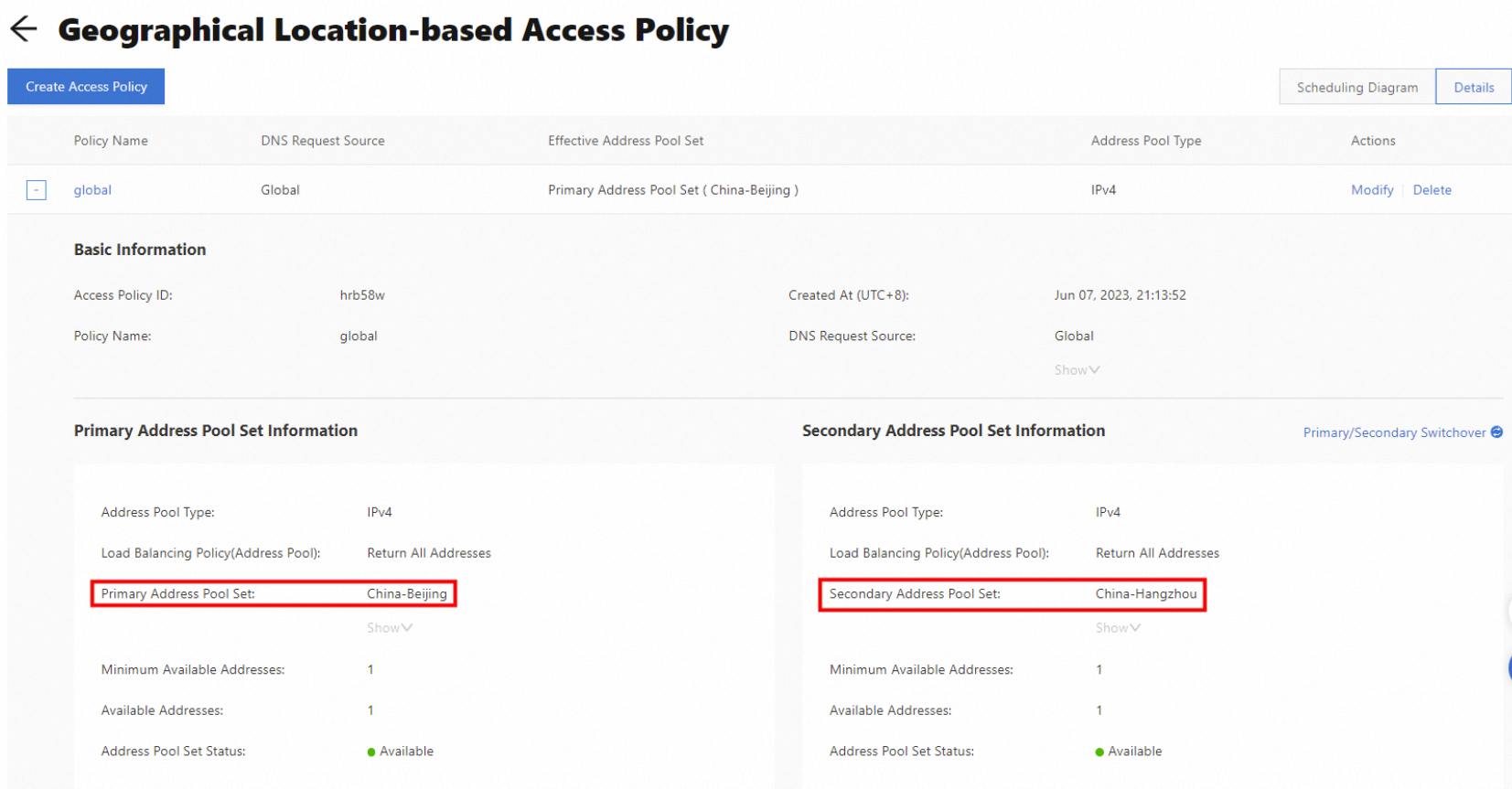
Access policy configuration: Click Add Access Policy, select Global for Resolution Request Source, associate the "Beijing" address pool with Primary Address Pool Collection, and associate the "Hangzhou" address pool with Secondary Address Pool Collection.
Online traffic access
Go to Alibaba Cloud DNS - Hosted Public Zone, and click Settings for the target domain name.
Click the Add Record button to add a CNAME record, with the record value being the GTM CNAME access domain. After completing the resolution record addition, the application service is officially connected to Global Traffic Manager.
Solution verification
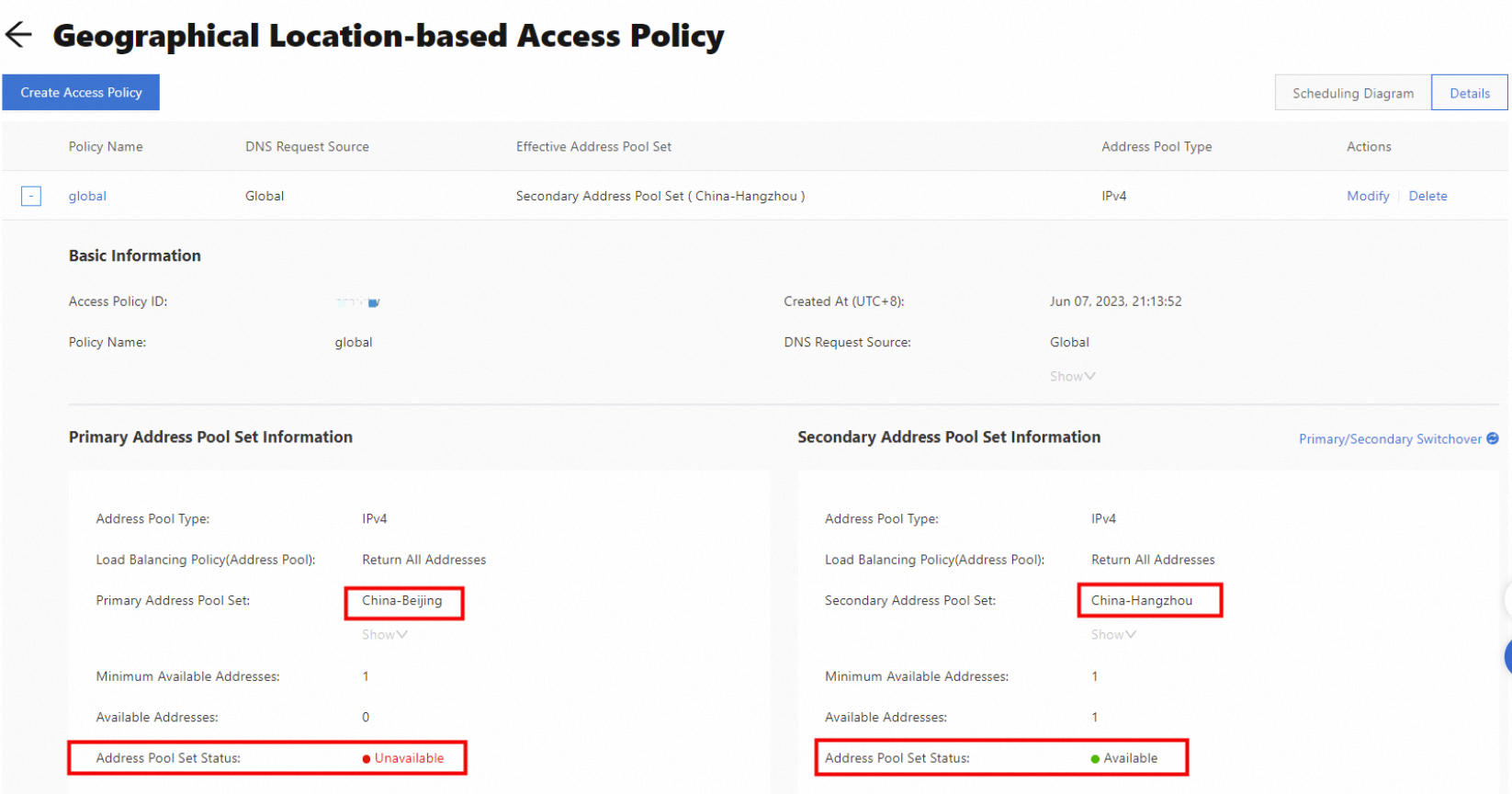
Disconnect or stop China (Beijing) 192.0.2.0 and China (Beijing) 192.0.2.1, and the primary address pool collection status will become inactive.
When the Beijing dual data centers are abnormal, service traffic is switched to the secondary address pool collection (Hangzhou) to continue providing services.
FAQ
How long does failover take? With health check interval set to 15 seconds, TTL to 10 seconds, and consecutive failure count to 3, GTM can accurately detect failures and switch in about 1 minute. After failover, theoretically, it can take effect across the network in about 10 seconds, but the actual situation depends on the cache settings of ISPs across the country.
Can I use Global Traffic Manager if DNS is not using Cloud DNS? No, the current version has disabled the system default domain allocation function. You must add a domain in the Cloud DNS console. Global Traffic Manager will provide a CNAME scheduling domain, and you can create a CNAME record on your DNS management platform.