Overview
Solution overview
Off-site disaster recovery is a strategy for applications deployed across multiple regions. If a failure occurs in one region, Global Traffic Manager (GTM) can redirect user traffic to an off-site disaster recovery center. This ensures uninterrupted access for your users.
In a three-center, two-region architecture, a remote backup center supplements two data centers in the same city and handles data replication. If the primary data centers fail due to a natural disaster or other major incident, you can restore services from the backup data in the remote center.
Target audience
Network and operations engineers.
Use cases
Applications deployed across multiple data centers or regions.
Key concepts
|
Term |
Description |
|
GTM |
Global Traffic Manager (GTM) provides intelligent DNS resolution, health checks, fault isolation, and failover. Use it to build resilient architectures such as dual-center disaster recovery or three-center, two-region models. |
|
Intelligent DNS resolution |
Routes user requests to the nearest application server based on the request's origin, such as ISP or geographic location. |
|
Health check |
Monitors your servers from Layer 3 to Layer 7 to quickly detect application issues. |
|
Primary and secondary address pools |
Lets you configure service addresses for different data centers into primary and secondary address pools, enabling data center-level fault isolation and failover. |
Solution architecture
Architecture diagram
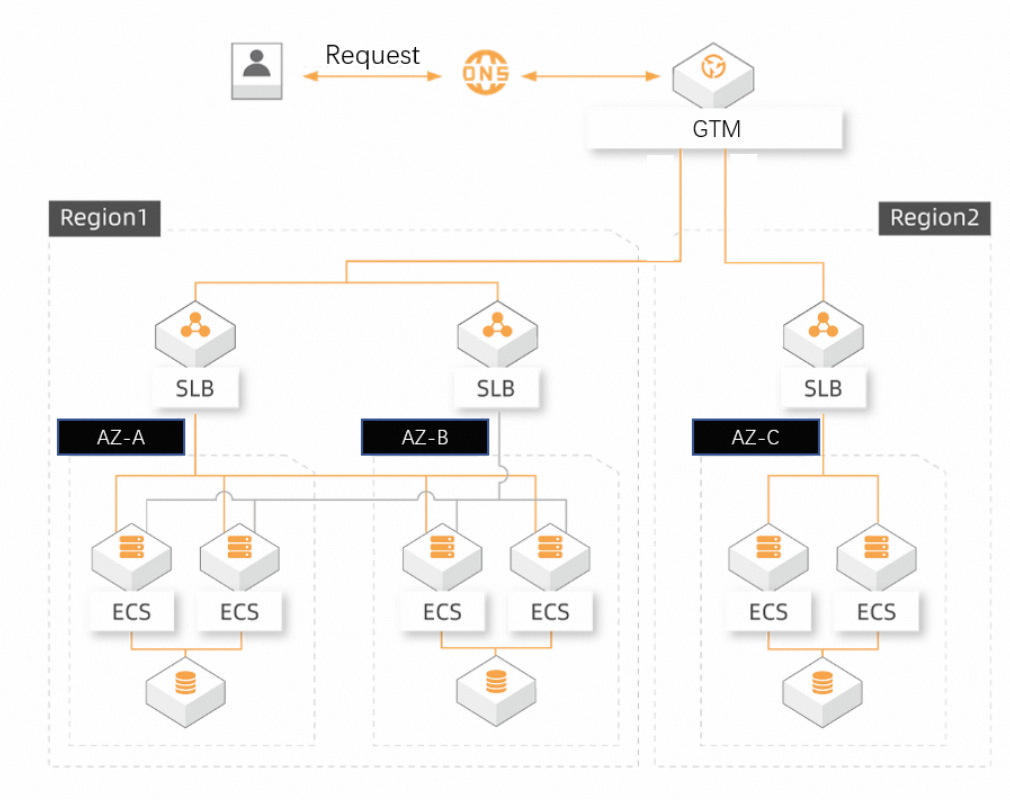
Benefits
-
Reliable health checks: Real-time monitoring with both manual and automatic failover options ensures uninterrupted user access.
-
Unified management: Centrally manage IP addresses and traffic across multiple data centers, regardless of their ISP, region, or cloud provider.
-
Easy to use: Build multi-active and off-site disaster recovery solutions quickly without changing your existing architecture.
Implement the solution
Prerequisites
-
You have created a GTM instance. For details, see the Global Traffic Manager product page.
NoteThe Ultimate Edition detects failures and performs a failover in about 1 minute, while the Standard Edition takes about 3 minutes. For high-availability scenarios, we recommend the Ultimate Edition.
-
You have prepared the required IP resources. This example uses the following addresses: 192.0.2.0 in China (Beijing), 192.0.2.1 in China (Beijing), and 192.0.2.2 in China (Hangzhou).
Procedure
-
Go to the Alibaba Cloud DNS - Global Traffic Manager console. In the instance list, find your target instance and click Configure in the Actions column.
-
Configure basic settings based on your business needs. We recommend that you set Global TTL to 10 minutes, but you can adjust this value as needed.
The configuration page contains the Basic Settings, Address Pool Settings, and Alert Log tabs. On the Basic Settings tab, you can view information such as Instance ID, Instance Name, Service Domain Name (Public), CNAME Scheduling Domain (Public), Global TTL, Alert Group, Creation Time, Instance Edition, and Expiration Time. To edit the settings, click Modify.
-
Configure address pools. Click Add Address Pool to create two pools named "Beijing" and "Hangzhou". Enable Health Check for both.
For the Hangzhou address pool, set the Load Balancing Policy to Return All Addresses. For the Beijing address pool, set the Load Balancing Policy to Return by Weight. Add the addresses
192.0.2.0and192.0.2.1, set the mode for both to Intelligent Return, set the weight for both to 1, and verify that the health check status is normal. -
Configure an access policy. Click Add Access Policy. For Resolution Request Source, select Global. For Primary Address Pool Collection, associate the "Beijing" address pool. For Secondary Address Pool Collection, associate the "Hangzhou" address pool.
After you complete the configuration, the address pool type is IPv4, and the load balancing policy is Return All Addresses. Set the active address pool switching policy to Automatic Switching. When the Primary Address Pool Collection (Beijing) becomes unavailable (current number of available addresses is 0), the system automatically switches to the Secondary Address Pool Collection (Hangzhou).
-
Route live traffic.
-
Navigate to the Alibaba Cloud DNS - Hosted Public Zone console. In the domain list, find your domain name and click Settings.
-
Click Add DNS Record. Create a CNAME record that points your service hostname to the CNAME access domain provided by GTM. After you add the record, GTM manages your application traffic.
-
Verify the solution
-
To simulate a failure, disconnect or stop the services at 192.0.2.0 and 192.0.2.1 in China (Beijing). The status of the Primary Address Pool Collection changes to Unavailable.
-
When the dual data centers in Beijing become unavailable, traffic fails over to the Secondary Address Pool Collection (Hangzhou) to maintain service continuity.
On the GTM access policy details page, you can verify that the failover was successful. The Currently Active Address Pool Collection now shows Secondary Address Pool Collection (Hangzhou). The Address Pool Collection Status for the Primary Address Pool Collection (Beijing) is Unavailable (Current Available Addresses: 0), while the Address Pool Collection Status for the Secondary Address Pool Collection (Hangzhou) is Available (Current Available Addresses: 1).
FAQ
-
How long does failover take? With a health check interval of 15 seconds, a TTL of 10 seconds, and 3 consecutive failed checks, GTM can detect a failure and trigger a failover in about 1 minute. The change then propagates across the internet in about 10 seconds, though actual timing depends on the DNS cache settings of local ISPs.
-
Can I use Global Traffic Manager if I do not use Alibaba Cloud DNS? No. The current version requires you to add a domain in the Alibaba Cloud DNS console to configure GTM. GTM then provides a CNAME scheduling domain, which you must use to create a CNAME record on your DNS management platform.