Grafana V11.x introduces updates across dashboards, panels, data exploration, alerting, and enterprise capabilities. Highlights:
View mode and Edit mode separate viewing from editing for a cleaner dashboard experience.
New transformations such as Transpose, Format string, and Group to nested tables provide more flexibility in data processing.
Explore Metrics and Explore Logs let you browse Prometheus metrics and Loki logs without writing queries.
Simplified alert rule creation reduces the steps needed to configure alerting.
Canvas flowcharting supports new shapes, connector styles, and element rotation.
This topic covers selected updates in Grafana V11.x. For the complete changelog, see Grafana documentation.
Dashboards and visualization
Grafana V11.x redesigns the dashboard architecture for more stable, dynamic, and flexible dashboards.
View mode and Edit mode
Dashboards now separate viewing from editing. View mode provides a clean, distraction-free layout. Switch to Edit mode to add panels, modify settings, and configure layouts.


Template variables and time picker
The time picker has moved from the toolbar into the dashboard variable bar. As you scroll, both the time picker and template variables remain pinned to the top of the page.

Timezone URL parameter
A new timezone URL parameter lets you set the dashboard timezone directly through the URL.
Dashboard controls in TV mode and Kiosk mode
When playing a playlist or displaying a dashboard in full screen in TV mode or Kiosk mode, use these URL parameters to show or hide controls:
| Parameter | Effect |
|---|---|
_dash.hideTimePicker | Hides the time and refresh picker |
_dash.hideVariables | Hides variables and annotation controls |
_dash.hideLinks | Hides dashboard links |

Subfolders
Subfolders are generally available in all editions of the Grafana 11 release.
Create subfolders within any folder where you have edit or manage permissions -- no additional permissions required. Subfolders support:
Folder browsing -- Navigate nested folder structures in the dashboard list.
Folder moving -- Reorganize dashboards by moving folders.
Permission management -- Grant users minimum necessary permissions to maintain instance security.


Library panels and panel editor updates
Several updates improve the panel editing experience:
The library panel tab has been removed from the panel editor.


(V11.3.0) An Overrides tab now appears at the bottom of the panel options list.


(V11.3.0) A drop-down menu lets you collapse the visualization picker.


(V11.3.0) The Share button is now visible in Edit mode.
In Cell Inspect, table cell values are automatically formatted.

Transformations
Grafana V11.x adds new transformations -- including Filter data by values, Partition by values, Transpose, Format string, Group to nested tables, and Add field from calculation -- and improves existing ones with template variable support and more intuitive interaction modes.

Template variable support in transformations
Template variables now work with these transformations: Limit, Sort by, Filter data by values, Grouping to matrix, Heatmap, and Histogram.
Filter data by values
Filter rows by adding a condition, selecting a field, choosing a matcher, and entering the string to match.

Transpose
Pivot data frames by converting rows into columns and columns into rows. This transformation is useful for data sources that do not support pivot queries natively.

Group to nested tables
Group table data by specified fields and run calculations on each group, adding depth and utility to table visualizations.
Format string
Standardize string data presentation by formatting values to upper case, lower case, or title case.

Add field from calculation
When setting up binary operations (for example, dividing each column by a specific value), select the All Number Fields option to apply the calculation across all numeric fields at once.

Panels
Grafana V11.x updates multiple panel types and adds capabilities for plugins, AI integration, data links, canvas, and more.
Redesigned plugin details page
The plugin details page highlights important metadata, including richer icon visualizations for the Business Charts (Apache ECharts) component.


AI-powered title and description generation
Use generative AI to auto-generate panel and dashboard titles and descriptions through the Grafana LLM plugin.
Before using this feature, install and configure the LLM plugin.


Data links and actions
A new Data links and actions section in the panel options lets you add actions that call API endpoints directly from visualizations.
Supported visualizations: Bar chart, Candlestick, Heatmap, State timeline, Status history, Time series, Trend, and XY chart.


Canvas
The canvas visualization adds flowcharting capabilities, universal data link support, and infinite panning.
Enhanced flowcharting
New elements: cloud, parallelogram, and triangle shapes.
Midpoint controls for curved connectors (connectors no longer have to be straight lines).
Additional connector styles, including dashed lines with corner radius and direction control.
Horizontal and vertical snapping for connectors.
Rounded corner styling for elements.
Element rotation.

Infinite panning
Zoom in and out of canvases for large diagrams.
To try this update, you must first enable the canvasPanelPanZoom feature toggle.

Universal data link support
Previously, data links were limited to text elements or elements using the TextConfig object. Now, almost all canvas elements support data links and actions.


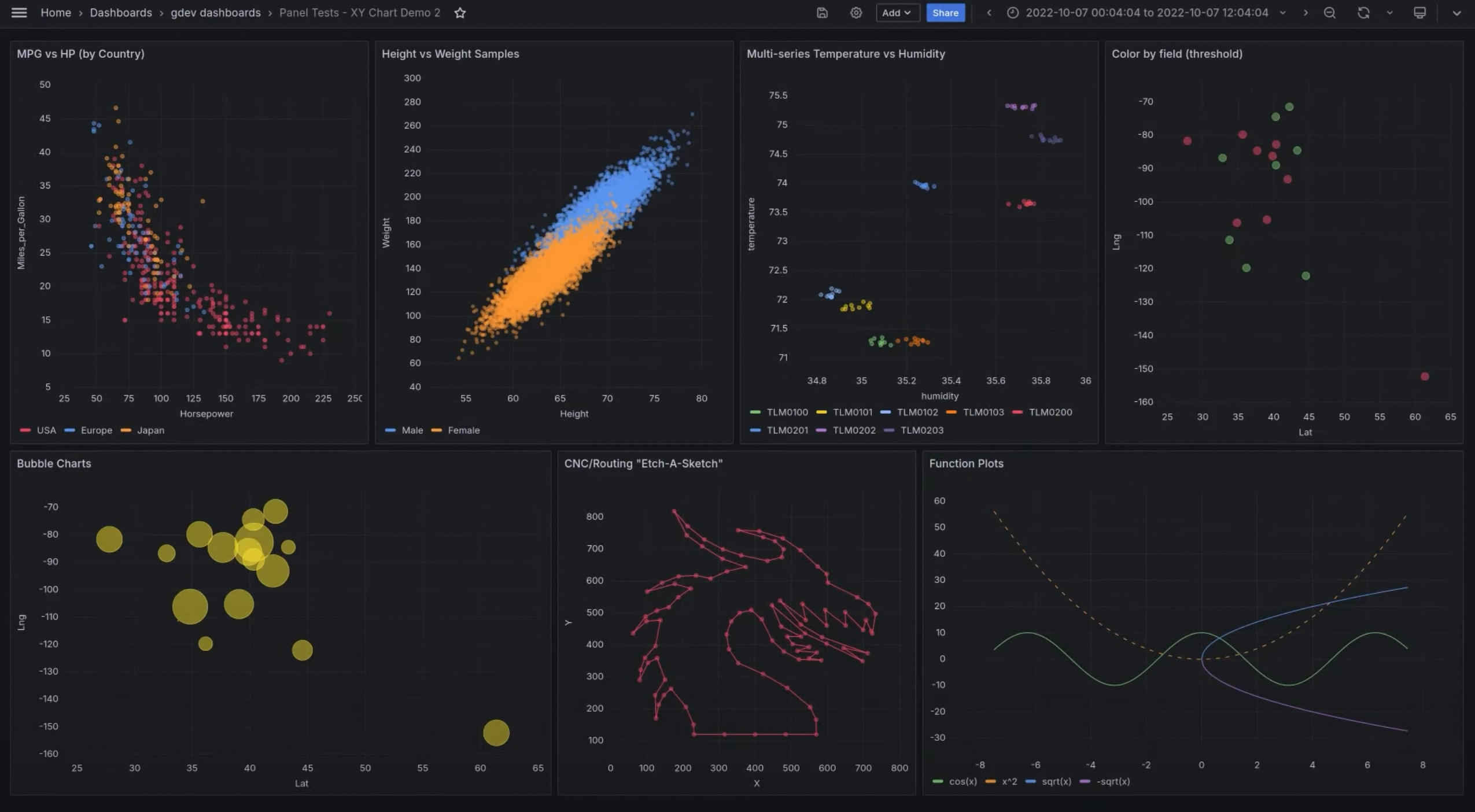
XY chart
To use the XY chart visualization, you must first enable the autoMigrateXYChartPanel feature toggle.
XY charts visualize the relationship between two variables by plotting arbitrary x and y values. Common use cases include scatter plots and bubble charts, where field values determine bubble size.


Table
Colored rows with conditional formatting
Color full table rows using the Colored Background cell type. Map status fields (such as info, debug, or warning) to colors, and let rows display the appropriate threshold color.


Cell text wrapping
*(V11.1)* Wrap text within table cells, either for all columns or for specific columns.


Stat: percent change color
The stat visualization now supports a percent change color option, making it easier to spot trends at a glance.


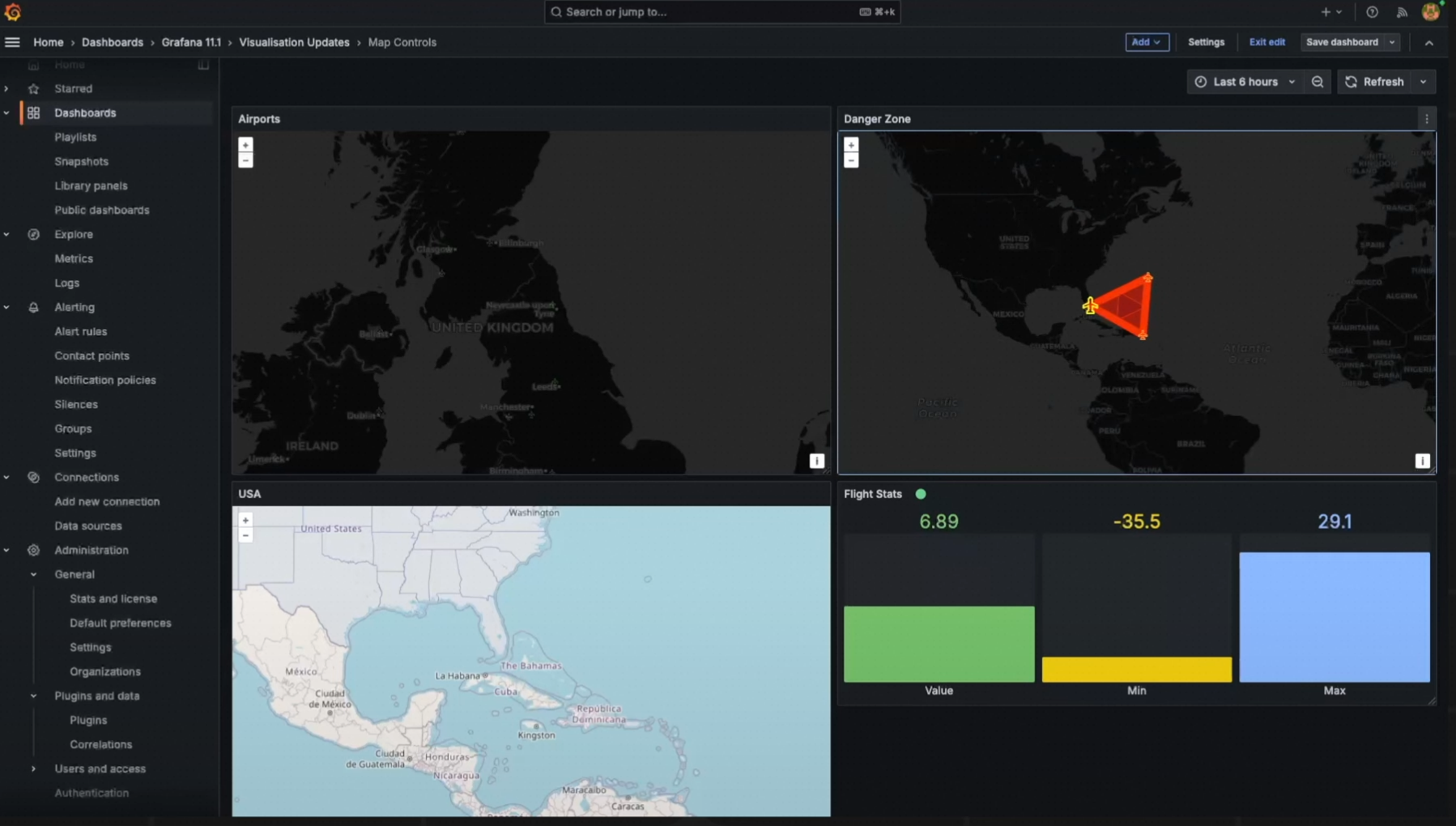
GeoMap keyboard navigation
Navigate the GeoMap visualization using a keyboard: focus on the map area, move with arrow keys, and zoom in or out with + and -.

State timeline pagination
The state timeline visualization now supports pagination through the Page size option. This limits how many series are visible at once. Previously, all series were compressed into a single panel window, making dense timelines hard to read.


Bar gauge legend support
The bar gauge visualization now includes legend support, standardizing legends across more panel types.

Data sources
Role-based data source authorization
Data sources now support authorization by role, user, service account, and team for fine-grained access control.

CloudWatch Metric Insights cross-account support
Build SQL queries in the Metric Insights query builder for AWS CloudWatch Plugin to monitor across multiple accounts in the same region.

New data source plugins
Grafana V11.x adds support for Zendesk, Catchpoint Enterprise, and Yugabyte data sources.
GitHub App authentication
The GitHub data source now supports GitHub App authentication, which provides more granular permissions and reduces the risk of over-permissioning. For details, see GitHub data source documentation.

Explore
Grafana V11.x expands Explore with dedicated interfaces for metrics, logs, traces, and profiles, making it easier to investigate data without writing queries.

Explorer Traces and Explorer Profiles are not visible in Grafana V11.3.x.
Core Explore improvements
Left-side navigation -- A new navigation menu for quick positioning within Explore.
Forward-direction Loki log search -- Browse logs in forward chronological order within a time range, with filtering and pinning support.

Correlations -- Set up links between data sources to navigate from search results to related external URLs.

Explore Metrics
Browse Prometheus metrics without writing queries.
Recent metrics and bookmarks -- Quickly return to previously viewed metrics.

Metric filtering by data source -- Select a data source on the Metrics page to filter results.

History -- Navigate through previously viewed metrics and filters.
Metric details -- Select a metric to view its summary, drill down into label values, and discover relevant metrics.


Explore Logs
Browse Loki logs without writing LogQL queries. View log volume and log line samples on the landing page, and filter out noise or focus on anomalies -- all without query syntax. Power users can switch to the familiar Explore interface while preserving context.

Alerting
Grafana V11.x redesigns the alerting experience with a cleaner settings page, simplified rule creation, and improved access control.
Redesigned Alertmanager settings
The alerting settings page has been redesigned with a cleaner layout:
Updated alert settings interface.
Improved Alertmanager configuration page.
Side-by-side Alertmanager configuration comparison.


OAuth2 support for contact points
Contact points now support OAuth2 authentication, in addition to Basic Auth and TLS.

Alert template selector
Select from predefined templates when configuring alert notifications to reduce manual template setup.
Simplified alert rule creation
The query and conditions step for alert rule creation has been simplified. Switch to advanced options to add multiple queries and expressions for more complex rules.
To try this update, you must first enable the alertingQueryAndExpressionsStepMode feature toggle.

Streamlined alert rule execution and notification settings
Alert rule execution and notification settings have been reorganized to reduce the number of steps needed during rule setup.
Alert rule detail view
The alert rule detail view has been redesigned with metadata displayed at the top and content organized into tabs:
| Tab | Content |
|---|---|
| Query and conditions | View the query and conditions that trigger the alert |
| Instances | Explore each alert instance, its status, tags, and metadata |
| History | View the recorded history for the alert rule |
| Details | Debug or audit using alert rule metadata (such as rule ID) and view annotations |
Paused alert visibility has also been improved.


Keep Last State
The Keep Last State option retains the last known state of an alert rule. The alert history view displays a bar chart of recent alert events for quick scanning.


Role-Based Access Control (RBAC) for alerting
Contact points, silences, and notifications now support Role-Based Access Control (RBAC), letting you restrict access based on user roles.

Foundational updates
LDAP configuration in the UI
Configure LDAP settings directly from the Grafana UI instead of editing configuration files.
To try this update, you must first enable the alertingQueryAndExpressionsStepMode feature toggle.

Navigation bookmarks
Pin frequently visited pages to the top of the navigation menu for quick access.
To try this update, you must first enable the pinNavItems feature toggle in Grafana V11.2 or later.

Other updates
Improved title display across the UI.
Reduced transitions and animations for a snappier feel.
Anonymous user billing in Grafana Enterprise.
New strong password policy enforcement.

Enterprise features
Announcement banners
Display customizable banners across the Grafana UI to communicate critical information to all users.
This update is available in public preview in Grafana Cloud and Enterprise.
To use the announcement banner in self-managed Grafana, you must first enable the
notificationBannerfeature toggle in Grafana V11.3 or later.

Faster PDF export
Dashboard PDF export performance has been dramatically improved. An SLO dashboard with approximately 200 panels that previously took over seven minutes to export now completes in eleven seconds.
This update is available in public preview in Grafana Cloud and Enterprise.
To try this update, you must first enable the
newPDFRenderingfeature.

Grafana Cloud Migration Assistant
Migrating from self-managed Grafana (open source or Enterprise) to Grafana Cloud previously required manual work with the Grafana HTTP API. The Migration Assistant provides a UI-driven workflow:
Start the migration and create a token.
Complete the migration.

