By default, functions in Function Compute can access the public network. They cannot access resources in a virtual private cloud (VPC). To allow a function to access VPC resources or to allow a function to be called from a specific VPC, you must configure network settings and permissions. This topic describes how to configure network settings for a function in the Function Compute console.
Precautions
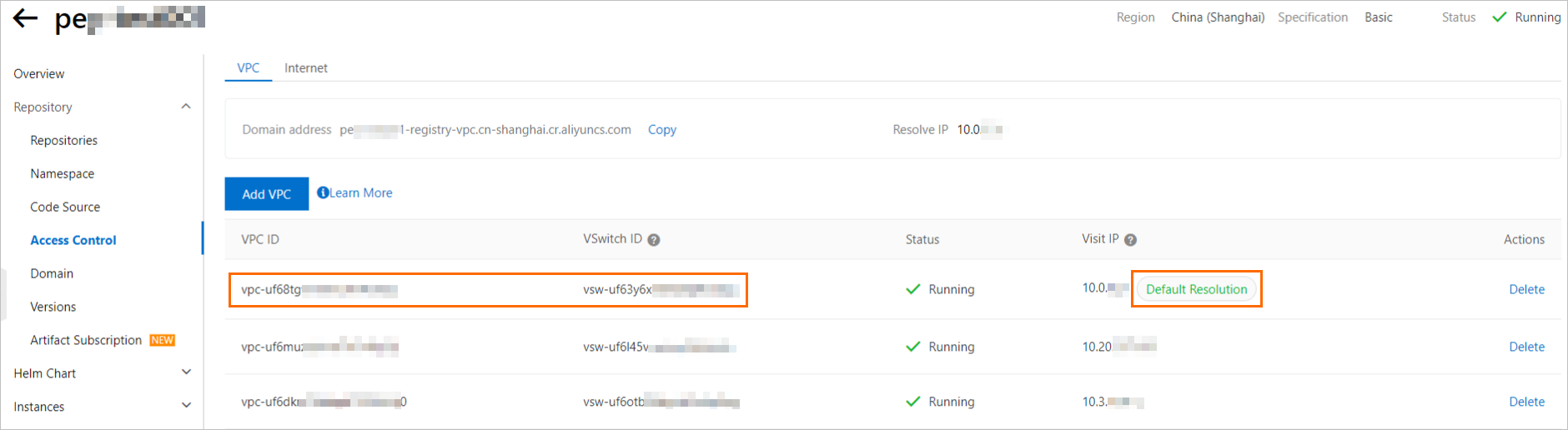
When you configure VPC access for a GPU function created from a container image of an ACR Enterprise instance, the selected VPC and vSwitch must meet the following requirements.
-
If the Resource Access Management page of an ACR Enterprise instance contains the Access IP section with the Default Resolution label, the VPC and vSwitch for the function must be the same as the VPC and vSwitch that correspond to the default resolved IP address.
-
If the Resource Access Management page of an ACR Enterprise instance does not display the Access IP section with the Default Resolution label, you can set the function's VPC and vSwitch to any VPC and vSwitch pair that is attached to the instance.
Network access capabilities
Using the VPC feature can affect the cold start performance of Function Compute. Configure this feature only when necessary. We recommend that you use RAM authorization to access resources when possible. For more information, see Use a function role to grant Function Compute permissions to access other Alibaba Cloud services.
Traffic is generated when a function accesses a network address or is accessed by one. This traffic is classified into the following types.
-
Internet traffic: traffic for accessing Internet addresses, such as the official Alibaba Cloud website, Taobao, and public endpoints of Alibaba Cloud services.
-
VPC private network traffic: traffic for accessing addresses within your VPC, such as the addresses of RDS, NAS, and ECS instances in the VPC.
Based on different network settings, a function can have the following network access capabilities. You can configure them as needed.
-
Function outbound traffic: specifies whether to allow outbound traffic from a function to the public network or to resources in a VPC. The corresponding configurations are Access to VPC and Allow Function to Access Public Network.
Table 1. Function outbound traffic
Network configuration
Description
Allow the function to access only the public network
The function accesses the public network and private network through the function network. Access through your VPC is denied.
The required network configurations are as follows:
-
Set Access to VPC to No.
-
Set Allow Function to Access Public Network to Yes.
Allow the function to access only the VPC
The function accesses the public network and private network only through your VPC. This applies to scenarios such as PrivateZone, NAT Gateway, and functions that are bound to a VPC.
The required network configurations are as follows:
-
Set Access to VPC to Yes, and configure the VPC information.
-
Set Allow Function to Access Public Network to No.
Allow the function to access both the public network and the VPC
-
For non-GPU functions:
-
You can access the public network through the function network.
-
The function accesses the private network through your VPC. PrivateZone is supported for private domain name resolution.
-
-
For GPU functions:
-
The function accesses the public network and the private network in the 100.0.0.0/8 CIDR block through the function network.
-
The function accesses the private network outside the 100.0.0.0/8 CIDR block through your VPC. PrivateZone is not supported for private domain name resolution. To enable private domain name resolution, you can submit a ticket.
-
The required network configurations are as follows:
-
Set Access to VPC to Yes, and configure the VPC information.
-
Set Allow Function to Access Public Network to Yes.
Deny function access to both the public network and the VPC
The function accesses the private network through the function network. Access to the public network and access through your VPC are denied. The required network configurations are as follows:
-
Set Access to VPC to No.
-
Set Allow Function to Access Public Network to No.
-
-
Function inbound traffic: specifies whether to allow inbound traffic to a function from a public IP address or a VPC address. The corresponding configuration is Function Invocation only by Specified VPCs.
Table 2. Function inbound traffic
Network configuration
Description
Allow the function to be accessed from both the public network and a VPC
By default, a function can be called from the public network and a VPC after it is created. The default network configuration is as follows:
-
Set Function Invocation only by Specified VPCs to No.
Allow the function to be accessed only from a VPC
The function can be called from a specified VPC, and calls from the public network are denied. The required network configuration is as follows:
-
Set Function Invocation only by Specified VPCs to Yes, and configure the information about the VPCs that are allowed to call the function.
-
Zones supported by Function Compute
If the zone where your resources reside is not supported by Function Compute, you can create a vSwitch in a zone supported by Function Compute within your VPC environment and specify this vSwitch ID in the VPC configuration of your Function Compute function. Because vSwitches within the same VPC are connected using private network peering, Function Compute can access resources in VPCs located in other zones through this vSwitch. For more information, see How do I resolve the 'vSwitch is in unsupported zone' error?.
Prerequisites
-
(Optional) Create network resources.
If you have not created the required resources, you can select Automatic Configuration during the configuration. Otherwise, you can create the resources in advance by following the instructions in the following topics:
Configure network settings and roles
-
Log on to the Function Compute console. In the navigation pane on the left, choose .
-
In the top navigation bar, select a region. On the Function page, click the target function.
-
On the function details page, click the Configuration tab, and then click Modify in the Advanced Settings section.
-
In the Advanced Settings panel, find the Network section, configure the following items as required, and then click Deploy.
-
Access to VPC: specifies whether to allow the function to access resources in a VPC. Valid values:
-
Enable: allows the function to access resources in a VPC. After you select Enable, you must select a Configuration Mode. Valid values:
-
(Recommended) Automatic Configuration: Function Compute automatically creates resources such as a VPC, a vSwitch, and a security group. You do not need to manually create them. If the system has already created the resources in the current region, they are not created again.
-
Custom Configuration: You must manually select existing network resources. Make sure that you have created the resources in advance.
-
VPC: Select the VPC that you want to access from the list.
ImportantYou can create a maximum of 10 vSwitches in the selected VPC.
-
vSwitch: Select at least one vSwitch from the list.
This parameter specifies the subnets that Function Compute can access. We recommend that you specify two or more vSwitches. If a zone fails or runs out of IP addresses, your function can run in other subnets.
-
Security Group: Select a security group from the list.
This security group is used to associate an elastic network interface (ENI) with the function to control the function's access to VPC resources through the ENI. By default, the outbound rule of the security group allows all traffic. You can also configure outbound rules to implement fine-grained control over the function's access to VPC resources.
NoteThe outbound rule of the security group must allow the ICMP protocol. Function Compute uses the ICMP protocol to check VPC network connectivity.
-
-
-
Disable: does not allow the function to access resources in a VPC.
-
-
Static Public IP Address: specifies whether to obtain a static public IP address for outbound traffic using a NAT gateway and an Elastic IP Address. For more information, see Configure a static public IP address.
-
Allow Function to Access Public Network: specifies whether to allow the function to access the public network. Valid values:
-
Enable: allows the function to access the public network.
-
Disable: does not allow the function to access the public network.
-
-
Function Invocation only by Specified VPCs: specifies whether to allow the function to be called from specified VPCs. Valid values:
-
Enable: allows the function to be called from specified VPCs. Note:
-
A function can be bound to a maximum of 20 VPCs.
-
After you allow only specified VPCs to invoke the function, calls from triggers are not affected.
-
The VPC binding takes effect for all versions and aliases of the function.
-
After you allow only specified VPCs to invoke the function, call requests from the public network and other VPCs are denied. The
StatusCodeis 403, theErrorCodeisAccessDenied, and the error message isResource access is bound by VPC: VPC ID. -
You can bind VPCs only using a private HTTP endpoint. You cannot bind VPCs using a public endpoint or a private HTTPS endpoint.
-
-
Disable: allows the function to be called from the public network and all VPCs.
-
-
FAQ
-
Why does a Function Compute function fail to connect to a VPC?
If you configured your function to access a VPC but the connection fails, the cause may be one of the following.
-
The subnet where the vSwitch resides is faulty, or the IP addresses in the subnet are exhausted. You can specify two or more vSwitch IDs when you configure the VPC. If a zone fails, your function can run in other zones to improve fault tolerance.
-
The security group is incorrectly configured. Configure the security group according to the following requirements.
-
The inbound rule of the security group in the VPC must allow access from the security group where Function Compute resides.
-
The outbound rule of the security group must allow the ICMP protocol. Function Compute uses the ICMP protocol to check VPC network connectivity.
For more information about how to configure a security group, see Add a security group rule.
-
-
-
What do I do if I find that network resources are insufficient when I add new resources?
When you create VPC network resources, the auto-configuration feature provides a network prefix of 24, which offers 252 available IP addresses. If you have many instances, this limit may be exceeded. In this case, you must manually adjust the CIDR block of the vSwitch and the corresponding security group.
Troubleshooting
Function Compute does not check permissions to access a VPC when you configure the vpcConfig parameter. The check is performed when the function is executed. Therefore, new error types may occur when you call the function using the InvokeFunction API operation. The following table describes common errors that may occur when a function connects to a VPC to help you quickly troubleshoot issues.
|
Error code |
Status code |
Cause |
Solution |
|
InvalidArgument |
400 |
The zone where the specified vSwitchId resides is not supported by Function Compute. |
Reset the vSwitchId parameter. For more information, see Zones supported by Function Compute. |
|
The resource in vpcConfig corresponding to vpcId, vSwitchIds, or securityGroupId could not be found. |
Check the settings of the vpcConfig parameter. |
||
|
The specified vSwitch or security group is not in the corresponding VPC. |
Check the settings of the vpcConfig parameter to make sure that the resources corresponding to vSwitchId and securityGroupId are in the VPC that corresponds to vpcId. |
||
|
AccessDenied |
403 |
Permissions to perform operations on ENIs are not granted. |
Check the permissions of the function. For more information, see Use a function role to grant Function Compute permissions to access other Alibaba Cloud services. |
|
ResourceExhausted |
429 |
The number of available IP addresses in the CIDR block of the vSwitch is insufficient. Function Compute cannot create more ENIs. |
Create a vSwitch with a larger CIDR block and update the vSwitchId parameter of vpcConfig. Note
We recommend that you use a |
References
-
To access a database in a VPC, configure a whitelist of IP addresses for the database. The CIDR block that you add to the whitelist must be the CIDR block of the vSwitch that you configure for the function. For more information, see Access a database.
-
To limit the outbound public network traffic of a function, you must configure a static IP address. For more information, see Configure a static public IP address.