Function Compute supports HTTP triggers, which allow you to invoke functions using WebSocket requests. The function acts as a web server that processes WebSocket requests and returns the results to the client. This topic describes how to configure an HTTP trigger for this purpose in the Function Compute console.
Prerequisites
A function that uses the Node.js 14 runtime is created. For more information, see Create a function.
Step 1: Create a trigger
Log on to the Function Compute console. In the left-side navigation pane, click Functions.
In the top navigation bar, select a region. On the Functions page, click the function that you want to manage.
On the Function Details page, click the Configurations tab. In the left-side navigation pane, click Triggers. Then, click Create Trigger.
In the Create Trigger panel, configure the parameters and click OK.
Parameter
Description
Example
Trigger Type
The type of the trigger that you want to create. Select HTTP Trigger.
HTTP Trigger
Name
The name of the HTTP trigger.
http-trigger
Version or Alias
The version or alias of the function for which you want to create the HTTP trigger. The default value is LATEST. If you want to create an HTTP trigger for another version or alias, select the version or alias from the Version or Alias drop-down list. For more information about versions and aliases, see Manage versions and Manage aliases.
LATEST
Request Methods
The methods that can be used to trigger the HTTP trigger.
GET, POST, PUT, DELETE
Disable Internet URL
Specifies whether to deny access to the HTTP trigger from public endpoints. The default value is No, which means you can use a public endpoint to invoke the function.
If you select Yes, no default public endpoint is provided for the HTTP trigger. In this case, an
access denied due to function internet URL is disableerror is reported if you use a public endpoint to invoke the function. Instead, you can invoke the function by using a custom domain name.No
Authentication Method
The method that is used to authenticate HTTP requests. Value values:
No Authentication: Function Compute supports anonymous access to the function and does not authenticate HTTP requests. All users can invoke the function by using HTTP requests.
Signature Authentication: Identity authentication is required for HTTP requests. For more information about the sample code for signature authentication, see Access the URL of an HTTP trigger by using a signature in a request.
JWT Authentication: Function Compute authenticates HTTP requests based on JSON Web Tokens (JWTs). For more information, see Configure JWT authentication for an HTTP trigger.
No Authentication
After the creation of the trigger, you can modify some parameters, such as Version or Alias, Request Methods, Disable Internet URL, and Authentication Method, of the HTTP trigger based on your business requirements.
Step 2: Write and deploy the code
On the function details page, click the Code tab. In the code editor, write the code and then click Deploy Code.
In the current directory of the WebIDE in the console, copy the following code to the index.js file. This topic uses Node.js code as an example.
const WebSocket = require('ws'); const WebSocketServer = WebSocket.Server; const wss = new WebSocketServer({ host: "0.0.0.0", port: 9000, }); wss.on('connection', function (ws, req) { console.log(`[SERVER] connection()`); ws.on('message', function (message) { ws.send(`${message}`, (err) => { if (err) { console.log(`[SERVER] error: ${err}`); } }); }) });NoteThe WebSocket server must listen on the IP address
0.0.0.0, not127.0.0.1orlocalhost. If you do not configure a custom listener port, port9000is used by default.The directory structure in the WebIDE is shown in the following figure:

In the terminal of the WebIDE, run the
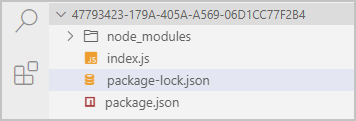
npm install wscommand to install dependencies.After the installation is complete, the package-lock.json file is automatically generated. The directory structure is shown in the following figure:
Click Deploy Code to deploy your code to Function Compute.
Step 3: Test the function
On the function details page, click the Triggers tab to view and copy the public endpoint of the trigger.

Use Postman to test the function.
Copy the URL to Postman and change the scheme from HTTPS to WSS. For more information, see Postman.
Billing method
The billing method for WebSocket is the same as for HTTP. A WebSocket connection is billed as a long-lived HTTP call.
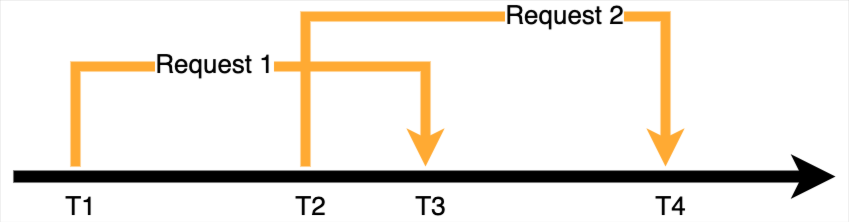
For a function with a concurrency set to 1, billing starts when the WebSocket connection is established and ends when it is closed.
For a function with a concurrency greater than 1, billing for an instance starts when the first WebSocket connection is received and ends when the last WebSocket connection is closed. You are not charged multiple times for simultaneous connections on the same instance.
As shown in the following figure, the concurrency of a function is set to 2. The first request arrives at T1 and ends at T3. The second request arrives at T2 and ends at T4. The billable duration is T4-T1. The period from T2 to T3 is billed only once.
More information
Request timeout
Function Compute applies the same execution timeout to WebSocket and HTTP requests. If a WebSocket connection's time to live (TTL) exceeds the configured execution timeout, Function Compute forcibly closes the connection. Your client receives status code 1006.
Connection keepalive and timeout reconnection
After a WebSocket connection is established, Function Compute does not interfere with your logic, but it closes the connection if the execution timeout is exceeded. If no data is transmitted over the connection for a period, intermediate network nodes, such as a NAT Gateway, may close the connection. In this case, you can use the Ping and Pong frames from the WebSocket protocol to keep the connection alive or verify its availability.
If your business requires a connection to last longer than the maximum request timeout that Function Compute provides, or if your application needs to maintain a stable logical connection, you must add a reconnection mechanism to your client code. You can use libraries such as Reconnecting-WebSocket or Socket.IO to implement this mechanism.
Sticky sessions (session affinity)
Function Compute is stateless. For functions with high concurrency, Function Compute cannot guarantee that multiple requests from the same client are processed by the same container instance. You may need to use external storage, such as Redis, Memcached, Kafka, or a database, to maintain the state of WebSocket requests across multiple container instances.
For example, in a chat room application, Function Compute cannot guarantee that all users connect to the same function instance. Therefore, your function can use the publish/subscribe (pub/sub) feature of Redis to create a chat room. When a user joins a chat room, they subscribe to the channel for that room. When a user sends a message, the function receives it and publishes it to the room's channel in Redis. Because all users in the same chat room have subscribed to the channel, they all receive the message.
More examples
Custom Runtime | Custom Container |
FAQ
Why can't my WebSocket function be executed?
If you just created the trigger, wait about 10 s for the cache to update and then try again.
Check whether the dependency packages in the function code are installed correctly. For more information, see Install third-party dependencies for a function.
Check whether the function is listening on the correct port and IP address. The listening IP address must be
0.0.0.0, not127.0.0.1orlocalhost. If you do not configure a custom listener port, port9000is used by default.
Troubleshooting
Errors that occur before the WebSocket handshake is complete are divided into two main types:
Request errors: The sent request does not meet the standard. A 4xx status code is returned.
Function errors: An issue exists in the function code. A 5xx status code is returned.
Error type | HTTP status code | Cause Analysis | Billing |
Request error | 400 | Your request exceeds the request limits. For more information, see HTTP trigger overview. | No |
400 | The request to invoke a function that requires identity authentication does not contain the Date or Authorization information. | No | |
403 | The signature in the request to invoke a function that requires identity authentication is incorrect. This means the Authorization is incorrect. Because the Date header is used in signature calculation and the signature is valid for only 15 minutes, the signature may have expired. A common cause is that the Date sent in the request header is more than 15 minutes before the current time. | No | |
403 | Your request uses a request method that is not configured for the HTTP trigger. A WebSocket function requires the HTTP trigger to support the GET method. If this method is not configured, this error is reported. | No | |
404 | A WebSocket request is sent to a function that does not have an HTTP trigger. | No | |
User throttling | 429 | The user is throttled. Reduce the concurrency or contact the Alibaba Cloud Function Compute team to increase the concurrency limit. | No |
System error | 500 | A Function Compute system error occurred. You can retry to resolve the issue. | No |
System throttling | 503 | Function Compute system throttling. You can retry with exponential backoff. | No |
Errors that occur after the WebSocket handshake is complete are caused by your function code. Check your code or view the logs generated during code execution. For more information, see View invocation logs.
More information
In addition to the Function Compute console, you can configure triggers by using one of the following methods:
Use Serverless Devs tool to configure triggers. For more operations, please refer to Common commands of Serverless Devs.
Use SDKs to configure triggers. For more information, see SDKs.
To modify or delete an existing trigger, see Manage triggers.