When a function instance starts or shuts down, you may need to run custom logic — for example, opening a database connection before the first request arrives, or releasing resources cleanly before the instance is destroyed. Lifecycle hooks let you register Python functions that Function Compute calls automatically at these two points in a function instance's life.
Two hook types are available for Python runtimes:
Initializer hook — runs once after an instance starts, before the handler processes any request.
PreStop hook — runs before an instance is destroyed, giving you time to release resources.
How lifecycle hooks work
A function instance goes through three phases:
| Phase | When it runs | Hook |
|---|---|---|
| Init | Instance starts | Initializer hook (if configured) |
| Invoke | Handler processes requests | — |
| Shutdown | Instance is destroyed | PreStop hook (if configured) |
Lifecycle hook execution is billed at the same rate as regular invocations. Logs appear in Function Logs, Real-time Logs, and Advanced Logs, but not in the invocation request list.
Initializer hook
The Initializer hook runs once per instance, after the instance starts and before the first handler invocation. Function Compute guarantees exactly-once execution per instance.
Failure behavior: If the hook fails, the invocation returns an error. On the next invocation, Function Compute creates a new instance and runs the Initializer hook again.
Method signature:
| Parameter | Description |
|---|---|
context | Provides runtime metadata for the current invocation. |
| Return value | None. |
Example: initialize a database connection
A common pattern is to open shared resources in the Initializer hook so every handler invocation reuses them, rather than reconnecting on each request.
import os
import pymysql

db_connection = None

def initialize(context):
    global db_connection
    host = os.environ.get("DB_HOST")
    user = os.environ.get("DB_USER")
    password = os.environ.get("DB_PASSWORD")
    database = os.environ.get("DB_NAME")

    db_connection = pymysql.connect(
        host=host,
        user=user,
        password=password,
        database=database,
    )
    print("Database connection established")
The method name (initialize in this example) must match the Initializer Hook value you configure. For example, setting Initializer Hook to index.initialize tells Function Compute to call the initialize method in index.py.
PreStop hook
The PreStop hook runs before a function instance is destroyed. Its method signature is identical to the Initializer hook: one context parameter, no return value.
Example: close a database connection
def preStop(context):
    global db_connection
    if db_connection:
        db_connection.close()
        print("Database connection closed")
Function instances are cached and not destroyed immediately after the last invocation. PreStop logs may not appear right away. To trigger a PreStop hook quickly for testing, update the function's configuration or code — this recycles existing instances, after which you can view the PreStop logs in Function Logs.
Configure lifecycle hooks
Use the Function Compute console
Log on to the Function Compute console. In the left-side navigation pane, click Functions.
Select the function you want to configure.
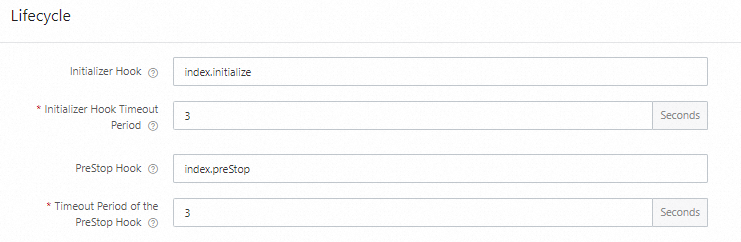
In the function settings, set the Initializer Hook and PreStop Hook fields using the format
<filename>.<method>— for example,index.initializeorindex.preStop.
For detailed steps, see Configure instance lifecycles.
Use Serverless Devs
Add instanceLifecycleConfig under the function resource in s.yaml. Both hooks require a handler (in <filename>.<method> format) and a timeout (in seconds).
edition: 3.0.0
name: fcDeployApp
access: "default"

vars: # The global variables
  region: "cn-hangzhou"

resources:
  hello_world:
    component: fc3 # The name of the component
    props:
      region: ${vars.region}
      functionName: "emojipy"
      description: 'this is emoji'
      runtime: "python3"
      code: ./
      handler: index.handler
      memorySize: 128
      timeout: 30
      environmentVariables:
        PYTHONPATH: /code:/code/python:/opt/python
      instanceLifecycleConfig:
        initializer:
          handler: index.initialize
          timeout: 60  # Timeout in seconds for the Initializer hook
        preStop:
          handler: index.preStop
          timeout: 60  # Timeout in seconds for the PreStop hook
Set timeout long enough to cover your initialization or cleanup logic. For YAML syntax details, see Common commands of Serverless Devs.
View lifecycle hook logs
Log on to the Function Compute console. In the left-side navigation pane, click Functions.
In the top navigation bar, select a region. On the Functions page, click the function.
On the function details page, click the Test Function tab, then click Test Function and choose Logs > Function Logs.
The Logs tab shows both invocation logs and lifecycle hook logs. Each hook execution is bracketed by Start and End markers that include the RequestId:
2024-03-04 17:57:28FC Initialize Start RequestId: 1-65e59b07-1520da26-bf73bbb91b69
2024-03-04 17:57:282024-03-04 09:57:28.192 1-65e59b07-1520da26-bf73bbb91b69 [info] initializer
2024-03-04 17:57:28FC Initialize End RequestId: 1-65e59b07-1520da26-bf73bbb91b69
2024-03-04 17:57:28FC Invoke Start RequestId: 1-65e59b07-1520da26-bf73bbb91b69
2024-03-04 17:57:28FC Invoke End RequestId: 1-65e59b07-1520da26-bf73bbb91b69
PreStop hook logs follow the same format:
2024-03-04 18:33:26FC PreStop Start RequestId: 93c93603-9fbe-4576-9458-193c8b213031
2024-03-04 18:33:262024-03-04 10:33:26.077 93c93603-9fbe-4576-9458-193c8b213031 [info] preStop
2024-03-04 18:33:26FC PreStop End RequestId: 93c93603-9fbe-4576-9458-193c8b213031
What's next
Configure instance lifecycles — full reference for all instance lifecycle settings.
python3-mysql sample — a complete example using Initializer and PreStop hooks to manage MySQL database connections.