Function Compute supports two lifecycle hooks for Node.js function instances: an Initializer hook that runs once after an instance starts, and a PreStop hook that runs before an instance is destroyed. Use these hooks to manage resources — such as database connections — that should be initialized once per instance and released when the instance shuts down.
How lifecycle hooks work
A function instance passes through the following stages:
Instance starts
Initializer hook runs (at most once per instance)
Handler runs for each invocation request
Instance is scheduled for destruction
PreStop hook runs
Instance is destroyed
Hook execution logs are billed at the same rate as regular invocation requests. However, hook logs appear only in Function Logs, Real-time Logs, and Advanced Logs — not in the invocation request list. For more information, see View lifecycle hook logs.
Initializer hook
The Initializer hook runs after a function instance starts and before the handler processes any requests. Function Compute guarantees the hook runs at most once per instance lifecycle. If the hook fails, Function Compute retries until it succeeds before routing any requests to the instance.
Use the Initializer hook to set up shared resources — for example, opening a database connection that all subsequent invocations can reuse, rather than reconnecting on each call.
Method signature
| Aspect | Details |
|---|---|
| Input | context only — provides runtime context at invocation time |
| Return | No return value. Call return (ESM) or callback (CommonJS) to signal completion |
Code examples
Both examples use initialize as the hook function name. This name must match the Initializer hook name configured in the Function Compute console.
ECMAScript modules (Node.js 18 and later)
export const initialize = async (context) => {
  console.log('initializer');
  return "";
}
CommonJS modules
exports.initialize = function(context, callback) {
  console.log('initializer');
  callback(null, "");
};
PreStop hook
The PreStop hook runs before a function instance is destroyed. Its method signature is identical to the Initializer hook: it accepts context as the only input and requires a return or callback call to complete.
Use the PreStop hook to release resources held by the instance — for example, closing database connections before the instance shuts down.
Function instances are cached for a period after processing stops, so the PreStop hook does not run immediately after an invocation ends. To trigger PreStop quickly for testing, update the function configuration or code — this forces the existing instance to be replaced, which triggers the PreStop hook.
Code examples
Both examples use preStop as the hook function name. This name must match the PreStop hook name configured in the console.
ECMAScript modules (Node.js 18 and later)
export const preStop = async (context) => {
  console.log('preStop');
  return "";
}
CommonJS modules
module.exports.preStop = function(context, callback) {
  console.log('preStop');
  callback(null, "");
}
Configure lifecycle hooks
Use the Function Compute console
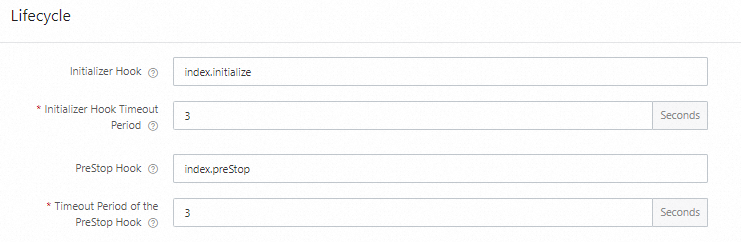
In the Function Compute console, configure the Initializer hook and PreStop hook in the function's configuration settings. For details, see Configure instance lifecycles.
Specify each hook name in [filename.methodname] format:
| Hook | Value | Description |
|---|---|---|
| Initializer hook | index.initialize | The initialize method in index.js |
| PreStop hook | index.preStop | The preStop method in index.js |
Use Serverless Devs
Add instanceLifecycleConfig under props in your s.yaml file. Each hook requires a handler (in filename.methodname format) and a timeout (in seconds).
edition: 3.0.0
name: hello-world-app
access: default

resources:
  hello_world:
    component: fc3
    props:
      region: cn-hangzhou
      functionName: nodejs-fc-hooks
      description: "Node.js lifecycle hooks by serverless devs"
      runtime: nodejs20
      code: ./code
      handler: index.handler
      memorySize: 128
      timeout: 30
      instanceLifecycleConfig:
        preStop:
          handler: index.preStop
          timeout: 3
        initializer:
          handler: index.initialize
          timeout: 3
      internetAccess: true
      logConfig: auto
For all supported YAML fields, see Common commands of Serverless Devs.
View lifecycle hook logs
Log on to the Function Compute console. In the left-side navigation pane, click Functions.
In the top navigation bar, select a region. On the Functions page, click the target function.
On the function details page, click the Test Function tab, click Test Function, and then choose Logs > Function Logs.
The Logs tab shows both invocation logs and Initializer logs. Example:
2023-09-06 11:18:10 FC Initialize Start RequestId: 1-64f7ef72-64caf1ff0046194d9a26bbd7
2023-09-06 11:18:10 load code for handler:index.initialize
2023-09-06 11:18:10 2023-09-06 11:18:10 1-64f7ef72-64caf1ff0046194d9a26bbd7 [verbose] initializer
2023-09-06 11:18:10 FC Initialize End RequestId: 1-64f7ef72-64caf1ff0046194d9a26bbd7
2023-09-06 11:18:10 FC Invoke Start RequestId: 1-64f7ef72-64caf1ff0046194d9a26bbd7
2023-09-06 11:18:10 load code for handler:index.handler
2023-09-06 11:18:10 FC Invoke End RequestId: 1-64f7ef72-64caf1ff0046194d9a26bbd7
To view PreStop hook logs, update the function configuration or code to force an instance replacement. After the update completes, PreStop logs appear in Function Logs. Example:
2023-09-06 11:08:10 FC PreStop Start RequestId: 944bca62-b209-47a1-9e48-2723647bce0a
2023-09-06 11:08:10 load code for handler:index.preStop
2023-09-06 11:08:10 2023-09-06 11:08:10 944bca62-b209-47a1-9e48-2723647bce0a [verbose] preStop
2023-09-06 11:08:10 FC PreStop End RequestId: 944bca62-b209-47a1-9e48-2723647bce0a
Sample program
A complete Node.js example using both hooks with a MySQL database is available at nodejs14-mysql. The Initializer hook reads MySQL configuration from environment variables, creates a connection, and tests connectivity. The PreStop hook closes the connection.