When you need to let another company manage your Function Compute resources without sharing long-term credentials, use Resource Access Management (RAM) roles and Security Token Service (STS). Account A (the resource owner) creates a RAM role and grants Account B permission to assume it. Account B's employees then switch identity into that role to access Account A's functions — and when the collaboration ends, Account A deletes the role to revoke all access immediately.
How it works
Cross-account access involves two accounts and three actions:
Account A (the resource owner) creates a RAM role, attaches the required policies, and sets the trust policy to allow Account B to assume the role.
Account B (the delegated manager) creates RAM users for its employees and grants them the
AliyunSTSAssumeRoleAccesspolicy so they can assume Account A's role.An Account B RAM user switches identity to assume Account A's role, then accesses Account A's Function Compute resources.
To revoke access at any time, Account A deletes the RAM role.
Considerations
Before you start, review these constraints:
Root account cannot switch roles. Only RAM users can switch to an assumed role in the console. The root account of Account B cannot perform the identity switch.
Detach policies before deleting a role. You must remove all attached policies from a RAM role before you can delete it. Skipping this step causes the deletion to fail.
Temporary credentials expire. STS tokens issued via the SDK are temporary. The default expiry in the examples below is 3,600 seconds (1 hour). Design your application to refresh tokens before they expire.
Scope of access. The RAM role only grants access to resources covered by the attached policy. In the examples below,
AliyunFCReadOnlyAccessgrants read-only access to all Function Compute resources in Account A.
Use cases
Outsource Function Compute operations to a partner company without sharing account credentials.
Let a third-party team manage specific functions while retaining ownership of all resources.
Centralize Function Compute management across multiple Alibaba Cloud accounts within an organization.
Grant access using the RAM console
The following example grants employees of Enterprise B (Account B, ID: 134567890123****, alias: company-b) read-only access to all functions in Enterprise A's account (Account A, ID: 123456789012****, alias: company-a).
Steps overview:
| Step | Who acts | What they do |
|---|---|---|
| 1 | Account A | Create a RAM role trusted by Account B and attach AliyunFCReadOnlyAccess |
| 2 | Account B | Create RAM users and grant them AliyunSTSAssumeRoleAccess |
| 3 | Account B RAM user | Switch identity to assume Account A's role |
| (Optional) | Account A | Delete the RAM role to revoke all access |
Step 1: Create a RAM role (Account A)
Use Account A to create a RAM role trusted by Account B, then attach the required policy.
Log on to the RAM console as Account A.
In the left-side navigation pane, choose Identities > Roles.
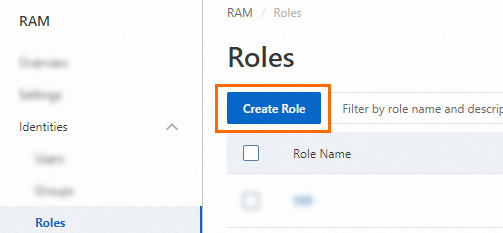
On the Roles page, click Create Role.
On the Create Role page, set Principal Type to Cloud Account, enter the ID of Account B in the Other Alibaba Cloud Account field, and then click OK.

In the Create Role dialog box, enter a Role Name and click OK.
Attach the
AliyunFCReadOnlyAccesspolicy to the role. For details, see Grant permissions to a RAM role.Click the role you created. On the role details page, click the Trust Policy tab. Edit the trust policy and change the
accountidvalue to the ID of Account B. This ensures that only RAM users within Account B can assume the role.
Step 2: Create RAM users and grant the assume-role permission (Account B)
Use Account B to create RAM users for the employees who need access. For details, see Create a RAM user.
Attach the
AliyunSTSAssumeRoleAccesspolicy to those RAM users. For details, see Grant permissions to a RAM user.
Step 3: Switch identity to assume Account A's role (Account B RAM user)
Log on to the RAM console as an Account B RAM user. For details, see Log on to the console as a RAM user.
In the upper-right corner, move the pointer over the profile picture and click Switch Identity.
In the Switch Role dialog box, enter the account alias, default domain name, or ID of Account A, then enter the name of the RAM role. Click Submit. For more information, see Assume a RAM role.
To find Account A's domain name, see View and modify the default domain name.
To find the role name, see View the information about a RAM role.

After switching roles, log on to the Function Compute console. All Function Compute resources belonging to Account A are now visible.
Revoke access (optional)
When the collaboration ends, Account A can delete the RAM role to revoke all access granted to Account B.
Detach all policies from the RAM role before deleting it. For details, see Revoke permissions from a RAM role.
Log on to the RAM console as Account A.
In the left-side navigation pane, choose Identities > Roles.
On the Roles page, find the RAM role and click Delete Role in the Actions column.
In the Delete Role dialog box, enter the role name and click Delete Role.
Grant access using an SDK
Use STS to issue temporary access credentials programmatically, without storing long-term AccessKey secrets in your code.
The following example shows how an Account B function obtains a temporary credential and uses it to list all services in Account A's Function Compute account.
Prerequisites
Before you begin, ensure that you have:
A function deployed in Account B. See Create a web function
A RAM role created in Account A with Account B as the trusted account. See Create a RAM role for a trusted Alibaba Cloud account
RAM users in Account B authorized to assume the role — create them via Create a RAM user, then attach
AliyunSTSAssumeRoleAccessvia Grant permissions to a RAM user
Step 1: Get a temporary credential (STS token)
In the function code for Account B, call the STS AssumeRole API to get a temporary credential. Store credentials in environment variables — never hardcode AccessKey secrets in function code.
For SDK setup details, see STS SDK overview. For full parameter reference, see AssumeRole.
Node.js
const Core = require('@alicloud/pop-core');

// Credentials are read from environment variables.
// Configure ALIBABA_CLOUD_ACCESS_KEY_ID and ALIBABA_CLOUD_ACCESS_KEY_SECRET
// in your local environment, or use the execution role in Function Compute
// to have them configured automatically.
const client = new Core({
  accessKeyId: process.env['ALIBABA_CLOUD_ACCESS_KEY_ID'],
  accessKeySecret: process.env['ALIBABA_CLOUD_ACCESS_KEY_SECRET'],
  endpoint: 'https://sts.aliyuncs.com',
  apiVersion: '2015-04-01'
});

const params = {
  "RegionId": "cn-hangzhou",
  "RoleArn": "<RoleARN>",           // Replace with the ARN of the RAM role in Account A
  "RoleSessionName": "<RoleSessionName>"  // Replace with a session name of your choice
};

client.request('AssumeRole', params, { method: 'POST' })
  .then(result => console.log(JSON.stringify(result)))
  .catch(ex => console.log(ex));
Python
# -*- coding: utf-8 -*-
import os
import json
from alibabacloud_tea_openapi.models import Config
from alibabacloud_sts20150401.client import Client
from alibabacloud_sts20150401.models import AssumeRoleRequest

def main():
    # Credentials are read from environment variables.
    # Configure ALIBABA_CLOUD_ACCESS_KEY_ID and ALIBABA_CLOUD_ACCESS_KEY_SECRET
    # in your local environment, or use the execution role in Function Compute
    # to have them configured automatically.
    config = Config(
        access_key_id=os.getenv('ALIBABA_CLOUD_ACCESS_KEY_ID'),
        access_key_secret=os.getenv('ALIBABA_CLOUD_ACCESS_KEY_SECRET'),
        region_id='cn-hangzhou'
    )
    client = Client(config)

    assume_role_request = AssumeRoleRequest(
        duration_seconds=3600,
        role_arn='<RoleARN>',               # Replace with the ARN of the RAM role in Account A
        role_session_name='fc-python-sdk'
    )
    response = client.assume_role(assume_role_request)
    result = json.dumps(json.loads(str(response.body).replace("'", "\"")))
    print(result)

if __name__ == "__main__":
    main()
The response includes the temporary credential:
{
  "RequestId": "964E0EC5-575B-4FF5-8FD0-D4BD8025602A",
  "AssumedRoleUser": {
    "Arn": "acs:ram::****:role/wss/wss",
    "AssumedRoleId": "***********:wss"
  },
  "Credentials": {
    "SecurityToken": "*************",
    "AccessKeyId": "STS.*************",
    "AccessKeySecret": "*************",
    "Expiration": "2023-05-28T11:23:19Z"
  }
}
For answers to common questions about STS tokens, see FAQ about RAM roles and STS tokens.
Step 2: Use the credential to access Account A's resources
Pass the temporary credential to the Function Compute client. The following Node.js example lists all services in Account A.
The RAM role created by Account A must have permission to list services (AliyunFCReadOnlyAccess or a custom policy granting fc:ListServices).
const FC = require('@alicloud/fc2');

// Use the temporary credential obtained from Step 1.
// Configure ALIBABA_CLOUD_ACCESS_KEY_ID, ALIBABA_CLOUD_ACCESS_KEY_SECRET,
// and ALIBABA_CLOUD_SECURITY_TOKEN in your environment, or rely on
// Function Compute's execution role to set them automatically.
const client = new FC('<accountID>', {    // Replace with Account A's account ID
  region: '<yourRegionID>',              // Replace with the region ID, e.g., cn-hangzhou
  accessKeyID: process.env['ALIBABA_CLOUD_ACCESS_KEY_ID'],
  accessKeySecret: process.env['ALIBABA_CLOUD_ACCESS_KEY_SECRET'],
  securityToken: process.env['ALIBABA_CLOUD_SECURITY_TOKEN'],
});

client.listServices()
  .then(res => console.log(JSON.stringify(res, null, ' ')))
  .catch(ex => console.log(ex));
What's next
Grant permissions to a RAM role — attach additional policies to extend or refine access.
FAQ about RAM roles and STS tokens — troubleshoot common STS token issues.