This topic answers frequently asked questions about deploying applications with Serverless Application Center.
Only one environment pipeline is triggered when multiple environments share a code branch
Function configurations are overwritten after each deployment
Environment shows an exception or fails to initialize
Problem: An environment shows an exception or fails to initialize.
Cause: In most cases, an environment exception is caused by insufficient permissions or quotas.
Diagnosis: View the running status of the environment to locate the cause of the exception.

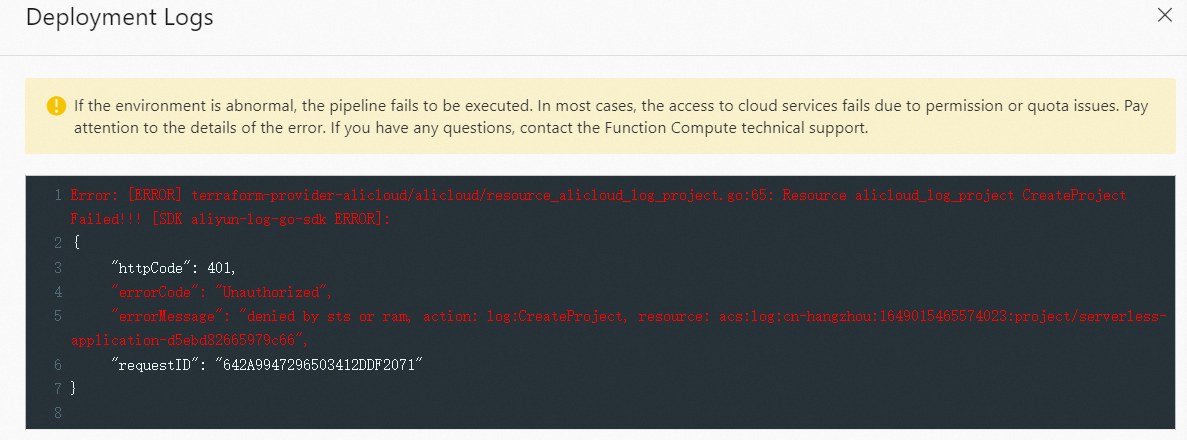
Solution:
Check the running status and error logs shown in the preceding screenshots.
Verify that your account has the required permissions for the resources being deployed.
Confirm that your resource quotas have not been exceeded.
Pipeline build times out during deployment
Problem: The pipeline build fails with the following error:
Error: Function timed out after 600 secondsCause: The default timeout period for a pipeline build is 10 minutes. This error occurs when dependency downloads take longer than the default timeout period.
Pipelines support both Chinese mainland and global build environments. The build environment depends on which code repository platform you use:
| Code repository platform | Build environment region |
|---|---|
| Gitee, Codeup, GitLab | China (Hangzhou) |
| GitHub | Singapore |
If you build a pipeline in a Chinese mainland region and the system installs dependencies from a registry outside the Chinese mainland, the download speed is slow. This causes the build to exceed the 10-minute timeout.
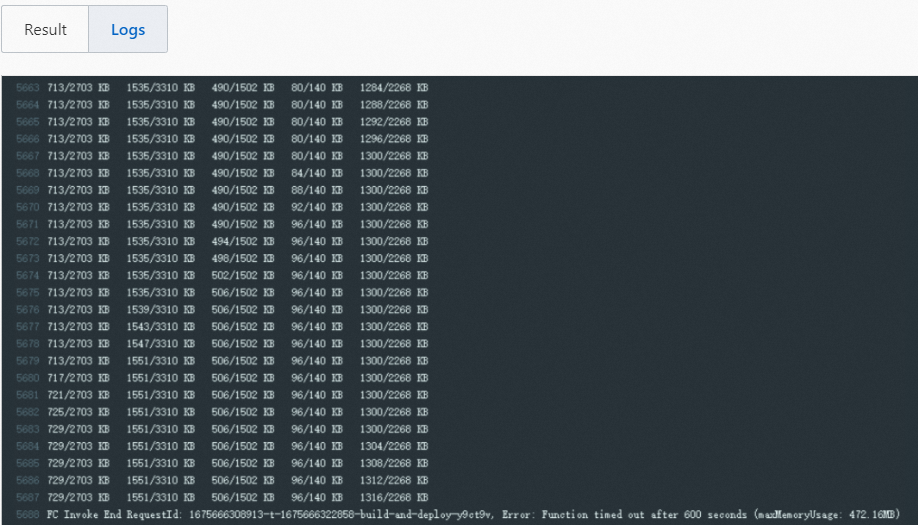
Solution: Use one of the following methods to resolve this issue.
Method 1: Use a Chinese mainland mirror for dependency installation
Configure a Chinese mainland source or proxy to speed up dependency downloads. Examples:
Python -- Use the Tsinghua source:
pip install some-package -i https://pypi.tuna.tsinghua.edu.cn/simpleNode.js -- Use the Taobao source:
npm install some-package --registry https://registry.npmmirror.comGolang -- Use Goproxy:
GOPROXY=https://goproxy.cn
Method 2: Use a custom pipeline with a different region or timeout
Use a custom pipeline to deploy the build environment in the China (Hong Kong) region, or set the build timeout period to a custom value.
If you use a custom pipeline, you are charged for function invocations. For more information, see Billing overview.
Pipeline is not triggered after code is submitted
Problem: A pipeline is not triggered after you submit code to the repository.
Diagnosis: Check the webhook execution history in your code repository to troubleshoot the issue.
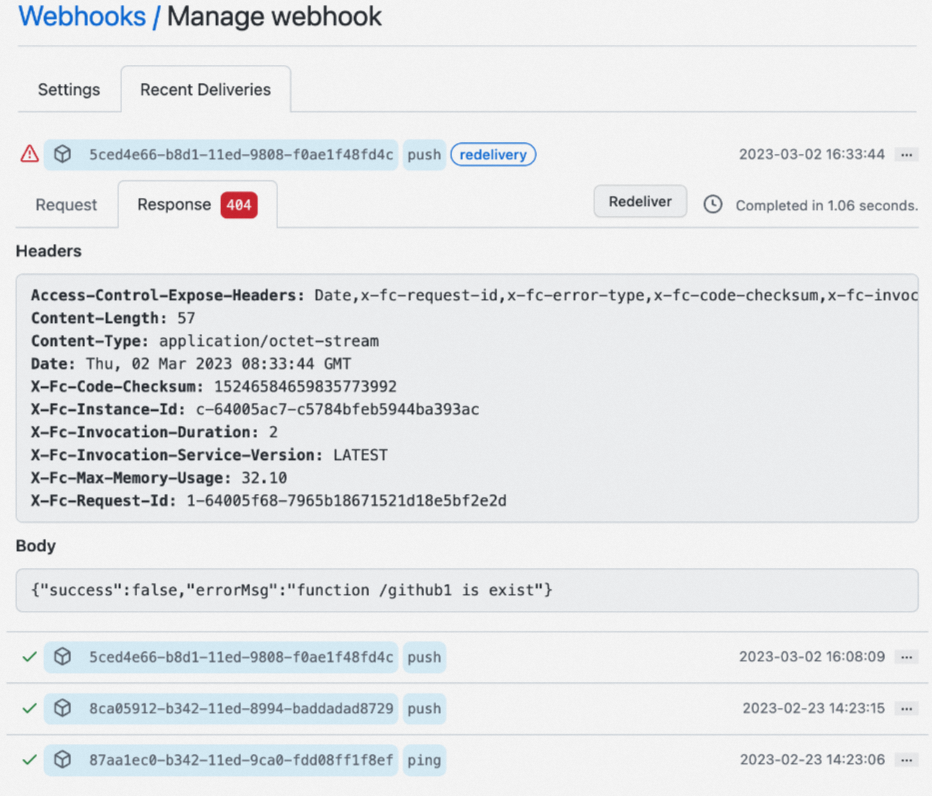
Open the webhook settings in your code repository.
Check the recent webhook delivery or event history for failed requests.
View the response details of failed requests to find HTTP status codes or error messages.
Solution: If a 500 error is reported in the webhook execution history, join the DingTalk group 64970014484 for technical support.
Only one environment pipeline is triggered when multiple environments share a code branch
Problem: When multiple environments are associated with the same code branch, only one environment pipeline is triggered.
Cause: Deploying all environments simultaneously with the same code version could cause functions in different environments to overwrite each other. To prevent this, Serverless Application Center allows the pipelines of only one environment to be executed at a time.
Solution: If you need to trigger pipelines in multiple environments simultaneously, join the DingTalk group 64970014484 for technical support.
Function configurations are overwritten after each deployment
Problem: Function configurations that you modified in the Function Compute console are overwritten after each deployment.
Cause: When you deploy an application, Serverless Application Center updates functions based on the configurations defined in the s.yaml file in the code repository. Any configurations you modified directly in the Function Compute console are overwritten during deployment.
Solution: Modify the configurations in the s.yaml file of your code repository instead of in the console. For more information about s.yaml configuration options, see service field.
If you have already modified function configurations in the Function Compute console and want to sync those changes to your s.yaml file, follow these steps:
Open the function details page in the Function Compute console.
Click Export Function in the upper-right corner.
Select Export Function Configurations to download the
s.yamlfile for the function.Use the exported file as a reference to update the
s.yamlfile in your code repository.
Application is inaccessible via domain name
Problem: Your application is inaccessible via the ***.devsapp.net domain name.
Note that the ***.devsapp.net domain name is provided by Serverless Devs for learning and testing purposes only. It cannot be used in production environments. Serverless Devs periodically sends URL test requests to the domain and revokes the domain one day after issuance. To ensure a better experience, we recommend that you promptly configure a custom domain name for your application. For more information about custom domain configuration, see Configure custom domain names.
Applications without a custom domain for more than one day will become inaccessible once the ***.devsapp.net domain is revoked. In such cases, you will need to redeploy your application to have Serverless Devs issue the domain again.
Solution: Configure a custom domain name for your application as soon as possible. For more information, see Configure a custom domain name.