Function Compute allows you to configure signature authentication for HTTP triggers. When you enable signature authentication on a custom domain name, API Gateway validates the signature on every inbound request before forwarding it to your function. This offloads authentication from your function so you can focus on business logic.
Enable signature authentication when you want only callers with a valid AccessKey to invoke your function through a custom domain name. Leave it disabled for public, unauthenticated endpoints.
Prerequisites
Before you begin, ensure that you have:
Enable signature authentication
Log on to the Function Compute console. In the left navigation pane, choose Function Management > Custom Domain Name.
In the top navigation bar, select the region where the custom domain name resides. On the Custom Domains page, click the custom domain name.
In the upper-right corner, click Modify. In the Authentication Settings section, set Authentication Method to Signature Authentication, then click Save.
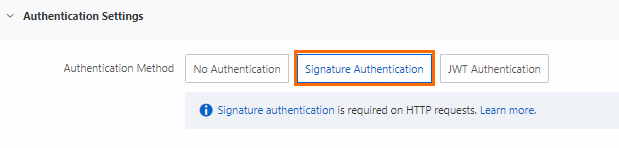
Verify the setup
After enabling signature authentication, write code on your on-premises machine and run the code to send a signed request and confirm that API Gateway accepts it. The following example uses Go to build and send a signed request.
The sample project contains two files:
| File | Purpose |
|---|---|
signature.go | Implements the signing algorithm |
main.go | Sends a signed POST request to your function endpoint |

How the signing algorithm works
The signing algorithm builds the Authorization header in four steps:
Build the canonical string — Concatenate the HTTP method,
Accept,Content-MD5,Content-Type, andDateheaders, followed by sortedx-acs-*headers (CanonicalizedOSSHeaders), and the canonicalized resource (URL path + sorted query parameters).Compute the HMAC-SHA1 signature — Apply HMAC-SHA1 using your AccessKey secret as the key, then Base64-encode the result.
Format the authorization string — Combine the result as
acs <AccessKey ID>:<signature>.Attach the header — Set
Authorization: acs <AccessKey ID>:<signature>on the request.
signature.go
package sign

import (
	"bytes"
	"crypto/hmac"
	"crypto/sha1"
	"encoding/base64"
	"hash"
	"io"
	"net/http"
	"sort"
	"strings"
)

// GetPOPAuthStr returns the Authorization header value for a request.
func GetPOPAuthStr(accessKeyID string, accessKeySecret string, req *http.Request) string {
	return "acs " + accessKeyID + ":" + GetPOPSignature(accessKeySecret, req)
}

// GetPOPSignature computes the signature for a request.
func GetPOPSignature(akSecret string, req *http.Request) string {
	stringToSign := getStringToSign(req)
	return GetROASignature(stringToSign, akSecret)
}

// GetROASignature applies HMAC-SHA1 and Base64-encodes the result.
func GetROASignature(stringToSign string, secret string) string {
	h := hmac.New(func() hash.Hash { return sha1.New() }, []byte(secret))
	io.WriteString(h, stringToSign)
	signedStr := base64.StdEncoding.EncodeToString(h.Sum(nil))
	return signedStr
}

// getStringToSign builds the canonical string from the request.
func getStringToSign(req *http.Request) string {
	queryParams := make(map[string]string)
	for k, v := range req.URL.Query() {
		queryParams[k] = v[0]
	}
	// Sort query parameters by key
	var queryKeys []string
	for key := range queryParams {
		queryKeys = append(queryKeys, key)
	}
	sort.Strings(queryKeys)
	tmp := ""
	for i := 0; i < len(queryKeys); i++ {
		queryKey := queryKeys[i]
		v := queryParams[queryKey]
		if v != "" {
			tmp = tmp + "&" + queryKey + "=" + v
		} else {
			tmp = tmp + "&" + queryKey
		}
	}
	resource := req.URL.EscapedPath()
	if tmp != "" {
		tmp = strings.TrimLeft(tmp, "&")
		resource = resource + "?" + tmp
	}
	return getSignedStr(req, resource)
}

func getSignedStr(req *http.Request, canonicalizedResource string) string {
	temp := make(map[string]string)

	for k, v := range req.Header {
		if strings.HasPrefix(strings.ToLower(k), "x-acs-") {
			temp[strings.ToLower(k)] = v[0]
		}
	}
	hs := newSorter(temp)

	// Sort x-acs-* headers alphabetically
	hs.Sort()

	// Build the canonicalized x-acs-* headers string
	canonicalizedOSSHeaders := ""
	for i := range hs.Keys {
		canonicalizedOSSHeaders += hs.Keys[i] + ":" + hs.Vals[i] + "\n"
	}

	date := req.Header.Get("Date")
	accept := req.Header.Get("Accept")
	contentType := req.Header.Get("Content-Type")
	contentMd5 := req.Header.Get("Content-MD5")

	signStr := req.Method + "\n" + accept + "\n" + contentMd5 + "\n" + contentType + "\n" +
		date + "\n" + canonicalizedOSSHeaders + canonicalizedResource
	return signStr
}

// Sorter sorts header keys and values together.
type Sorter struct {
	Keys []string
	Vals []string
}

func newSorter(m map[string]string) *Sorter {
	hs := &Sorter{
		Keys: make([]string, 0, len(m)),
		Vals: make([]string, 0, len(m)),
	}
	for k, v := range m {
		hs.Keys = append(hs.Keys, k)
		hs.Vals = append(hs.Vals, v)
	}
	return hs
}

func (hs *Sorter) Sort() {
	sort.Sort(hs)
}

func (hs *Sorter) Len() int {
	return len(hs.Vals)
}

func (hs *Sorter) Less(i, j int) bool {
	return bytes.Compare([]byte(hs.Keys[i]), []byte(hs.Keys[j])) < 0
}

func (hs *Sorter) Swap(i, j int) {
	hs.Vals[i], hs.Vals[j] = hs.Vals[j], hs.Vals[i]
	hs.Keys[i], hs.Keys[j] = hs.Keys[j], hs.Keys[i]
}
go.mod
module auth.fc.aliyun.com

go 1.17
main.go
The following sample reads credentials from environment variables and sends a signed POST request to your function endpoint.
This example uses long-term AccessKey credentials for simplicity. For production workloads, use Security Token Service (STS) instead. See Create an AccessKey and Manage access credentials for details.
package main

import (
	"bytes"
	"encoding/json"
	"fmt"
	"io/ioutil"
	"net/http"
	"os"
	"time"

	"auth.fc.aliyun.com/sign"
)

func main() {
	// Replace with your custom domain name or HTTP trigger endpoint.
	url := "A custom domain name or the endpoint of the HTTP trigger"

	// Read credentials from environment variables.
	// Make sure ALIBABA_CLOUD_ACCESS_KEY_ID and ALIBABA_CLOUD_ACCESS_KEY_SECRET are set.
	ak := os.Getenv("ALIBABA_CLOUD_ACCESS_KEY_ID")
	sk := os.Getenv("ALIBABA_CLOUD_ACCESS_KEY_SECRET")

	// Build the request body.
	data := map[string]interface{}{
		"user": "FC 3.0",
	}
	jsonData, err := json.Marshal(data)
	if err != nil {
		fmt.Printf("Error encoding JSON: %s\n", err)
		return
	}

	// Create the request.
	request, err := http.NewRequest("POST", url, bytes.NewBuffer(jsonData))
	if err != nil {
		fmt.Printf("Error creating request: %s\n", err)
		return
	}
	request.Header.Set("Content-Type", "application/json")

	// Sign the request and attach the Authorization header.
	addAuthInfo(request, ak, sk)

	// Send the request.
	client := &http.Client{}
	response, err := client.Do(request)
	if err != nil {
		fmt.Printf("Error sending request to server: %s\n", err)
		return
	}
	defer response.Body.Close()

	body, err := ioutil.ReadAll(response.Body)
	if err != nil {
		fmt.Printf("Error reading response body: %s\n", err)
		return
	}

	fmt.Printf("Response Status: %s\n", response.Status)
	fmt.Printf("Response Body: %s\n", string(body))
}

func addAuthInfo(req *http.Request, ak, sk string) {
	if req.Header.Get("Date") == "" {
		req.Header.Set("Date", time.Now().UTC().Format(http.TimeFormat))
	}
	if req.URL.Path == "" {
		req.URL.Path = "/"
	}
	authHeader := sign.GetPOPAuthStr(ak, sk, req)
	req.Header.Set("Authorization", authHeader)
}
A successful response looks like this:
Response Status: 200 OK
Response Body: Hello World!
Troubleshoot common errors
"Required HTTP header Date was not specified"
Cause: The request is missing the Date header, the Authorization header, or both.
Fix:
If the request has no
Authorizationheader, add signing logic using the sample code above.If the
Authorizationheader is present butDateis missing, add aDateheader set to the current UTC time in RFC 7231 format — for example,Thu, 04 Jan 2024 01:33:13 GMT. TheaddAuthInfofunction inmain.gosets this automatically.
"The difference between the request time and the current time is too large"
Cause: The signature has expired. Re-sign the request using the current system time.
"The request signature we calculated does not match the signature you provided"
Cause: The signature in the request does not match what Function Compute computed from the same inputs.
Fix: Check the following in order:
Credentials — Verify the AccessKey ID and AccessKey secret in your environment variables are correct.
Canonical string order — Compare your implementation against the
getStringToSignfunction step by step. The required order is: HTTP method →Accept→Content-MD5→Content-Type→Date→ sortedx-acs-*headers → canonicalized resource.Authorization format — Confirm the
Authorizationheader value follows the formatacs <AccessKey ID>:<signature>. Check the output ofGetPOPAuthStr.