Realtime Compute for Apache Flink integrates with Apache Sedona to run distributed, real-time geospatial analysis on streaming data. This tutorial walks through a traffic density analysis scenario—counting vehicles in each area using spatial SQL—and shows how to build it with either Flink SQL or a JAR job.
Limitations
This feature requires Ververica Runtime (VVR) 8.0.11 or later.
Apache Sedona overview
Apache Sedona is a distributed, high-performance computing (HPC) framework for processing large-scale geospatial data. It extends Flink with spatial data types and functions, making point-in-polygon joins and other spatial operations available directly in SQL or the Table API.
Apache Sedona 1.7.2 supports three aggregate functions and over 200 scalar functions. For the full function list, see the Flink API documentation.
Procedure
SQL
This section shows how to build the traffic density job using Flink SQL.
Prerequisites
Before you begin, make sure you have:
-
A Realtime Compute for Apache Flink workspace running VVR 8.0.11 or later
-
Access to the Development Console
Step 1: Download the sedona-flink JAR
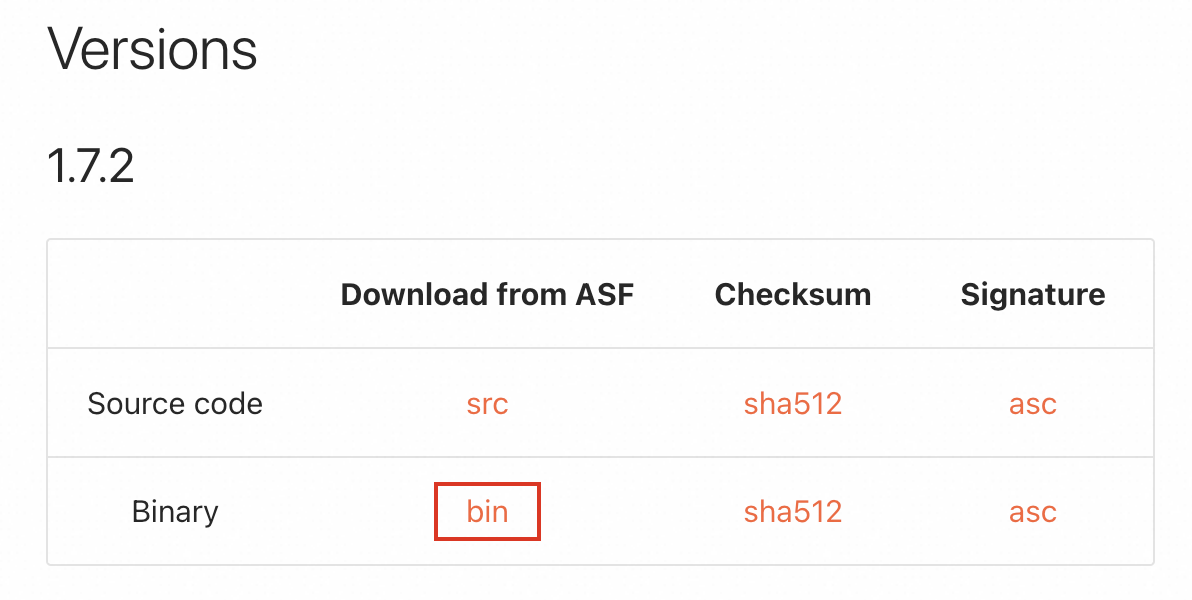
Download sedona-flink-shaded_2.12-1.7.2.jar from the Apache Sedona Maven repository.
Alternatively, download the compressed package from the Apache Sedona download page and extract the JAR from the archive.
Step 2: Register the UDF
-
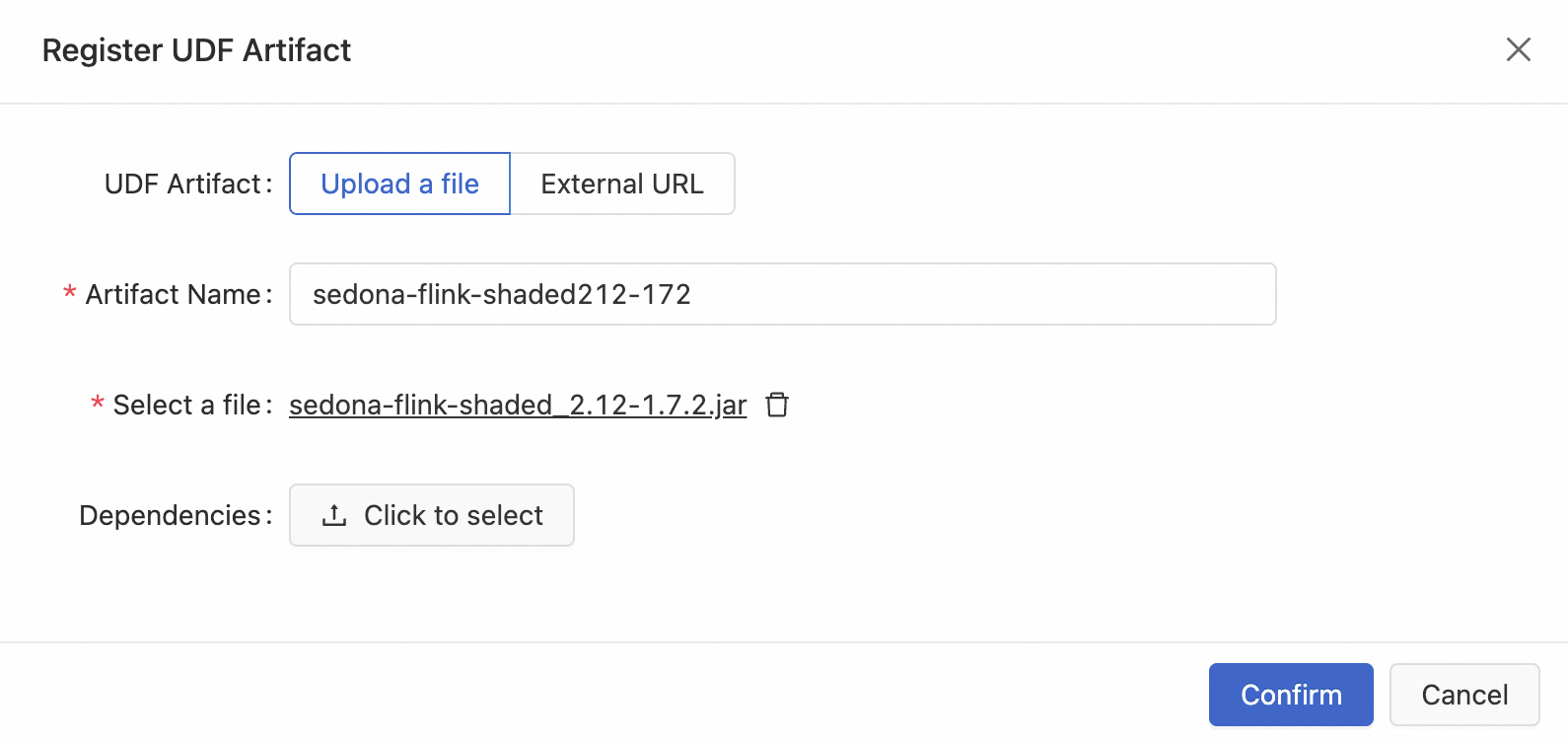
In the Development Console, navigate to Development > ETL and select the UDFs tab.
-
Click the + icon to register a UDF.
-
Upload
sedona-flink-shaded_2.12-1.7.2.jarand select the functions to register.
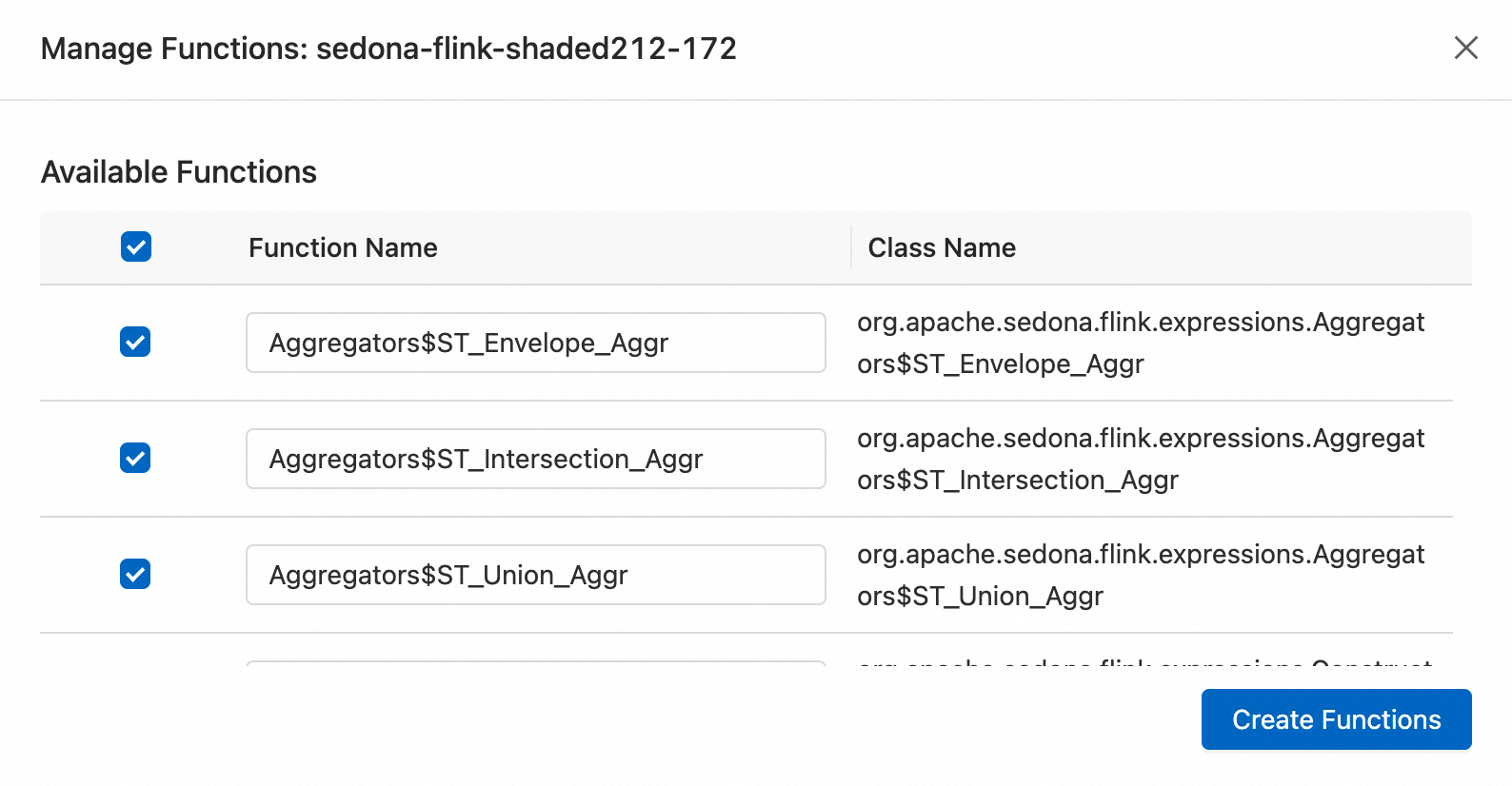
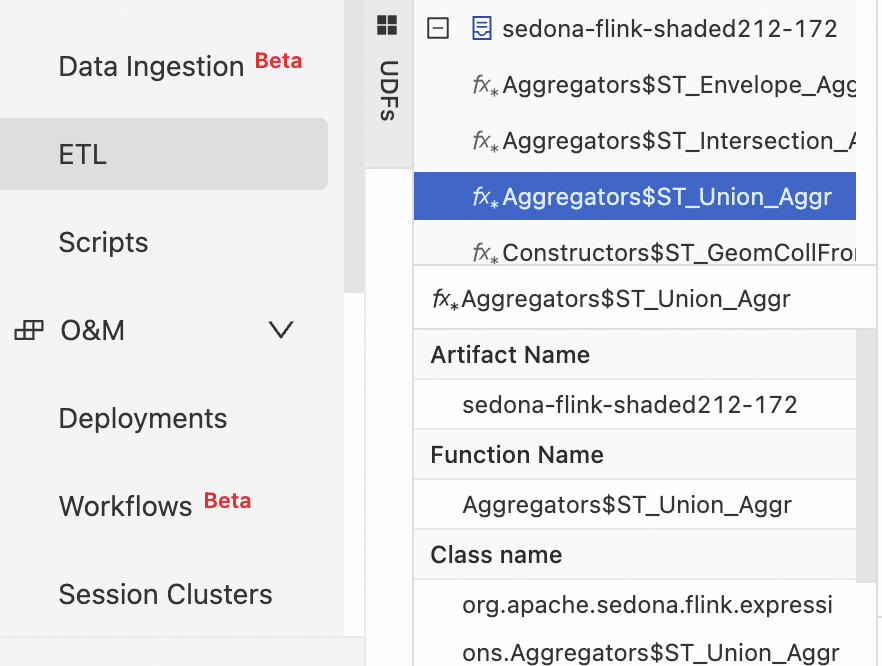
After registration, all registered functions appear on the Development > ETL > UDFs page.
Step 3: Write the job code
In the Development Console, navigate to Development > ETL, create a blank stream draft, and write your SQL code.
The job has three parts: serializer configuration, table definitions, and the ETL query.
Part 1: Register the Kryo serializers
Register Sedona's dedicated Kryo serializers at the top of your job code by setting pipeline.default-kryo-serializers. Skipping this step causes high memory consumption and significantly degrades performance. Registering serializers reduces serialization overhead by approximately two-thirds. For parameter details, see pipeline.default-kryo-serializers.
SET 'pipeline.default-kryo-serializers' = 'class:org.locationtech.jts.geom.Geometry,serializer:org.apache.sedona.common.geometrySerde.GeometrySerde;class:org.locationtech.jts.geom.Point,serializer:org.apache.sedona.common.geometrySerde.GeometrySerde;class:org.locationtech.jts.geom.LineString,serializer:org.apache.sedona.common.geometrySerde.GeometrySerde;class:org.locationtech.jts.geom.Polygon,serializer:org.apache.sedona.common.geometrySerde.GeometrySerde;class:org.locationtech.jts.geom.MultiPoint,serializer:org.apache.sedona.common.geometrySerde.GeometrySerde;class:org.locationtech.jts.geom.MultiLineString,serializer:org.apache.sedona.common.geometrySerde.GeometrySerde;class:org.locationtech.jts.geom.MultiPolygon,serializer:org.apache.sedona.common.geometrySerde.GeometrySerde;class:org.locationtech.jts.geom.GeometryCollection,serializer:org.apache.sedona.common.geometrySerde.GeometrySerde;class:org.apache.sedona.common.geometryObjects.Circle,serializer:org.apache.sedona.common.geometrySerde.GeometrySerde;class:org.locationtech.jts.geom.Envelope,serializer:org.apache.sedona.common.geometrySerde.GeometrySerde;class:org.locationtech.jts.index.quadtree.Quadtree,serializer:org.apache.sedona.common.geometrySerde.SpatialIndexSerde;class:org.locationtech.jts.index.strtree.STRtree,serializer:org.apache.sedona.common.geometrySerde.SpatialIndexSerde';Full sample code
The complete job registers serializers, defines the source and sink tables, and runs a spatial join with tumble window aggregation to count vehicles per area every 10 seconds.
-- =============================================================================
--  0. Register the dedicated serializer
-- =============================================================================
SET 'pipeline.default-kryo-serializers' = 'class:org.locationtech.jts.geom.Geometry,serializer:org.apache.sedona.common.geometrySerde.GeometrySerde;class:org.locationtech.jts.geom.Point,serializer:org.apache.sedona.common.geometrySerde.GeometrySerde;class:org.locationtech.jts.geom.LineString,serializer:org.apache.sedona.common.geometrySerde.GeometrySerde;class:org.locationtech.jts.geom.Polygon,serializer:org.apache.sedona.common.geometrySerde.GeometrySerde;class:org.locationtech.jts.geom.MultiPoint,serializer:org.apache.sedona.common.geometrySerde.GeometrySerde;class:org.locationtech.jts.geom.MultiLineString,serializer:org.apache.sedona.common.geometrySerde.GeometrySerde;class:org.locationtech.jts.geom.MultiPolygon,serializer:org.apache.sedona.common.geometrySerde.GeometrySerde;class:org.locationtech.jts.geom.GeometryCollection,serializer:org.apache.sedona.common.geometrySerde.GeometrySerde;class:org.apache.sedona.common.geometryObjects.Circle,serializer:org.apache.sedona.common.geometrySerde.GeometrySerde;class:org.locationtech.jts.geom.Envelope,serializer:org.apache.sedona.common.geometrySerde.GeometrySerde;class:org.locationtech.jts.index.quadtree.Quadtree,serializer:org.apache.sedona.common.geometrySerde.SpatialIndexSerde;class:org.locationtech.jts.index.strtree.STRtree,serializer:org.apache.sedona.common.geometrySerde.SpatialIndexSerde';

-- =============================================================================
--  1. Define the source table
-- =============================================================================
-- Create a temporary table to simulate a continuous data stream of vehicle positions.
CREATE TEMPORARY TABLE vehicle_positions (
  `vehicle_id` STRING,
  `lon`        DOUBLE,
  `lat`        DOUBLE,
  `event_time` TIMESTAMP_LTZ(3),
  WATERMARK FOR `event_time` AS `event_time` - INTERVAL '2' SECOND
) WITH (
  'connector' = 'datagen',
  'rows-per-second' = '10',
  'fields.vehicle_id.length' = '5',
  'fields.lon.min' = '116.3',
  'fields.lon.max' = '116.5',
  'fields.lat.min' = '39.85',
  'fields.lat.max' = '40.0'
);

-- =============================================================================
--  2. Define the sink table
-- =============================================================================
-- Create a temporary table to print the final aggregation results to the console.
CREATE TEMPORARY TABLE print_sink (
  `area_name`     STRING,
  `vehicle_count` BIGINT,
  `window_end`    TIMESTAMP(3)
) WITH (
  'connector' = 'print',
  'print-identifier' = 'AREA_STATS_SQL'
);

-- =============================================================================
--  3. ETL logic
-- =============================================================================
-- Deduplicate and count vehicle IDs within each area and window.
INSERT INTO print_sink
SELECT
    F.area_name,
    COUNT(DISTINCT V.vehicle_id) AS vehicle_count,
    V.window_end
FROM
    TABLE(TUMBLE(TABLE vehicle_positions, DESCRIPTOR(event_time), INTERVAL '10' SECOND)) AS V
-- Area range
INNER JOIN (
    VALUES
        ('area_01', 'West District', 'POLYGON((116.30 39.90, 116.40 39.90, 116.40 39.95, 116.30 39.95, 116.30 39.90))'),
        ('area_02', 'East District', 'POLYGON((116.41 39.90, 116.48 39.90, 116.48 39.95, 116.41 39.95, 116.41 39.90))')
)
AS F(area_id, area_name, wkt_polygon)
-- The join condition is whether the vehicle is within the defined area.
ON Predicates$ST_Contains(Constructors$ST_GeomFromWKT(F.wkt_polygon), Constructors$ST_Point(V.lon, V.lat))
GROUP BY
    V.window_start,
    V.window_end,
    F.area_id,
    F.area_name;
Step 4: Deploy the job
In the SQL editor, click Deploy.
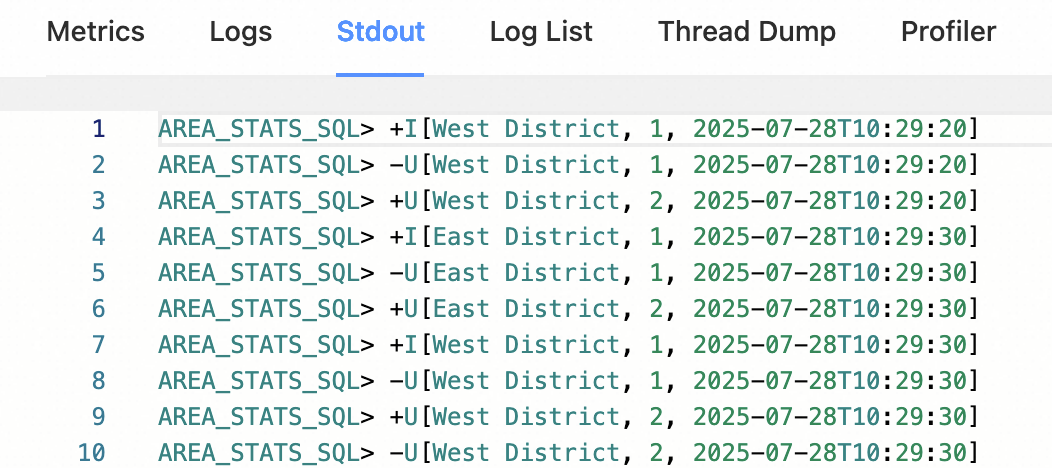
After the job starts, view its output on Flink Web UI > Task Manager > Stdout.
JAR
This section shows how to write a Flink JAR application for real-time traffic density analysis and deploy it to Realtime Compute for Apache Flink.
Prerequisites
Before you begin, make sure you have:
-
A Realtime Compute for Apache Flink workspace running VVR 8.0.11 or later (which corresponds to Apache Flink 1.17.2)
-
Maven installed locally
-
Access to the Development Console
Step 1: Add dependencies
Add the following dependencies to your pom.xml. If you are using Apache Sedona 1.7.2, use the coordinates from the official Maven coordinates page.
<dependency>
    <groupId>org.apache.sedona</groupId>
    <artifactId>sedona-flink-shaded_2.12</artifactId>
    <version>1.7.2</version>
</dependency>
<!-- Optional: required only if you use CRS transformation, ShapefileReader, or GeoTiff reader.
     This wrapper re-distributes GeoTools from the OSGEO repository to Maven Central.
     https://mvnrepository.com/artifact/org.datasyslab/geotools-wrapper -->
<dependency>
    <groupId>org.datasyslab</groupId>
    <artifactId>geotools-wrapper</artifactId>
    <version>1.7.2-28.5</version>
</dependency>
Step 2: Initialize the environment
Before writing job logic, initialize the Flink environment and register Sedona's spatial functions and serializers.
Registering Sedona's Kryo serializers is required. Skipping this step causes high memory consumption and significantly degrades job performance.
Option 1: Use `SedonaContext` (recommended)
SedonaContext.create() registers both Sedona's spatial functions and Kryo serializers in one call:
StreamExecutionEnvironment env = StreamExecutionEnvironment.getExecutionEnvironment();
StreamTableEnvironment tableEnv = StreamTableEnvironment.create(env);
// Register Sedona spatial functions and Kryo serializers
SedonaContext.create(env, tableEnv);
Option 2: Use `TableEnvironment` with manual registration
If you prefer the TableEnvironment interface, register functions and serializers manually. This approach is functionally equivalent to SedonaContext.
TableEnvironment tableEnv =
    TableEnvironment.create(EnvironmentSettings.newInstance().build());

TelemetryCollector.send("flink", "java");

// Register Kryo serializers
tableEnv.getConfig()
    .set(
        PipelineOptions.KRYO_DEFAULT_SERIALIZERS.key(),
        "class:org.locationtech.jts.geom.Geometry,serializer:org.apache.sedona.common.geometrySerde.GeometrySerde;"
        + "class:org.locationtech.jts.geom.Point,serializer:org.apache.sedona.common.geometrySerde.GeometrySerde;"
        + "class:org.locationtech.jts.geom.LineString,serializer:org.apache.sedona.common.geometrySerde.GeometrySerde;"
        + "class:org.locationtech.jts.geom.Polygon,serializer:org.apache.sedona.common.geometrySerde.GeometrySerde;"
        + "class:org.locationtech.jts.geom.MultiPoint,serializer:org.apache.sedona.common.geometrySerde.GeometrySerde;"
        + "class:org.locationtech.jts.geom.MultiLineString,serializer:org.apache.sedona.common.geometrySerde.GeometrySerde;"
        + "class:org.locationtech.jts.geom.MultiPolygon,serializer:org.apache.sedona.common.geometrySerde.GeometrySerde;"
        + "class:org.locationtech.jts.geom.GeometryCollection,serializer:org.apache.sedona.common.geometrySerde.GeometrySerde;"
        + "class:org.apache.sedona.common.geometryObjects.Circle,serializer:org.apache.sedona.common.geometrySerde.GeometrySerde;"
        + "class:org.locationtech.jts.geom.Envelope,serializer:org.apache.sedona.common.geometrySerde.GeometrySerde;"
        + "class:org.locationtech.jts.index.quadtree.Quadtree,serializer:org.apache.sedona.common.geometrySerde.SpatialIndexSerde;"
        + "class:org.locationtech.jts.index.strtree.STRtree,serializer:org.apache.sedona.common.geometrySerde.SpatialIndexSerde");

// Register scalar functions
Arrays.stream(Catalog.getFuncs())
    .forEach(
        (func) -> {
            tableEnv.createTemporarySystemFunction(
                func.getClass().getSimpleName(), func);
        });
// Register predicate functions
Arrays.stream(Catalog.getPredicates())
    .forEach(
        (func) -> {
            tableEnv.createTemporarySystemFunction(
                func.getClass().getSimpleName(), func);
        });
Step 3: Write the job code and package the project
Write your job logic and package the project into a JAR.
Realtime Compute for Apache Flink provides sample code and a prebuilt JAR for this tutorial. Both use VVR 8.0.11, which corresponds to Apache Flink 1.17.2.
-
FlinkSedonaExample.zip — source code
-
FlinkSedonaExample-1.0-SNAPSHOT.jar — prebuilt JAR
Step 4: Deploy the job
-
In the Development Console, navigate to O&M > Deployments > Create Deployment > JAR Deployment.
-
Upload your JAR and configure the deployment.
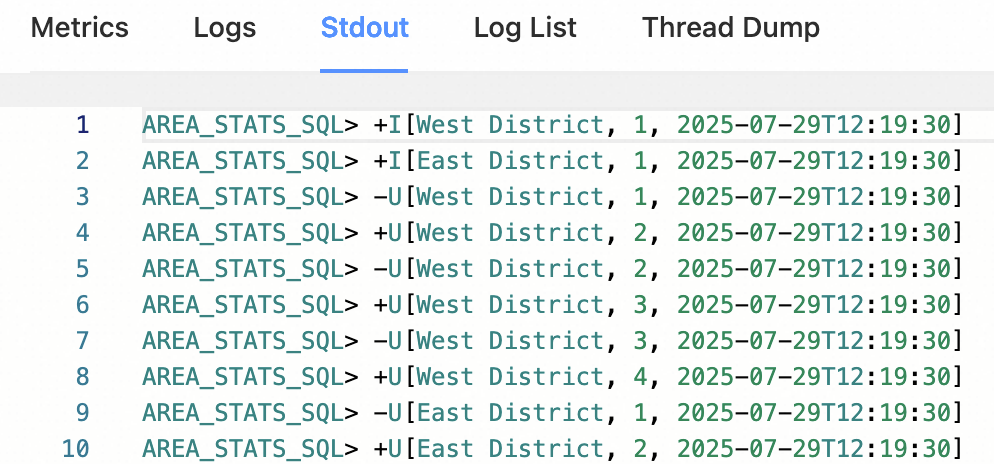
After the job starts, view its output on Flink Web UI > Task Manager > Stdout, as shown below.
What's next
-
Apache Sedona API documentation for Flink — full list of spatial functions
-
Apache Sedona Flink SQL tutorial — Table API examples and spatial join patterns
-
Apache Sedona Demo project — ready-to-run example on GitHub