The new Workbench consolidates Name Screening (NSS), Transaction Monitoring (TMS), and Customer Risk Rating (CRR) tasks and dashboards into a single entry point, replacing fragmented module navigation with one unified starting point for daily compliance work.
Unified Workbench Enhancement in Matrix Platform — Effective Date: Upon Release — To: All Matrix Customers and Partners — From: Anti-Money Laundering (AML) Product & Platform Leadership Team
What changed and why it matters
Based on recurring challenges observed in client operations, this release addresses three key pain points:
Fragmented user journeys — analysts frequently switched between NSS, TMS, and CRR modules to locate tasks, creating unnecessary navigation overhead.
No unified starting point — after login, users had no single place that clearly surfaced what needed handling, increasing time to action and onboarding effort.
Limited visibility for supervisors — supervisors lacked a consolidated view of team-wide tasks and backlog across modules, raising the risk of delayed or missed case handling.
The Workbench replaces separate module entry points with two unified views:
Workbench – Tasks: a single to-do list aggregating all under-review alerts, cases, and EDD tasks across NSS, TMS, and CRR.
Workbench – Dashboard: a single scrollable page combining the NSS, TMS, and CRR dashboards.
The Portal entry is also simplified — a single Enter System button now lands users directly on Workbench – Tasks.
Before and after
|
Before |
After |
|
Separate Portal entries for each product dashboard |
Single Enter System button → Workbench – Tasks |
|
Analysts navigate across NSS, TMS, and CRR to find their tasks |
All assigned tasks surface in one place |
|
No consolidated team-wide task view for supervisors |
All Under-Review Tasks perspective shows team workload across modules |
|
Module-specific dashboards accessed separately |
NSS, TMS, and CRR dashboards consolidated into one scrollable page |
Who benefits
|
Role |
What you get |
|
Frontline analysts |
One task list for all NSS, TMS, and CRR work — no cross-module navigation needed |
|
Supervisors and reviewers |
Full team workload visibility across modules, plus KPI cards to spot bottlenecks |
|
MLROs and administrators |
Single dashboard page correlating risk indicators and processing throughput |
Unified "Workbench – Tasks & Dashboard" experience
The enhanced architecture structures user workflows into two complementary views:
Workbench – Tasks — A unified to-do center showing all tasks under review across NSS, TMS, and CRR.
Workbench – Dashboard — A consolidated risk dashboard integrating NSS, TMS, and CRR dashboards into a single, scrollable page.
The Portal entry is streamlined into a single Enter System button that lands users directly on the Workbench.
Workbench – Tasks: centralized to-do management across modules
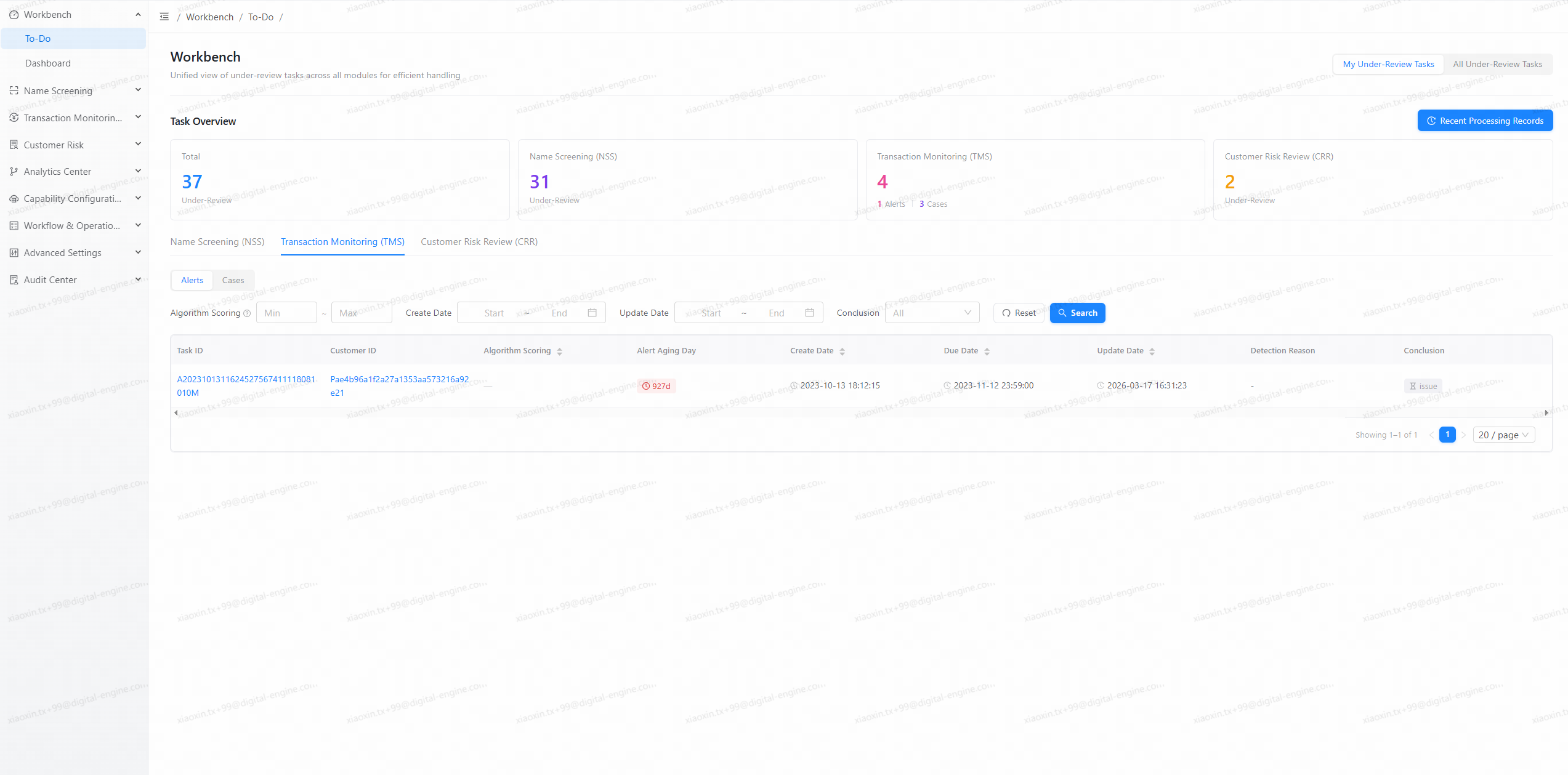
1. Unified aggregation across NSS, TMS, and CRR
Workbench – Tasks is the default landing view after login. It aggregates all tasks requiring attention from:
Name Screening (NSS): alerts under review.
Transaction Monitoring (TMS): alerts and cases under review.
Customer Risk Rating (CRR): EDD tasks under review.
Closed or fully processed alerts, cases, and EDD items are excluded to keep focus on actionable workload.
All content is governed by tenant-level and user-level permissions. Modules not enabled for a tenant are not shown.
2. Dual perspectives: my tasks and all tasks
A toggle at the top of the page switches between two perspectives without leaving the Workbench:
-
My Under-Review Tasks
Shows only tasks assigned to the current user.
Designed for frontline analysts to quickly identify and act on their personal queue of alerts, cases, and EDD tasks.
-
All Under-Review Tasks
-
Shows all tasks within the current user's permission scope, including:
Tasks under review (assigned or in progress).
Pending tasks (unassigned alerts that still require action).
Designed for supervisors and reviewers to monitor team-wide workload, backlog, and processing status across NSS, TMS, and CRR.
-
3. Key task metrics and click-through navigation
At the top of Workbench – Tasks, KPI cards show an at-a-glance count under the current perspective:
Total Under Review
NSS Under Review
TMS Under Review
CRR Under Review
Each card is interactive — clicking it scrolls the page directly to that module's task list for a seamless jump from overview metric to actionable task list.
4. Module-specific task views with targeted filters
Tasks are organized by module tabs, keeping familiar workflows intact while eliminating cross-module navigation:
-
Name Screening (NSS)
Dedicated tab for NSS alerts under review or requiring review.
Filter by alert type, algorithm score range, creation time, and last update time.
Sort and query to surface the most urgent or relevant alerts first.
-
Transaction Monitoring (TMS)
Dedicated tab with a second-level toggle for Alerts and Cases.
Filter by algorithm score, creation time, update time, and alert or case conclusion (Issue / No Issue).
Prioritize monitoring tasks by due date, aging, and risk indicators.
-
Customer Risk Rating (CRR)
Dedicated tab for EDD tasks under review.
Filter by creation time, update time, and EDD conclusion (Adjust / Maintain / Terminate).
Quickly identify customers whose risk assessments are pending or require adjustment.
The module-specific table layouts remain consistent with existing product behavior.
5. Recent activity records: return to in-progress work
In the My Under-Review Tasks perspective, a Recent Activity Records section shows items the current user recently processed:
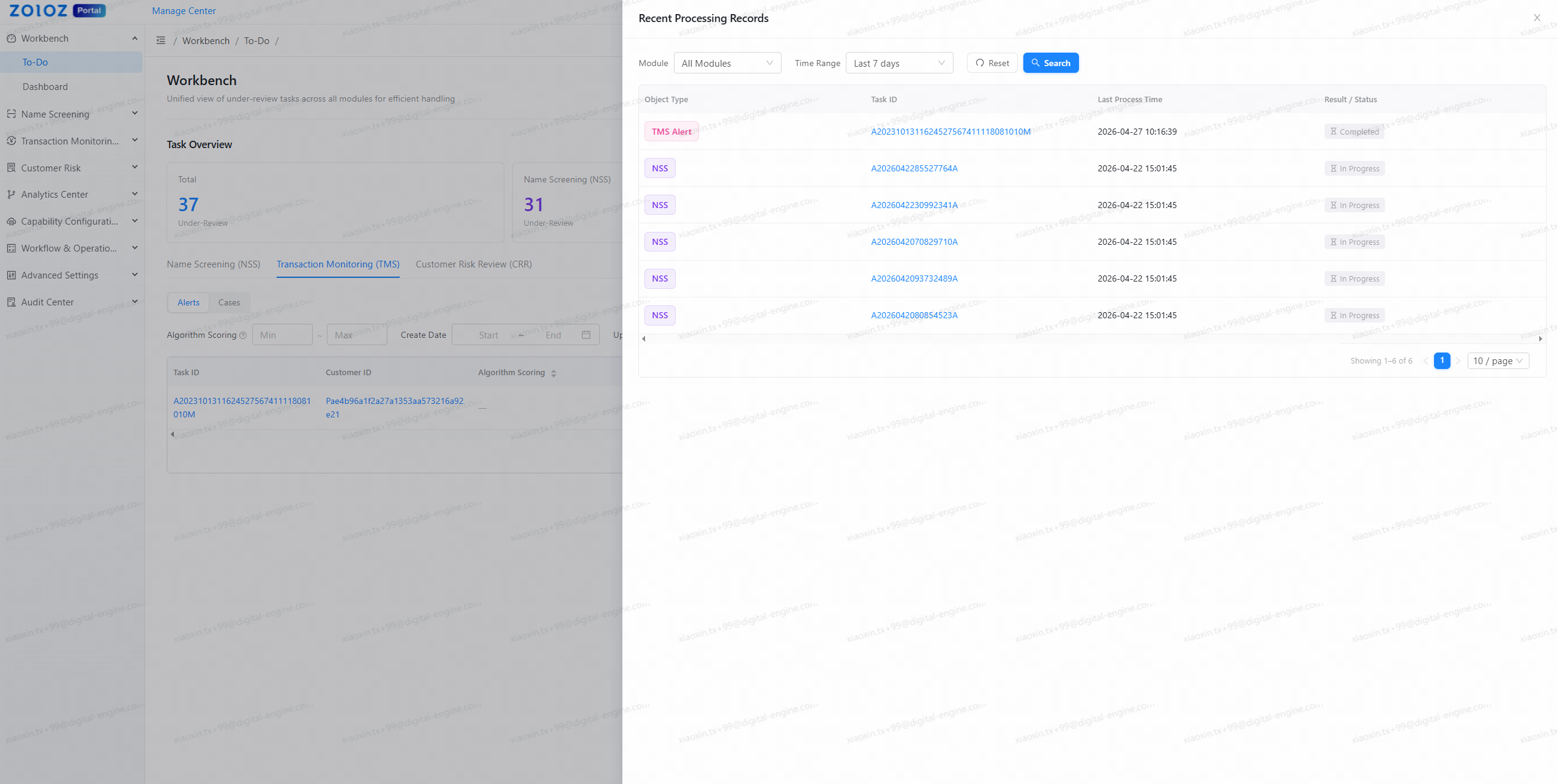
-
Scope
NSS alerts
TMS alerts
TMS cases
CRR EDD recently processed by the current user.
-
Key information
Task identifier, record type, last processed time, and current status (In Progress / Completed), with direct navigation to detailed views.
This lets analysts quickly return to items left in progress, reducing the risk of losing track of ongoing work.
Workbench – Dashboard: unified view of risk and processing status
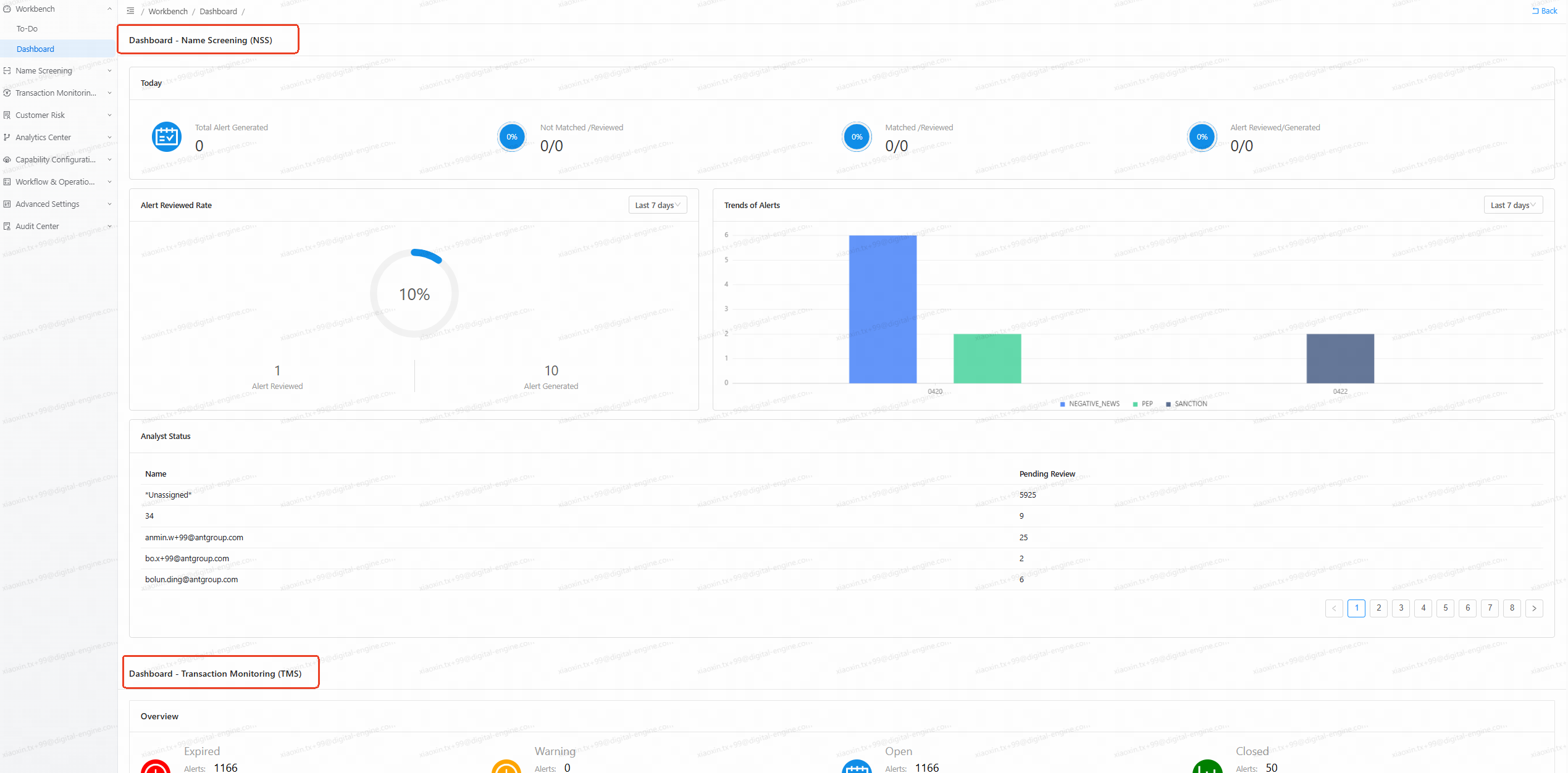
Workbench – Dashboard consolidates previously separate dashboards into a single integrated page:
-
Integrated NSS, TMS, and CRR dashboards
The Name Screening, Transaction Monitoring, and Customer Risk Rating dashboards are now presented as a unified, scrollable view under the Workbench – Dashboard tab.
Per-tenant permissions determine which product dashboards are visible to each user.
-
Simplified access
The legacy module-specific dashboard entries are deprecated.
All dashboard access is centralized under the Workbench, providing consistent navigation and a clearer mental model.
MLROs, supervisors, and administrators with appropriate permissions can quickly understand overall risk exposure and processing performance across all active products.
Optimizing your workflow with the new Workbench
-
Frontline analysts
Start each day from Workbench – Tasks, which surfaces all NSS, TMS, and CRR review tasks assigned to you.
Use module tabs and filters to prioritize by due date, aging, or algorithm score.
Return to recently processed items via Recent Activity Records.
-
Supervisors and reviewers
Use the All Under-Review Tasks perspective and KPI cards to monitor all pending and under-review tasks across modules.
Identify processing bottlenecks by module from the aggregated metrics.
Use the unified Dashboard view to correlate risk indicators with processing throughput.
These enhancements reduce system learning time, increase efficiency in handling alerts, cases, and EDD tasks, and lower the risk of missed or delayed handling caused by fragmented navigation.
Reduce system learning and onboarding time.
Increase efficiency in handling alerts, cases, and EDD tasks that require review.
Lower the risk of missed or delayed handling caused by fragmented navigation.
Portal entry simplification and rollout
-
Previous behavior
Separate Portal entries directed users to different product dashboards.
-
New behavior
A single Enter System button.
Default landing page: Workbench – Tasks (to-do).
Switch between Tasks and Dashboard from within the Workbench.
This is a one-time global update to all tenants, effective immediately upon release. There is no configuration option to retain the previous dashboard entry behavior — the Workbench fully replaces the legacy entry points.
We appreciate your continued trust in Matrix and look forward to supporting your compliance operations with a more integrated and efficient experience.