This topic describes how to create, view, edit, and delete connections and api destinations to quickly integrate with other applications.
Prerequisites
Background information
You can use api destinations to call the HTTP or HTTPS APIs of third-party SaaS systems or your self-managed systems. This low-code integration method requires no additional architecture for API calls. With api destinations, you can easily build and connect to SaaS applications and break down data silos. Additionally, multiple APIs can share a single connection, providing convenient and pluggable authentication.
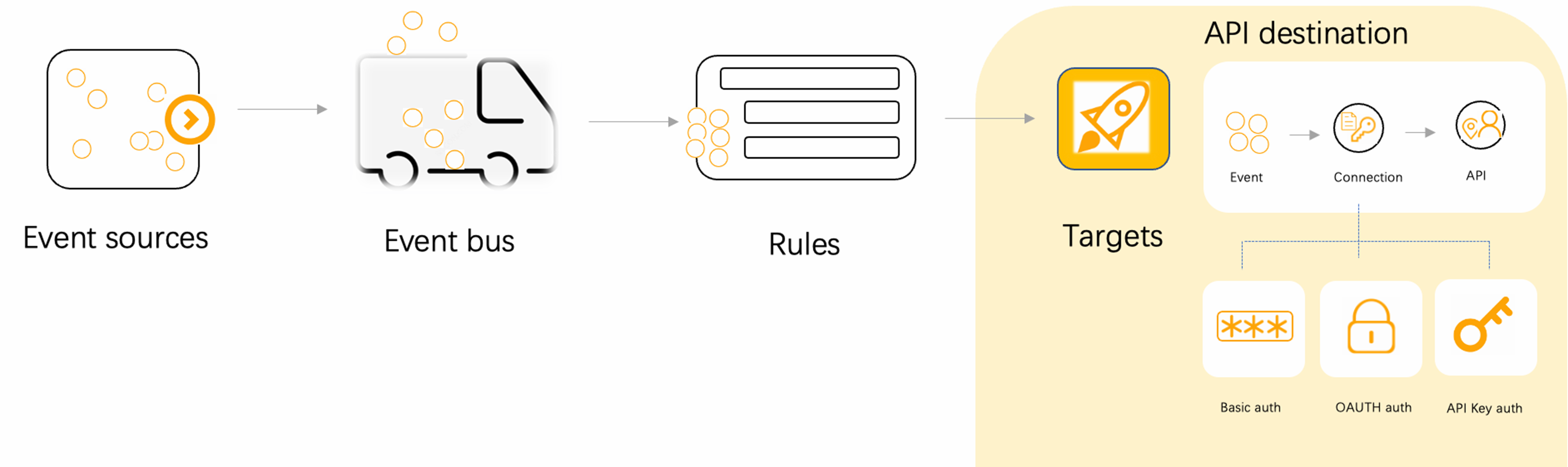
Calling APIs on third-party SaaS or self-managed systems involves two EventBridge components: an api destination and a connection.
An api destination defines the metadata of an API. When you create an event rule, you can reference different api destinations to access different third-party SaaS or self-managed systems. Multiple rules can also reference the same api destination. If multiple rules deliver events to the same target API, you would have to modify each rule individually if a parameter needs to be changed. However, if you define the target API as an api destination, you only need to modify the configuration of the api destination. All event rules that reference this api destination are automatically updated.
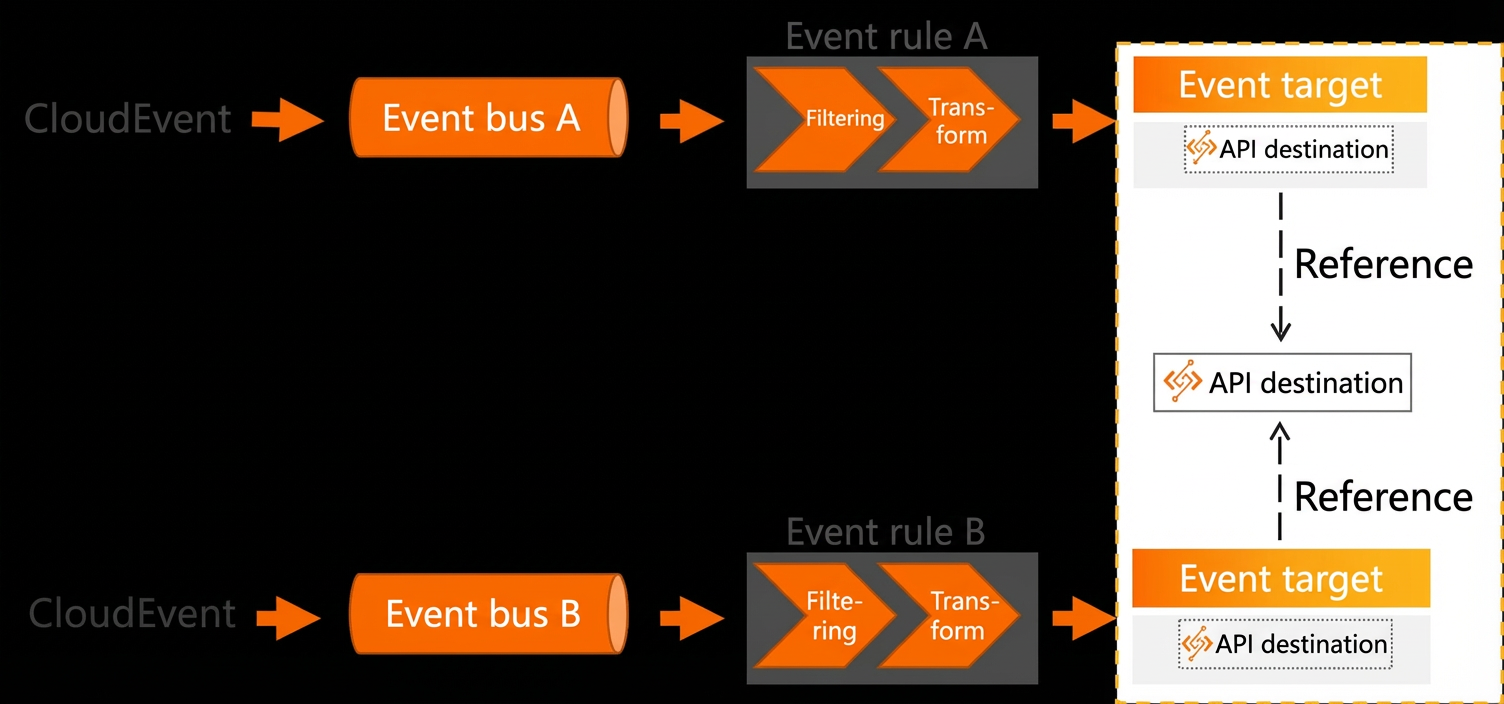
A connection establishes the link between an external service and the api destination. A connection includes a network configuration and an authentication configuration. The network configuration specifies whether the external service connects to the api destination over a public network or a private network. For authentication configuration, EventBridge supports three common methods: basic authentication, OAuth, and api key.
-
basic authentication: Uses a username and password to access a data resource. The username and password are Base64-encoded, prefixed with Basic , and sent to the target service. If the service decodes the credentials and authentication is successful, it responds to the EventBridge request. Otherwise, the request is rejected.
-
OAuth: A secure and reliable authorization method. OAuth has four grant types: authorization code, implicit, password, and client credential. In event-driven scenarios, the client credential grant type is commonly used. In this mode, you must configure the information required to obtain a client credential in EventBridge, including the authorization endpoint, client ID, and client secret. EventBridge supports GET and POST methods to retrieve the client credential.
-
api key: A simple authentication method. You can define a custom key name and value for API access. EventBridge sends these credentials in an HTTP header to the server for authentication.
Connections
Create a connection
When you create an api destination, you associate it with a connection. The connection defines the authentication method and network settings for the API call.
-
Log on to the EventBridge console. In the left-side navigation pane, choose Integrations > API Destinations.
-
In the top menu bar, select a region, and then click the Connection Configuration tab.
-
On the Connection tab, click Create. In the Create Connection panel, set the following parameters and click OK.
Parameter
Description
Example
Name
The connection name.
testName
Description
The connection description.
test
Authentication
The authentication method for the connection. Valid values:
-
Basic
-
OAuth Client Credential
-
API Key
Basic
Username
The username for authorization. This parameter is required only when Authentication is set to Basic.
Admin
Password
The password for authorization. This parameter is required only when Authentication is set to Basic.
******
Endpoint
The URL of the authorization endpoint for obtaining the
access_token. This parameter is required only when Authentication is set to OAuth Client Credential.https://postman-echo.com/oauth1
HTTP Method
The request method used to obtain the
access_token. This parameter is required only when Authentication is set to OAuth Client Credential.POST
Client ID
The ID of the client that you authorize to obtain the
access_token. This parameter is required only when Authentication is set to OAuth Client Credential.Admin
Client Secret
The secret of the authorized client ID. This parameter is required only when Authentication is set to OAuth Client Credential.
******
OAuth HTTP Parameter
The request headers, body, and query parameters to add to the request to obtain the
access_token. This parameter is required only when Authentication is set to OAuth Client Credential.Parameter:Header key:name Value:eventbridgeAPI Key Name
The key name for authorization. This parameter is required only when Authentication is set to API Key.
Admin
API Key Value
The value for the authorized key. This parameter is required only when Authentication is set to API Key.
******
Network
The network connection type between the api destination and the third-party application. The default value is Internet.
Public Network
-
Other operations
After you create a connection, you can view, edit, and delete it in the console.
-
To view details: In the Actions column of the connection, click Details to view its basic information, authentication configuration, network configuration, and bound api destinations.
-
To edit a connection: In the Actions column of the connection, click Edit to modify the connection description.
-
To delete a connection: In the Actions column of the connection, click Delete. Review the information in the Show Tooltip dialog box and click OK to delete the connection.
API destinations
Create an API destination
-
Log on to the EventBridge console. In the left-side navigation pane, choose Integrations > API Destinations.
-
In the top menu bar, select a region, and then click the API Destinations tab.
-
On the API Destination tab, click Create. In the Create API Destination panel, set the following parameters and click OK.
-
In the Basic Information section, set Method to Custom, and then enter a name and description for the api destination.
-
In the API Configuration section, set URL to the API address of the server resource you want to access. Set HTTP Method to the request method for accessing the URL.
-
In the Connection section, select Create Connection or Select Existing Connection, and then click OK.
-
Create Connection: Configure the name, description, authentication configuration, and network configuration for the connection as described in Create a connection.
-
Select Existing Connection: Select a pre-configured connection from the drop-down list.
-
-
Select an API destination as an event target
-
Log on to the EventBridge console. In the left-side navigation pane, click Event Buses.
-
In the top menu bar, select a region. On the Event Buses page, click the name of the target event bus.
-
In the left-side navigation pane, click Event Rules, and then click Create Rule.
-
In the Create Rule panel, complete the following configurations and click Create.
-
Configure the basic information and event pattern for the rule. For more information, see Create an event rule.
-
On the Configure Targets tab, select Triggered by API Operation from the Service Type drop-down list.
-
To create a custom api destination: In the Basic Information section, select Custom as the creation method. Then, complete the configuration by following the steps in the Create an api destination section.
-
To use an existing api destination: In the Basic Information section, select Use Existing API Destination as the creation method, and then select a pre-configured api destination from the drop-down list.
-
-
Other operations
After you create an api destination, you can view, edit, and delete it in the console.
-
To view details: In the Actions column of the api destination, click Details to view its basic information, API configuration, and connection.
-
To edit an api destination: In the Actions column of the api destination, click Edit to modify its description and API configuration.
-
To delete an api destination: In the Actions column of the api destination, click Delete. Review the information in the Show Tooltip dialog box and click OK to delete the api destination.