The Reindex API copies data — in full or filtered by a query — from one index to another, within the same cluster or across clusters. This topic walks you through migrating data between two Alibaba Cloud Elasticsearch (ES) clusters over a private network using the Reindex API.
Limitations
-
Both clusters must be in the same region and zone.
-
Deployment control mode: Supports v2-to-v3, v2-to-v2, and v3-to-v3 migrations. Clusters have two control modes: cloud-native new control (v3) and basic control (v2).

-
Cluster version: Migrate only between the same major version (for example, 8.15.1 to 8.15.1). Cross-major-version migration (for example, 7.7.1 to 8.15.1) is not supported.
Prerequisites
Before you begin, ensure that you have:
-
Two ES clusters (ES_1 and ES_2) running the same major version, in the same region and zone
-
Access credentials (username and password) for both clusters
Prepare test data
This topic uses two 8.15.1 vector-enhanced ES clusters as an example. The goal is to migrate data from ES_2 to ES_1.
Create a source index and insert test data in ES_2
Create an index named product_info with five shards and one replica:
PUT /product_info
{
  "settings": {
    "number_of_shards": 5,
    "number_of_replicas": 1
  },
  "mappings": {
    "properties": {
      "productName": {
        "type": "text",
        "analyzer": "ik_smart"
      },
      "annual_rate": {
        "type": "keyword"
      },
      "describe": {
        "type": "text",
        "analyzer": "ik_smart"
      }
    }
  }
}
A successful response returns:
{
  "acknowledged": true,
  "shards_acknowledged": true,
  "index": "product_info"
}
Insert six test documents using the bulk API:
POST /product_info/_bulk
{"index":{}}
{"productName":"Wealth Management Product A","annual_rate":"3.2200%","describe":"180-day fixed wealth management, minimum investment of 20,000, stable returns, self-service message push selection available"}
{"index":{}}
{"productName":"Wealth Management Product B","annual_rate":"3.1100%","describe":"90-day fixed investment product, minimum investment of 10,000, daily income message push"}
{"index":{}}
{"productName":"Wealth Management Product C","annual_rate":"3.3500%","describe":"270-day fixed investment product, minimum investment of 40,000, daily income immediately pushed"}
{"index":{}}
{"productName":"Wealth Management Product D","annual_rate":"3.1200%","describe":"90-day fixed investment product, minimum investment of 12,000, daily income message push"}
{"index":{}}
{"productName":"Wealth Management Product E","annual_rate":"3.0100%","describe":"30-day fixed investment product recommendation, minimum investment of 8,000, daily income message push"}
{"index":{}}
{"productName":"Wealth Management Product F","annual_rate":"2.7500%","describe":"Popular short-term product, 3-day short term, no service fees, minimum investment of 500, receive income messages via text message"}
Create a destination index in ES_1
Create the destination index dest in ES_1:
PUT dest
{
  "settings": {
    "number_of_shards": 5,
    "number_of_replicas": 1
  }
}
Establish a private network connection using NLB and PrivateLink
To protect cluster security, clusters in the same virtual private cloud (VPC) or across different VPCs are network-isolated from each other. Establish a private network connection between the two clusters using Network Load Balancer (NLB) and PrivateLink.
The following diagram shows two ES clusters deployed in the same VPC. Create an endpoint service in the source VPC, configure a private network connection in ES_1 to obtain an endpoint, and then associate the endpoint with the endpoint service.
An endpoint service lets other VPCs establish a PrivateLink connection by creating an endpoint. An endpoint is associated with an endpoint service and provides network connectivity for private access through a VPC. Alibaba Cloud ES automatically creates an endpoint in the ES network environment when you configure PrivateLink.

For the full configuration steps (steps 1, 2, and 3), see Private network peering between Alibaba Cloud ES clusters using NLB and PrivateLink.
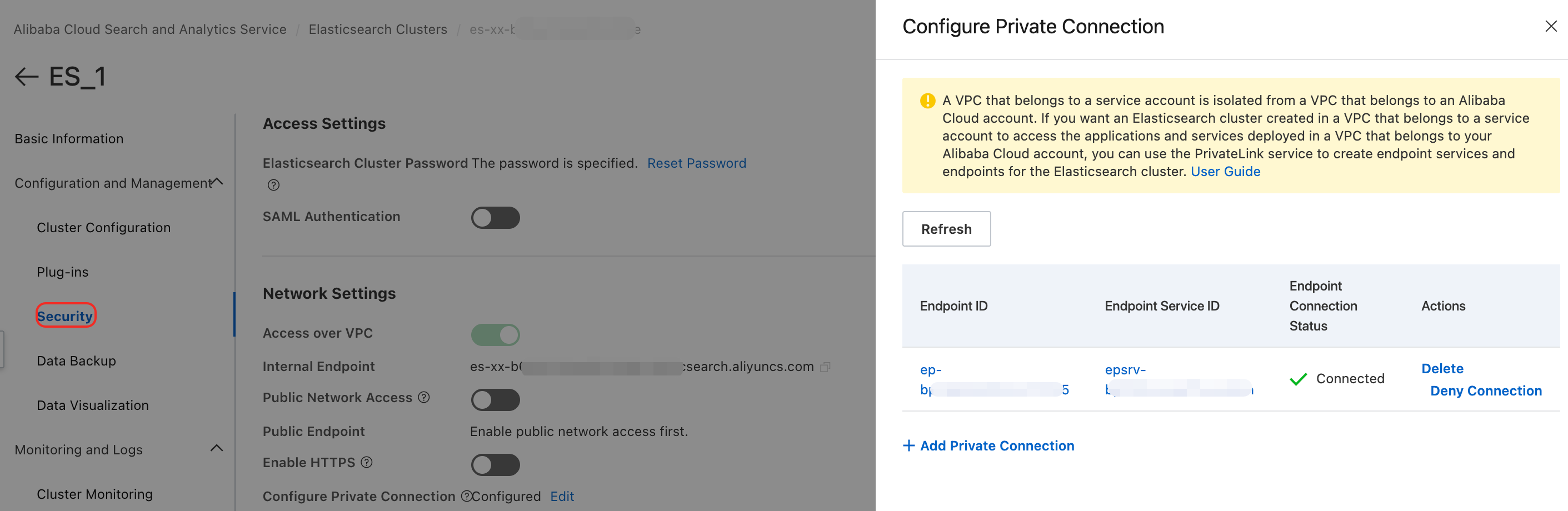
After successful configuration, the interface appears as follows:
Configure the Reindex API whitelist
Add the ES_2 cluster's private network address and communication port to the Reindex API whitelist in ES_1.
-
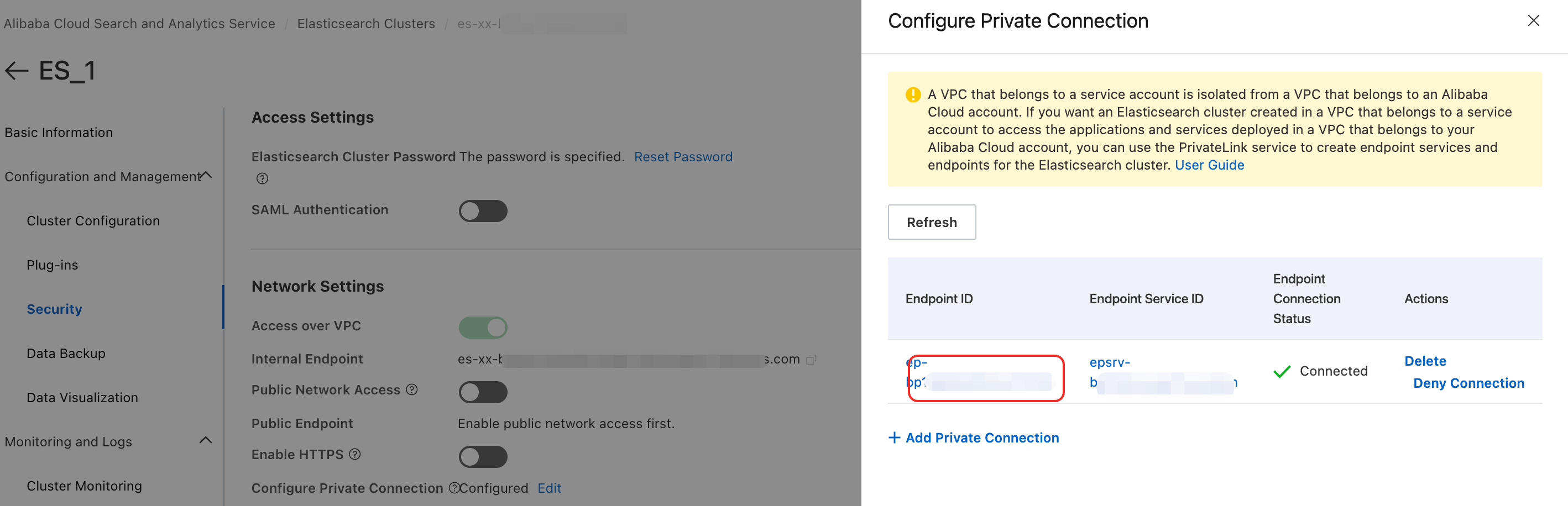
Go to the Security page of ES_1. Click Configure Private Connection, then click Edit. In the Configure Private Connection sidebar, click the target Endpoint ID.
-
In the Endpoint Connections tab of the VPC console, click the
 icon next to the Endpoint ID to view its corresponding domain name.Important
Remove the zone information from the domain name before configuring the whitelist. For example, if the full domain name is
ep-bp1****************-cn-hangzhou-i.epsrv-bp1****************.cn-hangzhou.privatelink.aliyuncs.com, remove the zone segment-cn-hangzhou-ito get the final domain name:ep-bp1****************.epsrv-bp1****************.cn-hangzhou.privatelink.aliyuncs.com.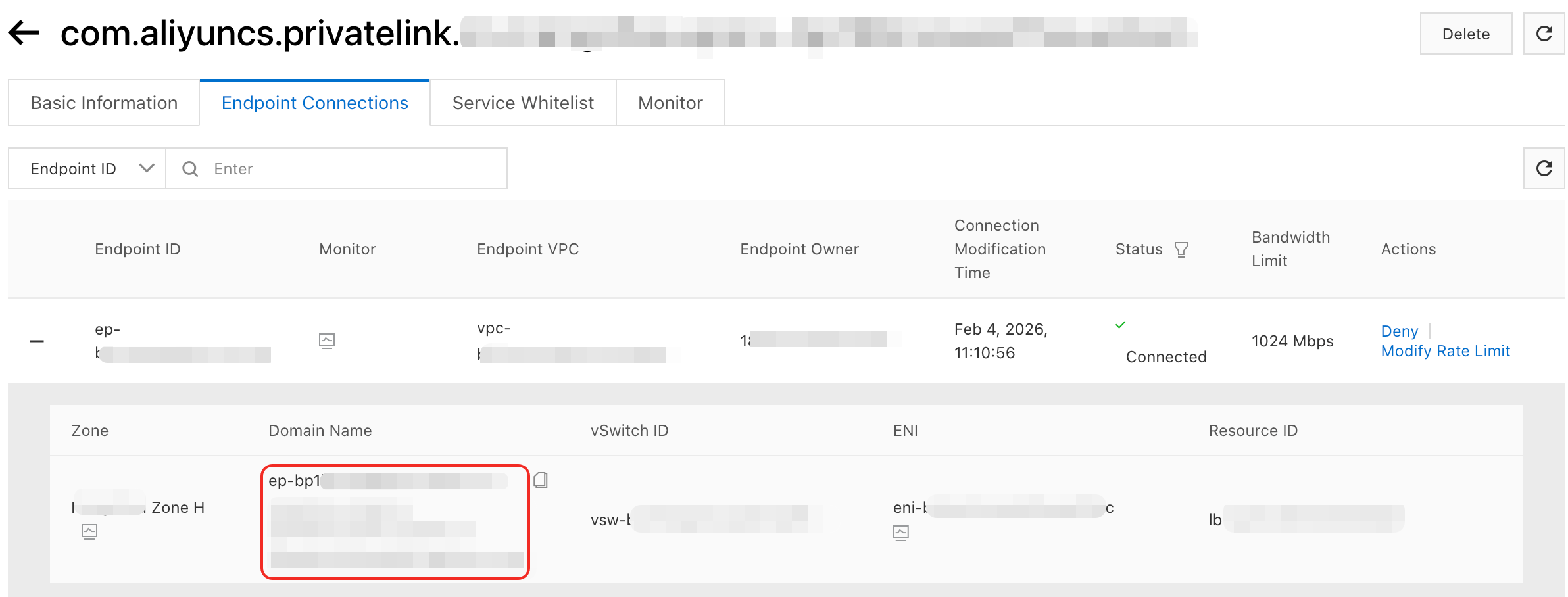
-
Add the endpoint domain name and port 9200 to ES_1's YAML configuration file under
reindex.remote.whitelist:reindex: remote: whitelist: >- ep-bp1bp1****************.epsrv-bp1****************.cn-hangzhou.privatelink.aliyuncs.com:9200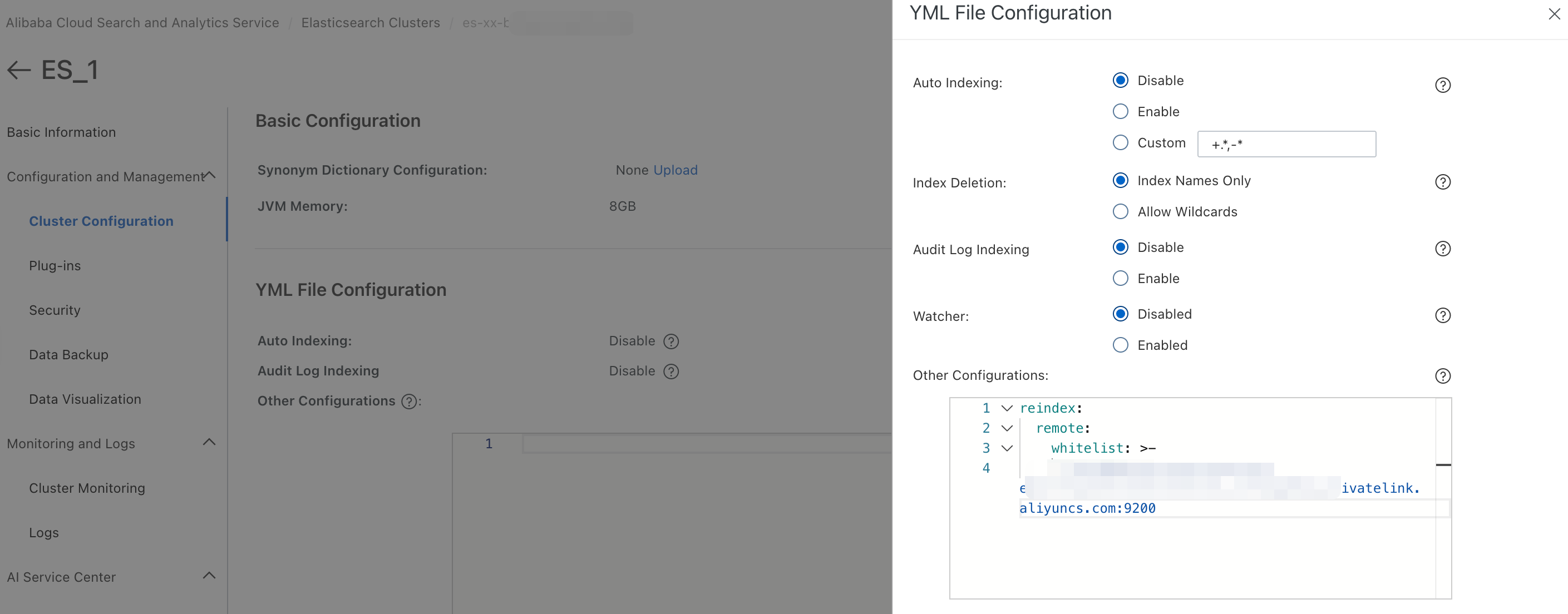
Run the Reindex API
-
Log in to the Kibana console of ES_1.
-
In Dev Tools > Console, run the following Reindex API call to migrate data from ES_2 to ES_1:
POST _reindex
{
  "source": {
    "remote": {
      "host": "http://ep-bp1bp1****************.epsrv-bp1****************.cn-hangzhou.privatelink.aliyuncs.com:9200",
      "username": "elastic",
      "password": "xxx-xxxx123!"
    },
    "index": "product_info",
    "query": {
      "match": {
        "productName": "wealth management product"
      }
    }
  },
  "dest": {
    "index": "dest"
  }
}
The following table describes all parameters:
Parameter Type Required Default Description source.remote.hostString Yes — The endpoint of ES_2, in the format <protocol>://<domain>:<port>. The domain must match the value configured in the Reindex whitelist. Use HTTPS to avoid transmitting passwords in plain text. For more information, see Enable HTTPS. The port is fixed at 9200.source.remote.usernameString No elasticThe cluster username. source.remote.passwordString No — The password for the username. If you forget the password, reset it. source.remote.socket_timeoutTime unit No 30sThe socket read timeout. source.remote.connect_timeoutTime unit No 1sThe connection timeout. source.indexString Yes — The source index in ES_2 to migrate from. source.queryObject No — A query to filter which documents to migrate. Omit this parameter to migrate all documents. dest.indexString Yes — The destination index in ES_1 to write migrated data into. -
Verify the response. A successful reindex returns output similar to:
{
  "took": 211,
  "timed_out": false,
  "total": 6,
  "updated": 6,
  "created": 0,
  "deleted": 0,
  "batches": 1,
  "version_conflicts": 0,
  "noops": 0,
  "retries": {
    "bulk": 0,
    "search": 0
  },
  "throttled_millis": 0,
  "requests_per_second": -1,
  "throttled_until_millis": 0,
  "failures": []
}
Key fields to check:
Field Description totalTotal number of documents processed. createdDocuments written to ES_1 for the first time — no existing document with the same ID was found in the destination index. updatedDocuments that overwrote an existing document with the same ID in ES_1. version_conflictsDocuments skipped due to version conflicts. A non-zero value means some documents were not migrated. failuresDetails of any documents that failed to migrate. An empty array means all documents migrated successfully. -
Query the destination index to confirm the migrated data:
GET dest/_searchExpected output:
{
  "took": 6,
  "timed_out": false,
  "_shards": {
    "total": 5,
    "successful": 5,
    "skipped": 0,
    "failed": 0
  },
  "hits": {
    "total": {
      "value": 6,
      "relation": "eq"
    },
    "max_score": 1,
    "hits": [
      {
        "_index": "dest",
        "_id": "n9kyqpcBCRuDZhswJCpH",
        "_score": 1,
        "_source": {
          "productName": "wealth management product D",
          "annual_rate": "3.1200%",
          "describe": "90-day fixed investment product, minimum investment of 12,000, daily income message push"
        }
      },
      {
        "_index": "dest",
        "_id": "nNkyqpcBCRuDZhswJCpG",
        "_score": 1,
        "_source": {
          "productName": "wealth management product A",
          "annual_rate": "3.2200%",
          "describe": "180-day regular wealth management, minimum investment of 20,000, stable returns, can self-select message push"
        }
      },
      {
        "_index": "dest",
        "_id": "ndkyqpcBCRuDZhswJCpG",
        "_score": 1,
        "_source": {
          "productName": "wealth management product B",
          "annual_rate": "3.1100%",
          "describe": "90-day fixed investment product, minimum investment of 10,000, daily income message push"
        }
      },
      {
        "_index": "dest",
        "_id": "ntkyqpcBCRuDZhswJCpH",
        "_score": 1,
        "_source": {
          "productName": "wealth management product C",
          "annual_rate": "3.3500%",
          "describe": "270-day fixed investment product, minimum investment of 40,000, daily income message push"
        }
      },
      {
        "_index": "dest",
        "_id": "oNkyqpcBCRuDZhswJCpH",
        "_score": 1,
        "_source": {
          "productName": "wealth management product E",
          "annual_rate": "3.0100%",
          "describe": "30-day fixed investment product recommendation, minimum investment of 8,000, daily income message push"
        }
      },
      {
        "_index": "dest",
        "_id": "odkyqpcBCRuDZhswJCpH",
        "_score": 1,
        "_source": {
          "productName": "wealth management product F",
          "annual_rate": "2.7500%",
          "describe": "Popular short-term product, 3-day term, no service fees, minimum investment of 500, receive income messages via text message"
        }
      }
    ]
  }
}