Using the Mem0 framework to manage the memory lifecycle and Elasticsearch for vector search lets you build a production-grade AI memory system that supports persistent storage, semantic retrieval, and intelligent updates.
Use cases
-
Handle long interactions: Prevents context loss in extended conversations.
-
Maintain cross-session context: Lets an agent remember user interaction history and personal preferences.
-
Manage persistent memory: Stores key information from conversations in a structured format.
-
Enable multi-agent collaboration: Lets multiple agents share a single memory store.
These two scenarios illustrate the value of a memory system.
E-commerce intelligent shopping assistant
A user starts a new session to ask for a "dishwasher that automatically reminds me to add water softener salt." Without cross-session memory, the system cannot recall a constraint from a previous session: "I have an infant at home, so water quality is a priority." Standard context truncation would treat this as an isolated query. A memory system, however, can use a vector index to persistently link the "infant household" tag to the user ID. It then injects this information as a structured memory fragment into the new session's context, ensuring cross-session intent persists.
Intelligent AI customer service
A customer complains, "The app for the robot vacuum I bought last month won't connect." Without a memory system, the agent must ask repetitive questions like, "Which model did you buy? What is the serial number?" This repetition degrades the customer experience and consumes valuable context window space. A memory system can store the user's device ID, historical support tickets, and previously attempted solutions as versioned memory units. When a new session begins, the system uses a low-token semantic query to accurately retrieve this structured state. This shifts the customer service response from "diagnosing again" to "resuming resolution."
How it works
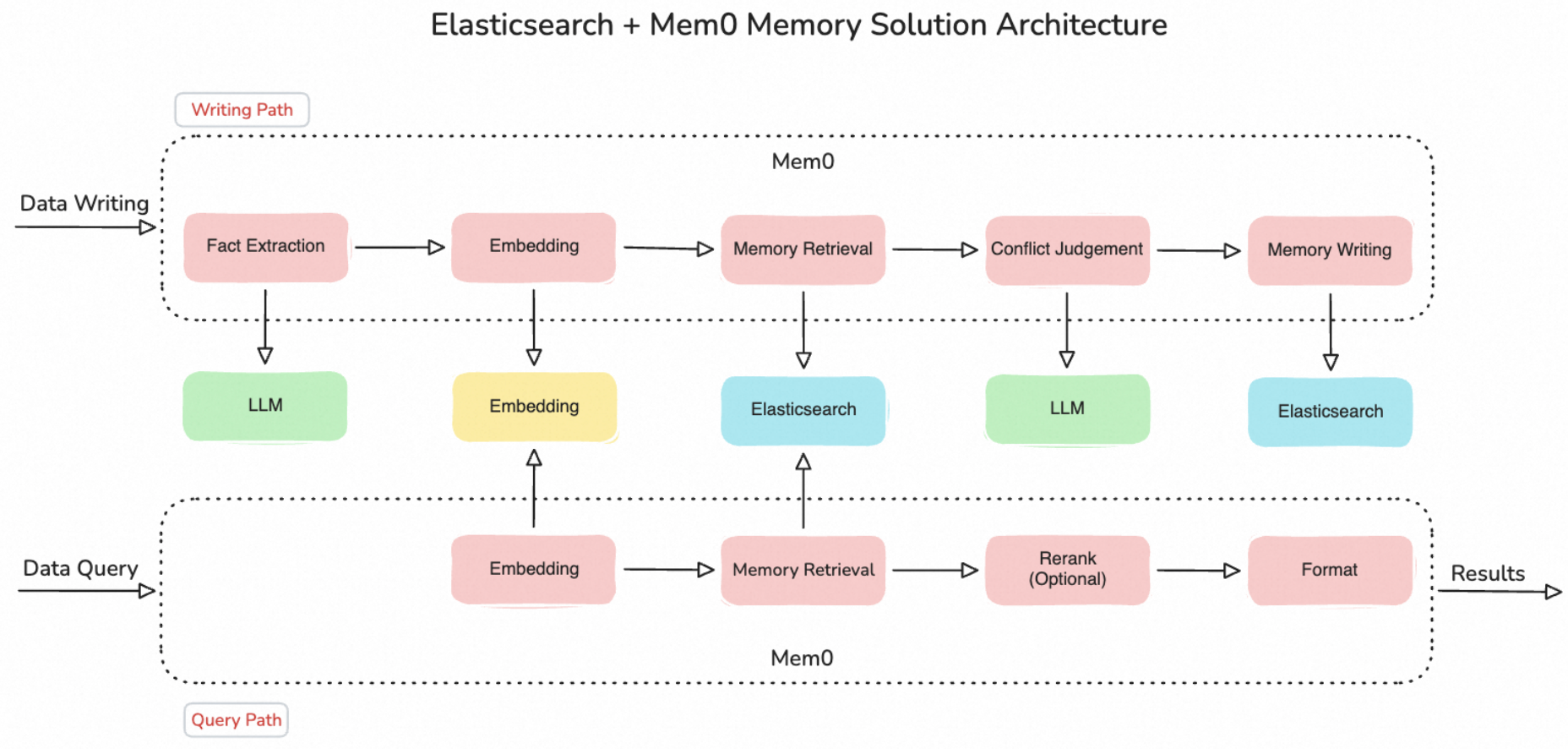
The system's core workflow is as follows:
-
Fact extraction: Uses an LLM to extract facts from the input.
-
Vectorization: Uses an embedding model to convert text into vectors, ensuring semantically similar memories are close in the vector space.
-
Memory retrieval: Executes a top-K similarity vector search in Elasticsearch, returning the most relevant memory fragments.
-
Conflict resolution: Uses an LLM to decide whether to update, merge, ignore, or create a memory.
-
Write execution: Persists the latest memory in Elasticsearch.
In the retrieval path, you can also configure a reranker model to re-rank the search results, improving retrieval precision.
Example: Add a memory system to OpenClaw
OpenClaw is an open-source personal AI agent framework that combines a Large Language Model (LLM) with capabilities like operating system control, web access, and file operations, enabling the AI to perform complex tasks sequentially. OpenClaw's native memory system has limitations, including a restricted context length, low retrieval efficiency, and a lack of cross-session continuity. Integrating Mem0 with Elasticsearch addresses these issues.
Step 1: Prepare Elasticsearch
-
Follow the Quick start guide to create an instance and set a login password.
-
Configure the Kibana public access whitelist:
-
Go to the Basic Information page of the target instance. In the left-side navigation pane, click . In the Kibana section, click Modify Configuration.
-
Configure the Public IP Address Whitelist: The whitelist defaults to 127.0.0.1, which denies access from all IPv4 addresses. To access Kibana, add your device's public IP address to the whitelist. For more information, see Connect to a cluster through Kibana.
-
-
Return to the Kibana section and click Access over Internet. On the Kibana login page, enter your username and password. After a successful login, use Kibana Dev Tools to create an index named
mem0:PUT /mem0 { "settings": { "number_of_shards": 1, "number_of_replicas": 1 } }
Step 2: Deploy the Mem0 server
-
Install Mem0 and Flask:
pip install mem0ai flaskFor more installation methods, see the Mem0 README.
-
Create the Mem0 server directory:
mkdir -p /opt/mem0-server cd /opt/mem0-server -
Create a
server.pyfile with the following content, replacing the placeholders with your actual values:-
$API_KEY: Your Model Studio API key
-
$ELASTICSEARCH_HOST, $ELASTICSEARCH_PORT: The endpoint and port of your Elasticsearch instance
-
$ELASTICSEARCH_USER, $ELASTICSEARCH_PASSWORD: The username and password for your Elasticsearch instance
# server.py - Run this as a standalone service
from mem0 import Memory
from flask import Flask, request, jsonify

app = Flask(__name__)

# Configure Mem0 here
config = {
    "llm": {
        "provider": "openai",
        "config": {
            "model": "qwen-plus",
            "api_key": "$API_KEY",
            "openai_base_url": "https://dashscope.aliyuncs.com/compatible-mode/v1",
        }
    },
    "embedder": {
        "provider": "openai",
        "config": {
            "model": "text-embedding-v4",
            "api_key": "$API_KEY",
            "openai_base_url": "https://dashscope.aliyuncs.com/compatible-mode/v1",
        }
    },
    "vector_store": {
        "provider": "elasticsearch",
        "config": {
            "host": "$ELASTICSEARCH_HOST",     # The host of your Elasticsearch instance
            "port": "$ELASTICSEARCH_PORT",     # The port of your Elasticsearch instance
            "user": "$ELASTICSEARCH_USER",     # The username for your Elasticsearch instance
            "password": "$ELASTICSEARCH_PASSWORD",  # The password for your Elasticsearch instance
            "collection_name": "mem0",         # The name of the index created in Step 1
        }
    },
}

memory = Memory.from_config(config)

@app.route('/v1/memories', methods=['POST'])
def add_memory():
    data = request.json
    result = memory.add(
        messages=data['messages'],
        user_id=data['user_id']
    )
    return jsonify(result)

@app.route('/v2/memories/search', methods=['POST'])
def search_memories():
    data = request.json
    result = memory.search(
        query=data['query'],
        user_id=data['user_id']
    )
    return jsonify(result)

@app.route('/v1/memories', methods=['DELETE'])
def delete_memories():
    user_id = request.args.get('user_id')
    memory.delete_all(user_id=user_id)
    return jsonify({"status": "success"})

if __name__ == '__main__':
    app.run(host='0.0.0.0', port=8420)
-
-
Start the Mem0 server:
python server.py
Step 3: Configure OpenClaw
-
Deploy OpenClaw on an ECS instance. You can choose one of the following methods:
-
Method 1 (One-click deployment with Compute Nest): Deploy OpenClaw on an ECS instance
-
Method 2 (One-click installation with Workbench):
-
Log on to the ECS console and select the target instance.
-
Click Remote Connection > Log On Now.
-
In the Workbench terminal toolbar, click One-click Management for OpenClaw.
-
Select Install OpenClaw and confirm the action.
-
-
-
Log on to the ECS instance and create the Skill directory:
mkdir -p ~/.openclaw/workspace/skills/agentic-memory-es cd ~/.openclaw/workspace/skills/agentic-memory-es -
Create these three files in this directory:
agentic-memory-es/
├── manifest.json    # Metadata and API definition
├── handler.py       # Core processing logic
└── SKILL.md         # Instruction document
manifest.json:
{
  "name": "agentic memory",
  "id": "agentic-memory-es",
  "version": "1.0.0",
  "description_for_model": "A memory platform based on Mem0 + Elasticsearch. Supports adding (add), searching (search), deleting by run ID (delete_by_run_id), and deleting by user ID (delete_by_user_id).",
  "description_for_human": "An agent memory platform powered by Alibaba Cloud Elasticsearch.",
  "auth": {
    "type": "token",
    "token_header": "Authorization",
    "token_prefix": "Token"
  },
  "api": {
    "type": "python",
    "main_file": "handler.py",
    "functions": [
      {
        "name": "add",
        "description": "Extracts facts, user preferences, or habits from a session and persists them.",
        "parameters": {
          "type": "object",
          "properties": {
            "user_id": { "type": "string", "description": "user ID" },
            "context": { "type": "string", "description": "Session content" }
          },
          "required": ["user_id", "context"]
        }
      },
      {
        "name": "search",
        "description": "Retrieves user-level historical memories (cross-session).",
        "parameters": {
          "type": "object",
          "properties": {
            "user_id": { "type": "string", "description": "user ID" },
            "query": { "type": "string", "description": "Search query" }
          },
          "required": ["user_id", "query"]
        }
      },
      {
        "name": "delete_by_run_id",
        "description": "Deletes the historical memory associated with a run ID.",
        "parameters": {
          "type": "object",
          "properties": {
            "run_id": { "type": "string", "description": "run ID" }
          },
          "required": ["run_id"]
        }
      },
      {
        "name": "delete_by_user_id",
        "description": "Deletes the historical memory associated with a user ID.",
        "parameters": {
          "type": "object",
          "properties": {
            "user_id": { "type": "string", "description": "user ID" }
          },
          "required": ["user_id"]
        }
      }
    ]
  }
}
handler.py:
Replace
$Mem0_HOSTwith the endpoint of the Mem0 server you deployed in Step 2:-
If the Mem0 server and OpenClaw are on the same ECS instance, use
http://127.0.0.1:8420. -
If they are on different machines, use the internal or public IP address of the Mem0 server.
import json
import subprocess

HOST = "$Mem0_HOST"

def _run_safe_curl(url, payload, method='POST'):
    if payload is not None:
        input_data = json.dumps(payload, ensure_ascii=False)
    else:
        input_data = ""

    cmd = [
        "curl", "-s", "-X", method, url,
        "-H", "Content-Type: application/json",
        "--data-binary", "@-",
        "--max-time", "15",
        "--no-buffer"
    ]

    try:
        input_data = json.dumps(payload)

        result = subprocess.run(
            cmd, input=input_data, capture_output=True,
            text=True, check=True, encoding='utf-8'
        )

        output = result.stdout.strip()
        if not output:
            return {"status": "success"}
        return json.loads(output)

    except subprocess.CalledProcessError as e:
        return {"error": f"Curl command failed: {e.stderr}"}
    except Exception as e:
        return {"error": str(e)}

def add(user_id, context):
    url = f"{HOST}/v1/memories"
    payload = {
        "messages": [
            {"role": "user", "content": context}
        ],
        "user_id": str(user_id)
    }
    return _run_safe_curl(url, payload, method='POST')

def search(user_id, query):
    url = f"{HOST}/v2/memories/search"
    payload = {
        "query": query,
        "user_id": str(user_id)
    }
    return _run_safe_curl(url, payload, method='POST')

def delete_by_run_id(run_id):
    url = f"{HOST}/v1/memories?run_id={run_id}"
    return _run_safe_curl(url, payload=None, method='DELETE')

def delete_by_user_id(user_id):
    url = f"{HOST}/v1/memories?user_id={user_id}"
    return _run_safe_curl(url, payload=None, method='DELETE')
SKILL.md:
--- name: agentic memory description: A memory platform based on Mem0 + Elasticsearch. allowed-tools: - add - search - delete_by_run_id - delete_by_user_id metadata: category: memory provider: elasticsearch --- # Instructions You now have access to a memory store powered by Elasticsearch. This skill integrates the Mem0 + Elasticsearch service to provide OpenClaw with long-term memory, replacing the native .md file storage. It enables precise extraction and millisecond-level retrieval of user preferences, facts, and event relationships, supporting cross-session knowledge persistence. Follow these principles: 1. Proactive memorization: Capture core facts (identity, skills) or explicit preferences (habits, restrictions). - When the user mentions, "I am developing an agent assistant," call add. - When the user expresses a preference like, "I like to plan before I start," or "I don't like to be disturbed while working," call add. 2. Contextual retrieval: When starting a new task or reviewing history, call search to retrieve memories and ensure a coherent conversation. 3. Forgetting a memory: If the user abandons a decision (e.g., "I don't want to worry about this anymore"), call delete_by_run_id to delete the memory associated with that run ID. 4. Clearing memories: If the user decides to clear all memories, call delete_by_user_id to delete all memories for that user ID. # Tools ## Memory Management (Mem0 + Elasticsearch) This toolset provides memory capabilities based on Mem0 + Elasticsearch, enabling the agent to persist and retrieve memories across different sessions. ### 1. add - Description: Extracts facts, user preferences, or habits from a session and persists them. - Required parameters: - user_id (string): The unique identifier for the user. - context (string): The content of the session. - Returns: An object containing the operation status or the ID of the newly stored record. ### 2. search - Description: Retrieves user-level historical memories (cross-session). - Required parameters: - user_id (string): The unique identifier for the user. - query (string): The search query. - Returns: An object containing results sorted by relevance. ### 3. delete_by_run_id - Description: Deletes the historical memory associated with a run ID. - Required parameters: - run_id (string): An identifier for isolating temporary sessions (such as support tickets) that need to be reset independently. - Returns: An operation confirmation message. ### 4. delete_by_user_id - Description: Deletes the historical memory associated with a user ID. - Required parameters: - user_id (string): The unique identifier for the user. - Returns: An operation confirmation message. # Output Format 1. Natural integration: Do not mention terms like "searching memory." Directly embed facts as known context in your replies (e.g., "Based on the fact that you're learning Rust, I suggest..."). 2. Context awareness: Prioritize using retrieved facts to make personalized decisions and provide customized technical guidance. 3. Graceful handling: If no relevant memory is found, generate a high-quality response directly. Do not mention "no memory found" or "search failed." 4. Action feedback: After a successful add call, confirm it naturally at the end of the reply (e.g., "I've noted your preference"), avoiding robotic system prompts. # Examples ### Scenario 1: Add a memory User input: "I plan to scale out my Elasticsearch service next month." Action: add(user_id="user_01", context="Plans to scale out Elasticsearch next month") ### Scenario 2: Search for a memory User input: "Check my previous scale-out plan." Action: search(user_id="user_01", query="scale-out plan") ### Scenario 3: Forget a memory (Delete by run ID) User input: "Forget the previous scale-out plan; we're not going to do it anymore." Action: delete_by_run_id(run_id="run_01") ### Scenario 4: Clear user memories (Delete by user ID) User input: "Clear all my memories." Action: delete_by_user_id(user_id="user_01") # Tags Memory-as-a-Service Elasticsearch Mem0 # Limitations - Complexity limit: Avoid saving extremely long paragraphs as a single fact. Split them into shorter, semantically defined statements for better retrieval accuracy. -
-
Refresh the Skills or restart the OpenClaw Gateway.
Step 4: Verify the results
After deploying the Mem0 server, verify its functionality as follows:
-
Write a memory:
In the gateway chat interface, send
/newto start a new session, then send "Remember that I have a baby at home." If the Assistant's reply confirms that this information has been remembered, the agentic memory write based on Mem0 + Elasticsearch is successful. -
Retrieve a memory:
In the gateway chat interface, send
/newto start a new session. The user only enters "Recommend a dishwasher that supports automatic salt refill reminders" without mentioning family member information. If the Assistant's reply automatically references the recorded memory, it indicates that the system's agentic memory driven by Mem0 + Elasticsearch recalled the user's context of having a baby from historical sessions, and cross-session memory retrieval is working.
This example uses an Alibaba Cloud-hosted OpenClaw setup that supports quick, one-click deployment. For local deployment, see the OpenClaw GitHub repository.