Alibaba Cloud Elasticsearch Kernel-enhanced Edition with Indexing Service provides cloud-based write hosting that delivers a low-cost, high-performance Elasticsearch service for time series log scenarios, with on-demand purchase and pay-as-you-go billing. You can select this edition based on the read and write requirements of your business. This topic describes the scenarios, architecture, billing, benefits, limits, and performance test results of Indexing Service.
Kernel-enhanced Edition with Indexing Service is built on a read/write splitting architecture. Indexing Service hosts the write operations of your Elasticsearch cluster in the cloud and delivers comprehensive optimizations in hardware selection, cluster architecture, and kernel performance. In addition to improved cluster write performance, you can evaluate the read and write requirements of your business separately. You pay only for the write operations that you actually perform, instead of reserving resources for the peak write throughput of your cluster. This significantly reduces the resource costs and the operations and maintenance (O&M) costs of using Elasticsearch in the cloud.
Indexing Service is now available in the China (Hong Kong) region. Support for other regions will be added in the future.
Scenarios
Indexing Service applies to time series data analytics scenarios that feature high write transactions per second (TPS), large write traffic fluctuations, and low search queries per second (QPS). Typical scenarios include: log retrieval and analysis; metric monitoring and analysis; and Internet of Things (IoT) smart hardware data collection, monitoring, and analysis.
When a Kernel-enhanced Edition instance with Indexing Service enabled synchronizes data with your cluster, the synchronization depends on the apack/cube/metadata/sync task. You can run the GET _cat/tasks?v command to query information about this task. Do not manually clear the task. If the task is cleared, run the POST /_cube/meta/sync command to restore it as soon as possible. Otherwise, data writes for your business are affected.
Architecture
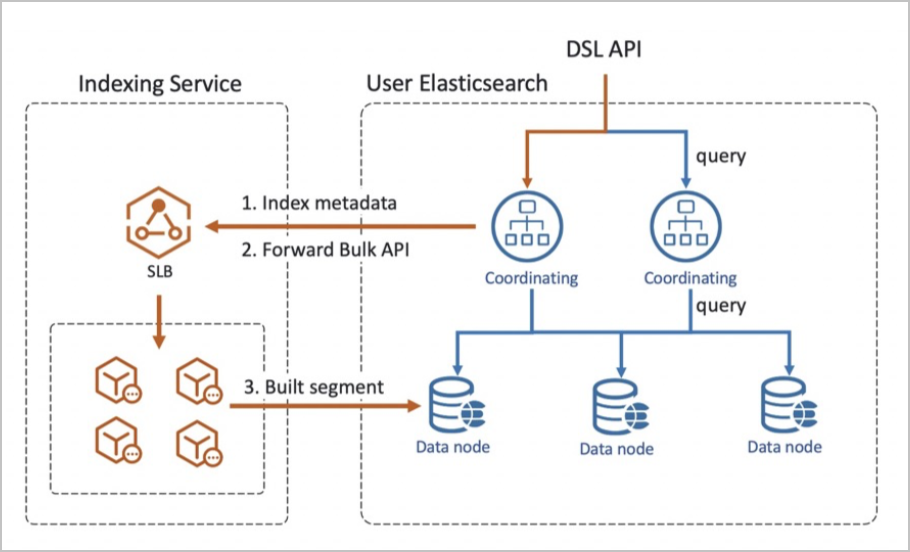
The Indexing Service architecture is built on read/write splitting and provides the following technical advantages:
High performance: professional-grade write optimization. Indexing Service optimizes write performance through Alibaba Cloud proprietary features such as physical replication of indexes, separation of compute and storage, and faster-bulk. You can gain professional-grade write performance without making any configuration changes.
Low latency: real-time cross-cluster physical replication. With segment-level real-time physical replication, the average data latency of your cluster relative to the Indexing Service cluster is on the order of hundreds of milliseconds when write traffic is saturated.
High stability: geo-disaster recovery. Indexing Service provides multi-cluster backup across regions. If a cluster becomes unhealthy, the index hosting of your cluster can be switched to another healthy cluster, which further improves the high availability (HA) of write operations.
Billing
Indexing Service charges write hosting fees, which cover write traffic and hosted storage space.
Write hosting fees are charged on a pay-as-you-go basis regardless of whether your Elasticsearch instance uses the subscription or pay-as-you-go billing method. The fees are based on the actual write traffic and the actual hosted storage space. For pricing information, see Billing rules.
Although write hosting fees are charged when you enable Indexing Service, the service reduces the fees of the node resources that handle write computing in your cluster.
Benefits
Low cost: The cost of write compute resources is reduced by an average of 60%.
Elastic scaling: Indexing Service allocates and manages write resources in the cloud background to handle write traffic fluctuations. This delivers elastic write scaling for Elasticsearch clusters in log scenarios without data migration, so that your cluster can handle traffic peaks.
No operations and maintenance (O&M): You do not need to worry about the write resources or the write pressure of your Elasticsearch cluster. Indexing Service hosts write operations in the cloud, which significantly reduces cluster O&M costs.
Limits
Indexing Service provides a serverless write hosting service for the Elasticsearch clusters that you create. However, limits apply to data writes and index configurations when you use this service. The following table describes the limits.
| Category | Item | Description | Remarks |
| Instance dimension | Write traffic protection | The maximum write traffic is 200 MB/s. | Hard limit. If the maximum limit is exceeded, the status code 429 is returned and the Inflow Quota Exceed message is displayed. To apply for a higher limit, submit a ticket. |
| Instance dimension | Write document count protection | The maximum number of written documents is 200,000 per second. | Hard limit. If the maximum limit is exceeded, the status code 429 is returned and the Write QPS Exceed message is displayed. To apply for a higher limit, submit a ticket. |
| Instance dimension | Put Mapping throttling protection | The maximum Put Mapping rate is 50 TPS. | Hard limit. If the maximum limit is exceeded, the status code 429 is returned and the Note Frequent Put Mapping operations consume large amounts of compute resources and significantly affect the stability of the hosting service. To reduce Put Mapping operations, define an index template before you write data. |
| Shard dimension | Write traffic | The maximum write traffic without a primary key is 10 MB/s. The maximum write traffic with a primary key is 5 MB/s. | Soft limit. If the maximum limit is exceeded, the status code 429 is returned and the write_size blocked message is displayed. The system still serves your requests as much as possible, but the service quality is not guaranteed. |
| Shard dimension | Written documents | The maximum number of written documents is 5,000 per second. | Soft limit. If the maximum limit is exceeded, the system serves your requests as much as possible, but the service quality cannot be guaranteed. |
| Number of shards | The maximum number of shards that can be created for a single index | A maximum of 300 shards can be created. | None. |
| Configuration | index.refresh_interval | This parameter is configured by default in the cloud-hosted cluster, and your custom configurations do not take effect. | None. |
| Configuration | index.translog.durability | In the cloud-hosted cluster, translog is configured in asynchronous write mode by default (index.translog.durability=async), and your custom configurations do not take effect. | None. |
| Configuration | Write parameters such as refresh and merge | Write parameters such as refresh and merge are configured by default in the cloud-hosted cluster, and your custom configurations do not take effect. | The default configurations are as follows: "index.merge.policy.max_merged_segment" : "1024mb", "index.refresh_interval" : "30s", "index.translog.durability" : "async", "index.translog.flush_threshold_size" : "2gb", "index.translog.sync_interval" : "100s" |
| Index | Lifecycle configuration | You cannot customize freeze in the index lifecycle. | None. |
| Index | Shrink operation | None. | |
| Index | Hosting cancellation time | By default, an index is automatically unhosted 3 days after it is hosted. | You can modify the hosting cancellation time in the lifecycle based on your business data. |
| Index | Ingest Node | Concept: Pre-processing operations use a series of predefined processors and pipelines to transform and enrich data before documents are indexed, that is, before data is written. For more information, see Ingest Node. Usage recommendations: When you use Indexing Service, if you use an ingest node to pre-process documents before indexing, the ingest processing is performed in your cluster. We recommend that you avoid overly complex processing logic. |
Performance test
Test environment:
Cluster specifications: the 2-core 8 GB, 4-core 16 GB, and 8-core 32 GB specifications, each with 3 data nodes.
Index configuration: The number of shards is 15 and the number of replicas is 1. Asynchronous translog writes and physical replication are both enabled, and refresh_interval is set to 5 seconds.
Test results:
Specifications Instance edition Write TPS Write visibility latency 2 cores and 8 GB with 3 data nodes Standard Edition 24,883 5 seconds 2 cores and 8 GB with 3 data nodes Kernel-enhanced Edition with Indexing Service 226,649 6 seconds 4 cores and 16 GB with 3 data nodes Standard Edition 52,372 5 seconds 4 cores and 16 GB with 3 data nodes Kernel-enhanced Edition with Indexing Service 419,574 6 seconds 8 cores and 32 GB with 3 data nodes Standard Edition 110,277 5 seconds 8 cores and 32 GB with 3 data nodes Kernel-enhanced Edition with Indexing Service 804,010 6 seconds Test conclusions:
The following results compare the performance of Kernel-enhanced Edition with Indexing Service and Standard Edition:
Based on the 2-core 8 GB specification with 3 data nodes, performance improved by 910%.
Based on the 4-core 16 GB specification with 3 data nodes, performance improved by 801%.
Based on the 8-core 32 GB specification with 3 data nodes, performance improved by 729%.