StarRocks asynchronous materialized views use a mainstream transparent query rewrite algorithm based on the SPJG (select-project-join-group-by) pattern. Without modifying query statements, StarRocks automatically rewrites queries on base tables as queries on materialized views, using pre-computed results to significantly reduce computation costs and accelerate query execution. This topic describes how to use StarRocks asynchronous materialized views to rewrite and accelerate queries.
Scenarios
The query rewrite feature of StarRocks asynchronous materialized views is primarily applied in the following scenarios:
Metric pre-aggregation
If you need to process high-dimensional data, you can use materialized views to create a pre-aggregated metric layer.
Wide table Join
Materialized views allow you to transparently accelerate queries that include large wide table joins in complex scenarios.
Lakehouse Acceleration
Building materialized views based on External Catalog can easily accelerate queries targeting data in data lakes.
Asynchronous materialized views built on JDBC Catalog tables do not currently support query rewrite.
Features
The automatic query rewrite feature of StarRocks asynchronous materialized views has the following characteristics:
Strong data consistency: If the base table is a StarRocks internal table, StarRocks can ensure that the results obtained through materialized view query rewrite are consistent with the results obtained by directly querying the base table.
Staleness rewrite: StarRocks supports staleness rewrite, which allows tolerance of a certain degree of data expiration to handle situations where data changes frequently.
Multi-table Join: StarRocks asynchronous materialized views support various types of joins, including some complex join scenarios such as View Delta Join and Join derivation rewrite, which can be used to accelerate query scenarios involving large wide tables.
Aggregation rewrite: StarRocks can rewrite queries with aggregation operations to improve report performance.
Nested materialized views: StarRocks supports rewriting complex queries based on nested materialized views, extending the range of queries that can be rewritten.
Union rewrite: You can combine the Union rewrite feature with the Time to Live (TTL) of materialized view partitions to separate hot and cold data, allowing you to query hot data from materialized views and historical data from base tables.
Building materialized views based on views: You can accelerate queries in scenarios where modeling is based on views.
Building materialized views based on External Catalog: You can use this feature to accelerate queries in data lakes.
Complex expression rewrite: Supports calling functions and arithmetic operations in expressions, meeting complex analysis and calculation requirements.
Limits
For single materialized view query rewrite capabilities, StarRocks currently has the following limitations:
StarRocks does not support rewriting non-deterministic functions, including rand, random, uuid, and sleep.
StarRocks does not support rewriting window functions.
If the materialized view definition statement contains LIMIT, ORDER BY, UNION, EXCEPT, INTERSECT, MINUS, GROUPING SETS, WITH CUBE, or WITH ROLLUP, it cannot be used for rewriting.
Materialized views based on External Catalog do not guarantee strong consistency of query results.
Asynchronous materialized views built on JDBC Catalog tables do not currently support query rewrite.
For query rewrite based on views, StarRocks currently has the following limitations:
StarRocks does not support partition Union rewrite.
If the view contains random functions, query rewrite is not supported, including rand(), random(), uuid(), and sleep().
If the view contains columns with the same name, query rewrite is not supported. You must set different aliases for columns with the same name.
The view used to create a materialized view must contain at least one column of the following data types:
Integer types
Date and time types
String types
Join rewrite
StarRocks supports rewriting queries with various types of joins, including Inner Join, Cross Join, Left Outer Join, Full Outer Join, Right Outer Join, Semi Join, and Anti Join.
The following example demonstrates join query rewrite. Create the following database and base tables:
CREATE DATABASE IF NOT EXISTS test_db;
USE test_db;
CREATE TABLE customer (
  c_custkey     INT(11)     NOT NULL,
  c_name        VARCHAR(26) NOT NULL,
  c_address     VARCHAR(41) NOT NULL,
  c_city        VARCHAR(11) NOT NULL,
  c_nation      VARCHAR(16) NOT NULL,
  c_region      VARCHAR(13) NOT NULL,
  c_phone       VARCHAR(16) NOT NULL,
  c_mktsegment  VARCHAR(11) NOT NULL
) ENGINE=OLAP
DUPLICATE KEY(c_custkey)
DISTRIBUTED BY HASH(c_custkey) BUCKETS 12;

CREATE TABLE lineorder (
  lo_orderkey         INT(11) NOT NULL,
  lo_linenumber       INT(11) NOT NULL,
  lo_custkey          INT(11) NOT NULL,
  lo_partkey          INT(11) NOT NULL,
  lo_suppkey          INT(11) NOT NULL,
  lo_orderdate        INT(11) NOT NULL,
  lo_orderpriority    VARCHAR(16) NOT NULL,
  lo_shippriority     INT(11) NOT NULL,
  lo_quantity         INT(11) NOT NULL,
  lo_extendedprice    INT(11) NOT NULL,
  lo_ordtotalprice    INT(11) NOT NULL,
  lo_discount         INT(11) NOT NULL,
  lo_revenue          INT(11) NOT NULL,
  lo_supplycost       INT(11) NOT NULL,
  lo_tax              INT(11) NOT NULL,
  lo_commitdate       INT(11) NOT NULL,
  lo_shipmode         VARCHAR(11) NOT NULL
) ENGINE=OLAP
DUPLICATE KEY(lo_orderkey)
DISTRIBUTED BY HASH(lo_orderkey) BUCKETS 48;
Based on the above base tables, create the following materialized view.
USE test_db;
CREATE MATERIALIZED VIEW join_mv1
DISTRIBUTED BY HASH(lo_orderkey)
AS
SELECT lo_orderkey, lo_linenumber, lo_revenue, lo_partkey, c_name, c_address
FROM lineorder INNER JOIN customer
ON lo_custkey = c_custkey;
This materialized view can rewrite the following query.
SELECT lo_orderkey, lo_linenumber, lo_revenue, lo_partkey, c_name, c_address
FROM lineorder INNER JOIN customer
ON lo_custkey = c_custkey;
The original query plan and the rewritten plan are as follows.
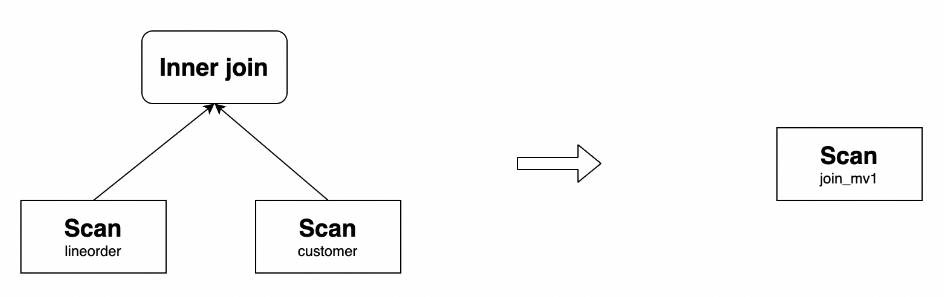
StarRocks supports rewriting join queries with complex expressions, such as arithmetic operations, string functions, date functions, CASE WHEN expressions, and OR predicates. For example, the above materialized view can rewrite the following query:
SELECT
    lo_orderkey,
    lo_linenumber,
    (2 * lo_revenue + 1) * lo_linenumber,
    upper(c_name),
    substr(c_address, 3)
FROM lineorder INNER JOIN customer
ON lo_custkey = c_custkey;
In addition to regular scenarios, StarRocks also supports rewriting join queries in more complex situations.
Query Delta Join rewrite
Query Delta Join refers to a situation where the tables joined in the query are a superset of the tables joined in the materialized view. For example, the following query joins the tables lineorder, customer, and part. If the materialized view join_mv1 only contains the join of lineorder and customer, StarRocks can use join_mv1 to rewrite the query.
Example:
SELECT lo_orderkey, lo_linenumber, lo_revenue, c_name, c_address, p_name
FROM
    lineorder INNER JOIN customer ON lo_custkey = c_custkey
    INNER JOIN part ON lo_partkey = p_partkey;
The original query plan and the rewritten plan are as follows:
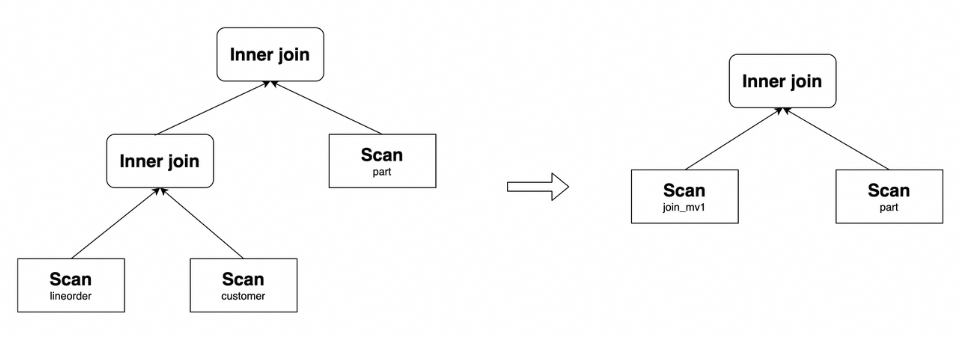
View Delta Join rewrite
View Delta Join refers to a situation where the tables joined in the query are a subset of the tables joined in the materialized view. This feature is typically used in scenarios involving large wide tables. For example, in the context of the Star Schema Benchmark (SSB), you can create a materialized view by joining all tables to improve query performance. Tests have shown that after transparently rewriting queries through materialized views, the performance of multi-table join queries can reach the same level as querying the corresponding large wide table.
To enable View Delta Join rewrite, you must ensure that the materialized view includes 1:1 Cardinality Preservation Joins with all relevant tables in the query. The following nine types of joins that meet the constraint conditions are considered Cardinality Preservation Joins and can be used to enable View Delta Join rewrite.
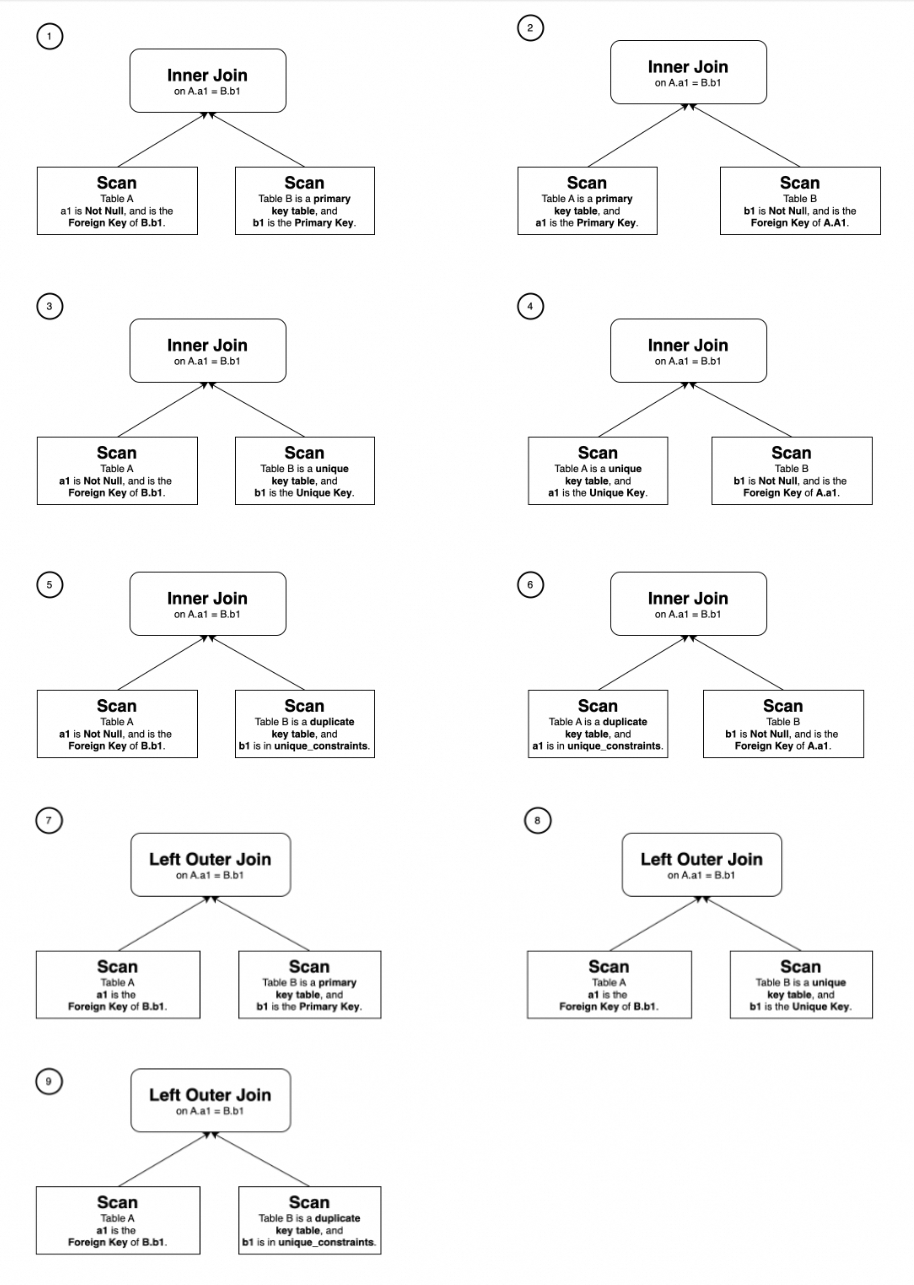
Using the SSB test as an example, create the following database and base tables.
CREATE DATABASE IF NOT EXISTS test_db;
USE test_db;
CREATE TABLE customer (
  c_custkey         INT(11)       NOT NULL,
  c_name            VARCHAR(26)   NOT NULL,
  c_address         VARCHAR(41)   NOT NULL,
  c_city            VARCHAR(11)   NOT NULL,
  c_nation          VARCHAR(16)   NOT NULL,
  c_region          VARCHAR(13)   NOT NULL,
  c_phone           VARCHAR(16)   NOT NULL,
  c_mktsegment      VARCHAR(11)   NOT NULL
) ENGINE=OLAP
DUPLICATE KEY(c_custkey)
DISTRIBUTED BY HASH(c_custkey) BUCKETS 12
PROPERTIES (
"unique_constraints" = "c_custkey"   -- Specify the unique key.
);

CREATE TABLE dates (
  d_datekey          DATE          NOT NULL,
  d_date             VARCHAR(20)   NOT NULL,
  d_dayofweek        VARCHAR(10)   NOT NULL,
  d_month            VARCHAR(11)   NOT NULL,
  d_year             INT(11)       NOT NULL,
  d_yearmonthnum     INT(11)       NOT NULL,
  d_yearmonth        VARCHAR(9)    NOT NULL,
  d_daynuminweek     INT(11)       NOT NULL,
  d_daynuminmonth    INT(11)       NOT NULL,
  d_daynuminyear     INT(11)       NOT NULL,
  d_monthnuminyear   INT(11)       NOT NULL,
  d_weeknuminyear    INT(11)       NOT NULL,
  d_sellingseason    VARCHAR(14)   NOT NULL,
  d_lastdayinweekfl  INT(11)       NOT NULL,
  d_lastdayinmonthfl INT(11)       NOT NULL,
  d_holidayfl        INT(11)       NOT NULL,
  d_weekdayfl        INT(11)       NOT NULL
) ENGINE=OLAP
DUPLICATE KEY(d_datekey)
DISTRIBUTED BY HASH(d_datekey) BUCKETS 1
PROPERTIES (
"unique_constraints" = "d_datekey"   -- Specify the unique key.
);

CREATE TABLE supplier (
  s_suppkey          INT(11)       NOT NULL,
  s_name             VARCHAR(26)   NOT NULL,
  s_address          VARCHAR(26)   NOT NULL,
  s_city             VARCHAR(11)   NOT NULL,
  s_nation           VARCHAR(16)   NOT NULL,
  s_region           VARCHAR(13)   NOT NULL,
  s_phone            VARCHAR(16)   NOT NULL
) ENGINE=OLAP
DUPLICATE KEY(s_suppkey)
DISTRIBUTED BY HASH(s_suppkey) BUCKETS 12
PROPERTIES (
"unique_constraints" = "s_suppkey"   -- Specify the unique key.
);

CREATE TABLE part (
  p_partkey          INT(11)       NOT NULL,
  p_name             VARCHAR(23)   NOT NULL,
  p_mfgr             VARCHAR(7)    NOT NULL,
  p_category         VARCHAR(8)    NOT NULL,
  p_brand            VARCHAR(10)   NOT NULL,
  p_color            VARCHAR(12)   NOT NULL,
  p_type             VARCHAR(26)   NOT NULL,
  p_size             TINYINT(11)   NOT NULL,
  p_container        VARCHAR(11)   NOT NULL
) ENGINE=OLAP
DUPLICATE KEY(p_partkey)
DISTRIBUTED BY HASH(p_partkey) BUCKETS 12
PROPERTIES (
"unique_constraints" = "p_partkey"   -- Specify the unique key.
);

CREATE TABLE lineorder (
  lo_orderdate       DATE          NOT NULL, -- Specify as NOT NULL.
  lo_orderkey        INT(11)       NOT NULL,
  lo_linenumber      TINYINT       NOT NULL,
  lo_custkey         INT(11)       NOT NULL, -- Specify as NOT NULL.
  lo_partkey         INT(11)       NOT NULL, -- Specify as NOT NULL.
  lo_suppkey         INT(11)       NOT NULL, -- Specify as NOT NULL.
  lo_orderpriority   VARCHAR(100)  NOT NULL,
  lo_shippriority    TINYINT       NOT NULL,
  lo_quantity        TINYINT       NOT NULL,
  lo_extendedprice   INT(11)       NOT NULL,
  lo_ordtotalprice   INT(11)       NOT NULL,
  lo_discount        TINYINT       NOT NULL,
  lo_revenue         INT(11)       NOT NULL,
  lo_supplycost      INT(11)       NOT NULL,
  lo_tax             TINYINT       NOT NULL,
  lo_commitdate      DATE          NOT NULL,
  lo_shipmode        VARCHAR(100)  NOT NULL
) ENGINE=OLAP
DUPLICATE KEY(lo_orderdate,lo_orderkey)
PARTITION BY RANGE(lo_orderdate)
(PARTITION p1 VALUES [("0000-01-01"), ("1993-01-01")),
PARTITION p2 VALUES [("1993-01-01"), ("1994-01-01")),
PARTITION p3 VALUES [("1994-01-01"), ("1995-01-01")),
PARTITION p4 VALUES [("1995-01-01"), ("1996-01-01")),
PARTITION p5 VALUES [("1996-01-01"), ("1997-01-01")),
PARTITION p6 VALUES [("1997-01-01"), ("1998-01-01")),
PARTITION p7 VALUES [("1998-01-01"), ("1999-01-01")))
DISTRIBUTED BY HASH(lo_orderkey) BUCKETS 48
PROPERTIES (
"foreign_key_constraints" = "(
    (lo_custkey) REFERENCES customer(c_custkey),
    (lo_partkey) REFERENCES part(p_partkey),
    (lo_suppkey) REFERENCES supplier(s_suppkey)
    )"  -- Specify foreign key constraints.
);
Create the materialized view lineorder_flat_mv that joins the tables lineorder, customer, supplier, part, and dates.
USE test_db;
CREATE MATERIALIZED VIEW lineorder_flat_mv
DISTRIBUTED BY HASH(LO_ORDERDATE, LO_ORDERKEY) BUCKETS 48
PARTITION BY LO_ORDERDATE
REFRESH MANUAL
PROPERTIES (
    "partition_refresh_number"="1"
)
AS SELECT /*+ SET_VAR(query_timeout = 7200) */     -- Set the refresh timeout.
       l.LO_ORDERDATE        AS LO_ORDERDATE,
       l.LO_ORDERKEY         AS LO_ORDERKEY,
       l.LO_LINENUMBER       AS LO_LINENUMBER,
       l.LO_CUSTKEY          AS LO_CUSTKEY,
       l.LO_PARTKEY          AS LO_PARTKEY,
       l.LO_SUPPKEY          AS LO_SUPPKEY,
       l.LO_ORDERPRIORITY    AS LO_ORDERPRIORITY,
       l.LO_SHIPPRIORITY     AS LO_SHIPPRIORITY,
       l.LO_QUANTITY         AS LO_QUANTITY,
       l.LO_EXTENDEDPRICE    AS LO_EXTENDEDPRICE,
       l.LO_ORDTOTALPRICE    AS LO_ORDTOTALPRICE,
       l.LO_DISCOUNT         AS LO_DISCOUNT,
       l.LO_REVENUE          AS LO_REVENUE,
       l.LO_SUPPLYCOST       AS LO_SUPPLYCOST,
       l.LO_TAX              AS LO_TAX,
       l.LO_COMMITDATE       AS LO_COMMITDATE,
       l.LO_SHIPMODE         AS LO_SHIPMODE,
       c.C_NAME              AS C_NAME,
       c.C_ADDRESS           AS C_ADDRESS,
       c.C_CITY              AS C_CITY,
       c.C_NATION            AS C_NATION,
       c.C_REGION            AS C_REGION,
       c.C_PHONE             AS C_PHONE,
       c.C_MKTSEGMENT        AS C_MKTSEGMENT,
       s.S_NAME              AS S_NAME,
       s.S_ADDRESS           AS S_ADDRESS,
       s.S_CITY              AS S_CITY,
       s.S_NATION            AS S_NATION,
       s.S_REGION            AS S_REGION,
       s.S_PHONE             AS S_PHONE,
       p.P_NAME              AS P_NAME,
       p.P_MFGR              AS P_MFGR,
       p.P_CATEGORY          AS P_CATEGORY,
       p.P_BRAND             AS P_BRAND,
       p.P_COLOR             AS P_COLOR,
       p.P_TYPE              AS P_TYPE,
       p.P_SIZE              AS P_SIZE,
       p.P_CONTAINER         AS P_CONTAINER,
       d.D_DATE              AS D_DATE,
       d.D_DAYOFWEEK         AS D_DAYOFWEEK,
       d.D_MONTH             AS D_MONTH,
       d.D_YEAR              AS D_YEAR,
       d.D_YEARMONTHNUM      AS D_YEARMONTHNUM,
       d.D_YEARMONTH         AS D_YEARMONTH,
       d.D_DAYNUMINWEEK      AS D_DAYNUMINWEEK,
       d.D_DAYNUMINMONTH     AS D_DAYNUMINMONTH,
       d.D_DAYNUMINYEAR      AS D_DAYNUMINYEAR,
       d.D_MONTHNUMINYEAR    AS D_MONTHNUMINYEAR,
       d.D_WEEKNUMINYEAR     AS D_WEEKNUMINYEAR,
       d.D_SELLINGSEASON     AS D_SELLINGSEASON,
       d.D_LASTDAYINWEEKFL   AS D_LASTDAYINWEEKFL,
       d.D_LASTDAYINMONTHFL  AS D_LASTDAYINMONTHFL,
       d.D_HOLIDAYFL         AS D_HOLIDAYFL,
       d.D_WEEKDAYFL         AS D_WEEKDAYFL
   FROM lineorder            AS l
       INNER JOIN customer   AS c ON c.C_CUSTKEY = l.LO_CUSTKEY
       INNER JOIN supplier   AS s ON s.S_SUPPKEY = l.LO_SUPPKEY
       INNER JOIN part       AS p ON p.P_PARTKEY = l.LO_PARTKEY
       INNER JOIN dates      AS d ON l.LO_ORDERDATE = d.D_DATEKEY;
SSB Q2.1 example is as follows.
USE test_db;
SELECT
    SUM(lo_revenue) AS lo_revenue,
    d_year,
    p_brand
FROM lineorder
    JOIN dates ON lo_orderdate = d_datekey
    JOIN part ON lo_partkey = p_partkey
    JOIN supplier ON lo_suppkey = s_suppkey
WHERE p_category = 'MFGR#12' AND s_region = 'AMERICA'
GROUP BY d_year, p_brand
ORDER BY d_year, p_brand;
SSB Q2.1 involves joining four tables, but compared to the materialized view lineorder_flat_mv, it is missing the customer table. In lineorder_flat_mv, lineorder INNER JOIN customer is essentially a Cardinality Preservation Join. Therefore, logically, this join can be eliminated without affecting the query results. As a result, Q2.1 can be rewritten using lineorder_flat_mv.
The original query plan and the rewritten plan are as follows.
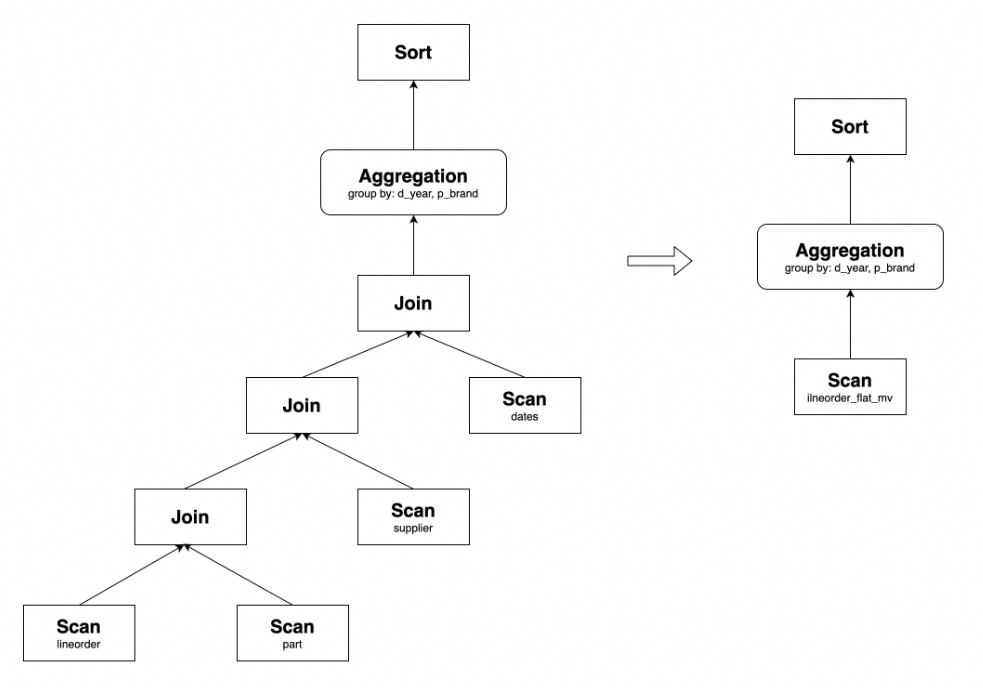
Similarly, other queries in SSB can also be transparently rewritten using lineorder_flat_mv, thereby optimizing query performance.
Join derivation rewrite
Join derivation refers to a situation where the join types in the materialized view and the query are inconsistent, but the join result of the materialized view includes the join result of the query.
Currently, the following two scenarios are supported:
Three or more table joins
Suppose a materialized view includes a Left Outer Join between tables t1 and t2, and an Inner Join between tables t2 and t3. Both join conditions include columns from table t2.
The query includes an Inner Join between t1 and t2, and an Inner Join between t2 and t3. Both join conditions include columns from table t2.
In this case, the above query can be rewritten through the materialized view. This is because in the materialized view, the Left Outer Join is executed first, followed by the Inner Join. The Left Outer Join generates results where the right table has no matches (i.e., columns from the right table are NULL). These results are filtered out during the execution of the Inner Join. Therefore, the materialized view and the query are logically equivalent, and the query can be rewritten.
For example, create the following materialized view join_mv5.
USE test_db;
CREATE MATERIALIZED VIEW join_mv5
PARTITION BY lo_orderdate
DISTRIBUTED BY hash(lo_orderkey)
PROPERTIES (
  "partition_refresh_number" = "1"
)
AS
SELECT lo_orderkey, lo_orderdate, lo_linenumber, lo_revenue, c_custkey, c_address, p_name
FROM customer LEFT OUTER JOIN lineorder
ON c_custkey = lo_custkey
INNER JOIN part
ON p_partkey = lo_partkey;
join_mv5 can rewrite the following query.
USE test_db;
SELECT lo_orderkey, lo_orderdate, lo_linenumber, lo_revenue, c_custkey, c_address, p_name
FROM customer INNER JOIN lineorder
ON c_custkey = lo_custkey
INNER JOIN part
ON p_partkey = lo_partkey;
The original query plan and the rewritten plan are as follows.
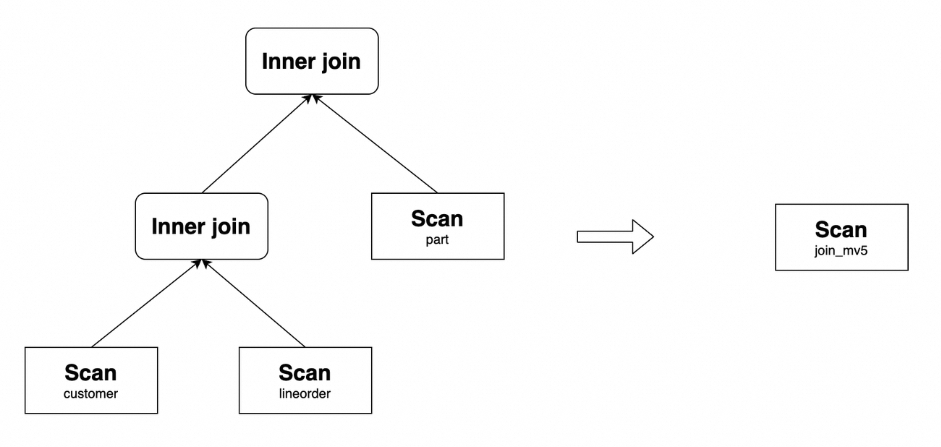
Similarly, if the materialized view is defined as t1 INNER JOIN t2 INNER JOIN t3, and the query is LEFT OUTER JOIN t2 INNER JOIN t3, then the query can also be rewritten. Moreover, this rewrite capability also applies in cases involving more than three tables.
Two-table joins
Two-table join derivation rewrite supports the following sub-scenarios.
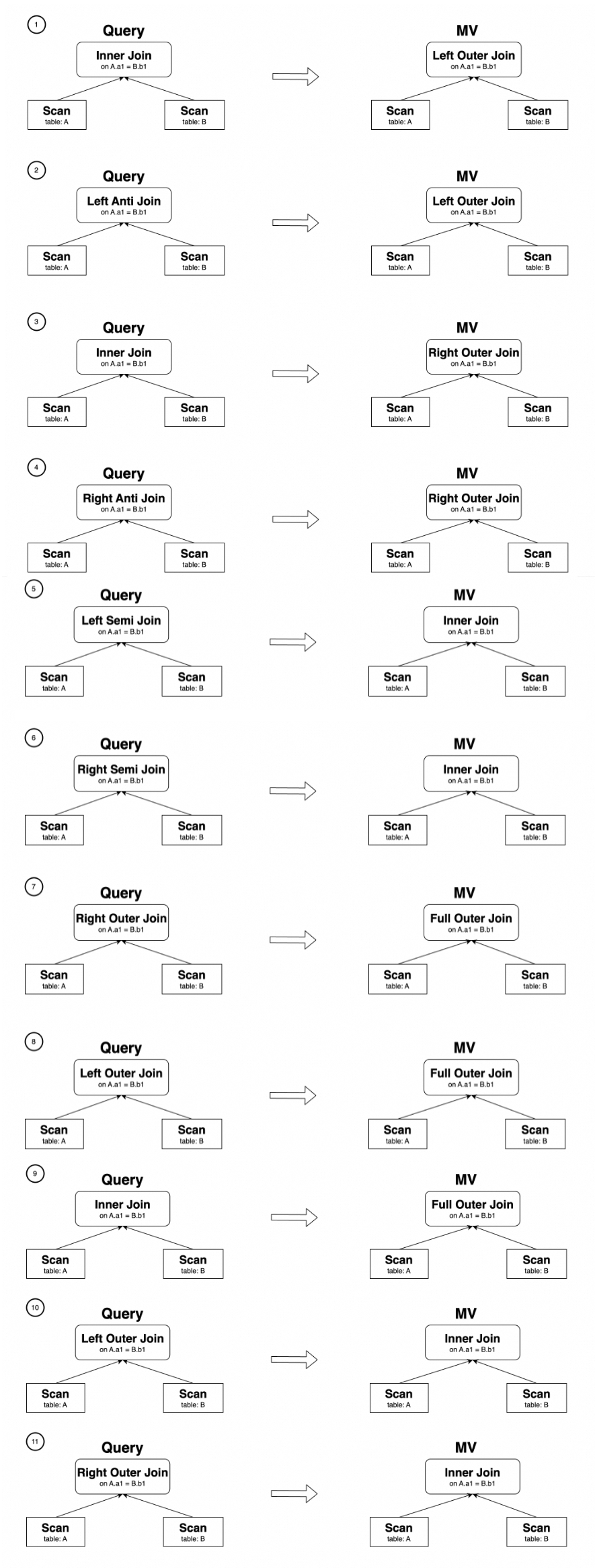
In scenarios 1 through 9, a filter predicate needs to be added to the rewrite result to ensure semantic equivalence. For example, create the following materialized view.
USE test_db;
CREATE MATERIALIZED VIEW join_mv3
DISTRIBUTED BY hash(lo_orderkey)
AS
SELECT lo_orderkey, lo_linenumber, lo_revenue, c_custkey, c_address
FROM lineorder LEFT OUTER JOIN customer
ON lo_custkey = c_custkey;
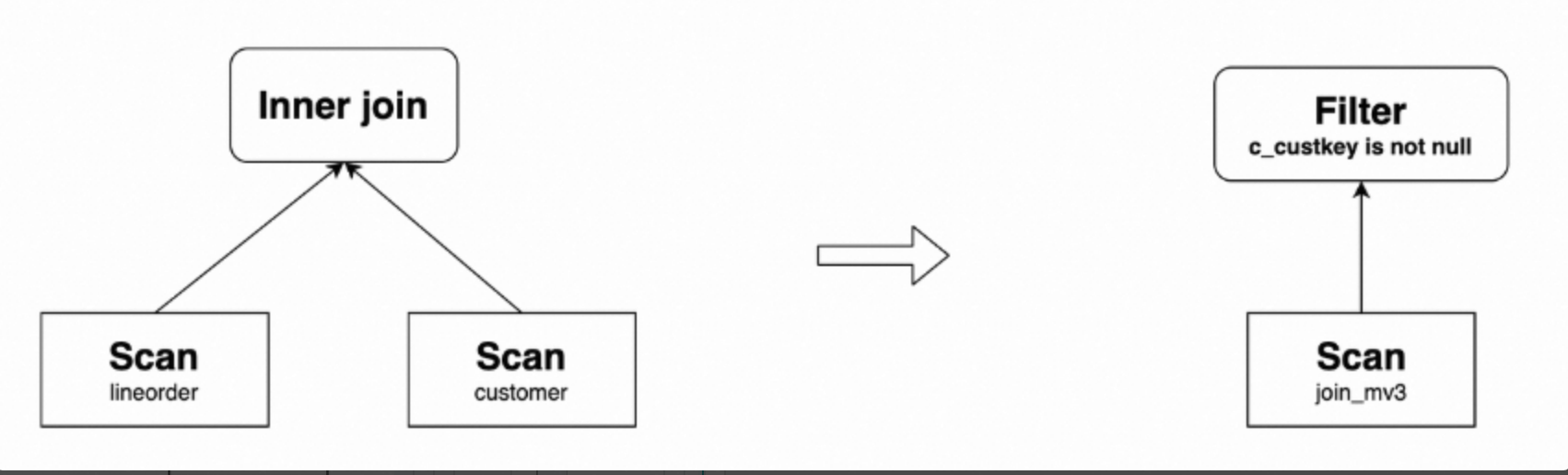
Then join_mv3 can rewrite the following query, and the query result needs to be compensated with the predicate c_custkey IS NOT NULL.
USE test_db;
SELECT lo_orderkey, lo_linenumber, lo_revenue, c_custkey, c_address
FROM lineorder INNER JOIN customer
ON lo_custkey = c_custkey;
The original query plan and the rewritten plan are as follows.
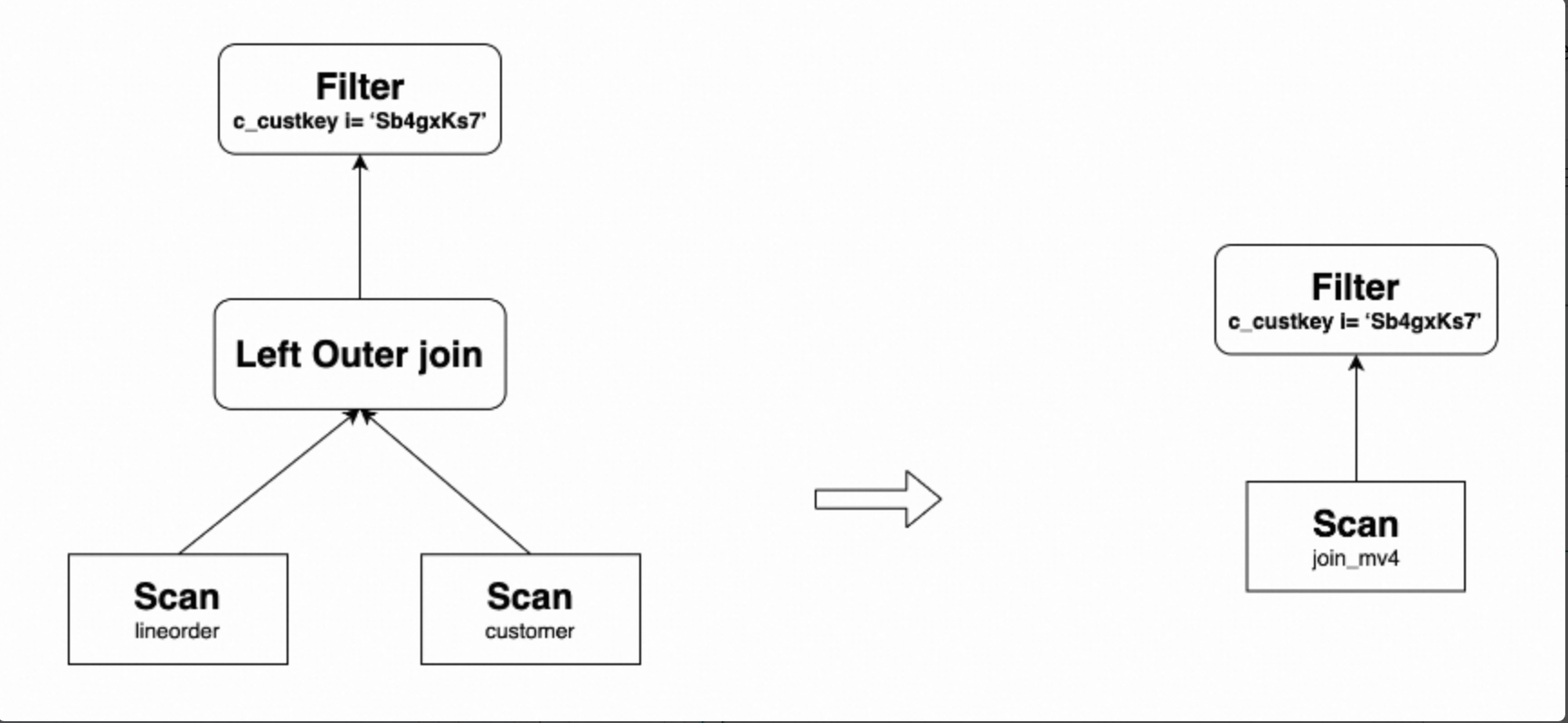
In scenario 10, the Left Outer Join query needs to include an IS NOT NULL filter predicate on the right table, such as =, <>, >, <, <=, >=, LIKE, IN, NOT LIKE, or NOT IN. For example, create the following materialized view.
USE test_db;
CREATE MATERIALIZED VIEW join_mv4
DISTRIBUTED BY hash(lo_orderkey)
AS
SELECT lo_orderkey, lo_linenumber, lo_revenue, c_custkey, c_address
FROM lineorder INNER JOIN customer
ON lo_custkey = c_custkey;
Then join_mv4 can rewrite the following query, where customer.c_address = "Sb4gxKs7" is an IS NOT NULL predicate.
USE test_db;
SELECT lo_orderkey, lo_linenumber, lo_revenue, c_custkey, c_address
FROM lineorder LEFT OUTER JOIN customer
ON lo_custkey = c_custkey
WHERE customer.c_address = "Sb4gxKs7";
The original query plan and the rewritten plan are as follows.
Aggregation rewrite
StarRocks asynchronous materialized view multi-table aggregation query rewrite supports all aggregation functions, including bitmap_union, hll_union, and percentile_union. For example, create the following materialized view.
USE test_db;
CREATE MATERIALIZED VIEW agg_mv1
DISTRIBUTED BY hash(lo_orderkey)
AS
SELECT
  lo_orderkey,
  lo_linenumber,
  c_name,
  sum(lo_revenue) AS total_revenue,
  max(lo_discount) AS max_discount
FROM lineorder INNER JOIN customer
ON lo_custkey = c_custkey
GROUP BY lo_orderkey, lo_linenumber, c_name;
This materialized view can rewrite the following query.
USE test_db;
SELECT
  lo_orderkey,
  lo_linenumber,
  c_name,
  sum(lo_revenue) AS total_revenue,
  max(lo_discount) AS max_discount
FROM lineorder INNER JOIN customer
ON lo_custkey = c_custkey
GROUP BY lo_orderkey, lo_linenumber, c_name;
The original query plan and the rewritten plan are as follows.
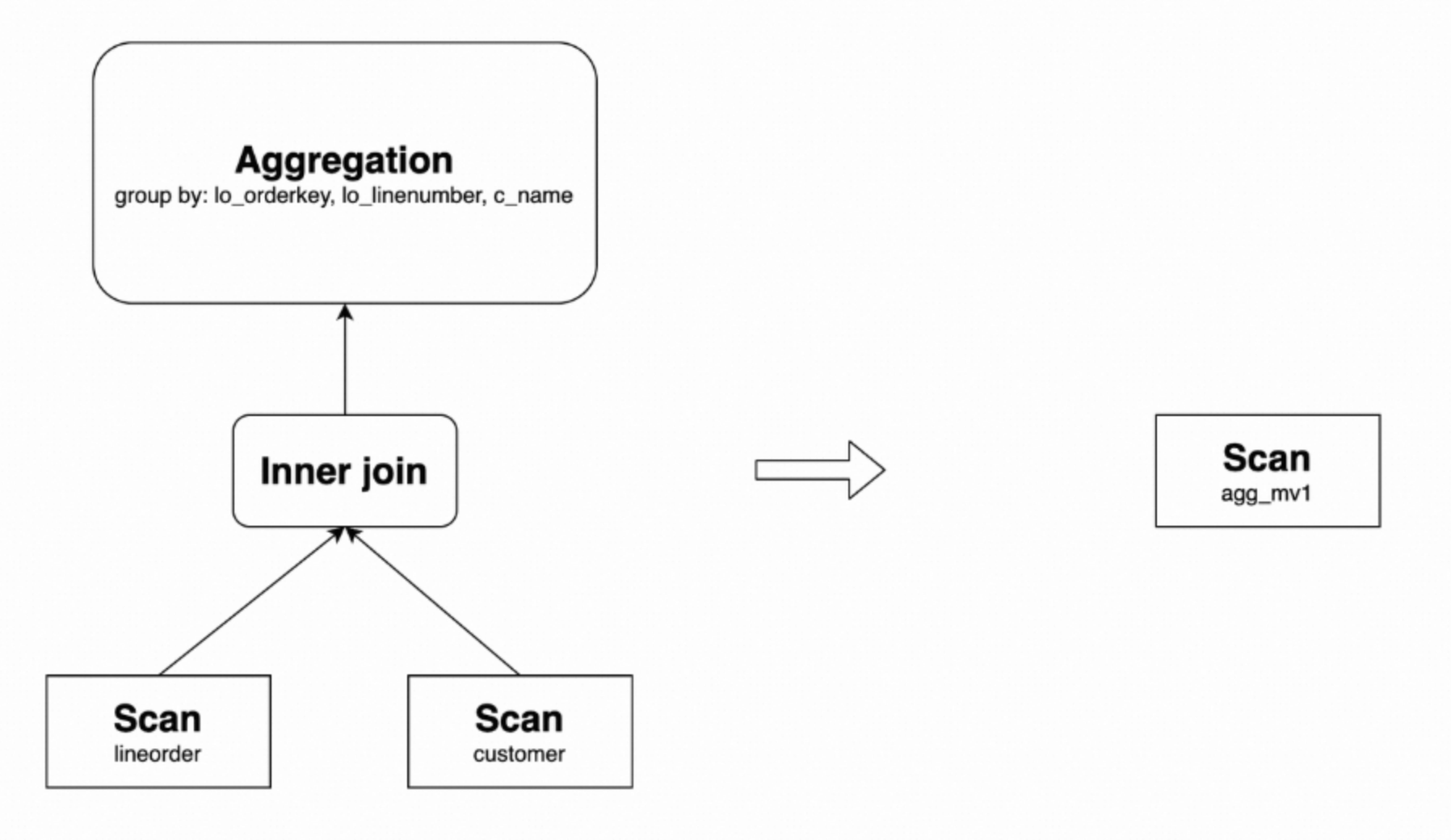
The following details the scenarios where the aggregation rewrite feature can be used.
Aggregate rollup rewrite
StarRocks supports rewriting queries through aggregate rollup, meaning StarRocks can use an asynchronous materialized view created with a GROUP BY a,b clause to rewrite an aggregation query with a GROUP BY a clause. For example, agg_mv1 can rewrite the following query.
USE test_db;
SELECT
  lo_orderkey,
  c_name,
  sum(lo_revenue) AS total_revenue,
  max(lo_discount) AS max_discount
FROM lineorder INNER JOIN customer
ON lo_custkey = c_custkey
GROUP BY lo_orderkey, c_name;
The original query plan and the rewritten plan are as follows.
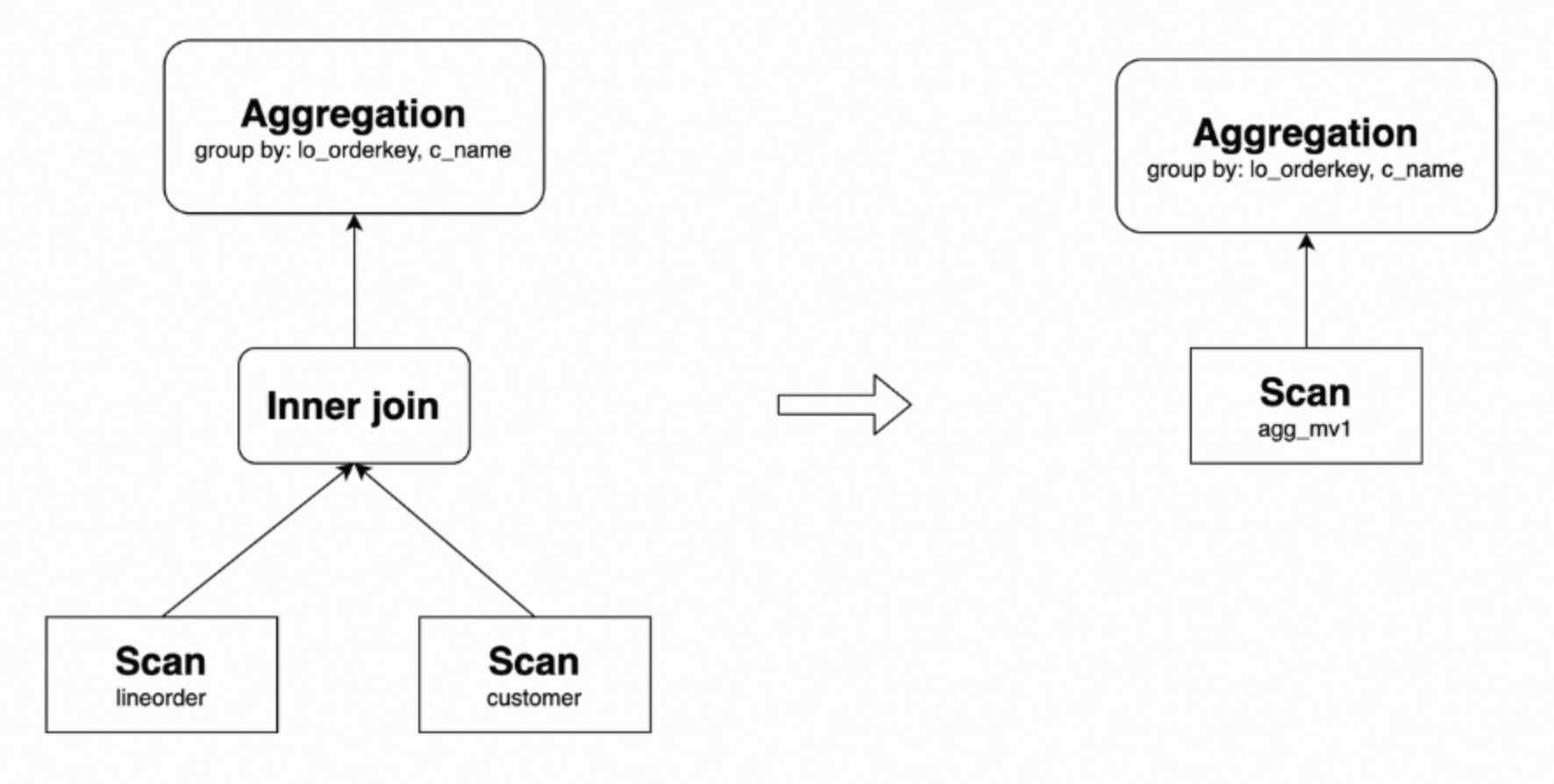
Currently, rewriting grouping set, grouping set with rollup, and grouping set with cube is not supported.
Only some aggregation functions support aggregate rollup query rewrite. The following table shows the correspondence between aggregation functions in the original query and aggregation functions used to build materialized views. You can choose the appropriate aggregation functions to build materialized views based on your business scenarios.
Original query aggregation function | Materialized view building aggregation functions that support Aggregate Rollup |
sum | sum |
count | count |
min | min |
max | max |
avg | sum/count |
bitmap_union, bitmap_union_count, count(distinct) | bitmap_union |
hll_raw_agg, hll_union_agg, ndv, approx_count_distinct | hll_union |
percentile_approx, percentile_union | percentile_union |
DISTINCT aggregations without corresponding GROUP BY columns cannot use aggregate rollup query rewrite. However, starting from StarRocks v3.1, if a query with DISTINCT aggregation functions has no GROUP BY columns but has equivalent predicates, the query can also be rewritten by relevant materialized views because StarRocks can convert equivalent predicates to GROUP BY constant expressions.
In the following example, StarRocks can use the materialized view order_agg_mv1 to rewrite the corresponding Query.
USE test_db;
CREATE MATERIALIZED VIEW order_agg_mv1
DISTRIBUTED BY HASH(`order_id`) BUCKETS 12
REFRESH ASYNC START('2022-09-01 10:00:00') EVERY (interval 1 day)
AS
SELECT
    order_date,
    count(distinct client_id)
FROM order_list
GROUP BY order_date;


-- Query
USE test_db;
SELECT
    order_date,
    count(distinct client_id)
FROM order_list WHERE order_date='2023-07-03';
Aggregation pushdown
Starting from v3.3.0, StarRocks supports the aggregation pushdown feature for materialized view query rewrite. When this feature is enabled, aggregation functions are pushed down to the Scan Operator during query execution and are rewritten by materialized views before the Join Operator is executed. This alleviates data expansion caused by join operations, thereby improving query performance.
This feature is disabled by default. To enable it, you must set the system variable enable_materialized_view_agg_pushdown_rewrite to true.
Suppose you need to accelerate the following SSB-based query SQL1.
-- SQL1
USE test_db;
SELECT
    LO_ORDERDATE, sum(LO_REVENUE), max(LO_REVENUE), count(distinct LO_REVENUE)
FROM lineorder l JOIN dates d
ON l.LO_ORDERDATE = d.d_date
GROUP BY LO_ORDERDATE
ORDER BY LO_ORDERDATE;
SQL1 includes aggregation within the lineorder table and a join between lineorder and dates tables. The aggregation occurs within lineorder, and the join with dates is only used for data filtering. So SQL1 is logically equivalent to the following SQL2.
-- SQL2
USE test_db;
SELECT
    LO_ORDERDATE, sum(sum1), max(max1), bitmap_union_count(bitmap1)
FROM
 (SELECT
  LO_ORDERDATE,  sum(LO_REVENUE) AS sum1, max(LO_REVENUE) AS max1, bitmap_union(to_bitmap(LO_REVENUE)) AS bitmap1
  FROM lineorder
  GROUP BY LO_ORDERDATE) l JOIN dates d
ON l.LO_ORDERDATE = d.d_date
GROUP BY LO_ORDERDATE
ORDER BY LO_ORDERDATE;
SQL2 brings the aggregation forward, greatly reducing the amount of data for the join. You can create a materialized view based on the subquery in SQL2 and enable aggregation pushdown to rewrite and accelerate aggregation.
-- Create materialized view mv0
USE test_db;
CREATE MATERIALIZED VIEW mv0 REFRESH MANUAL AS
SELECT
  LO_ORDERDATE,
  sum(LO_REVENUE) AS sum1,
  max(LO_REVENUE) AS max1,
  bitmap_union(to_bitmap(LO_REVENUE)) AS bitmap1
FROM lineorder
GROUP BY LO_ORDERDATE;

-- Enable aggregation pushdown
SET enable_materialized_view_agg_pushdown_rewrite=true;
At this point, SQL1 will be rewritten and accelerated through the materialized view. The rewritten query is as follows.
USE test_db;
SELECT
    LO_ORDERDATE, sum(sum1), max(max1), bitmap_union_count(bitmap1)
FROM
 (SELECT LO_ORDERDATE, sum1, max1, bitmap1 FROM mv0) l JOIN dates d
ON l.LO_ORDERDATE = d.d_date
GROUP BY LO_ORDERDATE
ORDER BY LO_ORDERDATE;
Note that only some aggregation functions that support aggregate rollup rewrite can be pushed down. Currently, the following aggregation functions support pushdown:
MIN
MAX
COUNT
COUNT DISTINCT
SUM
BITMAP_UNION
HLL_UNION
PERCENTILE_UNION
BITMAP_AGG
ARRAY_AGG_DISTINCT
Pushed-down aggregation functions need to be rolled up to align with the original semantics. For more information about aggregate rollup, see Aggregate rollup rewrite.
Aggregation pushdown supports Count Distinct rollup rewrite based on Bitmap or HLL functions.
Aggregation pushdown only supports pushing down aggregation functions in the query to above the Scan Operator and below the Join, Filter, and Where Operators.
Aggregation pushdown only supports query rewrite and acceleration using materialized views built on a single table.
COUNT DISTINCT rewrite
StarRocks supports rewriting COUNT DISTINCT calculations as BITMAP type calculations, enabling high-performance, accurate deduplication using materialized views. For example, create the following materialized view.
USE test_db;
CREATE MATERIALIZED VIEW distinct_mv
DISTRIBUTED BY hash(lo_orderkey)
AS
SELECT lo_orderkey, bitmap_union(to_bitmap(lo_custkey)) AS distinct_customer
FROM lineorder
GROUP BY lo_orderkey;
This materialized view can rewrite the following query.
USE test_db;
SELECT lo_orderkey, count(distinct lo_custkey)
FROM lineorder
GROUP BY lo_orderkey;
Nested materialized view rewrite
StarRocks supports rewriting queries using nested materialized views. For example, create the following materialized views join_mv2, agg_mv2, and agg_mv3.
USE test_db;
CREATE MATERIALIZED VIEW join_mv2
DISTRIBUTED BY hash(lo_orderkey)
AS
SELECT lo_orderkey, lo_linenumber, lo_revenue, lo_discount, c_name, c_address
FROM lineorder INNER JOIN customer
ON lo_custkey = c_custkey;


CREATE MATERIALIZED VIEW agg_mv2
DISTRIBUTED BY hash(lo_orderkey)
AS
SELECT
  lo_orderkey,
  lo_linenumber,
  c_name,
  SUM(lo_revenue) AS total_revenue,
  MAX(lo_discount) AS max_discount
FROM join_mv2
GROUP BY lo_orderkey, lo_linenumber, c_name;

CREATE MATERIALIZED VIEW agg_mv3
DISTRIBUTED BY hash(lo_orderkey)
AS
SELECT
  lo_orderkey,
  SUM(total_revenue) AS total_revenue,
  MAX(max_discount) AS max_discount
FROM agg_mv2
GROUP BY lo_orderkey;
Their relationship is as follows.
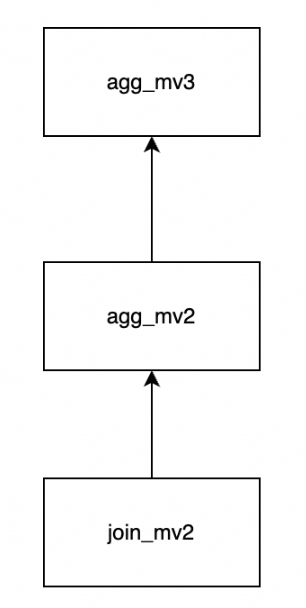
agg_mv3 can rewrite the following query.
USE test_db;
SELECT
  lo_orderkey,
  SUM(lo_revenue) AS total_revenue,
  MAX(lo_discount) AS max_discount
FROM lineorder INNER JOIN customer
ON lo_custkey = c_custkey
GROUP BY lo_orderkey;
The original query plan and the rewritten plan are as follows.
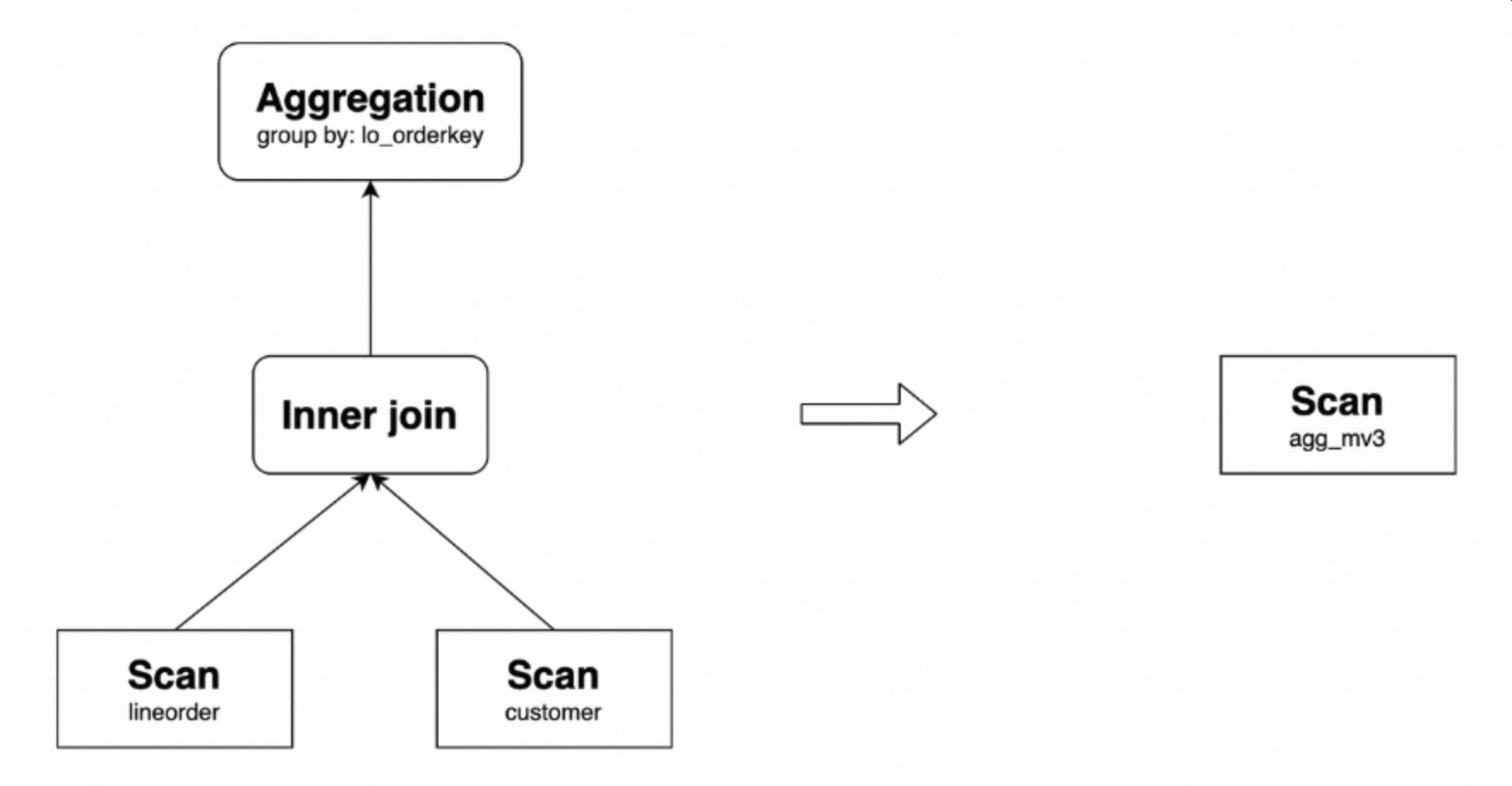
Union rewrite
Predicate Union rewrite
When the predicate range of a materialized view is a subset of the predicate range of a query, the query can be rewritten using a UNION operation.
For example, create the following materialized view.
USE test_db;
CREATE MATERIALIZED VIEW agg_mv4
DISTRIBUTED BY hash(lo_orderkey)
AS
SELECT
  lo_orderkey,
  SUM(lo_revenue) AS total_revenue,
  MAX(lo_discount) AS max_discount
FROM lineorder
WHERE lo_orderkey < 300000000
GROUP BY lo_orderkey;
This materialized view can rewrite the following query.
USE test_db;
SELECT
  lo_orderkey,
  SUM(lo_revenue) AS total_revenue,
  MAX(lo_discount) AS max_discount
FROM lineorder
GROUP BY lo_orderkey;
The original query plan and the rewritten plan are as follows.
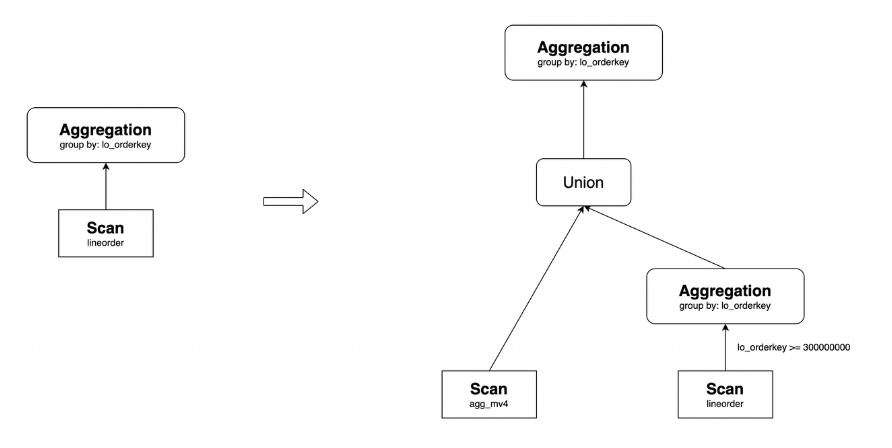
Here, agg_mv4 contains data where lo_orderkey < 300000000, while data where lo_orderkey >= 300000000 is obtained by directly querying the lineorder table. Finally, the results are aggregated after a Union operation to obtain the final result.
Partition Union rewrite
Suppose a partitioned materialized view is created based on a partitioned table. When the partition range scanned by the query is a superset of the latest partition range of the materialized view, the query can be rewritten using a UNION operation.
For example, consider the following materialized view agg_mv5. The base table lineorder currently contains partitions p1 to p7, and the materialized view also contains partitions p1 to p7.
USE test_db;
CREATE MATERIALIZED VIEW agg_mv5
DISTRIBUTED BY hash(lo_orderkey)
PARTITION BY RANGE(lo_orderdate)(
  START ("1993-01-01") END ("1999-01-01") EVERY (INTERVAL 1 YEAR)
)
REFRESH MANUAL
AS
SELECT
  lo_orderdate,
  lo_orderkey,
  sum(lo_revenue) AS total_revenue,
  max(lo_discount) AS max_discount
FROM lineorder
GROUP BY lo_orderdate,lo_orderkey;
If lineorder adds a new partition p8 with the range [("19990101"), ("20000101")), then the following query can be rewritten using a UNION operation.
USE test_db;
SELECT
  lo_orderdate,
  lo_orderkey,
  sum(lo_revenue) AS total_revenue,
  max(lo_discount) AS max_discount
FROM lineorder
GROUP BY lo_orderdate,lo_orderkey;
The original query plan and the rewritten plan are as follows.
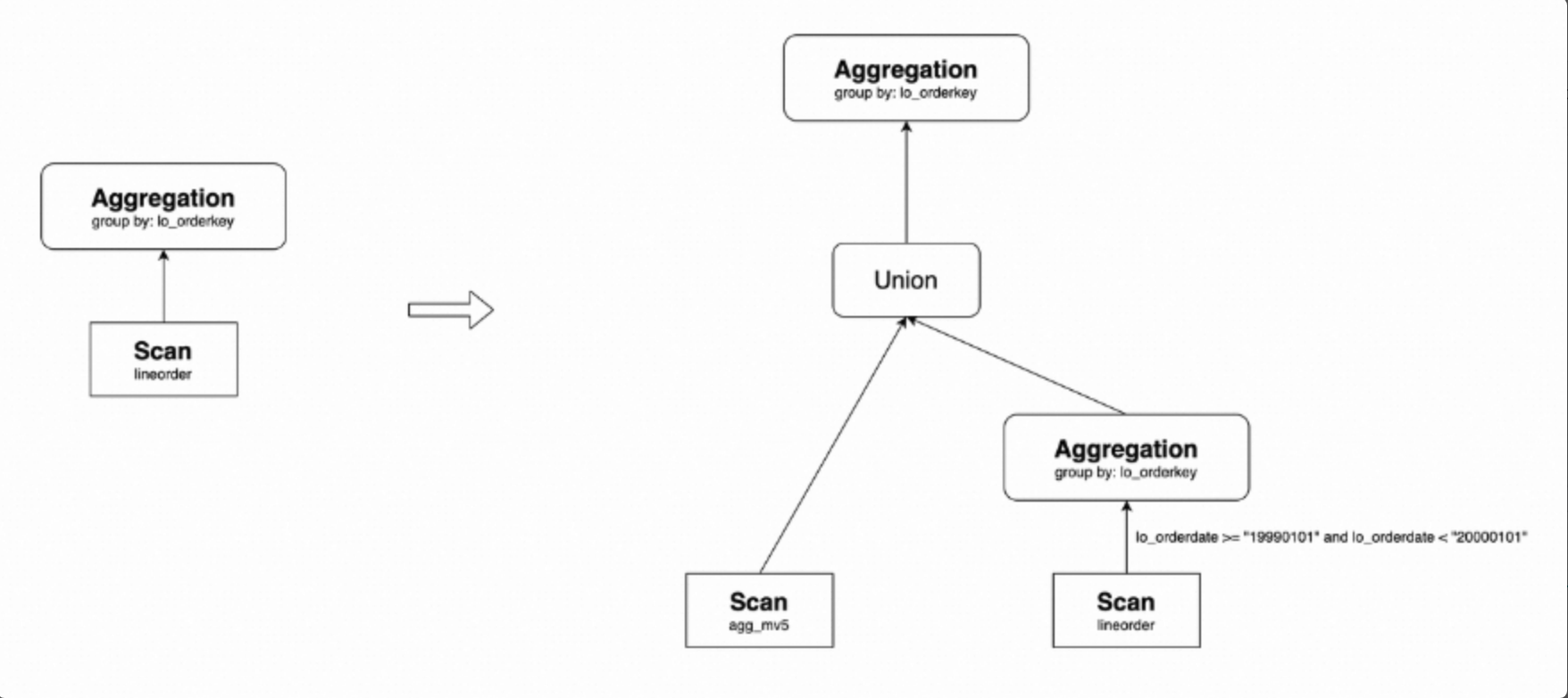
As shown above, agg_mv5 contains data from partitions p1 to p7, while data from partition p8 comes from lineorder. Finally, these two sets of data are combined using a UNION operation.
Query rewrite with materialized views based on views
Starting from v3.1.0, StarRocks supports creating materialized views based on views. If a query based on a view is of the SPJG type, StarRocks will inline expand the query and then rewrite it. By default, queries on views are automatically expanded into queries on the base tables of the view, and then transparently matched and rewritten.
However, in real-world scenarios, you might model data based on complex nested views that cannot be directly expanded. Therefore, materialized views created based on these views cannot rewrite queries. To improve capabilities in such situations, starting from v3.3.0, StarRocks has optimized the query rewrite logic for materialized views based on views.
Basic principles
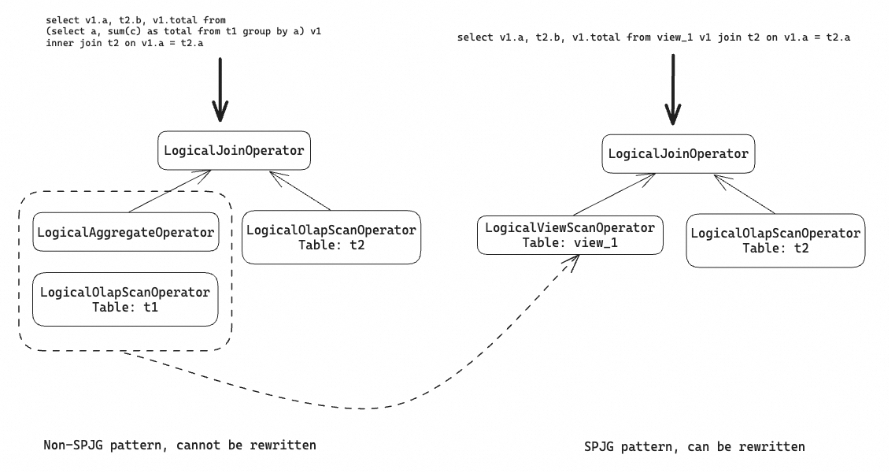
In the previous query rewrite logic, StarRocks would expand queries based on views into queries targeting the base tables of the view. If the execution plan of the expanded query did not match the SPJG pattern, the materialized view could not rewrite the query.
To address this issue, StarRocks introduced a new operator, LogicalViewScanOperator, which simplifies the structure of the execution plan tree and does not require expanding the query. This makes the query execution plan tree more likely to satisfy the SPJG pattern, thereby optimizing query rewrite.
The following example shows a query containing an aggregation subquery, a view built on the subquery, a query expanded based on the view, and a materialized view built on the view.
-- Original query.
SELECT
  v1.a,
  t2.b,
  v1.total
FROM(
  SELECT
    a,
    sum(c) AS total
  FROM t1
  GROUP BY a
) v1
INNER JOIN t2 ON v1.a = t2.a;

-- View built on the subquery.
CREATE VIEW view_1 AS
SELECT
  t1.a,
  sum(t1.c) AS total
FROM t1
GROUP BY t1.a;

-- Query based on the view.
SELECT
  v1.a,
  t2.b,
  v1.total
FROM view_1 v1
JOIN t2 ON v1.a = t2.a;

-- Materialized view based on the view.
CREATE MATERIALIZED VIEW mv1
DISTRIBUTED BY hash(a)
REFRESH MANUAL
AS
SELECT
  v1.a,
  t2.b,
  v1.total
FROM view_1 v1
JOIN t2 ON v1.a = t2.a;
The execution plan of the original query is shown on the left side of the figure below. Because the LogicalAggregateOperator inside the JOIN does not match the SPJG pattern, StarRocks does not support query rewrite in this case. However, if the subquery is defined as a view, the original query can be expanded into a query targeting that view. Using LogicalViewScanOperator, StarRocks can convert the non-matching part into the SPJG pattern, thus allowing the query to be rewritten.
Configuration items
StarRocks disables query rewrite for materialized views based on views by default.
To enable this feature, you must set the following variable.
SET enable_view_based_mv_rewrite = true;Usage scenarios
Query rewrite with materialized views based on a single view
StarRocks supports query rewrite through materialized views based on a single view, including aggregation queries.
For example, you can build the following view and materialized view for TPC-H Query 18.
USE test_db;
CREATE VIEW q18_view
AS
SELECT
  c_name,
  c_custkey,
  o_orderkey,
  o_orderdate,
  o_totalprice,
  sum(l_quantity)
FROM
  customer,
  orders,
  lineitem
WHERE
  o_orderkey IN (
    SELECT
      l_orderkey
    FROM
      lineitem
    GROUP BY
      l_orderkey having
        sum(l_quantity) > 315
  )
  AND c_custkey = o_custkey
  AND o_orderkey = l_orderkey
GROUP BY
    c_name,
    c_custkey,
    o_orderkey,
    o_orderdate,
    o_totalprice;

CREATE MATERIALIZED VIEW q18_mv
DISTRIBUTED BY hash(c_custkey, o_orderkey)
REFRESH MANUAL
AS
SELECT * FROM q18_view;
The materialized view can rewrite the following two queries.
USE test_db;
-- SQL1
EXPLAIN LOGICAL SELECT * FROM q18_view;
+-------------------------------------------------------------------------------------------------------+
| Explain String                                                                                        |
+-------------------------------------------------------------------------------------------------------+
| - Output => [2:c_name, 1:c_custkey, 9:o_orderkey, 10:o_orderdate, 13:o_totalprice, 52:sum]            |
|     - SCAN [q18_mv] => [1:c_custkey, 2:c_name, 52:sum, 9:o_orderkey, 10:o_orderdate, 13:o_totalprice] |
|             MaterializedView: true                                                                    |
|             Estimates: {row: 9, cpu: 486.00, memory: 0.00, network: 0.00, cost: 243.00}               |
|             partitionRatio: 1/1, tabletRatio: 96/96                                                   |
|             1:c_custkey := 60:c_custkey                                                               |
|             2:c_name := 59:c_name                                                                     |
|             52:sum := 64:sum(l_quantity)                                                              |
|             9:o_orderkey := 61:o_orderkey                                                             |
|             10:o_orderdate := 62:o_orderdate                                                          |
|             13:o_totalprice := 63:o_totalprice                                                        |
+-------------------------------------------------------------------------------------------------------+
-- SQL2
EXPLAIN LOGICAL SELECT c_name, sum(`sum(l_quantity)`) FROM q18_view GROUP BY c_name;
+-----------------------------------------------------------------------------------------------------+
| Explain String |
+-----------------------------------------------------------------------------------------------------+
| - Output => [2:c_name, 59:sum] |
| - AGGREGATE(GLOBAL) [2:c_name] |
| Estimates: {row: 9, cpu: 306.00, memory: 306.00, network: 0.00, cost: 1071.00} |
| 59:sum := sum(59:sum) |
| - EXCHANGE(SHUFFLE) [2] |
| Estimates: {row: 9, cpu: 30.60, memory: 0.00, network: 30.60, cost: 306.00} |
| - AGGREGATE(LOCAL) [2:c_name] |
| Estimates: {row: 9, cpu: 61.20, memory: 30.60, network: 0.00, cost: 244.80} |
| 59:sum := sum(52:sum) |
| - SCAN [q18_mv] => [2:c_name, 52:sum] |
| MaterializedView: true |
| Estimates: {row: 9, cpu: 306.00, memory: 0.00, network: 0.00, cost: 153.00} |
| partitionRatio: 1/1, tabletRatio: 96/96 |
| 2:c_name := 60:c_name |
| 52:sum := 65:sum(l_quantity) |
+-----------------------------------------------------------------------------------------------------+Rewriting JOIN queries with materialized views based on views
StarRocks supports rewriting queries that include JOINs between views or between views and tables, including aggregation on top of JOINs.
For example, you can create the following views and materialized view.
USE test_db;
CREATE VIEW view_1
AS
SELECT
  c_custkey,
  c_name,
  c_address,
  c_city,
  c_nation,
  c_region
FROM customer;

CREATE VIEW view_2
AS
SELECT
  lo_orderkey,
  lo_linenumber,
  lo_custkey,
  lo_partkey,
  lo_revenue,
  lo_supplycost
FROM lineorder;

CREATE MATERIALIZED VIEW join_mv
DISTRIBUTED BY hash(lo_orderkey)
REFRESH MANUAL
AS
SELECT
  v1.c_custkey,
  v1.c_name,
  v1.c_address,
  v2.lo_orderkey,
  v2.lo_linenumber,
  v2.lo_revenue
FROM view_1 v1
JOIN view_2 v2
ON v1.c_custkey = v2.lo_custkey;
The materialized view can rewrite the following query.
USE test_db;
SELECT
  v1.c_custkey,
  v1.c_name,
  v1.c_address,
  v2.lo_orderkey,
  v2.lo_linenumber,
  v2.lo_revenue
FROM view_1 v1
JOIN view_2 v2
ON v1.c_custkey = v2.lo_custkey;
Rewriting external table queries based on materialized views of views
You can create views on external tables in External Catalog, and then build materialized views based on these views to rewrite queries. The usage is similar to internal tables.
Query rewrite with materialized views based on External Catalog
StarRocks supports building asynchronous materialized views on external data sources based on Hive Catalog, Hudi Catalog, Iceberg Catalog, and Paimon Catalog, and supports transparent query rewriting. Materialized views based on External Catalog support most query rewriting features but have the following limitations:
Materialized views created based on Hudi, Paimon, and JDBC Catalog do not support Union rewrite.
Materialized views created based on Hudi, Paimon, and JDBC Catalog do not support View Delta Join rewrite.
Materialized views created based on Hudi and JDBC Catalog do not support incremental refresh for partitions.
Text-based materialized view rewrite
Starting from v3.3.0, StarRocks supports text-based materialized view rewrite, which greatly expands its query rewrite capabilities.
Basic principles
To implement text-based materialized view rewrite, StarRocks compares the abstract syntax tree of the query (or its subquery) with the abstract syntax tree of the materialized view definition. When both match, StarRocks can rewrite the query based on the materialized view. Text-based materialized view rewrite is simple and efficient, with fewer limitations compared to conventional SPJG-type materialized view query rewrites. Proper use of this feature can significantly enhance query performance.
Text-based materialized view rewrite supports not only SPJG-type operators but also operators such as Union, Window, Order, Limit, and CTE.
Configuration items
Configuration name | Default value | Description |
| true | Used to control whether to enable text-based materialized view rewrite. This feature is enabled by default. Set this to |
| true | Used to control whether to build an abstract syntax tree when creating an asynchronous materialized view. This feature is enabled by default. Setting this to |
| 4 | Used to control the maximum number of times the system compares whether a subquery matches the materialized view definition. The default value is |
Only when the materialized view meets the timeliness (data consistency) requirements can it be used for text-based query rewrite. You can manually set the consistency check rule through the property query_rewrite_consistency when creating a materialized view.
Scenarios
Queries that meet the following conditions can be rewritten:
The original query is consistent with the definition of the materialized view.
The subquery of the original query is consistent with the definition of the materialized view.
Compared with conventional SPJG-type materialized view query rewrites, text-based materialized view rewrite supports more complex queries, such as multilayer aggregation.
You are recommended to encapsulate the queries that need to be matched into subqueries of the original query.
Do not encapsulate ORDER BY clauses in the definition of the materialized view or in the subquery of the original query, otherwise the query cannot be rewritten. This is because ORDER BY clauses in subqueries are eliminated by default.
For example, you can build the following materialized view.
USE test_db;
CREATE MATERIALIZED VIEW mv1 REFRESH MANUAL AS
SELECT
  user_id,
  count(1)
FROM (
  SELECT
    user_id,
    time,
    bitmap_union(to_bitmap(tag_id)) AS a
  FROM user_tags
  GROUP BY
    user_id,
    time) t
GROUP BY user_id;
This materialized view can rewrite the following two queries.
USE test_db;
-- SQL1
SELECT
  user_id,
  count(1)
FROM (
  SELECT
    user_id,
    time,
    bitmap_union(to_bitmap(tag_id)) AS a
  FROM user_tags
  GROUP BY
    user_id,
    time) t
GROUP BY user_id;

-- SQL2
SELECT count(1)
FROM
(
    SELECT
      user_id,
      count(1)
    FROM (
      SELECT
        user_id,
        time,
        bitmap_union(to_bitmap(tag_id)) AS a
      FROM user_tags
      GROUP BY
        user_id,
        time) t
    GROUP BY user_id
)m;
However, this materialized view cannot rewrite the following query that contains an ORDER BY clause.
USE test_db;
SELECT
  user_id,
  count(1)
FROM (
  SELECT
    user_id,
    time,
    bitmap_union(to_bitmap(tag_id)) AS a
  FROM user_tags
  GROUP BY
    user_id,
    time) t
GROUP BY user_id
ORDER BY user_id;
Setting up materialized view query rewrite
You can set asynchronous materialized view query rewriting through the following Session variables.
Variable | Default value | Description |
| true | Specifies whether to enable materialized view Union rewrite. |
| true | Specifies whether to enable the rule-based materialized view query rewrite feature, which is mainly used to process single table query rewrites. |
| 3 | The maximum number of layers of nested materialized views that can be used for query rewrites. Type: INT. Value range: [1, +∞). A value of |
Verify if query rewriting is effective
You can use the EXPLAIN statement to view the corresponding Query Plan. If the TABLE under the OlapScanNode item shows the corresponding asynchronous materialized view name, it indicates that the query has been rewritten based on the asynchronous materialized view.
USE test_db;
EXPLAIN SELECT
    order_id, sum(goods.price) AS total
    FROM order_list INNER JOIN goods
    ON goods.item_id1 = order_list.item_id2
    GROUP BY order_id;
+------------------------------------+
| Explain String                     |
+------------------------------------+
| PLAN FRAGMENT 0                    |
|  OUTPUT EXPRS:1: order_id | 8: sum |
|   PARTITION: RANDOM                |
|                                    |
|   RESULT SINK                      |
|                                    |
|   1:Project                        |
|   |  <slot 1> : 9: order_id        |
|   |  <slot 8> : 10: total          |
|   |                                |
|   0:OlapScanNode                   |
|      TABLE: order_mv               |
|      PREAGGREGATION: ON            |
|      partitions=1/1                |
|      rollup: order_mv              |
|      tabletRatio=0/12              |
|      tabletList=                   |
|      cardinality=3                 |
|      avgRowSize=4.0                |
|      numNodes=0                    |
+------------------------------------+
20 rows in set (0.01 sec)
Disable query rewrite
StarRocks enables query rewrite for asynchronous materialized views created based on the Default Catalog by default. You can disable this feature by setting the Session variable enable_materialized_view_rewrite to false.
For asynchronous materialized views created based on External Catalog, you can disable this feature by setting the materialized view Property force_external_table_query_rewrite to false through ALTER MATERIALIZED VIEW.